
Async
Async is an online AI video editor that lets users create and edit videos through chat.
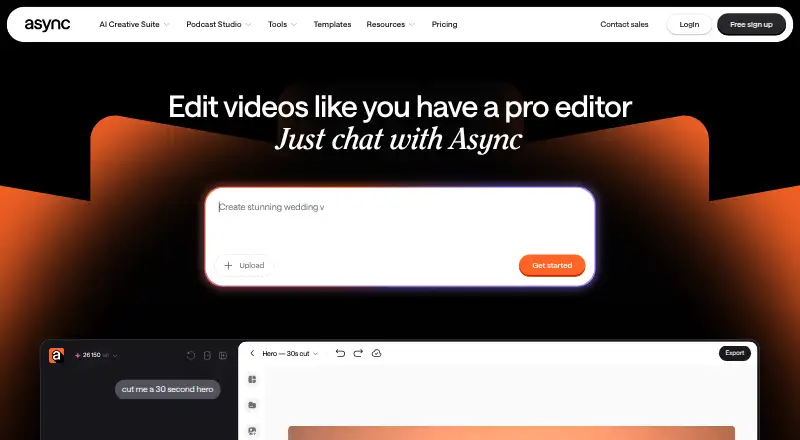
What Async is
Async is an online AI video editor that lets users create and edit videos through chat. It can remove filler, pauses, repeats, bad takes, and awkward moments from edits; Magic Dust reduces background noise and clarifies voices. Users can generate B-roll, visuals, scenes, or music in chat, add subtitles, and create short clips from longer videos. Async presents the workflow for ads, vlogs, explainers, and podcasts, and says it is built for creators and teams. Its browser-based remote interview feature supports up to 10 participants, with separate tracks; local recording and automatic transcription are also listed. The Async Voice API supports text-to-speech and speech-to-text, including streaming endpoints over WebSockets. The service is available on the web and iOS, with no Android version listed. The Free plan costs nothing and includes 10 lifetime AI credits, one hour of media upload to AI chat, exports up to 720p, and 2 GB storage. Paid pricing is listed from $11.99 a month (annual).
Good
- Can remove filler, pauses, repeats, and bad takes.
- Magic Dust reduces background noise.
- Can generate B-roll, visuals, scenes, or music in chat.
- Remote interviews support up to 10 participants.
- Free plan includes 2 GB storage.
Watch out
- No Android version is listed.
- Free plan includes 10 lifetime AI credits.
- Free plan limits media upload to one hour lifetime.
- Free exports are limited to up to 720p.
Who it suits
It suits creators and teams making ads, vlogs, explainers, or podcasts who want to edit video through chat. It may also suit people recording browser-based remote interviews with separate participant tracks.
Verdict
Async combines chat-based video editing with audio cleanup, generative tools, captions, and clips. Its free plan has lifetime credit and upload limits, and there is no Android version listed.
Plans and prices
From Async's own pricing page, checked 29 Sep 2026.
| Plan | Price | What it gives you |
|---|---|---|
| Free | Free | 10 lifetime AI credits · 1 hour media upload to AI chat (lifetime) · up to 720p export · 2 GB storage |
| Essentials | — | 450 AI credits/month · 20 GB storage · unlimited media upload minutes · up to Full HD export · Monthly or yearly billing is offered; the live pricing page did not display a numeric price. |
| Pro | — | 1,200 AI credits/month · 120 GB storage · up to 4K export · 20 hours remote recording · Monthly or yearly billing is offered; the live pricing page did not display a numeric price. |
| Teams | — | 3,000 AI credits/month · 1 TB storage · collaboration and team workspaces · 50 hours remote recording · Monthly or yearly billing is offered; the live pricing page did not display a numeric price. |
| Business | Priced on request | Custom AI credits · custom storage · advanced security and compliance · Custom pricing; contact sales. |
The facts
Each one read from Async's own pages, with the date it was checked.
What it does
- AI credit limits
- Subscription AI credits reset each billing cycle, while yearly-plan credits are added monthly rather than all at once.checked 29 Sep 2026
- API
- Async Voice API supports text-to-speech and speech-to-text, including streaming endpoints over WebSockets.checked 29 Sep 2026
- Audio cleanup
- Magic Dust removes background noise and makes voices sound clearer.checked 29 Sep 2026
- Captions and clips
- Async can add subtitles and turn strong moments from longer videos into short-form clips.checked 29 Sep 2026
- Editing
- Async can remove filler, pauses, repeats, bad takes, and awkward moments from video edits.checked 29 Sep 2026
- Formats and users
- Async presents its workflow for ads, vlogs, explainers, podcasts, and more, and says it is built for creators and teams.checked 29 Sep 2026
- Generative tools
- Users can generate B-roll, visuals, scenes, or music in chat without leaving the edit.checked 29 Sep 2026
- Integrations
- The Async Voice API documentation lists Pipecat, LiveKit, Twilio, n8n, and Picsart Flow as integrations.checked 29 Sep 2026
- Mobile availability
- Async’s mobile app is available on iOS, and its site says there is currently no Android version.checked 29 Sep 2026
- Paid from
- 11.99checked 21 Sep 2026
- Product
- Async is an online AI video editor that lets users create and edit videos by chatting with AI.checked 29 Sep 2026
- Remote recording
- Async says its remote interview feature supports up to 10 participants with a separate track for each.checked 29 Sep 2026
- Security
- Async’s privacy policy says it strives to protect personal data using commercially acceptable means but cannot guarantee absolute security.checked 29 Sep 2026
- Support
- Async’s help center provides guides covering accounts and billing, recording, video editing, AI generation, and other product areas.checked 29 Sep 2026
Money
- Free plan
- Yeschecked 21 Sep 2026
- Plan cancellation
- Users can cancel through Profile Settings, and new subscriptions have a 7-day refund policy excluding AI credits used.checked 29 Sep 2026
The full review of Async
Async suits creators and teams who want to edit spoken-word video, clean audio and make clips in one workflow. Its chat-based approach brings several production steps together, but recurring work quickly calls for a paid plan.
Overview
Async is an online AI video editor controlled through chat. It can remove filler, pauses, repeated lines, bad takes and awkward moments, then add subtitles or turn longer videos into short-form clips. That combination is useful for repurposing podcasts, vlogs and explainers; it is less compelling if you need only a focused audio recorder or editor.
Key features
Editing and generation in chat
Async can generate B-roll, visuals, scenes and music without leaving the edit. Keeping cleanup and asset creation in the same workflow can save context switching for creators producing ads, vlogs or explainers. The trade-off is that AI work draws on credits: the free allowance is only 10 credits for the lifetime of the account, while subscriptions replenish credits by billing cycle. Annual subscribers receive credits monthly, not as a full yearly balance.
Audio and recording
Magic Dust reduces background noise and clarifies voices, a useful aid for spoken-word footage. Browser-based remote recording supports video, automatic transcription and separate audio tracks, with separate participant tracks for up to 10 people. Local recording is supported, and audio can be exported as WAV or MP3. The feature set reaches beyond editing into recording, though the available recording hours vary by plan.
Voice API and support
Async Voice API supports text-to-speech and speech-to-text, including streaming over WebSockets. Its documented integrations include Pipecat, LiveKit, Twilio, n8n and Picsart Flow. The help center covers accounts and billing, recording, editing and AI generation.
Pricing
Async is freemium. The free plan costs nothing and includes 10 lifetime AI credits, one hour of media upload to AI chat for the account’s lifetime, exports up to 720p and 2 GB of storage. Those permanent caps make it suitable for a small trial, not a dependable ongoing workflow.
Essentials offers 450 AI credits per month, 20 GB of storage, unlimited media-upload minutes and Full HD export. Pro raises that to 1,200 monthly credits and 120 GB, adds exports up to 4K and includes 20 hours of remote recording. Teams provides 3,000 monthly credits, 1 TB of storage, collaboration and team workspaces, and 50 recording hours. Essentials, Pro and Teams offer monthly or yearly billing, but their plan prices are not published; the general starting price is $11.99/mo (annual), so compare the checkout price and credit allowance before choosing.
Business has custom AI credit limits and recording hours, plus advanced security and compliance and dedicated onboarding and support; it uses custom pricing. Subscription credits reset each billing cycle, with annual-plan credits delivered monthly. Users can cancel through Profile Settings. New subscriptions have a seven-day refund policy, excluding AI credits already used.
Platforms
Async is available on the web and iOS, with an API for developers. There is no Android version, which rules it out for Android users seeking a native mobile app.
Who it's for
Async is best suited to creators and teams making spoken-word video who value AI-assisted cleanup, captions, clips and generated assets alongside recording. Teams needing collaboration can consider Teams, while solo creators who want regular editing should weigh the monthly credit allowance against their workload. It is not a fit for Android-first users or anyone whose usage would outgrow the free plan but depends on knowing plan prices in advance.
Pros and cons
- Pros: Chat-based editing, audio cleanup, generation, captions and clips keep several video tasks in one workflow.
- Pros: Remote recording supports up to 10 participants with separate tracks, and local recording and automatic transcription are supported.
- Cons: The free plan’s 10 lifetime AI credits and one-hour lifetime upload allowance sharply limit continued use.
- Cons: The stated $11.99/mo (annual) starting price does not identify the price of each paid tier, making plan-by-plan budgeting harder.
- Cons: There is no Android app.
Alternatives
Choose Adobe Podcast when audio-only speech enhancement is the priority: its free plan includes Enhance Speech for audio files up to 30 minutes and 500 MB, with a one-hour daily limit. Pick Zencastr if you want podcast recording with a free allowance of six participants, unlimited recording and downloads, up to 4K video, unlimited track storage and five shows.
Consider Iris.fm if Android support matters: it runs on Android, iOS and web, and its Starter plan costs $9 a month for two hours of recording.
Cleanfeed is an alternative with a free plan and support across web, desktop operating systems and mobile. Airtape Studio has a free plan for two recording hours per month and two participants. Alitu is a paid web option at $38 a month, with 10 recording hours per month under its fair-use policy and 12 hours of transcription per monthly billing period. Hilite is another web-based freemium option.
For category browsing, see Podcast Recording Software, Video Podcast Software, AI Podcast Editing Software, AI Sound Effect Generators, AI Music Generators and Text-to-Speech Software.
Verdict
Choose Async if you want chat-based video cleanup, generated assets and short-form repurposing alongside browser recording. Its broad workflow is the main draw; the small lifetime free allowance and unclear tier-by-tier prices are the main reasons to compare alternatives before committing.
Getting started
- Open Async on the web or install its iOS app
- Create an account and select the Free plan or a paid plan
- Upload media or start a browser recording
- Use chat to edit, clean audio, generate visuals, or add captions
- Invite up to 10 remote participants when recording interviews
- Connect supported Voice API integrations if needed
Limits worth knowing
The Free plan provides 10 lifetime AI credits, one hour of media upload to AI chat, up to 720p export, and 2 GB storage. Subscription AI credits reset each billing cycle; annual-plan credits are added monthly.
Questions
Is there a free plan?
Yes. Free includes 10 lifetime AI credits, one hour of media upload to AI chat, up to 720p export, and 2 GB storage.
How much does paid access cost?
Paid pricing starts at $11.99/mo (annual).
Which devices support Async?
Async is available on the web and iOS. The listed facts say there is currently no Android version.
How many people can join a remote recording?
The browser-based remote interview feature supports up to 10 participants, with a separate track for each.
What does the Voice API provide?
It supports text-to-speech and speech-to-text, including streaming endpoints over WebSockets.
Can subscriptions be cancelled?
Users can cancel through Profile Settings. New subscriptions have a 7-day refund policy, excluding used AI credits.
Alternatives to Async
- 1

Resemble AI
Free planAndroidiOSWebAPI8.3From $280 a month - 2

ElevenLabs
Free planWebAPI7.6From $6 a month - 3
Morphic
Free planWeb7.4From $4 a month - 4

Sonilo
Free planAndroidiOSWebAPI7.4From $11.99 a month - 5

Creen
Free planAndroidiOSWeb7.3From $6 a month - 6

Mirelo
Free planWebAPImacOSWindows7.1From €20 a month