Cleanfeed
Cleanfeed is browser-based software for real-time, high-definition audio sessions over long distances.
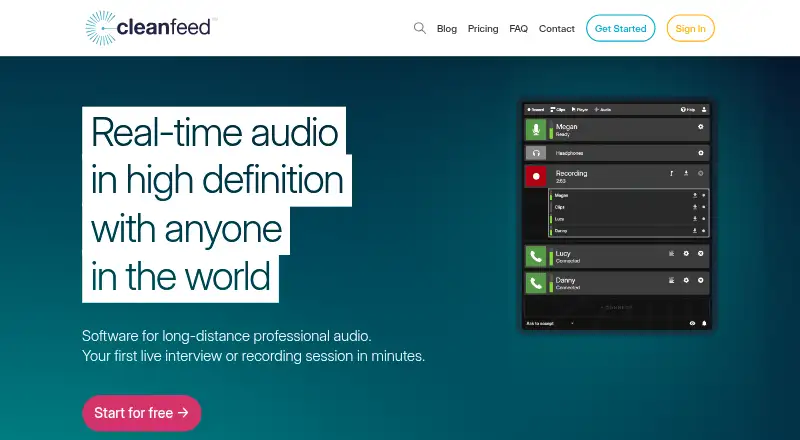
What Cleanfeed is
Cleanfeed is browser-based software for real-time, high-definition audio sessions over long distances. It is intended for interviews and recording work across podcasting, radio and broadcast, voice work, film and television, and commercial production. Recordings happen live, and every version includes unlimited recording time. The free Cleanfeed Lite plan supports two guests, one local audio source, and mono remote audio. Cleanfeed Pro supports up to 32 guests, stereo remote audio, four local audio sources, and multitrack recording, with guests captured on separate tracks. Its multitrack ceiling is 32 tracks or 16 stereo tracks. Pro also adds privacy controls, markers and notes, studio playback tools, live audio repair, auxiliary outputs, and email support. Auxiliary outputs can route guest audio to another application. Cleanfeed Cinema is a separate annual plan for up to 16 guests, with DCI 2K 60fps centre-stage video, Gallery, and dedicated server capacity tailored to the customer. The studio runs in a browser, with Chrome on Mac and Windows and Chromium on Linux listed as preferred. Audio export is WAV; video recording is available. Cleanfeed says it uses end-to-end encryption for audio and does not retain media copies on its servers.
Good
- Unlimited recording time on every version
- Live recording rather than later syncing
- Pro supports up to 32 guests
- Pro records guests on separate tracks
- WAV audio export and video recording are available
Watch out
- Lite is limited to two guests and mono remote audio
- Hosting from iPhone and iPad is not supported
- Firefox and Safari are for guests only
Who it suits
Cleanfeed suits people producing interviews, podcasts, radio and broadcast, voice work, film and television, or commercial audio sessions. Pro is aimed at sessions that need separate participant tracks, additional production tools, or routing guest audio to another application.
Verdict
Choose Cleanfeed for browser-based long-distance sessions with unlimited recording time, especially when Pro’s separate tracks and production tools fit the workflow. Lite is suitable for small sessions with mono remote audio; look elsewhere if hosting from an iPhone or iPad is required.
Plans and prices
From Cleanfeed's own pricing page, checked 7 Oct 2026.
| Plan | Price | What it gives you |
|---|---|---|
| Cleanfeed Lite | Free | 2 guests · unlimited recording time · 1 local audio source · mono remote audio · basic features |
| Cleanfeed Pro | $12 a month | 32 guests · multitrack recording · stereo remote audio · 4 local audio sources · email support · $12 monthly; $36 monthly for businesses; yearly renewal gives an additional 20% discount |
| Cleanfeed Cinema | $2,500 a year | 16 guests · DCI 2K 60fps centre-stage video · Gallery · dedicated server capacity tailored to you · $2,500 yearly for the first seat |
| Cleanfeed Pro Enterprise | Priced on request | Available for organizations requiring 5 or more seats over the year · custom branding · payment options · Contact for information |
The facts
Each one read from Cleanfeed's own pages, with the date it was checked.
What it does
- Audio routing
- Pro auxiliary outputs can route guest audio to another application, with maker guides showing Adobe Audition and virtual audio devices on Windows and macOS.checked 7 Oct 2026
- Data protection
- Cleanfeed identifies itself as a UK company that follows GDPR standards and says personal data is exchanged using TLS encryption.checked 7 Oct 2026
- Intended audience
- The maker presents Cleanfeed for podcasting, radio and broadcast, voice artists, film and television, and commercial production.checked 7 Oct 2026
- Mobile access
- Safari on iPhone and iPad is in beta for guests only; hosting from those devices is not supported yet.checked 7 Oct 2026
- Privacy and encryption
- Cleanfeed says it does not retain copies of media on its servers and uses end-to-end encryption for sending and receiving audio; some Cinema video features use point-to-point encryption.checked 7 Oct 2026
- Production features
- Pro includes privacy controls, markers and notes, studio playback tools, live audio repair, and auxiliary outputs.checked 7 Oct 2026
- Purpose
- Cleanfeed provides real-time high-definition audio software for long-distance professional audio, including interviews and recording sessions.checked 7 Oct 2026
- Recording
- All versions include unlimited recording time, and recordings are made live rather than synced later.checked 7 Oct 2026
- Separate tracks
- Cleanfeed Pro records each guest on an isolated track, and its multitrack limit is 32 tracks or 16 stereo tracks.checked 7 Oct 2026
- Support
- Paid Pro and Cinema plans include email support, and the contact page accepts technical support requests with account details and examples or screenshots requested as helpful context.checked 7 Oct 2026
- Usage limit
- The terms apply a fair-use policy against disproportionate bandwidth or resource consumption, including large numbers of streams or constant long-term use.checked 7 Oct 2026
Where it runs
- Browser limits
- Firefox and Safari are supported for guests only; the maker maintains studio support for them on a best-efforts basis.checked 7 Oct 2026
- Browser workflow
- The studio runs in a browser, and the maker lists Chrome on Mac and Windows and Chromium on Linux as preferred platforms.checked 7 Oct 2026
The full review of Cleanfeed
Overview
Cleanfeed is a browser-based studio for real-time, long-distance audio recording, built for interviews, podcasts and professional production. It suits audio teams that want live recording without a session-length cap; Pro is the stronger fit when isolated tracks and production controls matter. Its lack of local recording and limited mobile hosting make it a poor choice for workflows that depend on either.
The studio runs in a browser, with Chrome on Mac and Windows and Chromium on Linux preferred for hosting. It supports up to 32 people and exports audio as WAV. Recording happens live rather than syncing afterward, which keeps the session and capture in step, but there is no local recording option for a separate backup. Unlimited recording time is subject to a fair-use policy against disproportionate bandwidth or resource use, including large numbers of streams and constant long-term use.
Key features
Every plan includes unlimited recording time, but the recording capabilities differ substantially. Lite is limited to mono remote audio and basic features; Pro adds stereo remote audio, up to four local audio sources and isolated guest tracks. Pro supports up to 32 tracks or 16 stereo tracks, a useful distinction for editors who need to work on each guest independently.
Pro also includes privacy controls, markers and notes, studio playback tools, live audio repair and auxiliary outputs. Those outputs can route guest audio to another application, with maker guides for Adobe Audition and virtual audio devices on Windows and macOS. The broader toolset suits production workflows better than a simple interview capture, although it requires a paid plan.
Cleanfeed says it does not retain media copies on its servers and uses end-to-end encryption for audio sent and received; some Cinema video features use point-to-point encryption. It identifies as a UK company following GDPR standards and says personal data is exchanged using TLS encryption.
Video recording is supported, and Cinema adds DCI 2K 60fps centre-stage video and Gallery. Its dedicated server capacity is tailored to the customer, positioning it for higher-end video production rather than ordinary remote audio sessions.
Pricing
Cleanfeed Lite costs nothing. It allows two guests, one local audio source, mono remote audio and unlimited recording time. That makes it a sensible starting point for small audio sessions where stereo remote audio and separate guest tracks are not necessary.
Cleanfeed Pro costs $12 a month, billed $12 monthly; businesses pay $36 monthly. Yearly renewal gives an additional 20% discount. Pro supports 32 guests, multitrack recording, stereo remote audio, four local audio sources and email support. It is the practical choice for regular production work that needs separate tracks and routing tools. Paid Pro and Cinema plans include email support.
Cleanfeed Cinema costs $2,500 a year, billed $2,500 yearly for the first seat. It supports 16 guests, DCI 2K 60fps centre-stage video, Gallery and dedicated server capacity tailored to the customer. This is a specialist option for video productions needing those capabilities, not a straightforward upgrade for audio-only teams.
Cleanfeed Pro Enterprise has custom pricing. It is for organizations requiring five or more seats over the year and includes custom branding and payment options.
Platforms
The studio is browser-based, with Chrome on Mac and Windows and Chromium on Linux as the preferred hosting setup. Firefox and Safari are supported for guests only, and studio support for them is best-efforts. Safari on iPhone and iPad is in beta for guests; hosting from those devices is not supported yet. Cleanfeed is therefore a better fit for desktop-hosted sessions than mobile-led production.
Who it's for
Cleanfeed is aimed at podcasters, radio and broadcast teams, voice artists, film and television crews, and commercial production. Lite fits small sessions with simple mono remote audio. Pro suits teams that need guest-isolated tracks and more control over the mix. Cinema addresses productions that need its specified video setup and dedicated capacity. Anyone requiring local recording or iPhone and iPad hosting should look elsewhere.
Pros and cons
- Pro: Unlimited recording time is included across all versions, useful for extended sessions, subject to fair-use limits.
- Pro: Pro's isolated guest tracks, up to 32 tracks, and production tools suit editing and broadcast workflows.
- Pro: The browser studio supports desktop workflows without requiring a dedicated recording platform.
- Con: There is no local recording, so users who need a separate local capture cannot rely on Cleanfeed alone.
- Con: Lite limits remote audio to mono and sessions to two guests, leaving more demanding work to paid plans.
- Con: iPhone and iPad are guest-only in beta, and Firefox and Safari are not dependable host choices.
Alternatives
Podcast Recording Software is a useful category overview for comparing more recording options.
Riverside is worth considering if you want a freemium alternative with a free trial and a free plan that includes two hours of multitrack recordings and video up to 720p, with a watermark.
Spreaker is another freemium option, with a free plan for one podcast and unlimited episodes, making it an alternative for podcast publishing workflows.
Async is a freemium alternative available on web, iOS and API platforms.
Iris.fm offers a free plan where guests join in their browser and a Starter plan at $9 a month; consider it if those plan terms suit your sessions.
Alitu is a paid web option with a free trial and a monthly recording allowance, an alternative for users who prefer a defined monthly quota.
Zencastr has a free plan with six participants and unlimited recording and downloads, which may suit users who prioritize those allowances.
Boomcaster is a freemium web option with a free plan and a Starter plan at $20 a month.
Adobe Podcast offers a free web plan and free trial, and is an alternative to consider for users seeking Adobe's podcast tools.
Verdict
Choose Cleanfeed for browser-based long-distance audio sessions with unlimited recording time, especially when Pro's isolated tracks and production tools fit the workflow. Lite is appropriate for small sessions with mono remote audio, while Pro is the stronger choice for teams editing guests separately. Look elsewhere if local recording or hosting from an iPhone or iPad is essential.
Getting started
- Open the Cleanfeed website in a browser.
- Use Chrome on Mac or Windows, or Chromium on Linux, as the preferred studio browser.
- Choose Cleanfeed Lite for the free plan or Cleanfeed Pro at $12 per month.
- For Cinema, choose the $2,500 yearly plan for its video and dedicated server features.
Limits worth knowing
Cleanfeed Lite supports two guests, one local audio source, and mono remote audio. Pro supports up to 32 guests and up to 32 tracks or 16 stereo tracks; Cinema supports up to 16 guests. The terms apply a fair-use policy to disproportionate bandwidth or resource use.
Questions
Is Cleanfeed free?
Yes. Cleanfeed Lite is free and includes two guests, unlimited recording time, one local audio source, mono remote audio, and basic features.
How much does Cleanfeed Pro cost?
Pro is $12 per month, billed monthly. The listed business price is $36 monthly, and yearly renewal gives an additional 20% discount.
Which platforms can use Cleanfeed?
The listed platforms are Android, iOS, Linux, macOS, web, and Windows. The studio runs in a browser; iPhone and iPad Safari is in beta for guests only.
Can Cleanfeed record separate participant tracks?
Yes. Cleanfeed Pro records each guest on an isolated track, up to 32 tracks or 16 stereo tracks.
Does Cleanfeed support local recording?
No. Local recording is listed as unavailable; recording takes place in the browser.
What does Cleanfeed Cinema include?
Cinema costs $2,500 per year for the first seat and supports 16 guests. It includes DCI 2K 60fps centre-stage video, Gallery, and dedicated server capacity tailored to the customer.