CreateInstall
CreateInstall is Windows software for making application installers and self-extracting archives.
What CreateInstall is
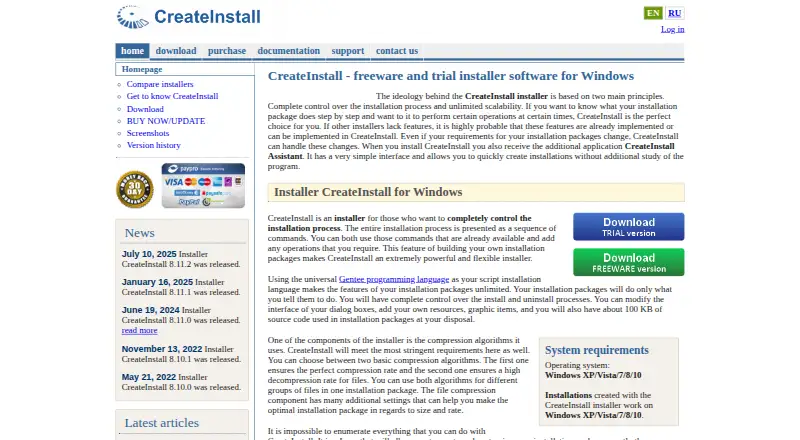
CreateInstall is Windows software for making application installers and self-extracting archives. Users define installation steps as command sequences, control install and uninstall processes, customize dialog boxes, and add resources. The included Gentee programming language supports installation scripts and customized actions, while CreateInstall Assistant offers a simpler interface for building installations. Packages can use either of the product’s two compression algorithms, including different algorithms for different file groups. The Freeware edition can be installed and used without limits, but some commands are unavailable and its dialog boxes display CreateInstall branding. Light is a $59.00 one-time lifetime license with some commands unavailable compared with Full; Full costs $119.00 once and provides all commands with no limit on installers created. Full and Light are available as 30-day trials with all program features. Purchased licenses remain valid forever and include 12 months of updates and technical support; yearly renewal afterward costs 50% of the initial price. Licensed installers may be distributed without additional royalties.
Good
- Free edition has no usage limits.
- Supports custom installation scripts and actions.
- Two compression algorithms can be assigned by file group.
- Licensed installers can be distributed without additional royalties.
Watch out
- Freeware withholds some commands and shows branding.
- Light costs $59.00 once.
- Full costs $119.00 once.
- Updates and support are included for 12 months.
Who it suits
CreateInstall suits Windows users who need to build installers or self-extracting archives and customize installation steps. Its Freeware edition may work for users who can do without some commands and accept branded dialog boxes.
Verdict
CreateInstall offers a free edition and paid lifetime licenses, with scripting and control over installer steps. Check which commands your workflow needs, since the Freeware and Light editions have limitations compared with Full.
Plans and prices
From CreateInstall's own pricing page, checked 8 Oct 2026.
| Plan | Price | What it gives you |
|---|---|---|
| CreateInstall Freeware | Free | Some commands unavailable · dialog boxes always show “CreateInstall” in the lower-left corner · Freeware |
| CreateInstall Light | $59, paid once | Some commands unavailable compared with Full · Lifetime license; includes 12-month updates and support |
| CreateInstall Full | $119, paid once | All commands available · no limit on installers created · Lifetime license; includes 12-month updates and support |
The facts
Each one read from CreateInstall's own pages, with the date it was checked.
What it does
- Assistant
- CreateInstall Assistant is included and provides a simpler interface for creating installations.checked 8 Oct 2026
- Compression
- The product offers two compression algorithms and allows them to be used for different file groups in one package.checked 8 Oct 2026
- Distribution
- Installers made with the licensed version may be distributed without additional royalties, and the license has no limit on the quantity of installers created.checked 8 Oct 2026
- Install and uninstall control
- Users can control install and uninstall processes and customize dialog boxes and add resources.checked 8 Oct 2026
- Integrations
- The maker's pages reviewed describe built-in Gentee scripting and installer commands, but do not state third-party integrations.checked 8 Oct 2026
- License
- A purchased license remains valid forever, while updates and technical support are included for 12 months; yearly renewal after that costs 50% of the initial price.checked 8 Oct 2026
- Purpose
- CreateInstall creates application installers and self-extracting archives, with installation steps specified as command sequences.checked 8 Oct 2026
- Scripting
- It includes the Gentee programming language for installation scripts and supports customized actions.checked 8 Oct 2026
- Security
- The license terms state that the software is distributed as is, with no express or implied warranty, and use is at the user's own risk.checked 8 Oct 2026
- Support
- Customers can submit support tickets for questions, problems, or bug reports; the purchase includes 12 months of technical support.checked 8 Oct 2026
- Supported operating systems
- The site lists Windows XP, Vista, 7, 8, and 10 as system requirements and target operating systems.checked 8 Oct 2026
The company
- Company
- Novostrim, OOO describes itself as privately owned and says its research and development office is in Tyumen, Russia.checked 8 Oct 2026
Money
- Free edition
- The Free version can be installed and used without limits, though some commands are unavailable and its dialog boxes show CreateInstall branding.checked 8 Oct 2026
- Trial
- The Full and Light versions are available as 30-day trials with access to all program features.checked 8 Oct 2026
Alternatives to CreateInstall
- 1
Fleet
Free planOpen sourceAndroidiOSWebAPI8.6From $7 a month - 2

OPSI
Free planOpen sourceWebAPILinuxmacOS8.4From €4.99 a year - 3

FileWave
Free planAndroidiOSWebAPI8.3Free plan - 4

ManageEngine Patch Manager Plus
Free planAndroidiOSWebAPI8.2From $245 a year - 5

Patch My PC
Free planWebmacOSSelf-hostedWindows7.7From $3.50 a year - 6

Uyuni
Free planOpen sourceWebAPILinuxSelf-hosted7.4Free plan