
Contacts+ Personal CRM
Contacts+ Personal CRM keeps contact records with personal context and follow-up reminders to help users maintain relationships.
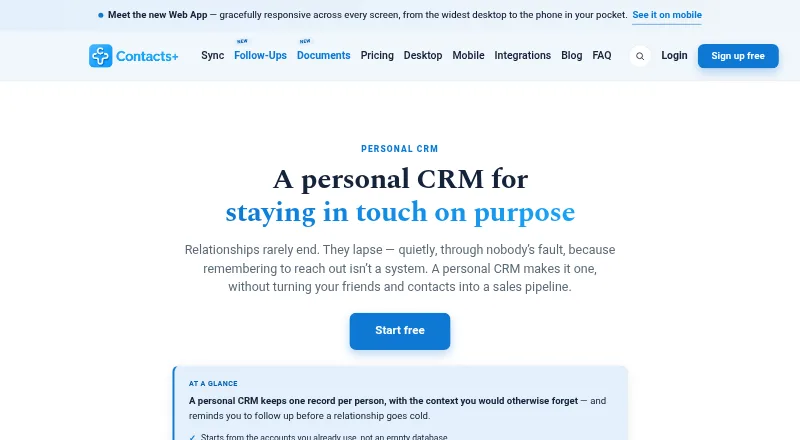
What Contacts+ Personal CRM is
Contacts+ Personal CRM keeps contact records with personal context and follow-up reminders to help users maintain relationships. A record can include notes, tags, relationships, contact details, custom fields, birthdays, and important dates. Contacts sync in both directions with Google, iCloud, and Microsoft/Outlook accounts. Users can set reminders with due dates and snooze them, sync tasks one way to calendars, and receive a daily task digest email. Its business-card scanner uses AI to turn cards and other images with contact information into records. Premium and Teams add enrichment, duplicate detection and merging, profile photo matching, and outdated-data cleanup. The browser-based web app has no separate native Mac or Windows app, according to the maker. The free plan includes one account, up to 1,000 contacts, daily sync, and web, iOS, and Android apps. Premium is $9.99 a month, billed 119.88 USD yearly; Teams is $12.99 a month, billed $155.88 per user yearly. An MCP integration connects the address book to ChatGPT, Claude, and Grok, with proposed changes waiting for user approval.
Good
- Two-way contact sync with Google, iCloud, and Microsoft/Outlook.
- Contact records support notes, tags, and important dates.
- AI scanner transcribes business cards and contact images.
- Free plan includes up to 1,000 contacts.
Watch out
- Free plan is limited to one account and 1,000 contacts.
- No separate native Mac or Windows app.
- Premium and Teams enrichment tools are paid features.
Who it suits
Contacts+ Personal CRM suits solo professionals and people who want contact context and reminders in one address book. Teams and small businesses can use its shared address book plan.
Verdict
Contacts+ combines contact details, relationship context, and follow-up tasks, with sync across common account providers. The free plan has a 1,000-contact limit, and the web app does not have a separate native Mac or Windows app.
Plans and prices
From Contacts+ Personal CRM's own pricing page, checked 15 Oct 2026.
| Plan | Price | What it gives you |
|---|---|---|
| Free | Free | 1 synced Apple, Google or Microsoft account · 1,000 contacts · daily sync · web, iOS and Android apps · free forever; no credit card |
| Premium | $9.99 a month | 5 synced accounts · 25,000 contacts · real-time sync · enrichment · deduplication · email-signature extraction · AI assistants · $119.88 billed yearly; monthly option $13.99 |
| Teams | $12.99 a month | 10 synced accounts · unlimited contacts · shared address book · roles and shared notes · up to 50 members · $155.88 per user billed yearly; monthly option $17.99 per user |
The facts
Each one read from Contacts+ Personal CRM's own pages, with the date it was checked.
What it does
- Acquisition news
- Benchmark Email announced it acquired Contacts+ from FullContact in a transaction closed January 29, 2021.checked 15 Oct 2026
- AI assistant controls
- AI assistants can suggest contact updates, notes and new contacts, but each change requires approval and they cannot delete or export the address book.checked 15 Oct 2026
- AI assistant integrations
- The MCP integration connects the address book to ChatGPT, Claude, and Grok, with proposed changes awaiting user approval.checked 28 Sep 2026
- API capabilities
- The API supports reading, searching, creating, updating and deleting contacts, uploading photos, managing tags and receiving change notifications.checked 15 Oct 2026
- Business card scanning
- The app uses AI to transcribe business cards and other images containing contact information into contact records.checked 28 Sep 2026
- Business-card scanning
- Premium and Teams use AI to transcribe business cards or other images containing contact information; the listed allowance is 100 cards per month.checked 15 Oct 2026
- Chrome extension status
- Contacts+ discontinued its Gmail Chrome extension and says it will not fix existing extension bugs because of Google requirement changes.checked 15 Oct 2026
- Compliance
- The security page describes its measures as aligned with GDPR Article 32 and CCPA.checked 28 Sep 2026
- Contact enrichment
- The service matches public information to add job titles, companies, social profiles and photos to contacts.checked 15 Oct 2026
- Contact records
- Records support multiple emails, phones and addresses, job details, social profiles, relationships, birthdays, photos, custom fields, tags and notes.checked 15 Oct 2026
- Contact sync
- It syncs contacts two ways with Google, iCloud, and Microsoft/Outlook accounts.checked 28 Sep 2026
- Data retention
- The security page says contact data is typically retained up to five years after its last update or use, and users can request deletion at any time.checked 28 Sep 2026
- Deduplication
- Premium and Teams detect duplicate records and provide one-click merging across accounts.checked 15 Oct 2026
- Documentation
- Developer documentation contains endpoint descriptions, objects, scopes and example requests and responses; a separate help center covers setup and integrations.checked 15 Oct 2026
- Enrichment and cleanup
- Premium and Teams include contact enrichment, duplicate detection and merging, profile photo matching, and outdated data cleanup.checked 28 Sep 2026
- Follow-up reminders
- Users can attach dated follow-up tasks and snooze reminders to individual contacts.checked 15 Oct 2026
- Follow-up tools
- Users can set contact reminders with due dates and snooze, sync tasks one way to calendars, and receive a daily task digest email.checked 28 Sep 2026
- Independent review criticism
- Software Advice displays reviewer criticism that the newer Contacts+ product and its support were substantially worse than the earlier FullContact application.checked 15 Oct 2026
- Integrations
- Official integrations include Google Contacts, iCloud, Microsoft/Outlook, Zapier, LinkedIn, ChatGPT, Claude, Grok and an MCP connection.checked 15 Oct 2026
- Intended users
- The maker describes ContactsPlus as serving professionals, teams, and small businesses, including solo professionals and growing teams.checked 28 Sep 2026
- Licence
- Contacts Plus LLC states that it owns intellectual-property rights in the site, apps, integrations, APIs and content, indicating proprietary software.checked 15 Oct 2026
- Limit: data corruption complaints
- Apple App Store reviewers report inaccurate merges, missing contacts and notes, and incorrect data propagating to Google and iCloud address books.checked 15 Oct 2026
- Limit: interface and customization
- G2 reviewers request a more attractive interface and more themes and fonts for contacts and messages.checked 15 Oct 2026
The company
- Company users
- ContactsPlus says more than 100,000 people have used the service across web, iOS and Android.checked 15 Oct 2026
The full review of Contacts+ Personal CRM
Overview
Contacts+ Personal CRM turns an address book into a place to keep relationship context and plan follow-ups. It suits people who already manage contacts through Google, iCloud, or Microsoft/Outlook and want reminders alongside those records. Its free tier is useful for a small address book, but the 1,000-contact ceiling and paid-only cleanup tools make the choice of plan matter as a network grows.
Each person has a record that can hold notes, tags, relationship details, custom fields, birthdays, and other important dates. Two-way sync with Google, iCloud, and Microsoft/Outlook helps keep those records connected to existing accounts; import and export and interaction history add practical ways to manage them.
For other options in the category, see our Personal CRM Software list.
Key features
Reminders and follow-ups
Reminders can have due dates and be snoozed, and tasks can sync one way to calendars. A daily email digest offers a second prompt to act on outstanding tasks. This is useful for staying in touch deliberately, though calendar task sync is one-way rather than a two-way task workflow.
Scanning and contact cleanup
AI transcription turns business cards and other images containing contact information into records, which can reduce manual entry after meeting someone. Premium and Teams add enrichment, duplicate detection and merging, profile photo matching, and outdated-data cleanup. Those maintenance tools are a meaningful reason to pay if the address book is large or changing often; they are not part of Free.
Integrations and safeguards
The MCP integration connects the address book to ChatGPT, Claude, and Grok, with proposed changes held for user approval. ContactsPlus also lists Zapier automation, LinkedIn contact import, and APIs for contacts, business-card scanning, and caller ID. The maker says data is encrypted with AES-256 at rest and TLS in transit, and hosted in AWS data centers; its security page describes measures aligned with GDPR Article 32 and CCPA. It says contact data is typically retained for up to five years after its last update or use, with deletion available on request.
Pricing
Contacts+ is freemium, with a free trial also offered. Free costs nothing, is free forever, and requires no credit card. It includes one account, up to 1,000 contacts, daily sync, and web, iOS, and Android apps. That is a sensible starting point for a modest address book, but daily rather than real-time sync and the contact cap limit it for people who rely on frequent updates or have a larger network.
Premium costs $9.99 a month, billed $119.88 billed yearly, with a stated 29% saving. It allows five accounts and 25,000 contacts, adds real-time sync and enrichment, and includes 100 business cards per month. It fits an individual who needs a larger, more actively maintained contact base; the annual billing term is important for anyone comparing it with the free tier.
Teams costs $12.99 a month, billed $155.88/user billed yearly, with a stated 28% saving. It includes ten accounts, unlimited contacts, a shared address book, and up to 50 team members, plus 100 business cards per user each month. This is the relevant tier for a group managing shared contacts; the per-user annual billing means costs scale with team size. Premium and Teams are the plans that include enrichment and cleanup.
Platforms
Contacts+ is available on Android, iOS, and the web, with APIs also listed. The browser-based web app has no separate native Mac or Windows app, so desktop users should expect to work in a browser rather than install a dedicated desktop client.
Who it's for
Contacts+ is best for solo professionals and teams who want relationship notes and follow-up tasks tied to a synced address book. Small businesses that need shared contacts have a clear reason to consider Teams. It is less compelling for someone with fewer than 1,000 contacts who needs only occasional updates, or for a desktop-first user who specifically wants a native Mac or Windows application.
Pros and cons
- Pros: Two-way sync with three common account providers keeps contact records connected to existing address books.
- Pros: Notes, relationship context, important dates, and reminders make records more useful for ongoing personal or professional connections.
- Pros: Teams combines a shared address book with up to 50 members and unlimited contacts, making it suited to group contact management.
- Cons: Free is capped at 1,000 contacts and syncs daily, so it may not suit a growing or frequently updated network.
- Cons: Enrichment and cleanup are reserved for paid plans, while Premium and Teams have monthly business-card quotas.
- Cons: The web app has no native Mac or Windows counterpart.
Alternatives
Fabriq is worth considering for a mobile-first personal CRM with categorized notes, reminders, and connection starters; its All Access monthly subscription is $4.99 a month and covers up to 150 people.
Revere may fit iPhone and Mac users who want unlimited people, notes, and reminders on its free plan; Premium is $4.99 a month.
Contact Book is an alternative for people who want an API- and web-oriented contact book, with a free plan and Standard options billed monthly or annually in EUR.
Dextr suits iOS and Mac users looking for a free plan with unlimited contacts, AI organization, relationship tags, reminders, places, and events; Pro is $14.99 a year.
Meaningful is a web-based alternative with a free Alpha plan that includes all features and unlimited contacts.
Kinu is another freemium option available on web, iOS, and Android.
Relatable is a paid alternative with a free trial and support for Android, iOS, Mac, web, and browser extension.
Coleva is a freemium option for iOS.
Verdict
Choose Contacts+ if you want relationship context and follow-up reminders integrated with a contact book that syncs both ways with Google, iCloud, or Microsoft/Outlook. The free plan is a credible fit for a small network, while Premium and Teams add scale and maintenance tools for individuals and groups. Look elsewhere if you need a native desktop app or want to avoid the 1,000-contact free cap.
Getting started
- Visit https://www.contactsplus.com/personal-crm/.
- Choose the Free plan or a paid plan; Free requires no credit card.
- Use the web app in a browser or get started on iOS or Android.
- Connect Google, iCloud, or Microsoft/Outlook to sync contacts.
Limits worth knowing
Free allows one account, 1,000 contacts, and daily sync. Premium includes five accounts and 25,000 contacts; Teams includes ten accounts and unlimited contacts.
Questions
Is Contacts+ free?
Yes. Free is available forever with no credit card, one account, 1,000 contacts, and daily sync.
How much do the paid plans cost?
Premium is $9.99 a month, billed $119.88 yearly. Teams is $12.99 a month, billed $155.88 per user yearly.
Which platforms does it support?
It lists Android, iOS, web, and API. The maker says the web app runs in a browser and there is no separate native Mac or Windows app.
Which contact accounts can it sync?
It syncs contacts in both directions with Google, iCloud, and Microsoft/Outlook accounts.
Does it connect to AI assistants?
Its MCP integration connects the address book to ChatGPT, Claude, and Grok. Proposed changes await user approval.
What security measures does the maker describe?
The maker says data is encrypted with AES-256 at rest and TLS in transit, and describes its measures as aligned with GDPR Article 32 and CCPA.