
CoderUI
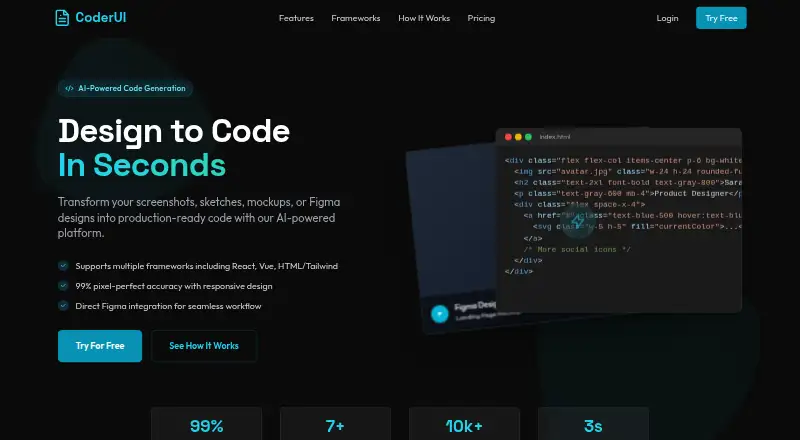
CoderUI is a web tool that turns screenshots, sketches, mockups, Figma designs, and text prompts into code for front-end projects.
What CoderUI is
CoderUI is a web tool that turns screenshots, sketches, mockups, Figma designs, and text prompts into code for front-end projects. It can generate HTML with Tailwind or CSS, React with Tailwind, Bootstrap, Vue with Tailwind, Ionic with Tailwind, and SVG. Users can upload PNG, JPG, SVG, or PDF files, or connect Figma and select frames or components. Generated code can be edited in a browser, including class naming, component structure, and code style, then copied, downloaded, or exported to a project. CoderUI says it adds responsive classes and media queries automatically. The site claims 99% translation accuracy, while noting complex interactive elements may need minor adjustments. The Free plan includes 5 credits per month. Pro costs $29 a month and includes 500 credits per month, all frameworks, and advanced customization. Enterprise costs $99 a month, with unlimited credits, full customization, and advanced integrations plus API access. Enterprise is also described as including team management, shared design libraries, and collaboration tools.
Good
- Accepts Figma designs and common image or document formats.
- Offers outputs across HTML, React, Vue, Ionic, Bootstrap, and SVG.
- Generated code can be edited before export.
- Free plan includes 5 credits per month.
- Enterprise includes team management and shared design libraries.
Watch out
- Free plan is limited to 5 credits per month.
- Pro costs $29 a month.
- Complex interactive elements may need minor adjustments.
- The service may transfer data internationally with safeguards.
Who it suits
CoderUI is aimed at front-end developers and marketers who want to convert visual references or prompts into code. It suits users who want to edit generated code in a browser before exporting it.
Verdict
CoderUI brings design imports, code generation, in-browser editing, and export into one web workflow. Its free plan is limited to 5 credits per month, and the service notes that complex interactive elements can require adjustment.
Plans and prices
From CoderUI's own pricing page, checked 15 Oct 2026.
| Plan | Price | What it gives you |
|---|---|---|
| Free | Free | 5 credits per month · all frameworks · basic customization |
| Pro | $29 a month | 500 credits per month · all frameworks · advanced customization |
| Enterprise | $99 a month | unlimited credits · all frameworks plus priority for new ones · full customization · advanced integrations · API access |
The facts
Each one read from CoderUI's own pages, with the date it was checked.
What it does
- Accuracy caveat
- The site claims 99% translation accuracy and says complex interactive elements may need minor adjustments.checked 30 Sep 2026
- Accuracy claim
- The website claims 99% design-to-code accuracy for spacing, colors, typography and layout.checked 15 Oct 2026
- Accuracy limitation
- The FAQ says complex interactive elements may still require minor manual adjustments.checked 15 Oct 2026
- API availability
- API access is listed only with the Enterprise plan.checked 15 Oct 2026
- Bootstrap output
- Bootstrap is one of the listed output targets.checked 15 Oct 2026
- Code editing
- Users can adjust class naming, component structure and code style in an in-browser editor.checked 15 Oct 2026
- Data handling
- The privacy policy says the service may use third parties for analytics, hosting, or communication and may transfer data internationally with safeguards such as Standard Contractual Clauses.checked 30 Sep 2026
- Design import
- Users can upload PNG, JPG, SVG, and PDF files or import designs from Figma.checked 30 Sep 2026
- Enterprise collaboration
- Enterprise is described as including team management, shared design libraries and collaboration tools.checked 15 Oct 2026
- Export
- Generated code can be copied, downloaded or exported to a project.checked 15 Oct 2026
- Figma integration
- Users can connect Figma and select frames or components for generation.checked 15 Oct 2026
- Founder launch date
- Almas Malik announced CoderUI publicly on Indie Hackers on April 16, 2025.checked 15 Oct 2026
- Frameworks
- Supported outputs include HTML with Tailwind or CSS, React with Tailwind, Bootstrap, Vue with Tailwind, Ionic with Tailwind, and SVG.checked 30 Sep 2026
- HTML CSS output
- CoderUI can generate traditional HTML and CSS.checked 15 Oct 2026
- HTML Tailwind output
- CoderUI can generate HTML using Tailwind CSS classes.checked 15 Oct 2026
- Image inputs
- The service accepts PNG, JPG, SVG and PDF uploads.checked 15 Oct 2026
- Intended users
- The About page describes CoderUI as designed for front-end developers and marketers who want to move faster without sacrificing quality.checked 30 Sep 2026
- Ionic output
- Ionic with Tailwind is a supported output format.checked 15 Oct 2026
- Licence
- The terms grant a non-exclusive, non-transferable use licence and state that site content, code, components and designs remain protected intellectual property.checked 15 Oct 2026
- Limit: data transfers
- The privacy policy says third parties may process data for analytics, hosting or communications and that international transfers may occur.checked 15 Oct 2026
- Limit: refunds
- The refund policy says credit purchases are final and non-refundable except for failed, duplicate or incomplete transactions.checked 15 Oct 2026
- Limit: service reliability
- The terms disclaim warranties and say the service may not be uninterrupted or error-free.checked 15 Oct 2026
The company
- Company status
- Crunchbase lists CoderUI as an active private, for-profit company.checked 15 Oct 2026
- Headquarters
- The registered address is M-55 Ayodhya Road, Lucknow, Uttar Pradesh, India 226016.checked 15 Oct 2026
The full review of CoderUI
CoderUI is a web-based design-to-code tool for front-end developers and marketers who want to turn visual concepts into a code starting point. Its broad input and output support make it useful across varied workflows, but the monthly credit limits matter if you generate frequently.
Overview
CoderUI converts screenshots, sketches, mockups, Figma designs, and text prompts into code. The generated result can be edited in the browser and copied, downloaded, or exported to a project. That gives developers a path from visual reference to editable implementation without locking them into a single output framework.
The service claims 99% translation accuracy, while also cautioning that complex interactive elements may need adjustment. That makes it a better fit for accelerating interface construction than for expecting a finished, interaction-complete implementation from every input.
Key features
- Flexible design inputs: Upload PNG, JPG, SVG, or PDF files, or connect Figma and select particular frames or components. This is useful when a team already has designs to work from; text prompts also allow a starting point without a supplied visual file.
- Multiple code targets: Outputs include HTML with Tailwind or CSS, React with Tailwind, Bootstrap, Vue with Tailwind, Ionic with Tailwind, and SVG. The range suits projects with different front-end conventions, though it does not remove the need to review and adapt generated code.
- Editing and export: Users can adjust class naming, component structure, and code style in an in-browser editor, then copy or download the result or export it directly to a project. This gives developers control over the output before it enters their workflow.
- Responsive output: CoderUI says it adds media queries and responsive classes automatically. That can provide a useful responsive starting point, but the caveat around complex interactions still applies.
Pricing
The Free plan costs no stated amount and includes 5 credits per month, all frameworks, and basic customization. It is a low-risk way to try the workflow, but five monthly credits make it a limited option for regular generation.
Pro costs $29 a month, billed /month. It raises the allowance to 500 credits per month and adds advanced customization while retaining all frameworks. For an individual or small workflow that needs repeated generations, the larger quota is the main reason to pay.
Enterprise costs $99 a month, billed /month, and includes unlimited credits, all frameworks plus priority for new ones, full customization, advanced integrations, API access, team management, shared design libraries, and collaboration tools. It is aimed at teams that need shared workflows or integrations; the step up from Pro is difficult to justify for someone who only needs occasional code generation. A free trial is offered.
Platforms
CoderUI runs on the web. The privacy policy says personal information is not sold, traded, or rented, and users may request deletion. The service may use third parties for analytics, hosting, or communication, and may transfer data internationally with safeguards such as Standard Contractual Clauses.
Who it's for
CoderUI is best suited to front-end developers and marketers who have designs or visual references to convert and want editable code in several common formats. Developers who can review and refine generated output are likely to get more from its editing and export options. It is less compelling for occasional users who can stay within five monthly free credits, or for anyone expecting complex interactive behavior to emerge without follow-up work.
Pros and cons
- Pro: Broad input and framework support. Figma, common image and document formats, prompts, and multiple code targets accommodate different starting points and projects.
- Pro: Editable output and direct export. Browser-based code changes and several export options help carry generated work into an implementation workflow.
- Con: A tight free allowance. Five credits per month may not sustain frequent experimentation or production work.
- Con: Generated code may need refinement. Complex interactive elements can require adjustment, so the accuracy claim should not be read as a guarantee of finished code.
Alternatives
For a broader comparison, see AI Screenshot-to-Code Tools. Choose OpenStitch if you want a free, self-hosted option.
Anima may suit Figma users who want a free allowance that includes five imports or website clones and five Figma-plugin code generations, as well as five daily AI Playground chat messages. AI Pic2Code is another free web option. Alloy is an extension-only alternative with a free plan that includes $5 in credits per user per month and 20 prototypes, or a Pro plan at $20 a month, billed bi.
Calque is a free option for users seeking a self-hostable replacement for subscription software, with Linux, macOS, and Windows support. NexusUI is a free, open-source web option that can also be run locally from its repository. Quest offers a free account with one code download and basically all features, making it worth considering if a single download is enough.
Verdict
Choose CoderUI if you regularly turn visual designs into code and value broad framework support, browser editing, and direct export. Pro’s 500 monthly credits are a substantial step up from the five-credit free allowance, while Enterprise is the more natural fit for teams needing shared libraries or API access. Look elsewhere if you need complex interactions generated with little adjustment or only need a few generations each month.
Alternatives to CoderUI
- 1

Figma Make
Free planAndroidiOSWebAPI8.2Free plan - 2
v0
Free planiOSWebAPI7.8From $30 a month - 3
Kombai
Free planWebAPIExtensionLinux7.7From $20 a month - 4

Builder.io
Free planWebAPIExtension7.1From $24 a month - 5

Alloy
Free planExtension6.9From $20 a month - 6
Anima
Free planWebExtension6.9From $500 a month