v0
v0 is an AI agent for creating code, full-stack applications and other agents.
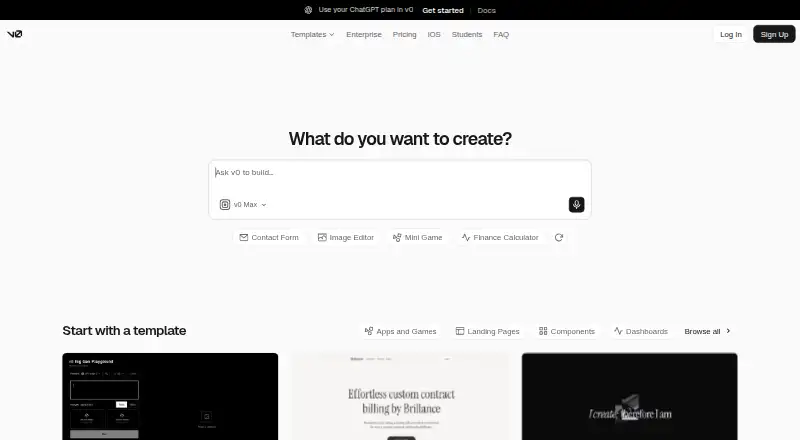
What v0 is
v0 is an AI agent for creating code, full-stack applications and other agents. Users can prompt it to build or refine projects, then deploy them to production or open a pull request for review. Documented project types include landing pages, dashboards, ecommerce stores, AI apps and full-stack applications. Design Mode provides visual controls and a live preview for fine-tuning. In GitHub-connected chats, v0 creates a working branch and commits changes; it does not push directly to main.
Previews run in isolated Vercel Sandbox environments, which support server-side features such as API routes and databases. Listed technology includes Next.js, React, TypeScript, Tailwind CSS and shadcn/ui. Integration topics include GitHub, Vercel, databases, Snowflake, Shopify, external APIs, MCP integrations and Slack. v0 is available on the web, iOS and API. The Free plan costs nothing and includes 7 messages/day, Vercel deployment, Design Mode and GitHub sync. Plus costs $30 a month, billed $30/user/month; Business costs $100 a month, billed $100/user/month. Enterprise pricing is custom.
Good
- Builds landing pages, dashboards, ecommerce and full-stack apps.
- Design Mode offers visual controls and live preview.
- GitHub chats create branches and commit code changes.
- Previews support API routes and databases.
- Free plan includes 7 messages/day and GitHub sync.
Watch out
- Free plan is limited to 7 messages/day.
- Plus costs $30 a month.
- Business costs $100 a month.
- Enterprise pricing is custom.
Who it suits
v0 may suit people who want to build or refine applications through prompts, from product and engineering teams to educators and founders. Its deployment, pull request and integration options also address users connecting generated work to development workflows.
Verdict
v0 combines prompt-driven app creation with visual editing, deployment and GitHub pull request workflows. The Free plan includes a daily message limit, while team features and higher tiers have listed per-user costs.
Plans and prices
From v0's own pricing page, checked 15 Oct 2026.
| Plan | Price | What it gives you |
|---|---|---|
| Free | Free | 7 messages/day · Vercel deployment · Design Mode · GitHub sync · $0/month |
| Plus | $30 a month | All models · $30 monthly credits/user · $2 daily login credits/user · team chat sharing · $30/user/month |
| Business | $100 a month | All Plus features · training opt-out by default · team collaboration · $100/user/month |
| Enterprise | Priced on request | No training use · SAML SSO · RBAC · priority access · support SLAs · Custom |
The facts
Each one read from v0's own pages, with the date it was checked.
What it does
- Agent capabilities
- The agent can search the web, use browsers, run terminal commands, integrate external tools and operate inside an isolated sandbox.checked 15 Oct 2026
- API availability
- The v2 API exposes chat creation, file and repository imports, streaming, deployment, preview URLs, webhooks and other operations.checked 15 Oct 2026
- API file import limitation
- Create Chat From Files imports a complete runnable project and does not scaffold a Next.js app or generate missing files.checked 15 Oct 2026
- API maturity
- The v2 API documentation states that v2 is beta and may contain breaking changes.checked 15 Oct 2026
- Automatic fixing
- v0 can detect missing files, dependency problems, syntax issues, runtime errors and import/export problems and attempt fixes.checked 15 Oct 2026
- Backend support
- Documentation says v0 can connect to backends and build data-driven full-stack applications.checked 15 Oct 2026
- Build and deploy
- Users can prompt v0 to build or refine applications and deploy them to production or open a pull request for review.checked 7 Oct 2026
- Compliance
- The enterprise page lists SOC 2, ISO, GDPR, and HIPAA under support and compliance.checked 7 Oct 2026
- Deployment
- v0 deploys projects to Vercel with preview deployments for branches and production deployments for published work.checked 15 Oct 2026
- Design mode
- Visual controls and live preview let users fine-tune generated interfaces.checked 15 Oct 2026
- Design systems
- Users can define reusable colors, typography and styles across projects.checked 15 Oct 2026
- Editing
- The homepage says Design Mode provides visual controls and a live preview for fine-tuning projects.checked 7 Oct 2026
- Enterprise controls
- The security documentation lists SAML SSO, role-based access control, audit logs, session management, and private workspaces for enterprise teams.checked 7 Oct 2026
- Environment variables
- v0 warns about potentially risky NEXT_PUBLIC_ variables and can refactor secrets into server-side contexts.checked 15 Oct 2026
- GitHub integration
- Connecting GitHub creates a branch from main, commits code changes automatically and supports pull requests.checked 15 Oct 2026
- Git workflow
- For GitHub-connected chats, v0 creates a working branch, commits code changes, and lets users create pull requests; it does not push directly to main.checked 7 Oct 2026
- Integrations
- The documentation lists AI models, databases, Snowflake, Shopify, external APIs, Vercel Connect, GitHub, MCP integrations, pre-installed agents and Slack.checked 15 Oct 2026
- Limit: credit consumption
- Trustpilot reviewers repeatedly complained that credits ran out after a small number of messages or were consumed by failed or unwanted work.checked 15 Oct 2026
Where it runs
- App types
- The documentation lists landing pages, dashboards, ecommerce stores, AI apps, and full-stack applications as things users can build.checked 7 Oct 2026
- iOS requirements
- The App Store listing requires iOS 18.0 or later and lists iPhone, iPad and Apple Vision compatibility.checked 15 Oct 2026
The company
- Company founded
- LinkedIn lists Vercel as founded in 2015.checked 15 Oct 2026
- Company headquarters
- LinkedIn lists Vercel headquarters in San Francisco, California.checked 15 Oct 2026
- Company size
- LinkedIn lists Vercel as a privately held software company with 501–1,000 employees.checked 15 Oct 2026
- Headquarters
- San Francisco, California, United Stateschecked 28 Sep 2026
The full review of v0
v0 is an AI agent for turning prompts into code, full-stack applications and agents, with a workflow that can continue into visual refinement, deployment and code review. It is best for product and engineering teams already working with GitHub and Vercel, while solo users should weigh the tight free allowance against paid usage. The strongest case is moving quickly from an idea to a reviewable application without abandoning a conventional development stack.
Overview
v0 builds or refines projects from natural-language prompts and can either deploy them to production or open a pull request. Its documented scope includes landing pages, dashboards, ecommerce stores, AI applications and full-stack software, so it is aimed at substantially more than static mockups. That breadth is valuable when a generated interface needs to become a working product rather than a one-off demonstration.
The generated stack is centered on Next.js, React, TypeScript, Tailwind CSS and shadcn/ui. Design Mode adds visual controls and a live preview for adjustments that are faster to make graphically than through another prompt. Previews run in an isolated Vercel Sandbox and support server-side capabilities such as API routes and databases. Generated code is analyzed before execution and runs in isolated environments, an important boundary for projects that include backend behavior.
Key features
- Prompt-driven development: v0 can create or revise code, full-stack apps and agents. The supported project range makes it suitable for both front-end delivery and applications with backend requirements.
- Visual editing: Design Mode provides live visual feedback and controls, giving designers and non-engineers a direct way to fine-tune a generated project instead of relying exclusively on text instructions.
- GitHub workflow: In GitHub-connected chats, v0 creates a working branch, commits changes and lets you open a pull request. It does not push directly to main, which preserves review and approval steps for teams.
- Deployment: Projects can be sent to production, with Vercel deployment in the Free plan. Custom domains are supported, making a finished project more presentable than one confined to a temporary preview.
- Integrations: Documentation covers GitHub, Vercel, databases, Snowflake, Shopify, external APIs, MCP integrations and Slack. This gives teams several routes for connecting generated applications to existing services.
- Enterprise safeguards: Enterprise adds SAML SSO, role-based access control, audit logs, session management and private workspaces. Its compliance coverage includes SOC 2, ISO, GDPR and HIPAA, with guaranteed customer-support SLAs.
Pricing
v0 uses a freemium model. The Free plan costs nothing and allows seven messages per day, Vercel deployment, Design Mode and GitHub sync. That is enough for evaluation and occasional small changes, but the daily cap can interrupt sustained building and makes the free tier a poor fit for intensive development.
Plus costs $30 a month, billed at $30 per user per month. It includes all models, $30 in monthly credits per user, $2 in daily login credits per user, additional shared team credits, centralized billing, chat sharing and team collaboration. It is the practical step up for an individual or small team that needs regular usage and shared workflows.
Business costs $100 a month, billed at $100 per user per month. It retains the Plus credit allowances and collaboration features, while adding training opt-out by default, centralized billing and additional shared credits. Choose it when organizational data handling matters enough to justify the large per-user increase.
Enterprise has custom pricing and includes no training use, SAML SSO, role-based access control, priority access and guaranteed customer-support SLAs. It is the appropriate tier for organizations requiring formal identity, governance and support commitments rather than a self-serve subscription.
Platforms
v0 is offered through the web and API, with an official iOS app. It supports web applications, databases and backend functionality, plus both deployment and pull-request workflows. Custom domains extend its usefulness beyond internal previews.
Who it's for
The documented audience spans product managers, designers, engineers, data scientists, marketing and content teams, educators, customer-support teams and founders. Designers and product leads benefit from prompt generation and Design Mode; engineers gain a GitHub branch-and-pull-request path; founders and small teams can move from concept to deployed web software without separating prototyping from implementation. Teams without a Vercel- and GitHub-oriented process may find less of an advantage in its workflow.
Pros and cons
Pros
- Combines prompting, visual refinement, backend-capable previews and deployment in one workflow.
- Pull requests, branches and commits keep generated changes inside a reviewable Git process.
- Broad integrations and enterprise controls support both connected products and governed team use.
- Free access includes Design Mode, GitHub sync and Vercel deployment.
Cons
- Seven free messages per day is restrictive for serious ongoing development.
- Regular use starts at $30 per user per month, while Business rises to $100 per user per month.
- The strongest collaboration and governance features are reserved for paid tiers.
Alternatives
For screenshot-led interface conversion, AI Screenshot-to-Code Tools is the more focused category. For a broader survey of prompt-based products, compare AI App Builders.
Figma Make suits Figma users who want 150 AI credits per day on its Starter plan or 3,000 monthly credits on the $16 Professional Full seat plan. Kombai is a lower-cost option for extension and desktop users, with a free tier capped at 300 credits per month. Codia AI offers a free plan across API, extension and web. Fronty fits simple publishing on a free fronty.live address, with branding.
Anima is worth considering for Figma imports and code generations, while Builder.io offers a free space with one included user, 60 monthly Agent Credits and one published app. CoderUI starts its Pro plan at $29 per month with 500 credits and all frameworks. Quest provides a free account with one code download and essentially all features.
Verdict
Choose v0 if you want prompt-based application creation tied to visual editing, GitHub review and Vercel deployment, especially as part of a team’s existing workflow. Its main reason to look elsewhere is sustained usage cost: the free tier is brief, and meaningful team governance begins at substantially higher per-user prices.
Alternatives to v0
- 1

Figma Make
Free planAndroidiOSWebAPI8.2Free plan - 2
Kombai
Free planWebAPIExtensionLinux7.7From $20 a month - 3

CoderUI
Free planWebAPI7.2From $29 a month - 4

Builder.io
Free planWebAPIExtension7.1From $24 a month - 5

Alloy
Free planExtension6.9From $20 a month - 6
Anima
Free planWebExtension6.9From $500 a month