CodeMatch
CodeMatch is a Windows program from SAFE Corporation for comparing source code across two directories, including their subdirectories.
What CodeMatch is
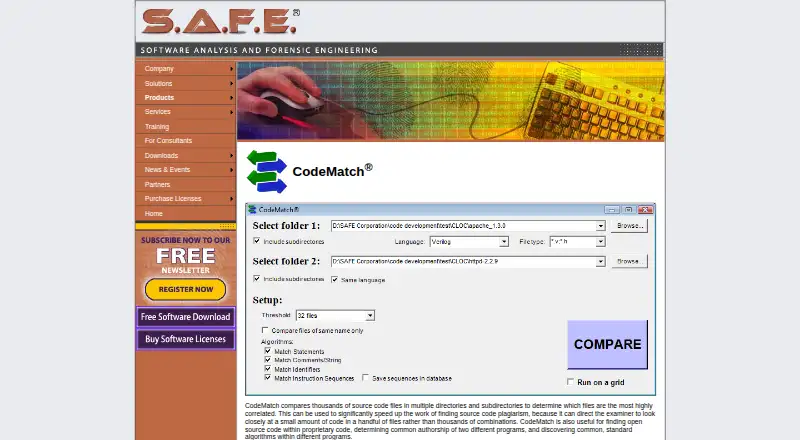
CodeMatch is a Windows program from SAFE Corporation for comparing source code across two directories, including their subdirectories. It ranks file pairs with correlation scores from 0 to 100, giving examiners a way to focus review on the most similar pairs. Its matching methods examine statements, comments and strings, instruction sequences, and identifiers. Reports can show the code material behind high correlations, and the comparison database can be exported as an HTML summary. Listed language support includes C, C++, C#, Java, JavaScript, Python, SQL, Swift, Verilog, and VHDL; SAFE says it will usually add requested language support within days. The company also describes uses such as finding open-source code in proprietary code, investigating common authorship, and identifying shared standard algorithms. CodeMatch is intended to narrow a large review set, not to establish plagiarism on its own. A SAFE press release says comparisons of up to 1 megabyte of source code can be made at no charge. The product is also described as paid and offers a free trial, but no CodeMatch price is listed.
Good
- Ranks file pairs using scores from 0 to 100
- Compares directories and their subdirectories
- Detailed HTML reports show highly correlated code
- Supports multiple matching methods and listed languages
- No-charge comparisons up to 1 megabyte are stated
Watch out
- Runs on Windows only
- Does not precisely pinpoint plagiarism
- No CodeMatch price is listed
- No CodeMatch download is listed on the maker’s download page
Who it suits
CodeMatch suits examiners who need to prioritize source-code pairs for expert review, including investigations of possible plagiarism or shared authorship. It may also help teams inspect proprietary code for open-source material.
Verdict
CodeMatch can help narrow a large code-comparison task and show which material drove high correlations. Its scores are a guide for expert review, not a definitive plagiarism finding.
The facts
Each one read from CodeMatch's own pages, with the date it was checked.
What it does
- Comparison methods
- CodeMatch uses statement, comment/string, instruction-sequence, and identifier matching algorithms to score file similarity.checked 8 Oct 2026
- Directory comparisons
- CodeMatch compares files across two directories and can include their subdirectories.checked 8 Oct 2026
- Download availability
- The maker’s software download page offers downloads for CodeSuite, CodeSuite-LT, CodeSuite-AC, DocMatch, HTML Preprocessor, and CodeMeasure, but does not list CodeMatch.checked 8 Oct 2026
- Intended users
- SAFE describes CodeMatch as a tool for lawyers, technical experts, and expert witnesses investigating potentially copied source code.checked 8 Oct 2026
- Interpretation limit
- SAFE says CodeMatch helps experts find possible plagiarism but does not precisely pinpoint plagiarized code.checked 8 Oct 2026
- Language requests
- SAFE says supporting new languages is simple and quick and that it will usually add a requested language within days.checked 8 Oct 2026
- Languages
- The product page lists support for languages including C, C++, C#, Java, JavaScript, Python, SQL, Swift, and TypeScript, and says new language support can usually be added within days on request.checked 8 Oct 2026
- Limitation
- The maker says CodeMatch assists an expert in finding potentially plagiarized code and does not precisely pinpoint plagiarism.checked 8 Oct 2026
- Matching methods
- The algorithms page describes statement, comment and string, instruction sequence, and identifier matching methods.checked 8 Oct 2026
- Other uses
- The maker says CodeMatch can help find open-source code in proprietary code, determine common authorship, and discover shared standard algorithms.checked 8 Oct 2026
- Pricing availability
- The maker’s sales page lists license purchase links for CodeSuite, CodeSuite-LT, CodeSuite-AC, and DocMatch, but does not list CodeMatch pricing.checked 8 Oct 2026
- Purpose
- CodeMatch compares source code files across directories and subdirectories, ranking the most highly correlated file pairs to help locate possible plagiarism.checked 8 Oct 2026
- Reports
- CodeMatch creates a database exportable to an HTML summary report, with detailed HTML reports showing the statements, comments, strings, identifiers, or instruction sequences behind high correlations.checked 8 Oct 2026
- Scoring
- CodeMatch assigns file pairs correlation scores from 0 to 100 and ranks pairs by score for review.checked 8 Oct 2026
- Support
- The maker invites users to contact it if a needed programming language is not listed and says it will usually add support within days.checked 8 Oct 2026
- Support contact
- SAFE lists [email protected] as its contact email.checked 8 Oct 2026
- Supported languages
- The product page lists support for languages including C, C++, C#, Java, JavaScript, Python, SQL, Swift, Verilog, and VHDL.checked 8 Oct 2026
The company
- Founded
- 2008checked 28 Sep 2026
- Maker
- The product page identifies SAFE Corporation as the maker through its site branding and product navigation.checked 8 Oct 2026
Money
- Free usage limit
- A SAFE press release says CodeMatch can be used at no charge to compare up to 1 megabyte of source code.checked 8 Oct 2026
Where it runs
- Platform
- A SAFE press release states that CodeMatch runs on a personal computer using Windows.checked 8 Oct 2026