
Cobase Bank Connector
Cobase Bank Connector links a cloud ERP with banks to automate payment-file and bank-statement flows.
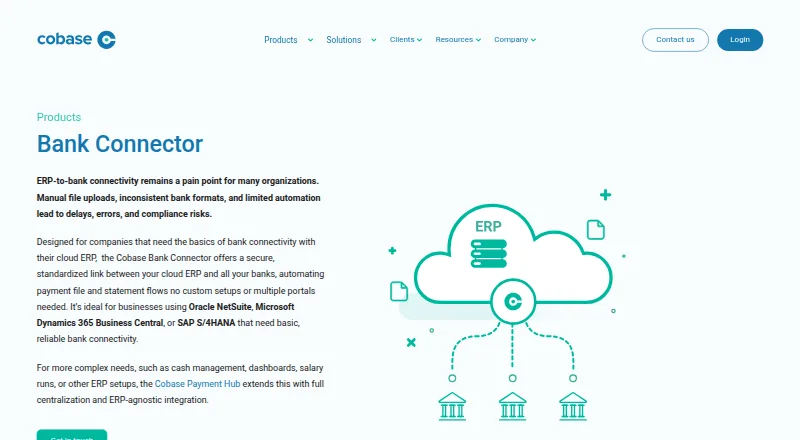
What Cobase Bank Connector is
Cobase Bank Connector links a cloud ERP with banks to automate payment-file and bank-statement flows. It is aimed at businesses using Oracle NetSuite, Microsoft Dynamics 365 Business Central, or SAP S/4HANA that need basic bank connectivity. The connector receives ERP payment files, validates and formats them for bank requirements, and prepares them for execution. It also imports daily CAMT.053 statements into the ERP for reconciliation. Approvals and user rights are centralized, while a single token and central audit trail support approval workflows. Payment statuses such as pending, approved, executed, and rejected are tracked in real time and synced back to the ERP. Supported formats include MT101, PAIN.001, MT940, CAMT.053, BAI2, and CSV; connections can use SWIFT, Host-to-Host SFTP, EBICS, or APIs. Pricing is available on request and depends on bank connections, account volume, modules, and ERP integrations. Cobase says its security program includes ISO 27001, SOC 2 Type 2, and ISAE 3402 Type 2 certifications.
Good
- Automates payment files and daily statement imports.
- Tracks payment statuses and syncs them to the ERP.
- Supports several bank connection methods and formats.
- Centralizes approvals and maintains an audit trail.
Watch out
- Pricing is available only on request.
- Designed for basic bank connectivity.
- More complex needs are addressed by the Payment Hub.
Who it suits
It suits businesses using one of the listed ERPs that need bank connectivity and automated payment and statement flows. Cobase directs more complex requirements, such as cash management or salary runs, to its Payment Hub.
Verdict
Cobase Bank Connector focuses on connecting listed ERPs with banks for payment and statement workflows. Ask about pricing and confirm that its basic scope matches your requirements.
Plans and prices
From Cobase Bank Connector's own pricing page, checked 28 Sep 2026.
| Plan | Price | What it gives you |
|---|---|---|
| Cobase Bank Connector | Priced on request | Pricing depends on bank connections, account volume, modules in use, and ERP integrations. |
The facts
Each one read from Cobase Bank Connector's own pages, with the date it was checked.
Where it runs
- Approvals and users
- Approvals and user rights are centralized, approvals use a single token, and actions are recorded in a central audit trail.checked 28 Sep 2026
What it does
- Best fit
- Cobase describes Bank Connector as suited to businesses using Oracle NetSuite, Microsoft Dynamics 365 Business Central, or SAP S/4HANA that need basic bank connectivity.checked 28 Sep 2026
- File formats
- The product supports format conversion for MT101, PAIN.001, MT940, CAMT.053, BAI2, and CSV, among other formats.checked 28 Sep 2026
- Implementation support
- Cobase says its professional implementation support helps configure bank connections, payment templates, and approval workflows.checked 28 Sep 2026
- Payment files
- It receives payment files from an ERP, validates and formats them for bank requirements, and prepares them for execution.checked 28 Sep 2026
- Payment tracking
- Payment statuses including pending, approved, executed, and rejected are tracked in real time and synced back to the ERP.checked 28 Sep 2026
- Product scope
- Cobase says more complex needs such as cash management, dashboards, salary runs, or other ERP setups are addressed by its Payment Hub.checked 28 Sep 2026
- Purpose
- Bank Connector provides a secure, standardized link between a cloud ERP and banks to automate payment file and bank statement flows.checked 28 Sep 2026
- Security certifications
- Cobase states it is externally certified under ISO 27001, SOC 2 Type 2, and ISAE 3402 Type 2 standards.checked 28 Sep 2026
- Security controls
- Cobase describes MFA, role-based access control, encryption at rest and in transit, and EU-based Microsoft Azure data centers in the Netherlands and Ireland.checked 28 Sep 2026
- Statements
- It automates daily bank statement imports into an ERP in CAMT.053 format for reconciliation.checked 28 Sep 2026
The company
- Company
- Cobase identifies itself as a technology provider for banking, payments, and treasury operations and says it supports clients in over 90 countries.checked 28 Sep 2026
- Headquarters
- Amsterdam, Netherlandschecked 28 Sep 2026
The full review of Cobase Bank Connector
Cobase Bank Connector links cloud ERPs to banks for businesses that need payment and statement flows. It suits teams on Oracle NetSuite, Microsoft Dynamics 365 Business Central, or SAP S/4HANA with basic connectivity needs. Its strength is a focused, governed bridge; businesses seeking broader treasury tools should look elsewhere.
Overview
The connector receives ERP payment files, validates and formats them to bank requirements, then prepares them for execution. It also imports daily CAMT.053 statements into the ERP for reconciliation. Direct bank feeds, ERP integrations, and real-time refresh support a continuous flow of balances, transactions, statements, and payment files.
Support for multiple entities and both import methods helps accommodate varied operating setups. Connections can use SWIFT, Host-to-Host SFTP, EBICS, or APIs. That range is useful where banks and systems require different routes, though configuration still depends on the relevant connections and ERP integration.
Key features
Payment controls extend beyond file conversion: centralized approvals and user rights, a single approval token, and a central audit trail give teams a consistent process. Real-time statuses—pending, approved, executed, or rejected—sync back to the ERP, making it easier to track payment progress without treating the connector as a full cash-management suite.
Supported formats include MT101, PAIN.001, MT940, CAMT.053, BAI2, and CSV, among others. That conversion breadth helps bridge different bank requirements; CAMT.053 statement imports are specifically used for daily ERP reconciliation.
Cobase says the service is externally certified to ISO 27001, SOC 2 Type 2, and ISAE 3402 Type 2 standards. It also describes MFA, role-based access, encryption at rest and in transit, and EU-based Microsoft Azure data centers in the Netherlands and Ireland. Professional implementation support covers bank connections, payment templates, and approval workflows, a practical advantage for teams that need help establishing controls.
Pricing
Cobase Bank Connector has custom pricing, with cost depending on bank connections, account volume, modules, and ERP integrations. There is no free plan, so it is best evaluated by businesses with a defined connectivity requirement and budget for a paid implementation. Ask for a quote against the number of banks, accounts, and integrations you expect to use.
Platforms
The product supports Android, iOS, and web. Its integration purpose is business banking and ERP workflows rather than a consumer banking app.
Who it's for
This is a strong fit for businesses using NetSuite, Business Central, or SAP S/4HANA that need standardized bank connections, daily statement imports, payment preparation, and approval tracking. Multiple entities and a choice of connection methods make it relevant to organizations with more than one banking relationship.
It is not the right choice for teams whose requirements extend to cash management, dashboards, salary runs, or other ERP setups. Cobase directs those more complex needs to its Payment Hub. The company says it supports clients in over 90 countries, though individual bank connectivity requirements still shape fit.
Pros and cons
- Pros: Payment validation and bank-format conversion reduce friction between supported ERP payment files and bank requirements.
- Pros: Daily CAMT.053 imports and real-time payment-status syncing keep reconciliation and payment tracking tied to the ERP.
- Pros: Central approvals, access rights, single-token approval, and an audit trail give teams governance in the payment flow.
- Pros: Several connection methods and common payment and statement formats can suit different bank setups.
- Cons: The stated best fit is limited to three ERP families; teams on other ERP setups may need a different Cobase product.
- Cons: Cash management, dashboards, and salary runs fall outside this connector's scope.
- Cons: Custom pricing and no free plan make it harder for a small team to trial the connector before committing.
Alternatives
Bank Connectivity Software is the broader category to compare if you want to weigh connectors against other options. Choose Payment Hub Software when the requirement is broader than basic bank connectivity; Cobase itself points to its Payment Hub for cash management, dashboards, salary runs, and other ERP setups.
Consider Powens if you want a paid API-oriented alternative with a free trial; its custom API plans are set out in a purchase order, and enterprise plans offer dedicated hosting and support. TrueLayer Data API offers a free sandbox using mock data but no production access; production pricing depends on volume and use case. Pick it when sandbox testing is the priority.
TIS Bank Connectivity is another paid, web-based option to compare. Plaid may suit teams that qualify for its free trial: eligible US and Canada teams created on or after April 15, 2026 can receive up to 10 Production Items. Lean Technologies is another paid alternative with Android, API, iOS, and web platforms.
BankConnector is a paid alternative with no free plan. finAPI is a paid web option, while Envestnet | Yodlee offers a freemium model and web access.
Verdict
Choose Cobase Bank Connector if your business runs NetSuite, Business Central, or SAP S/4HANA and needs controlled payment-file handling plus daily bank-statement flows into its ERP. Its approval trail, status syncing, format support, and implementation assistance make the focused scope valuable. Look elsewhere if you need broader treasury capabilities or a different ERP setup, and establish the custom price against your banking and integration footprint before proceeding.
Alternatives to Cobase Bank Connector
- 1

Kantox
WebAPI5.9 - 2
cTrader
AndroidiOSWebmacOS5.3 - 3
Currenex
WebWindows4.7 - 4
24 Exchange
Web4.6 - 54.6
- 6
oneZero
Web4.6