clpeak
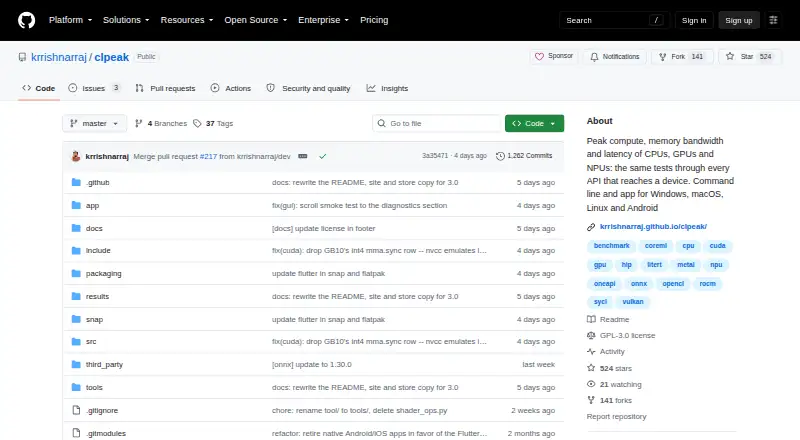
clpeak is free, GPL-3.0 licensed software for measuring peak compute throughput, memory bandwidth, and latency on CPUs, GPUs, and NPUs.
What clpeak is
clpeak is free, GPL-3.0 licensed software for measuring peak compute throughput, memory bandwidth, and latency on CPUs, GPUs, and NPUs. It runs tests through available device APIs so users can compare results from different machines side by side. Benchmark coverage includes compute, matrix engines, vendor libraries, bandwidth, latency, AI workloads, and CPU-specific operations. GPU backends include CUDA, ROCm/HIP, Metal, oneAPI/SYCL, Vulkan, and OpenCL; AI runtime backends include ONNX Runtime, Core ML, and LiteRT. The app detects devices, streams results as measurements are made, and retains run history that users can rename and export as JSON. Its command-line tool can select devices, backends, and test categories, describe measurements, save runs, and compare them with saved results. clpeak runs on Windows, macOS, Linux, iOS, and Android. Releases include platform zip files and a macOS app DMG; Linux is also available through Snap and Android through Google Play. Windows and macOS may show a warning before first launch because release binaries lack developer-certificate signatures.
Good
- Free and GPL-3.0 licensed.
- Measures compute, bandwidth, and latency.
- Supports several GPU and AI runtime backends.
- CLI can save and compare runs.
- Results can be exported as JSON.
Watch out
- Windows and macOS may warn before first launch.
- No comparison database is listed.
- Bug reports are directed to GitHub issues.
Who it suits
clpeak suits users who want to benchmark CPU, GPU, or NPU performance across supported devices. Its CLI and JSON export may be useful to people automating runs or comparing saved results.
Verdict
clpeak offers broad benchmark coverage, multiple backends, and both app and CLI workflows. Be prepared for first-launch warnings on Windows or macOS, and use its GitHub issue process for bug reports.
Plans and prices
From clpeak's own pricing page, checked 11 Oct 2026.
| Plan | Price | What it gives you |
|---|---|---|
| Free | Free | GPL-3.0 licensed software |
The facts
Each one read from clpeak's own pages, with the date it was checked.
What it does
- AI runtimes
- AI runtime backends include ONNX Runtime, Core ML and LiteRT.checked 11 Oct 2026
- Benchmark coverage
- Tests cover compute, matrix engines, vendor libraries, bandwidth, latency, AI workloads and CPU-specific operations.checked 11 Oct 2026
- CLI or automation
- Yeschecked 23 Sep 2026
- Command line
- The CLI can select devices, backends and test categories, describe measurements, save runs as JSON and compare against saved runs.checked 11 Oct 2026
- Comparison
- It runs the same tests through available device APIs so results from one machine can be compared side by side.checked 11 Oct 2026
- Comparison database
- Nochecked 23 Sep 2026
- Distribution
- Releases provide platform zip files containing the CLI and app, backend variants, and a macOS app DMG; Linux is also available through Snap and Android through Google Play.checked 11 Oct 2026
- GPU backends
- GPU backends include CUDA, ROCm/HIP, Metal, oneAPI/SYCL, Vulkan and OpenCL.checked 11 Oct 2026
- License
- The project is GPL-3.0 licensed.checked 11 Oct 2026
- Operating systems
- Windows; macOS; Linux; iOS; Androidchecked 23 Sep 2026
- Purpose
- clpeak measures peak compute throughput, memory bandwidth and latency on CPUs, GPUs and NPUs.checked 11 Oct 2026
- Result export formats
- JSONchecked 23 Sep 2026
- Security detail
- The release binaries are not signed with a developer certificate, so Windows and macOS prompt users before first launch.checked 11 Oct 2026
- Support
- The project directs users to open a GitHub issue and attach verbose run diagnostics when reporting bugs.checked 11 Oct 2026
- Workload areas
- compute throughput; memory bandwidth; matrix throughput; kernel launch latency; AI inferencechecked 23 Sep 2026
Where it runs
- App features
- The app lists detected devices, streams results as measured, and keeps run history that users can rename and export as JSON.checked 11 Oct 2026
- Platforms
- The project describes its app as running on Windows, macOS, Linux and Android.checked 11 Oct 2026
The full review of clpeak
clpeak is a cross-platform benchmark for comparing CPU, GPU and NPU performance through the APIs those devices actually expose. It is aimed at developers, hardware evaluators and technically minded buyers who need repeatable measurements rather than a single composite score. Its open-source breadth and command-line control are persuasive, although unsigned desktop binaries make the first launch less convenient.
Overview
The software measures compute throughput, memory bandwidth, matrix throughput, kernel-launch latency and AI inference. By running the same test families through available device APIs, it can put results from different machines side by side. That is useful when assessing an accelerator in a particular software stack, or when checking whether a processor delivers the performance expected from its specifications.
Comparisons are only as consistent as the hardware and APIs present on each system. Missing backends or devices mean that two machines may not expose identical datapoints, so clpeak suits controlled technical comparisons better than casual “which PC is faster?” browsing.
Key features
Benchmark coverage includes general compute, matrix engines, vendor libraries, bandwidth, latency, AI workloads and CPU-specific operations. GPU backends span CUDA, ROCm/HIP, Metal, oneAPI/SYCL, Vulkan and OpenCL, while AI runtimes include ONNX Runtime, Core ML and LiteRT. This range is valuable for mixed hardware fleets: users can target the interface relevant to a particular GPU, NPU or operating system instead of relying on one generic workload.
The app detects available devices, streams measurements as they are produced and retains run history. Runs can be renamed and exported as JSON, which makes it practical to archive results or feed them into another reporting workflow. The command-line interface goes further: it can select devices, backends and test categories, explain what measurements mean, save runs as JSON and compare them with saved runs. Those controls make clpeak a stronger choice for repeatable and automated benchmarking than a one-click score utility.
Pricing
clpeak is free software under the GPL-3.0 license. The Free plan costs nothing and has no trial or subscription terms. There is no paid tier that adds seats, quotas or expanded exports; every user receives the same app and CLI distribution. That is an excellent fit for laboratories, developers and enthusiasts who can manage their own result storage and interpretation. Readers wanting a hosted comparison service or polished commercial support should consider a different tool.
Platforms
Releases support Windows, macOS, Linux, iOS and Android. Download packages include the CLI and app, backend variants and a macOS DMG; Linux users can also install through Snap, and Android users can obtain the app through Google Play. Windows and macOS binaries are not signed with a developer certificate, so those systems warn before first launch. That prompt is a security step users must handle themselves, and it is the main distribution friction.
For bug reports, the project asks users to open a GitHub issue and attach verbose run diagnostics. This process is appropriate for an open-source project, but it is less immediate than commercial vendor support.
Who it's for
Choose clpeak if you compare systems across operating systems, need visibility into several accelerator APIs, or want benchmark jobs that can be scripted and exported. Developers validating CPU, GPU or NPU performance will benefit from selecting exact devices and backends. Hardware buyers can use its workload-specific results when a headline score would hide memory, matrix or latency behavior.
It is less suitable for readers seeking a simple consumer ranking, a built-in online comparison database or a signed installer with guided support. Its output rewards users who understand which APIs are active and how to interpret differences between runs.
Pros and cons
Pros
- Broad hardware coverage: CPU, GPU and NPU measurements span compute, bandwidth, matrix, latency and AI workloads.
- Many backends: CUDA, ROCm/HIP, Metal, oneAPI/SYCL, Vulkan, OpenCL and three AI runtimes accommodate varied hardware stacks.
- Automation-ready: The CLI selects devices and tests, saves JSON and compares previous runs.
- Open-source pricing: GPL-3.0 software costs 0.00 USD, with no trial expiry or paid feature split.
Cons
- API-dependent comparisons: Different machines may expose different devices or backends, limiting like-for-like results.
- Unsigned desktop releases: Windows and macOS display first-launch warnings.
- No comparison database: You must manage saved results or exports rather than browse a central catalogue.
- Technical support workflow: Bug fixes go through GitHub issues with verbose diagnostics, not a dedicated support desk.
Alternatives
CrossMark is the better pick for a freemium benchmark with a free dashboard and automatic online result submission, plus a free trial for its paid offering. Geekbench suits readers who want established CPU and GPU compute tests with online results management; its Pro edition costs 99.00 USD once per user. Choose Basemark GPU for a focused graphics benchmark and Powerboard submission, accepting that the free edition is for home or private use, requires internet and provides one score without breakdown analysis.
Novabench is a simpler desktop option covering CPU, GPU, memory and disk with online comparison. elbencho is preferable for GPL-3.0 distributed-storage benchmarking on Linux and Windows. Blender and DaVinci Resolve are free creative applications rather than general-purpose benchmark replacements. Nexus is another free cross-platform software option, but serves a different purpose.
For a wider catalogue of PC testing tools, see PC Benchmark Software.
Verdict
clpeak is a strong recommendation for engineers, developers and enthusiasts who need detailed, scriptable measurements across CPUs, GPUs and NPUs. Its combination of broad backends, workload depth and JSON workflows is the main reason to choose it. Look elsewhere if you want a central online ranking, a simple consumer score or signed desktop installers with commercial support.
Alternatives to clpeak
- 1
Geekbench
Free planAndroidiOSLinuxmacOS7.8$99 one-time - 2

Blender
Free planOpen sourceLinuxmacOSWindows7.5Free plan - 3
CrossMark
Free planAndroidiOSLinuxmacOS7.5Free plan - 4
Parkdale
Free planAndroidmacOSWindows7.2Free plan - 5
Basemark GPU
Free planAndroidiOSLinuxmacOS7.1Free plan - 6

Novabench
Free planLinuxmacOSWindows7.1From $36 a year