Clipy
Clipy is a free, open-source clipboard extension for macOS that keeps clipboard history and saved snippets on the Mac.
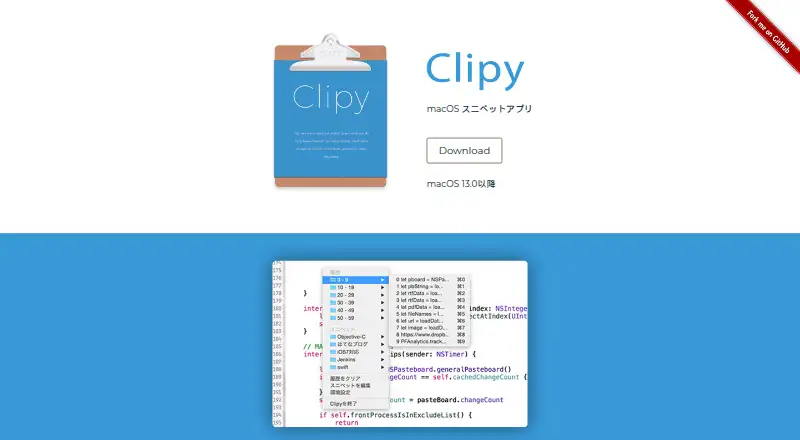
What Clipy is
Clipy is a free, open-source clipboard extension for macOS that keeps clipboard history and saved snippets on the Mac. A keyboard shortcut opens history so users can select an item copied earlier, while a separate menu provides access to snippets. Its default shortcuts are Shift-Command-V for the main menu, Control-Command-V for history, and Shift-Command-B for snippets. Clipy supports multiple clipboard formats, including text and images, and is published under the MIT license. The project requires macOS 13 Ventura or later. It says clipboard contents are not sent to its servers or third parties, and related app data is stored locally. Firebase Analytics and Crashlytics are enabled by default but can be disabled in Preferences. Clipy does not claim that the locally stored history is encrypted. macOS may require Accessibility permission for paste behavior. The 1.3.0 release includes a database migration, and the project advises exporting important data such as snippets before updating because migration can fail in some cases.
Good
- Keeps clipboard history and snippets locally.
- Supports text and image clipboard formats.
- Analytics and crash reporting can be disabled.
- Available under the MIT license.
Watch out
- Requires macOS 13 Ventura or later.
- Local clipboard history is not claimed to be encrypted.
- Migration may fail; exporting important data is advised before updating.
Who it suits
Clipy suits Mac users who want keyboard-accessible clipboard history and a saved-snippet menu. It requires macOS 13 Ventura or later.
Verdict
Clipy offers local clipboard history and snippets at no cost, with configurable analytics and crash reporting. Check the macOS requirement and export important data before the release’s database migration.
Plans and prices
From Clipy's own pricing page, checked 11 Oct 2026.
| Plan | Price | What it gives you |
|---|---|---|
| Clipy | Free | macOS 13 Ventura or later |
The facts
Each one read from Clipy's own pages, with the date it was checked.
What it does
- Accessibility permission
- Clipy's README says macOS may require Accessibility permission for paste behavior and checks it against the app's code signature.checked 5 Oct 2026
- Analytics
- Firebase Analytics is enabled by default, collects general usage information, and can be disabled in Preferences.checked 11 Oct 2026
- Clipboard formats
- It supports multiple clipboard formats, including plain text and images.checked 11 Oct 2026
- Clipboard history
- Keyboard shortcuts open a menu for viewing clipboard history.checked 11 Oct 2026
- Clipboard privacy
- The privacy policy says Clipy does not transmit clipboard contents or snippets to Clipy servers, Firebase, or other third parties.checked 11 Oct 2026
- Crash reporting
- Firebase Crashlytics collects crash reports and diagnostics by default, and crash reporting can be disabled in Preferences.checked 11 Oct 2026
- Development support
- The project accepts donations to support ongoing development.checked 5 Oct 2026
- Encryption limit
- Clipy does not claim that locally stored clipboard history is encrypted.checked 5 Oct 2026
- Keyboard shortcuts
- The default shortcuts include Shift-Command-V for the main menu, Control-Command-V for history, and Shift-Command-B for snippets.checked 5 Oct 2026
- Local encryption
- Clipy says it does not currently claim that locally stored clipboard history is encrypted.checked 11 Oct 2026
- Local storage
- Clipboard history, snippets, preferences, and related app data are stored locally on the Mac.checked 11 Oct 2026
- Migration note
- The 1.3.0 release includes a database migration and advises exporting important data such as snippets before updating because migration may fail in some cases.checked 11 Oct 2026
- Minimum requirement
- Clipy requires macOS 13.0 or later.checked 11 Oct 2026
- Network use
- The privacy policy lists Sparkle update checks and Firebase analytics and crash reporting as Clipy's intended network communications.checked 5 Oct 2026
- Open source
- Clipy is published as open-source software under the MIT license.checked 11 Oct 2026
- Open source license
- The project states that Clipy is available under the MIT license.checked 5 Oct 2026
- Product
- Clipy is a clipboard extension app for macOS.checked 11 Oct 2026
- Snippets
- Users can save frequently used text as snippets and paste it when needed.checked 11 Oct 2026
- Support
- The project invites users to report bugs and requests through GitHub issues and pull requests, and says Japanese is welcome.checked 11 Oct 2026
- Update checks
- Clipy uses Sparkle to check for updates from clipy-app.com, and those requests may include app version, macOS version, and IP address.checked 11 Oct 2026
Where it runs
- Apple Silicon
- The 1.3.0 release supports Apple Silicon and macOS 13 Ventura or later.checked 11 Oct 2026
- macOS requirement
- The project lists macOS 13 Ventura or later as a requirement.checked 5 Oct 2026
Alternatives to Clipy
- 1

Relic
Free planOpen sourceAndroidiOSWebAPI9.3From $5 a month - 2
Clipman
Free planOpen sourceAndroidiOSAPILinux9.2$1.99 one-time - 3

Pasteable
Free planAndroidiOSWebLinux8.3From $60 a year - 4

ClipboardFusion
Free planAndroidiOSWebExtension8.3$19 one-time - 5
OmniClip
Free planAndroidiOSWebExtension8.1Free plan - 6
Pastin
Free planiOSmacOS8.0From $29.99 a year