ClipX
ClipX is a free Windows clipboard history manager that keeps copied material available for later pasting.
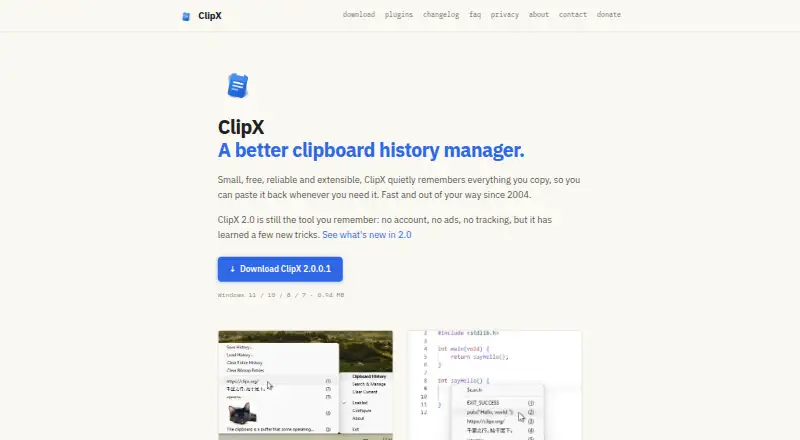
What ClipX is
ClipX is a free Windows clipboard history manager that keeps copied material available for later pasting. It records formatted text, images, files, and application-specific clipboard formats, then restores clips with their formatting. Search and snippets are supported. ClipX can detect sensitive content such as passwords, credit card numbers, and API keys and exclude it from history. Clipboard data remains on the computer instead of being uploaded to the cloud, and history can be kept only in memory. Users can purge older entries automatically or clear history when the computer locks or restarts. Optional plugins add actions, color picking, clip limits, local MCP access, richer previews, disk saving, trusted-computer sharing, and screen snipping. The maker says version 2.0 needs no account, ads, or tracking. It is free for personal or commercial use on any number of computers.
Good
- Stores formatted text, images, files, and formats
- Excludes detected sensitive content from history
- Keeps clipboard data on the local machine
- Offers automatic cleanup rules
- Free for personal and commercial use
Watch out
- Windows-only application
- Installer is not code-signed
- Optional features require plugins
- No free trial is listed
Who it suits
ClipX suits Windows users who need searchable clipboard history with local storage and sensitive-content controls. It also fits people wanting optional plugins or local AI-assistant access.
Verdict
ClipX provides local clipboard history, search, snippets, cleanup controls, and format preservation without accounts, ads, or tracking. Its free license and plugin system make it flexible, while Windows-only support and an unsigned installer are important considerations.
Plans and prices
From ClipX's own pricing page, checked 8 Oct 2026.
| Plan | Price | What it gives you |
|---|---|---|
| ClipX | Free | Free to install and use on any number of computers · personal or commercial use |
The facts
Each one read from ClipX's own pages, with the date it was checked.
What it does
- Automatic cleanup
- Users can configure old history entries to be purged automatically or history to be cleared when the computer locks or restarts.checked 8 Oct 2026
- Clipboard formats
- ClipX records formatted text, images, files, and application-specific clipboard formats, and can restore clips with their formatting.checked 8 Oct 2026
- Code signing
- The maker says the installer is not code-signed, so Chrome or Windows SmartScreen may show warnings.checked 8 Oct 2026
- Local storage
- Clipboard history stays on the user's machine and is not uploaded to the cloud; history can be kept in memory only.checked 8 Oct 2026
- MCP
- The MCP plugin lets local AI assistants find and add ClipX clips, with capabilities under the user's control.checked 8 Oct 2026
- No account or ads
- The maker says ClipX 2.0 requires no account and has no ads or tracking.checked 8 Oct 2026
- Optional plugins
- Optional plugins add actions, color picking, clip limits, local MCP access, richer format previews, saving clips to disk, sharing between trusted computers, and screen snipping.checked 8 Oct 2026
- Pricing and license
- ClipX may be used free of charge for personal or commercial purposes and installed on any number of computers.checked 8 Oct 2026
- Purpose
- ClipX is a clipboard history manager that remembers copied items so they can be pasted again.checked 8 Oct 2026
- Sensitive content
- ClipX can detect sensitive content such as passwords, credit card numbers, and API keys and exclude it from history.checked 8 Oct 2026
- Sharing
- The Sharing plugin sends clips between trusted computers without a cloud service.checked 8 Oct 2026
- Support
- Users can contact the maker through the site's feedback form to report bugs or ask questions.checked 8 Oct 2026
The company
- Founded
- 2004checked 28 Sep 2026
- Maker
- The site identifies Francis Gastellu as the maker and says ClipX has been made by the same person since its early release.checked 8 Oct 2026
Where it runs
- Windows support
- The download page lists Windows 11, 10, 8, and 7, with stable 64-bit and 32-bit installers.checked 8 Oct 2026
Alternatives to ClipX
- 1
Clipman
Free planOpen sourceAndroidiOSAPILinux8.5$1.99 one-time - 2

Relic
Free planOpen sourceAndroidiOSWebAPI8.5From $5 a month - 3
Pastin
Free planiOSmacOS7.6From $29.99 a year - 4

ClipboardFusion
Free planAndroidiOSWebExtension7.5$19 one-time - 5

Pasteable
Free planAndroidiOSWebLinux7.5From $60 a year - 6
OmniClip
Free planAndroidiOSWebExtension7.4Free plan