
ClipRadar
ClipRadar is local AI footage search for editors, helping find moments by what appears on screen, what was said, or who is visible.
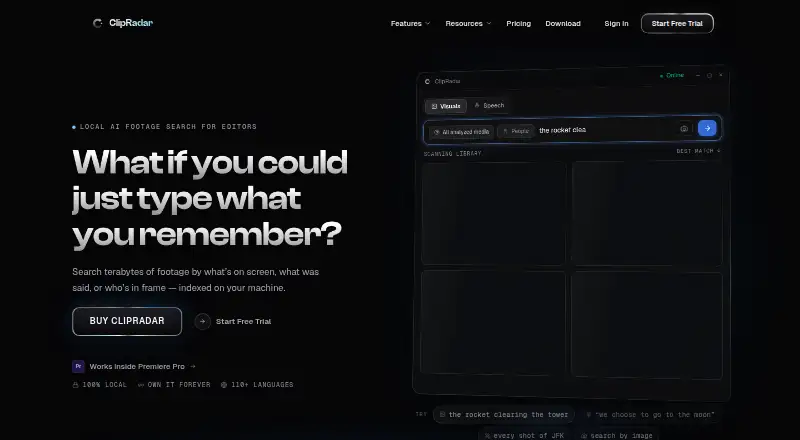
What ClipRadar is
ClipRadar is local AI footage search for editors, helping find moments by what appears on screen, what was said, or who is visible. Visual search accepts natural-language descriptions or a reference image to locate similar moments in an indexed library. Speech search transcribes and indexes footage on the user's machine and supports more than 110 languages. Face search lets users name people and find their appearances across a media library. Ultra Search combines person, speech, and visual queries into one ranked result list using a local LLM. A native Adobe Premiere Pro panel supports searching, previewing, and placing results on the timeline. ClipRadar can index H.264/265, ProRes, DNxHR, RAW workflows through proxies, and WAV and MP3 audio files. The maker says footage, transcripts, faces, and the search index remain on the machine and are not uploaded. Windows 10/11 64-bit and an NVIDIA GPU with about 6 GB VRAM are listed requirements; Premiere Pro 25.6+ is optional for the panel. The free trial allows 40 searches without a credit card. Paid plans include $29 a month, $249 a year, and a one-time $199.00 USD Founding plan.
Good
- Searches footage visually, by speech, and by face.
- Speech search supports more than 110 languages.
- Premiere Pro panel supports timeline placement.
- Trial includes 40 searches without a credit card.
Watch out
- Requires Windows 10/11 64-bit and an NVIDIA GPU.
- The license activates on one machine at a time.
- macOS support is planned, not currently listed as available.
Who it suits
ClipRadar suits video editors who need to search local footage by image, speech, or person, especially those using Premiere Pro. The listed download requirements target Windows users with an NVIDIA GPU.
Verdict
ClipRadar focuses on searching indexed footage locally and includes a Premiere Pro panel. Check the Windows and GPU requirements before starting the trial.
Plans and prices
From ClipRadar's own pricing page, checked 5 Oct 2026.
| Plan | Price | What it gives you |
|---|---|---|
| Monthly | $29 a month | Unlimited searches · terabyte-scale library · all features included · Billed monthly |
| Founding | $199, paid once | Unlimited searches · terabyte-scale library · all features included · One payment — yours forever; a year of updates included; page says $349 after launch |
| Annual | $249 a year | Unlimited searches · terabyte-scale library · all features included · Billed yearly · about $21/mo |
The facts
Each one read from ClipRadar's own pages, with the date it was checked.
The company
- Company
- ClipRadar is built by NDX Group, a small independent company incorporated in Bulgaria.checked 5 Oct 2026
What it does
- Face search
- Face search lets users name people and find their appearances across their media library.checked 5 Oct 2026
- Internet use
- The maker lists license checks, update checks, model downloads, user-submitted bug reports, and optional crash reports as reasons the app connects to the internet.checked 5 Oct 2026
- License limit
- The EULA says each license key can activate ClipRadar on one machine at a time, with deactivation available to move it to another machine.checked 5 Oct 2026
- Media formats
- The site says ClipRadar can index H.264/265, ProRes, DNxHR, RAW workflows via proxies, and audio-only WAV and MP3 files.checked 5 Oct 2026
- Premiere integration
- ClipRadar includes a native Adobe Premiere Pro panel for searching, previewing, and placing results on the timeline.checked 5 Oct 2026
- Privacy
- The maker says footage, transcripts, faces, and the search index stay on the user's machine and are not uploaded.checked 5 Oct 2026
- Product
- ClipRadar is local AI footage search for editors, finding footage by what is on screen, what was said, or who is in frame.checked 5 Oct 2026
- Speech search
- Speech search transcribes and indexes footage on the machine and supports searching in 110+ languages.checked 5 Oct 2026
- Support
- The maker offers Discord community support and says beta users can get one-to-one support from the team.checked 5 Oct 2026
- Ultra Search
- Ultra Search uses a local LLM to combine person, speech, and visual searches into one ranked result list.checked 5 Oct 2026
- Visual search
- Visual search accepts natural-language descriptions or a reference image and can find visually similar moments across an indexed library.checked 5 Oct 2026
Where it runs
- Mac availability
- The maker says the beta is Windows-first and macOS support is planned for the full release.checked 5 Oct 2026
- Platform requirements
- The download page lists Windows 10/11 64-bit and an NVIDIA GPU with about 6 GB VRAM as requirements; Premiere Pro 25.6+ is optional for the panel.checked 5 Oct 2026
Money
- Trial
- The free trial provides 40 searches on the user's footage and requires no credit card.checked 5 Oct 2026
Alternatives to ClipRadar
- 1

Deepgrip
Free planWebAPILinuxmacOS7.7From $89 a month - 2

FrameQuery
Free planWebAPImacOSWindows7.7From $19 a month - 3
VGG Image Annotator
Free planOpen sourceWebLinuxmacOSSelf-hosted7.7Free plan - 4

DISKO
Free planWebmacOS7.4From $12 a month - 5

Twelve Labs
Free planWebAPI7.3From $29 a month - 6
ViSearch
Free planWebAPIExtensionSelf-hosted7.3$0.09 one-time