
ClippingCut
ClippingCut is a web-based AI video editor that turns longer videos into short clips.
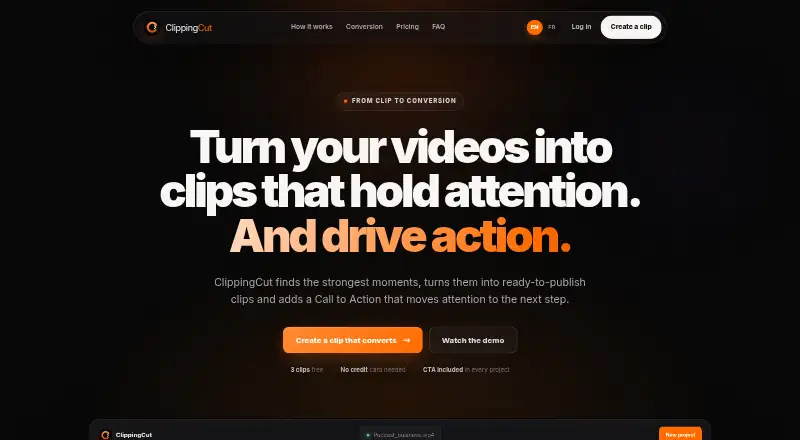
What ClippingCut is
ClippingCut is a web-based AI video editor that turns longer videos into short clips. Provide a public YouTube link or upload a video, and it can transcribe the source, identify and score highlights such as punchlines and emotional peaks, then create clips. Automatic reframing supports 9:16, 16:9, and 1:1 formats, using face detection to keep the subject in view. Captions synchronize with speech and are available in 15 animated styles; the service says Whisper transcription supports French. A Brand Kit can apply a creator name, handle, colors, font, and watermark, and clips can end with a call to action. Exports are available individually or together in an archive, in HD, for TikTok, Reels, and Shorts. The FAQ lists MP4, MOV, HEVC, and 4K among supported inputs. YouTube imports are limited to 1080p, and playlists and livestreams are unsupported. A free signup includes 3 clips and 30 minutes of source video without a card.
Good
- Automatically selects and scores video highlights
- Reframing supports 9:16, 16:9, and 1:1
- 15 animated caption styles
- Free signup includes 3 clips and 30 minutes
Watch out
- YouTube imports are limited to 1080p
- Playlists and livestreams are unsupported
- Upload limits depend on the plan
Who it suits
ClippingCut suits creators and podcasters who want to turn longer videos into clips, as well as agencies needing customizable branding and batch downloads. Its web platform and automated selection may fit teams seeking a clip-making workflow with captions and reframing.
Verdict
ClippingCut combines highlight selection, reframing, captions, and branding in a web-based clip workflow. Check the plan limits and unsupported YouTube sources before choosing it.
Plans and prices
From ClippingCut's own pricing page, checked 9 Oct 2026.
| Plan | Price | What it gives you |
|---|---|---|
| Free signup | Free | 3 free clips · 30 minutes of source video · no card required |
| Starter | €19 a month | 30 clips/month · 60 source-video minutes/month · sources up to 5 GB / 1 h · up to 5 clips per creation · HD export · per month |
| Pro | €39 a month | 100 clips/month · 240 source-video minutes/month · sources up to 5 GB / 2 h · up to 8 clips per creation · priority processing · 30 premium visual presets · per month |
| Scale | €89 a month | 300 clips/month · 720 source-video minutes/month · sources up to 12 GB / 3 h · up to 10 clips per creation · multi-video and batch exports · priority support · per month |
The facts
Each one read from ClippingCut's own pages, with the date it was checked.
What it does
- AI selection
- The service automatically transcribes, selects, scores, and cuts video highlights, including hooks, punchlines, and emotional peaks.checked 9 Oct 2026
- Branding and CTA
- The Brand Kit applies a creator name, handle, colors, font, and watermark, and clips can include a call to action at the end.checked 9 Oct 2026
- Cancellation
- Subscriptions are managed by Stripe and can be cancelled at any time; source-video minutes reset each month.checked 9 Oct 2026
- Captions
- It offers word-synchronized animated captions in 15 styles and says its Whisper transcription supports French.checked 9 Oct 2026
- Export
- Clips can be downloaded in HD individually or together in an archive, and the site describes outputs for TikTok, Reels, and Shorts.checked 9 Oct 2026
- Failed renders
- The FAQ says failed renders consume neither a clip nor source-video minutes.checked 9 Oct 2026
- Intended users
- The site presents the product for creators, podcasters, and agencies, with agency features including customizable branding and batch downloads.checked 9 Oct 2026
- Product
- ClippingCut is an AI-assisted video editing platform that turns long videos into short clips with reframing, subtitles, hooks, calls to action, and a viral score.checked 9 Oct 2026
- Reframing
- Automatic reframing supports 9:16, 16:9, and 1:1 formats, with face detection to keep the subject in frame.checked 9 Oct 2026
- Supported formats
- The FAQ names MP4, MOV, HEVC, and 4K among supported inputs; upload size and duration limits depend on the plan.checked 9 Oct 2026
- YouTube import
- Users can paste a public YouTube video link or upload a video file; the page says playlists and livestreams are not supported and YouTube imports are limited to 1080p.checked 9 Oct 2026