
ClassView
ClassView is classroom activity management software for schools, teachers, students, and educational organizations using managed Chromebook environments.
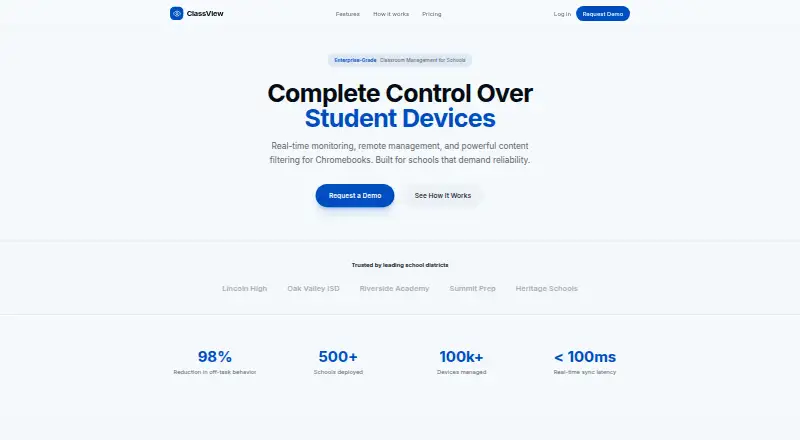
What ClassView is
ClassView is classroom activity management software for schools, teachers, students, and educational organizations using managed Chromebook environments. During active sessions started by authorized educators, it shows student screens, active tabs, URLs, and page titles in real time. Teachers can lock screens, unlock selected students or everyone, apply custom website allow and block lists, and send announcements to student screens. Students join with a code, while attendance is tracked automatically. ClassView detects VPN and proxy extensions, developer-tools access, and other bypass attempts. Schools can force-install its extension through Google Admin Console. Access is listed for web, Chrome extension, API, and self-hosted deployments. Basic costs $2 a year, billed $2/student/year for up to 500 students. Professional costs $3 a year, billed $3/student/year, with unlimited students and additional reporting, API, SSO, and priority support. Enterprise uses custom pricing and lists on-premise deployment, integrations, an SLA, training, and dedicated support.
Good
- Real-time screen, tab, URL, and title viewing
- Custom website allow and block lists
- Individual or all-student screen locking
- Automatic attendance through session codes
- Google Admin Console force-install option
Watch out
- No free plan
- Basic plan limited to 500 students
- Enterprise pricing is custom
- Monitoring applies only during active sessions
Who it suits
It suits schools and educators managing Chromebook classrooms that need live activity visibility, screen controls, filtering, and attendance. It is also aimed at organizations requiring managed deployment and healthcare-style privacy controls.
Verdict
ClassView combines live Chromebook oversight with filtering, screen controls, attendance, and bypass detection. Its fit depends on accepting paid plans and the active-session monitoring model.
Plans and prices
From ClassView's own pricing page, checked 8 Oct 2026.
| Plan | Price | What it gives you |
|---|---|---|
| Basic | $2 a year | Up to 500 students · Real-time monitoring · Content filtering · Screen lock · Email support · $2/student/year |
| Professional | $3 a year | Unlimited students · All Basic features · Activity reports · API access · SSO integration · Priority support · $3/student/year |
| Enterprise | Priced on request | Everything in Pro · Custom integrations · On-premise option · SLA guarantee · Training included · Dedicated support · Custom |
The facts
Each one read from ClassView's own pages, with the date it was checked.
What it does
- Bypass detection
- The service detects VPN and proxy extensions, developer tools access, and other bypass attempts in real time.checked 8 Oct 2026
- Collection scope
- The policy says classroom activity data is collected only during active sessions initiated by authorized educators, with no monitoring outside those contexts.checked 8 Oct 2026
- Deployment
- Schools can use Google Admin Console to force-install the ClassView extension on student Chromebooks.checked 8 Oct 2026
- Enterprise option
- The Enterprise plan lists an on-premise option, custom integrations, an SLA guarantee, and training.checked 8 Oct 2026
- Filtering and messaging
- ClassView supports custom website allow/block lists and lets teachers send announcements to student screens.checked 8 Oct 2026
- Integrations
- The privacy policy lists Google Workspace sign-in, optional Google Classroom roster integration, and Microsoft 365 sign-in.checked 8 Oct 2026
- Live monitoring
- Educators can view students' screens, active tabs, URLs, and page titles in real time.checked 8 Oct 2026
- Privacy and compliance
- The policy says ClassView does not sell user data or share it for advertising, and describes its FERPA school-official role and COPPA-related school consent approach.checked 8 Oct 2026
- Purpose
- ClassView is a classroom activity management platform for schools, teachers, students, and educational organizations using managed Chromebook environments.checked 8 Oct 2026
- Retention
- The policy says classroom activity logs are retained temporarily and then automatically deleted, while account information is retained while the account is active.checked 8 Oct 2026
- Screen controls
- Teachers can lock student screens and unlock them individually or all at once.checked 8 Oct 2026
- Security
- The policy states that data in transit uses TLS encryption and that the service uses OAuth and role-based access controls.checked 8 Oct 2026
- Sessions
- Students can join a classroom session with a code, and the service tracks attendance automatically.checked 8 Oct 2026
- Support
- The Basic plan includes email support; Professional includes priority support; Enterprise includes dedicated support.checked 8 Oct 2026
Alternatives to ClassView
- 1

ClassDojo
Free planAndroidiOSWebmacOS8.2From $69.99 a year - 2

Anchor
Free planOpen sourceWebAPIExtensionSelf-hosted7.9From €24 a month - 3
Piazza
Free planAndroidiOSWebAPI7.9Free plan - 4

KyberClassroom
AndroidiOSWebAPI7.6From $5 a year - 5

LiveSchool
Free planAndroidiOSWebmacOS7.4From $1,960 a year - 6
Veyon
Free planOpen sourceAPILinuxSelf-hostedWindows7.1Free plan