cc.com.ai Citation Generator
cc.com.ai Citation Generator creates formatted citations from a URL, DOI, ISBN, pasted reference or manually entered details.
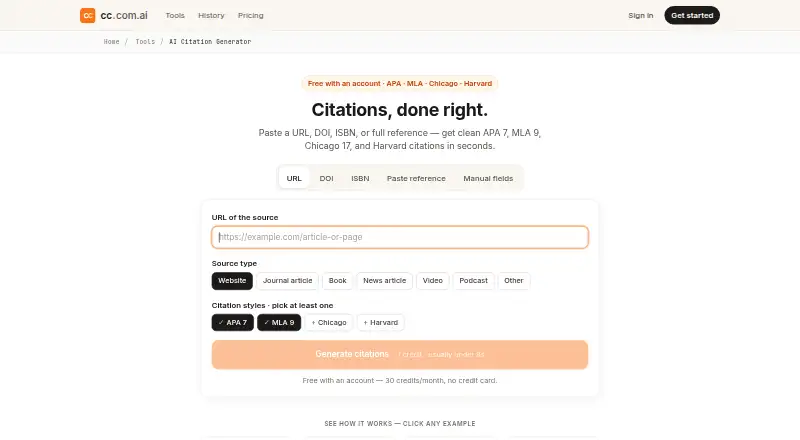
What cc.com.ai Citation Generator is
cc.com.ai Citation Generator creates formatted citations from a URL, DOI, ISBN, pasted reference or manually entered details. It supports APA 7, MLA 9, Chicago 17 author-date and Harvard, with both inline and bibliography formats. A single source can produce all four styles, and a source list can become a reference block. Supported material includes websites, journal articles, books, news, videos and podcasts. Smart parse can tidy an incomplete or rough reference, but the maker recommends providing an author, title and year when possible. Missing details appear in brackets rather than being filled in by the tool. It formats entered DOIs but does not fetch complete records from CrossRef, and the maker notes limits with some paywalled journal DOIs, obscure-language academic books and unlisted preprints. Results can be copied together as Markdown for Google Docs, Notion or Overleaf. Each citation generation uses one credit: free accounts receive 30 credits per month, while logged-out visitors get three runs per day per tool.
Good
- Supports four citation styles
- Formats a range of source types
- Flags missing details instead of inventing them
- Copies results as Markdown
- Free account includes 30 monthly credits
Watch out
- Does not fetch full DOI records from CrossRef
- Some paywalled DOIs may not work
- Shared result links remain accessible for 30 days
Who it suits
The tool suits students, researchers and writers preparing citations or reference lists. It may be especially useful when one source needs formatting in several citation styles.
Verdict
The generator can format varied sources in four styles and makes absent metadata visible. Users working with DOIs should supply available details because the tool does not retrieve full CrossRef records.
Plans and prices
From cc.com.ai Citation Generator's own pricing page, checked 30 Sep 2026.
| Plan | Price | What it gives you |
|---|---|---|
| Free | Free | 30 credits/month · 100 bonus credits on signup · citation generation costs 1 credit · $0/forever |
| Starter | $7 a month | 600 credits/month · citation generation costs 1 credit · $7/month |
| Pro | $14 a month | 1,500 credits/month · citation generation costs 1 credit · $14/month |
| Max | $29 a month | 4,000 credits/month · citation generation costs 1 credit · $29/month |
The facts
Each one read from cc.com.ai Citation Generator's own pages, with the date it was checked.
What it does
- Caching
- The maker says identical requests are cached for one week to save credits.checked 30 Sep 2026
- Citation styles
- Supports APA 7, MLA 9, Chicago 17 author-date, and Harvard, with inline and bibliography formats.checked 30 Sep 2026
- Data and sharing
- Generated citations receive a shareable URL accessible for 30 days and tied to the user's session; the result is public only if the link is shared.checked 30 Sep 2026
- DOI limitation
- The tool formats entered DOIs but does not currently fetch the full record from CrossRef, so the maker recommends supplying available metadata.checked 30 Sep 2026
- Export
- Results can be copied all at once as Markdown for use in Google Docs, Notion, or Overleaf.checked 30 Sep 2026
- Intended users
- The maker describes the tool as useful for students, researchers, and writers doing literature reviews.checked 30 Sep 2026
- Messy references
- Smart parse can normalize a rough reference, URL, DOI, or ISBN; the maker recommends including at least author, title, and year for best results.checked 30 Sep 2026
- Missing information
- Missing fields are flagged in brackets and listed with each citation, and the tool says it will not invent authors, publishers, or dates.checked 30 Sep 2026
- Multiple outputs
- Returns all four citation styles for one source and a reference block for an entire source list.checked 30 Sep 2026
- Other limits
- The maker says it may not work for paywalled journal DOIs it cannot resolve, academic books in obscure languages, or unlisted preprints.checked 30 Sep 2026
- Purpose
- Generates formatted citations from a URL, DOI, ISBN, pasted reference, or manually entered fields.checked 30 Sep 2026
- Source types
- Supports websites, journal articles, books, news, videos, podcasts, and other source types.checked 30 Sep 2026
- Support
- The site lists [email protected] as its contact email.checked 30 Sep 2026
Money
- Cost and free access
- Citation generation costs 1 credit; an account includes 30 credits per month, while logged-out visitors get three runs per day per tool.checked 30 Sep 2026
The full review of cc.com.ai Citation Generator
cc.com.ai Citation Generator is a web-based reference formatter for students, researchers, and writers handling mixed source material. It is strongest when you can provide basic metadata and need several mainstream styles at once. The sensible choice is a transparent formatter that exposes missing data, not an automatic authority on incomplete records.
Overview
Sources can be entered as URLs, DOIs, ISBNs, pasted references, or individual fields. Smart parse can clean up a rough reference, while the maker recommends supplying at least an author, title, and year for the best result. It covers websites, journal articles, books, news, videos, podcasts, and other source types, making it more useful for varied bibliographies than a narrowly URL-focused tool.
APA 7, MLA 9, Chicago 17 author-date, and Harvard outputs include both in-text and bibliography forms. A single source can produce all four styles, and a whole source list can be turned into one reference block. Missing fields appear in brackets and alongside each citation; the tool says it will not invent authors, publishers, or dates. That honesty prevents silently fabricated references, but incomplete entries still require your checking and editing.
Key features
Formatting and workflow
Returning four styles in one pass is useful when a paper, article, or assignment may need to be adapted to different house rules. Copy-all Markdown output works with Google Docs, Notion, and Overleaf, so the generator fits a copy-and-paste workflow rather than promising a full writing environment. A citation costs one credit, and identical requests are cached for one week, which can preserve credits when you repeat the same lookup.
DOI handling and limitations
DOIs are formatted when entered, but the tool does not fetch the complete CrossRef record. Supplying the metadata you already have is therefore important, especially for sources whose DOI is paywalled or cannot be resolved. The maker also cautions that obscure-language academic books, unlisted preprints, and some paywalled journal DOIs may not work. Choose it for controlled formatting; choose another service when automatic record retrieval is central to your process.
Sharing and data handling
Each result receives a shareable URL that remains accessible for 30 days and is tied to your session. The result becomes public only if you share that link, which is convenient for collaboration but worth remembering for sensitive bibliographies.
Pricing
| Plan | Price | Included credits |
|---|---|---|
| Free | free, billed $0/forever | 30 credits/month, plus 100 bonus credits on signup |
| Starter | $7 a month, billed $7/month | 600 credits/month |
| Pro | $14 a month, billed $14/month | 1,500 credits/month |
| Max | $29 a month, billed $29/month | 4,000 credits/month |
Every plan charges one credit per citation generation. The free tier suits occasional assignments, with 30 monthly credits and the signup bonus; logged-out visitors get three runs per day per tool. Starter is the practical step up for regular coursework or a modest literature review. Pro fits heavier individual research, while Max is aimed at sustained, high-volume production. There is no free trial, so paid capacity begins with a subscription rather than a trial period.
Platforms
The service runs on the web, making it suitable for any device with a browser rather than a native-platform workflow.
Who it's for
Students can use the free allowance for routine assignments and switch styles without re-entering a source. Researchers and literature-review writers benefit from mixed source support, bulk reference blocks, and Markdown copying. Writers who need a quick bibliography also gain from bracketed warnings that show what to verify. It is a poor fit for users expecting CrossRef-powered DOI discovery or automatic completion of every record.
Pros and cons
Pros
- Four familiar styles are generated together, useful for projects with changing style requirements.
- Web, journal, book, media, and other source types handle mixed bibliographies in one place.
- Bracketed missing fields and a no-invention policy make gaps visible instead of hiding guesses.
- Whole-list reference blocks and copy-all Markdown speed transfer to Google Docs, Notion, and Overleaf.
- The free plan includes 30 credits monthly and 100 signup bonus credits.
Cons
- DOIs are formatted but not fully retrieved from CrossRef, so metadata must often be supplied manually.
- Paywalled or unresolved DOIs, obscure-language academic books, and unlisted preprints may fail.
- Four styles are useful but do not cover every publication's preferred format.
- Shared result links last 30 days and become public when shared, requiring care with sensitive work.
Alternatives
Browse AI Citation Generators for a wider category comparison.
- Backrow Citation Generator is the better pick if you want Android, iOS, Linux, macOS, Windows, and web coverage, plus a trial and 600 credits for $9.99 per month on Starter.
- Logically suits users seeking an extension and desktop coverage with daily AI assistance, queries, and 100MB of reference storage on its free plan.
- Paperpal is worth choosing when a broader research-and-writing subscription and a free trial matter more than a citation-only workflow.
- Yomu AI Citation Generator is preferable if you need 15-plus styles and DOI, URL, or title lookup in a free web tool.
- AutoCaret Citation Generator fits users who also want AI long-form writing, tracked changes, and DOCX export.
- CitePlex is the alternative for API access, 11 styles, unlimited generation and copying, and project-based saving on its free plan.
- Conch AI Citation Generator suits anyone wanting no registration for its free citation generator and browser-extension access.
- cytado is an option for users who need API and extension access alongside source-resolution and project features.
Verdict
Choose cc.com.ai Citation Generator if you need fast, multi-style formatting for varied sources and want missing metadata called out rather than guessed. Its free tier is generous for occasional work, and paid credit bundles scale for regular research. Look elsewhere if dependable automatic DOI record retrieval, broader style coverage, or a native multi-platform app is your priority.
Alternatives to cc.com.ai Citation Generator
- 1

Backrow Citation Generator
Free planAndroidiOSWebAPI8.4From $9.99 a month - 2

Conch AI Citation Generator
Free planWebExtension8.3From $144 a year - 3

Scholarly
Free planWeb8.2From $144 a year - 4
Paperpal
Free planWebExtensionmacOSWindows8.1From $139 a year - 5

CitePlain
Free planWebExtension8.0From $39 a year - 6

BibGuru
Free planWebExtensionmacOSWindows8.0From $4.99 a month