CartFlow
CartFlow is back-office software for food trucks, market stalls, coffee carts, caterers and other mobile food businesses.
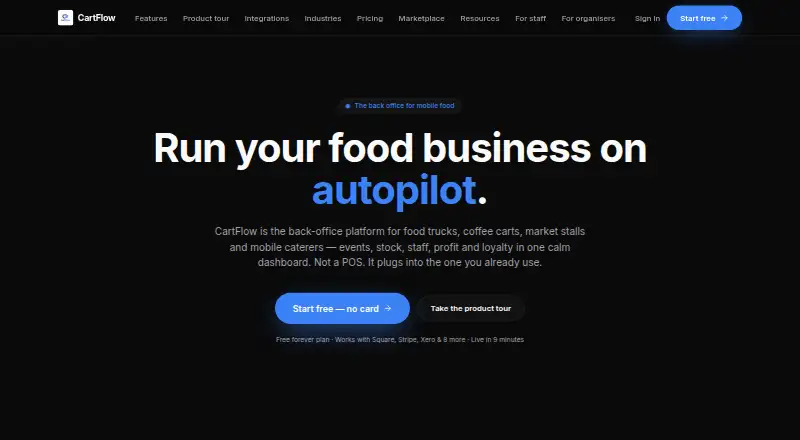
What CartFlow is
CartFlow is back-office software for food trucks, market stalls, coffee carts, caterers and other mobile food businesses. It organizes event applications and bookings alongside staff, packing lists, logistics and event records. CartFlow is not a point-of-sale system; it connects with the POS an operator already uses. Its reports show profitability by event, product and venue, including year-over-year comparisons. Inventory tools track live stock, flag low stock and record usage for each event. Sales, stock adjustments and event notes can be entered without a signal and sync when the device reconnects. The software runs in a browser on phones, tablets and laptops, and can be added to a phone home screen without an app store. Listed integrations include Square, SumUp, Zettle, Shopify POS, Lightspeed Retail, Clover, Toast, Loyverse, Xero, Zapier, HNRY via Zapier and Stripe. Free and paid plans are listed; Pro costs NZ$39 per month and Business costs NZ$79 per month.
Good
- Combines event bookings, staff and logistics
- Reports profitability by event, product and venue
- Records sales and stock changes offline
- Works in a browser on phones, tablets and laptops
Watch out
- It is not a point-of-sale system
- Free plan limits events to 3 per month
- Xero and AI assistant require Business
Who it suits
CartFlow suits mobile food operators who need to coordinate event logistics, stock and profitability reporting while continuing to use their existing POS.
Verdict
CartFlow focuses on the operational work around mobile food events, rather than serving as a POS. Its free plan has usage limits, and paid plans add broader capacity and features.
Plans and prices
From CartFlow's own pricing page, checked 4 Oct 2026.
| Plan | Price | What it gives you |
|---|---|---|
| Free | Free | 3 events/month · 20 sales records/month · 10 products · 3 recipes · 15 stock items · 1 saved venue · 3 tasks/event · 0 custom event fields |
| Pro | 39 NZD a month | Unlimited events, sales, products, recipes and stock · 5 custom event fields · NZ$39/mo |
| Business | 79 NZD a month | Unlimited events, sales, products, recipes and stock · Unlimited custom event fields · Team seats with roles · Priority support · NZ$79/mo |
The facts
Each one read from CartFlow's own pages, with the date it was checked.
What it does
- Event operations
- It manages market and festival applications, bookings, staff, packing lists, logistics and event records in one place.checked 4 Oct 2026
- Integration limits
- The integrations page says Xero and the AI assistant require Business, CSV import/export requires Pro, and OAuth POS connections may need account credentials configured in-app.checked 4 Oct 2026
- Integrations
- Listed available integrations include Square, SumUp, Zettle, Shopify POS, Lightspeed Retail, Clover, Toast, Loyverse, Xero, Zapier, HNRY via Zapier and Stripe.checked 4 Oct 2026
- Inventory
- Inventory features include live stock counts, low-stock alerts and per-event stock usage.checked 4 Oct 2026
- Mobile access
- CartFlow runs in a browser on phones, tablets and laptops, and its homepage says it can be installed to a phone home screen without an app store.checked 4 Oct 2026
- Offline use
- The help centre says sales, stock adjustments and event notes can be recorded without signal and sync when the device reconnects.checked 4 Oct 2026
- Privacy
- The privacy policy says CartFlow does not sell personal information or use business data to train third-party AI models.checked 4 Oct 2026
- Profit reporting
- CartFlow reports profitability by event, product and venue, with year-over-year comparisons.checked 4 Oct 2026
- Purpose
- CartFlow is back-office software for food trucks, market stalls, coffee carts, caterers and other mobile food businesses.checked 4 Oct 2026
- Security certification
- CartFlow says its security page describes its own practices and is not an independent audit or certification.checked 4 Oct 2026
- Security controls
- The security page describes row-level database security, per-workspace data isolation, private file storage with signed URLs, server-side authorization and HTTPS/TLS transport.checked 4 Oct 2026
- Support
- The Business plan includes priority support and dedicated onboarding.checked 4 Oct 2026
The company
- Maker and location
- CartFlow identifies its operator as the CartFlow team; the pages reviewed do not state a headquarters or founding year.checked 4 Oct 2026
Where it runs
- Not a POS
- CartFlow describes itself as not a POS and says it connects to the POS an operator already uses.checked 4 Oct 2026
The full review of CartFlow
CartFlow is operational software for mobile food businesses that already have a point-of-sale system. It is best suited to food trucks, market stalls, coffee carts and caterers juggling recurring events. Its appeal is connecting event logistics, stock and profitability reporting; it does not handle checkout itself.
Overview
CartFlow puts market and festival applications, bookings, staff coordination, packing lists, logistics and event records in one workspace. That breadth is useful when an operator needs to manage the work around a service as well as its sales. Profitability reports by event, product and venue, with year-over-year comparisons, can help identify which commitments and menu items are worth repeating.
CartFlow is explicitly not a POS: it connects to the system a business already uses. That makes it a poor fit for a new operation seeking one tool for checkout and back-office work. It runs in a browser on phones, tablets and laptops, and can be installed to a phone home screen without an app store. Sales, stock adjustments and event notes can be recorded offline and synced when a device reconnects, a practical benefit at venues with weak service.
Key features
Events, stock and reporting
Keeping applications, bookings, staffing and packing logistics alongside event records should make repeat-event administration easier to coordinate. Live stock counts, low-stock alerts and per-event usage give operators a way to connect inventory decisions to specific services, rather than relying only on general stock totals. The event-, product- and venue-level profitability views add a useful decision layer, though their value depends on having sales data flowing from a connected POS.
Connections and controls
CartFlow lists connections to Square, SumUp, Zettle, Shopify POS, Lightspeed Retail, Clover, Toast, Loyverse, Xero, Zapier, HNRY via Zapier and Stripe. The range is helpful for businesses already using one of those services, but setup is not entirely automatic: OAuth POS connections may require credentials configured in-app. Xero and the AI assistant require Business, while CSV import and export require Pro, so lower tiers do not unlock every route for moving or reconciling data.
CartFlow describes row-level database security, workspace-level data separation, private files with signed URLs, server-side authorization and HTTPS/TLS transport. It also says it does not sell personal information or use business data to train third-party AI models. These are relevant protections, but CartFlow says its security description is not an independent audit or certification.
Pricing
The free plan costs NZ$0.00 and is a constrained way to see whether CartFlow suits a small operation: it allows 3 events and 20 sales records per month, 10 products, 3 recipes, 15 stock items, 1 saved venue and 3 tasks per event, with no custom event fields. Those caps may be workable for occasional trading, but busy operators are likely to outgrow the event and sales-record allowances quickly.
Pro is billed at NZ$39/mo and removes the stated caps on events, sales, products, recipes and stock, while adding 5 custom event fields. It is the more practical choice for a solo operator with regular events who does not need team seats or unlimited customization. Business is billed at NZ$79/mo and adds unlimited custom event fields, team seats with roles, priority support and dedicated onboarding. It suits businesses coordinating staff across events; its extra cost is harder to justify for a single operator who can work within Pro's field limit. CartFlow's pricing note also says paid plans start at $29/mo, so check the applicable offer before subscribing.
Platforms
CartFlow supports Android, iOS and the web. Its browser access covers phones, tablets and laptops, while home-screen installation provides phone access without an app-store download. Offline entry for sales, stock adjustments and event notes helps preserve work during a signal outage, with syncing after reconnection.
Who it's for
Choose CartFlow if you run a mobile food business, already take payments through a POS, and need event coordination and stock usage tied to profitability. Multiple locations, inventory tracking and staff permissions are supported, making it relevant beyond a one-person cart. Look elsewhere if checkout is your primary need, or if your event volume would make the free plan's monthly caps a constant constraint.
Pros and cons
- Pro: Event applications, staffing, packing and records share a workspace, reducing fragmentation in recurring event work.
- Pro: Profitability by event, product and venue, plus year-over-year comparisons, supports more informed choices about where and what to sell.
- Pro: Offline recording and later sync address unreliable connectivity at event sites.
- Con: It is not a POS, so operators need a separate checkout system and a compatible connection.
- Con: The free tier's 3 events and 20 sales records per month can limit even a modestly active business.
- Con: Xero and the AI assistant are reserved for Business, and CSV transfer requires Pro, limiting lower-tier workflows.
- Con: Its security controls are described by CartFlow itself, not independently certified or audited.
Alternatives
If checkout software is the priority rather than event back-office work, compare Food Truck POS Software and Event Catering Software for category options.
Biyo POS is a freemium POS option with Android, iOS, Linux, macOS, web and Windows support; its free Premium + Processing plan is limited to US businesses and adds processing fees, while Standard is $47 a month. Loyverse has a free POS plan with 31 days of sales history and sells unlimited sales history for $5 a month per store, or $50/year; it may suit operators who want an inexpensive way to extend history rather than CartFlow's event-management focus.
SpotOn Restaurant offers POS software and hardware, ordering, payments, table layouts, menu management and reporting on its All-In Plan, with processing minimums and a two-year minimum term. Zeller has a free-to-run POS with no monthly subscription or software licence fee, but requires a Zeller Terminal and transaction fees apply. FuegoPOS offers a free Starter plan with cloud menu management, an employee module, split payments and offline mode, with processing fees and hardware exclusions to weigh.
ParcelPOS is an Android and Windows option with a free plan capped at 30 orders per day. Avocado POS is iOS-only and charges no monthly bill on Starter, but its payment fee is 5% + 15¢ per payment total. HunoMenu is another alternative for readers comparing restaurant software.
Verdict
CartFlow is a strong fit for mobile food operators who already have a POS and want one place to manage events, inventory and event-level profitability. Its offline workflow and operational scope are the clearest reasons to choose it. Look elsewhere if you need checkout built in, or if the free plan's tight quotas and the paid cost of team features do not suit your scale.
Getting started
- Open the CartFlow website in a browser on a phone, tablet or laptop.
- Add CartFlow to a phone home screen if desired; an app-store download is not required.
- Choose the Free plan or a paid plan: Pro is NZ$39 a month and Business is NZ$79 a month.
- Connect an existing POS or another listed service; OAuth POS connections may require account credentials configured in-app.
Limits worth knowing
The Free plan allows 3 events and 20 sales records per month, 10 products, 3 recipes, 15 stock items, 1 saved venue, 3 tasks per event and no custom event fields. Pro allows unlimited events, sales, products, recipes and stock, with 5 custom event fields; Business adds unlimited custom event fields and team seats with roles.
Questions
Is CartFlow a point-of-sale system?
No. CartFlow says it connects to the POS an operator already uses.
Is there a free plan?
Yes. The Free plan is free and limits events, sales records, products, recipes, stock, venues, tasks and custom event fields.
What do the paid plans cost?
Pro is listed at NZ$39 a month and Business at NZ$79 a month.
Which devices can run CartFlow?
CartFlow runs in a browser on phones, tablets and laptops. It can also be installed to a phone home screen without an app store.
What services does CartFlow integrate with?
Listed integrations include Square, SumUp, Zettle, Shopify POS, Lightspeed Retail, Clover, Toast, Loyverse, Xero, Zapier, HNRY via Zapier and Stripe.
What security and privacy practices does CartFlow describe?
CartFlow describes row-level database security, workspace data isolation, private file storage with signed URLs, server-side authorization and HTTPS/TLS. It says its security description is not an independent audit or certification, and its privacy policy says it does not sell personal information or use business data to train third-party AI models.
Alternatives to CartFlow
- 1

Catertoo
Free planAndroidiOSWebAPI8.0From $39 a month - 2
Eventifood
Free planAndroidiOSWebLinux8.0From £30 a month - 3

BanquetsCRM
Free planAndroidiOSWeb7.4From $9.99 a month - 4
Better Cater
AndroidiOSWebAPI7.2 - 5
CaterZen
AndroidiOSWeb7.1From $179 a month - 6

Caterease
AndroidiOSWebmacOS6.9From $25 a month