Capto Auto Subtitle Generator
Capto Auto Subtitle Generator creates editable, timestamped transcripts from uploaded videos using OpenAI Whisper.
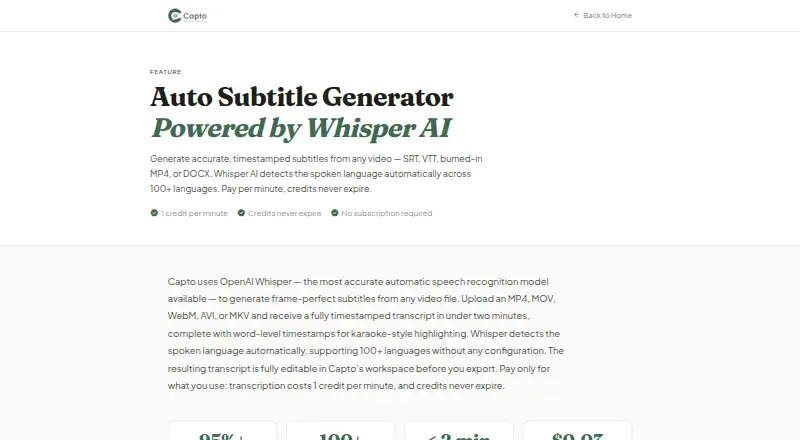
What Capto Auto Subtitle Generator is
Capto Auto Subtitle Generator creates editable, timestamped transcripts from uploaded videos using OpenAI Whisper. It detects more than 100 spoken languages automatically and offers subtitle translation into 60+ languages. Users can edit subtitle wording and segment timestamps before exporting SRT, VTT, TXT, DOCX, ASS, or a burned-in MP4. The tool accepts MP4, MOV, WebM, AVI, and MKV files, with caption styling, brand presets, and optional speaker identification. Diarization labels multiple speakers and costs 1.5 credits per video minute. Transcription costs 1 credit per minute, translation costs 0.2 credits per minute per language, and burned-in MP4 costs 2 credits per minute. A free plan includes five minutes without requiring a credit card. Essential, Creator, and Pro are listed at $4 a month, $9 a month, and $17 a month, respectively, each as a one-time purchase with credits that never expire. Growth costs $32 a month and auto-renews. The privacy policy says uploaded source videos are deleted within 48 hours and extracted audio after transcription.
Good
- Detects more than 100 spoken languages.
- Offers subtitle translation into 60+ languages.
- Supports editable text and timestamp adjustments.
- Exports multiple subtitle formats and burned-in MP4.
- Free plan includes five minutes.
Watch out
- Speaker identification costs 1.5 credits per video minute.
- Growth costs $32 a month and auto-renews.
- Uploaded source videos are deleted within 48 hours.
Who it suits
Capto may suit educators, course creators, video creators, and podcasters who need editable captions or translated subtitles. Its export formats and optional burned-in captions offer different ways to prepare subtitle files or finished video.
Verdict
Capto combines transcription, subtitle editing, translation, and several export formats, with a five-minute free plan and paid credit packages. Check the per-minute credit rates and plan limits against the length and output type of your videos.
Plans and prices
From Capto Auto Subtitle Generator's own pricing page, checked 9 Oct 2026.
| Plan | Price | What it gives you |
|---|---|---|
| Growth | $32 a month | 2 GB max file · 4 hours max video · 5 concurrent jobs · credits roll over · $32/month · auto-renews · 1,200 credits every month |
| Free | Free | 5 free minutes · no credit card required |
| Essential | $4, paid once | 120 credits · 120 min transcription · 100 MB max file · 15 min max video · 1 concurrent export · One-time purchase |
| Creator | $9, paid once | 300 credits · 300 min transcription · 500 MB max file · 60 min max video · 2 concurrent exports · One-time purchase |
| Pro | $17, paid once | 600 credits · 600 min transcription · 500 MB max file · 120 min max video · 3 concurrent exports · One-time purchase |
The facts
Each one read from Capto Auto Subtitle Generator's own pages, with the date it was checked.
What it does
- Brand caption presets
- Yeschecked 22 Sep 2026
- Burn-in captions
- Yeschecked 22 Sep 2026
- Caption styling
- Yeschecked 22 Sep 2026
- Credit rates
- Transcription costs 1 credit per minute; translation costs 0.2 credits per minute per language, burned-in MP4 costs 2 credits per minute, and social clips cost 5 credits per minute.checked 9 Oct 2026
- Editing
- Users can edit subtitle text and segment timestamps in the workspace before export.checked 9 Oct 2026
- Exports
- Exports include SRT, VTT, TXT, DOCX, and burned-in MP4; the homepage also lists ASS.checked 9 Oct 2026
- Integrations
- The maker says SRT files work with Teachable, Thinkific, and Kajabi, and identifies Kajabi, Teachable, and Canvas as educator destinations.checked 9 Oct 2026
- Intended users
- The maker presents the product for educators and course creators, YouTube and social video creators, and podcasters.checked 9 Oct 2026
- Languages
- It automatically detects more than 100 spoken languages and offers subtitle translation into 60+ languages.checked 9 Oct 2026
- Max video length
- 15checked 22 Sep 2026
- Processing time
- Capto says most videos are transcribed in under two minutes, while diarized videos may take up to four minutes.checked 9 Oct 2026
- Security and privacy
- The privacy policy describes HTTPS/TLS in transit, Supabase authentication, database row-level security, and role-based limits on internal data access.checked 9 Oct 2026
- Source file retention
- The privacy policy says uploaded source videos are automatically deleted from storage within 48 hours and extracted audio is deleted after transcription.checked 9 Oct 2026
- Speaker identification
- Yeschecked 22 Sep 2026
- Speaker labels
- Optional multi-speaker diarization labels speakers and costs 1.5 credits per video minute.checked 9 Oct 2026
- Subtitle export
- other formatschecked 22 Sep 2026
- Support
- The privacy policy lists [email protected] for privacy requests and says it responds to privacy inquiries within 30 days or the timeframe required by law.checked 9 Oct 2026
- Third-party processing
- The privacy policy says audio or text may be processed by OpenAI and optional diarization audio is sent to AssemblyAI.checked 9 Oct 2026
- Transcription
- The tool uses OpenAI Whisper to create editable, timestamped transcripts from uploaded videos.checked 9 Oct 2026
- Video formats
- Accepted video formats are MP4, MOV, WebM, AVI, and MKV.checked 9 Oct 2026
Money
- Free plan
- Nochecked 22 Sep 2026
Alternatives to Capto Auto Subtitle Generator
- 1

Captions
Free planAndroidiOSWebAPI9.1From $4.99 a month - 2

Whisper
Free planOpen sourceAPILinuxmacOSSelf-hosted8.9$0.01 usage-based - 3

SRTGen
Free planWebAPI8.3From $4 a month - 4
Fluen AI Subtitle Generator
Free planWebAPIExtensionmacOS8.2Free plan - 5
ZapCap
Free planAndroidiOSWebAPI8.1From $8 a month - 6
ngram
Free planWebAPIExtension8.1From $29 a month