
Canvas Network
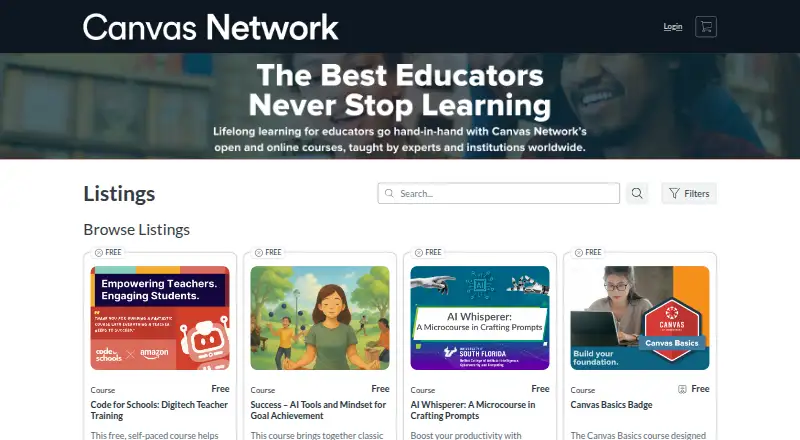
Canvas Network is a free platform for professional development courses made by educators for educators.
What Canvas Network is
Canvas Network is a free platform for professional development courses made by educators for educators. Its course audience includes K–12 and higher education educators, and subjects include teaching techniques, technology skills for educators, student performance analysis, and leadership. Anyone with an email address can enroll, but each learner needs a separate Canvas Network account, even if they already use another Canvas instance. The platform is powered by Canvas LMS and is available on the web, Android, iOS, Linux, macOS, and Windows.
Course materials become available on or after the course start date, which begins using U.S. Mountain time. Learners can complete activities at their convenience, although an instructor may invite them to synchronous activities. Instructors or sponsoring institutions may offer and issue certificates; Canvas Network does not issue them, and certificate availability and course prices vary by course. Eligible institutions can offer courses without paying a platform fee. Android and iOS Canvas apps let students access courses, submit assignments, join discussions, and view grades, although the apps do not support every Canvas feature. Course settings may also hide a course after it ends.
Good
- Courses focus on educator professional development.
- Enrollment is open to anyone with an email address.
- Learners can complete activities at their convenience.
- Available on web, Android, iOS, Linux, macOS, and Windows.
- Eligible institutions can offer courses without a platform fee.
Watch out
- A separate Canvas Network account is required.
- Course materials open on or after the start date.
- Canvas Network does not issue certificates itself.
- Mobile apps do not support every Canvas feature.
Who it suits
Canvas Network is suited to K–12 and higher education educators looking for professional development courses. It also works for learners who can use email to enroll and are comfortable creating a separate Canvas Network account.
Verdict
Choose Canvas Network if you want educator-focused professional development courses and can enroll with a separate account. Look elsewhere if you need Canvas Network itself to issue a certificate or require every Canvas feature in the mobile app.
Plans and prices
From Canvas Network's own pricing page, checked 9 Oct 2026.
| Plan | Price | What it gives you |
|---|---|---|
| Canvas Network courses | Free | Course prices and certificates vary by course; instructors or sponsoring institutions issue any certificates |
| Canvas Network free courses | Free | Free, open professional-development courses for educators · course-specific certificates may be offered by instructors or sponsoring institutions |
The facts
Each one read from Canvas Network's own pages, with the date it was checked.
What it does
- API authentication
- Canvas API applications authenticate with OAuth2, with bearer tokens recommended over query-string tokens.checked 15 Oct 2026
- Audience
- The courses support K–12 and higher education educators and focus on professional development.checked 9 Oct 2026
- Blueprint courses
- Blueprint courses let institutions centrally distribute curriculum and push updates across courses.checked 15 Oct 2026
- Canvas Data
- Canvas Data provides raw event-level files for custom dashboards, advanced queries and institutional data warehouses.checked 15 Oct 2026
- Certificates
- Canvas Network does not issue certificates; individual instructors or sponsoring institutions decide whether to provide them.checked 15 Oct 2026
- Course access
- Course materials become available on or after the course start date, and courses begin on that date using U.S. Mountain time.checked 9 Oct 2026
- Course eligibility
- Anyone with an email address can enroll, and learners must create a separate Canvas Network account even if they use another Canvas instance.checked 9 Oct 2026
- Course offering
- Canvas Network does not charge eligible institutions a fee to offer a course on the platform.checked 9 Oct 2026
- Course timing
- Course materials become available on the stated start date, which is based on U.S. Mountain time.checked 15 Oct 2026
- Course topics
- Topics include teaching techniques, educator technology skills, student performance analysis, and leadership skills.checked 9 Oct 2026
- Course visibility
- Individual course settings may hide a course after it has ended.checked 9 Oct 2026
- Developer keys
- Canvas developer keys issue OAuth2 client credentials and can be scoped to selected API endpoints by administrators.checked 15 Oct 2026
- Enrollment
- Anyone with an email address can enroll, but Canvas Network requires a separate account from other Canvas instances.checked 15 Oct 2026
- Gradebook
- Canvas Gradebook supports entering marks, managing assignments, weighting grades and organizing progress data.checked 15 Oct 2026
- Integrations
- Canvas states that it integrates with more than 1,000 external tools and partners.checked 15 Oct 2026
- Learning format
- Participants may review materials and complete activities at their convenience, although instructors can schedule optional synchronous activities.checked 15 Oct 2026
- Learning schedule
- Learners can complete activities at their convenience, though an instructor may invite them to synchronous activities.checked 9 Oct 2026
- Licence
- The public Canvas LMS codebase is open source under the GNU AGPLv3 licence.checked 15 Oct 2026
The company
- Company headquarters and size
- LinkedIn lists Instructure headquarters in Salt Lake City, Utah, with 1,001–5,000 employees.checked 15 Oct 2026
- Company legal name
- Crunchbase identifies the maker as Instructure, Inc., an education-technology company acquired by Kohlberg Kravis Roberts.checked 15 Oct 2026
- Founded
- Instructure’s company timeline states it was founded in 2008 and launched Canvas in 2011.checked 15 Oct 2026
- Headquarters
- Salt Lake City, Utah, USAchecked 28 Sep 2026
Money
- Free plan
- Yeschecked 23 Sep 2026
- Limit: Capterra complexity and cost
- Capterra reviews cite learning curves, too many clicks, inconsistent course layouts, notification overload and cost concerns for smaller schools.checked 15 Oct 2026
The full review of Canvas Network
Canvas Network is a free course platform focused on professional development created by educators for educators. It suits K–12 and higher-education teachers who want practical work on teaching, education technology, learner performance, or leadership. The main trade-off is that course timing and certificate arrangements are set by each offering rather than by Canvas Network itself.
Overview
Founded in 2008 and headquartered in Salt Lake City, Utah, Canvas Network uses Canvas LMS to host open courses from educators and institutions. Its narrow professional-development focus is useful for education professionals who want relevant subject matter instead of a broad consumer-learning catalog. Topics include teaching techniques, educator technology skills, student performance analysis, and leadership.
Anyone with an email address may enroll, but enrollment requires a separate Canvas Network account, even if you already use another Canvas instance. That extra account is a minor administrative step, but it matters for schools or educators trying to keep learning inside an existing Canvas setup.
Key features
Course materials appear on or after the published start date, and courses begin using U.S. Mountain time. You therefore need to check the calendar before planning study time; this is not a library in which every class necessarily starts immediately.
Activities can generally be completed when convenient, while instructors may invite learners to synchronous sessions. The result is flexible coursework with the possibility of scheduled participation, rather than a promise that every course is entirely self-paced. Individual course settings may hide a course after it ends, so long-term access depends on the offering.
Android and iOS Canvas apps allow learners to open courses, submit assignments, join discussions, and view grades. Not every Canvas feature works in the apps, so a browser remains important for a complete experience. Offline learning is supported. Help may come through a course help discussion forum when provided, Canvas Guides, or [email protected].
Instructors or sponsoring institutions may offer and issue completion certificates. Canvas Network itself does not issue them, so certificate value and availability must be judged course by course. Eligible institutions can offer courses without paying Canvas Network a platform fee.
Pricing
| Plan | Price | What it includes |
|---|---|---|
| Canvas Network courses | free | Access to free courses; course prices and certificate terms vary by course, with certificates issued by instructors or sponsoring institutions. |
There is no paid Canvas Network subscription, seat quota, renewal charge, or trial period to weigh. The practical cost is your time and any course-specific terms. Free access is strongest for educators choosing among relevant classes; it is less suitable if you require a standardized certificate with every completion.
Platforms
Canvas Network is available on Android, iOS, Linux, macOS, the web, and Windows. The mobile apps cover core student actions, while incomplete feature support makes the web version the safer choice for advanced course work. Offline learning is available for learners who need to study without a continuous connection.
Who it's for
This is a good fit for K–12 and higher-education educators pursuing continuing development in instruction, education technology, student-performance analysis, or leadership. It also suits institutions that want to sponsor an open professional-development course without a platform fee.
Look elsewhere if you need guaranteed certificates, instant access before a course start date, permanent access after a course ends, or every Canvas function on a phone. Learners outside education may find the subject focus too specialized.
Pros and cons
Pros
- Free courses: Learners can pursue educator-focused development without a platform subscription.
- Relevant professional scope: The catalog targets teaching practice, education technology, learner analysis, and leadership for K–12 and higher education.
- Flexible participation: Activities can be completed at a convenient pace, with offline learning and mobile access for core tasks.
- Open course hosting: Eligible institutions can offer courses without paying Canvas Network a fee.
Cons
- Separate account required: Existing Canvas users still need a Canvas Network account.
- Provider-controlled certificates: Canvas Network does not issue certificates, and availability varies by course.
- Calendar and access limits: Materials follow the course start date and may disappear after the course ends.
- Incomplete mobile feature set: The Android and iOS apps do not support every Canvas capability.
Alternatives
For a wider survey of course providers, compare MOOC Platforms or Online Course Marketplaces.
- Stepik is a better choice when you want free public course creation with video, text, and automatically checked assignments.
- Alison suits learners seeking self-paced free courses with certificates and diplomas available.
- edX is preferable when an audit track is enough and you accept limited content, no graded assignments, and no certificate.
- Chinese University MOOC offers free courses, with course and certificate terms varying.
- Codecademy is aimed at coding learners; its free Basic plan has limited course access and a limited AI Learning Assistant.
- Khan Academy is an option for U.S. schools and districts needing Enterprise Starter licenses at $10 per student per year for up to 1,000 student licenses.
- Brilliant offers free access capped at two lessons or practice sets per day.
- fast.ai is the more targeted choice for a free practical deep-learning course when coding experience is the stated prerequisite.
Verdict
Choose Canvas Network if you are an educator seeking focused, no-cost professional development and can work within each course’s start date and access rules. Its educator-built subject matter and flexible participation are the reasons to use it. Look elsewhere if a provider-issued certificate, immediate or permanent course access, or full mobile Canvas functionality is essential.
Getting started
- Visit https://www.canvas.net/.
- Create a separate Canvas Network account using an email address.
- Enroll in a course.
- Access course materials on or after its start date.
- Use the web platform or an Android or iOS Canvas app.
Limits worth knowing
Course prices and certificate availability vary by course. In the Android and iOS apps, not all Canvas features are supported.
Questions
Does Canvas Network cost money?
Canvas Network is free. Course prices vary by course, and eligible institutions pay no fee to offer a course on the platform.
Who can enroll?
Anyone with an email address can enroll, but learners must create a separate Canvas Network account, even if they use another Canvas instance.
Does Canvas Network issue completion certificates?
No. Instructors or sponsoring institutions may offer and issue certificates; availability varies by course.
Which platforms are available?
Canvas Network is listed for Android, iOS, Linux, macOS, web, and Windows. The Android and iOS Canvas apps do not support every Canvas feature.
When can I access course materials?
Materials become available on or after the course start date. Courses begin on that date using U.S. Mountain time.
Alternatives to Canvas Network
- 1
DataCamp
Free planAndroidiOSWebAPI8.9From $164 a year - 2

edX
Free planAndroidiOSWeb8.8From $150 a year - 3
Stepik
Free planAndroidiOSWebAPI8.8From 2,900 RUB a month - 4
Pluralsight
AndroidiOSWebAPI8.7From $299 a year - 5

Alison
Free planAndroidiOSWeb8.7From $5 a month - 6

Great Learning
Free planAndroidiOSWeb8.7From ₹999 a month