CamMask
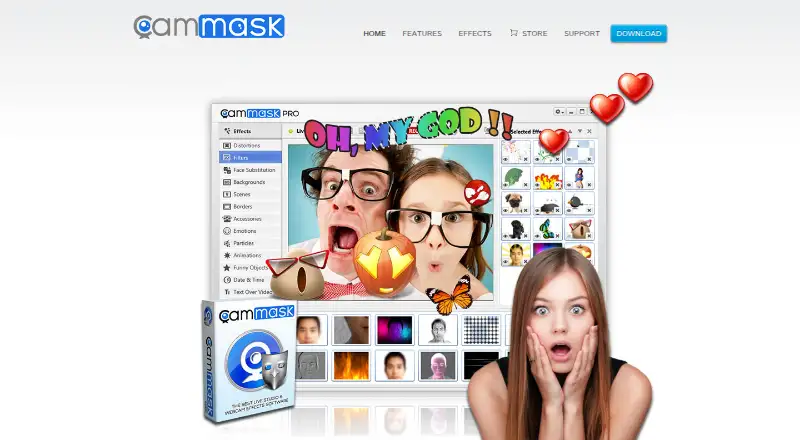
CamMask is virtual webcam software for Windows and Mac OS X that adds effects to video for chats, websites, and Flash applications.
What CamMask is
CamMask is virtual webcam software for Windows and Mac OS X that adds effects to video for chats, websites, and Flash applications. Its feature set includes thousands of distortions, filters, backgrounds, particles, emotions, and animations. A face-changing tool analyzes a face and expression before combining another face with it. You can replace backgrounds, draw with adjustable brush, fill, eraser, and stamp tools, and place date, time, fixed text, or scrolling text over video. Sources include a webcam, video gallery, image gallery, desktop, or gradient and solid colors. CamMask supports snapshots, recording, and a manager for reviewing clips or sharing them to Flickr or YouTube. Picture-in-picture offers two-channel and 2x2 modes. Output can reach 720p or 1080p, with up to six preset viewports. CamMask Free costs nothing, while CamMask Pro costs $34.99, paid once and removes the watermark while adding effects, gallery groups, viewports, and transitions.
Good
- Thousands of listed visual effects
- Background replacement and drawing tools
- Supports webcam, galleries, desktop, and colors
- Recording manager can share to Flickr or YouTube
- Up to six preset viewports
Watch out
- Pro costs 34.99 USD once
- No mobile platform is listed
Who it suits
CamMask suits Windows and Mac users who want webcam effects, compositing, recording, and virtual camera output for supported chat software and websites.
Verdict
CamMask combines extensive webcam effects with text, backgrounds, recording, and multiple video sources. The free download offers a starting point, while Pro adds watermark removal and additional production controls.
Plans and prices
From CamMask's own pricing page, checked 8 Oct 2026.
| Plan | Price | What it gives you |
|---|---|---|
| CamMask Free | Free | Free download; the site does not state feature or usage limits |
| CamMask Pro | $34.99, paid once | Removes video watermark · More effects · Multiple photo and video gallery groups · Six preset viewports · Up to 20 transition effects |
The facts
Each one read from CamMask's own pages, with the date it was checked.
What it does
- Backgrounds and drawing
- CamMask supports background replacement and lets users draw on the video with adjustable paintbrush, fill, eraser, and stamp tools.checked 8 Oct 2026
- Compatibility
- The store page says CamMask works with major webcam software and sites, listing YouTube, Facebook Video Chat, Google+ Hangouts, Skype, Ustream, Camfrog, Paltalk, MSN Messenger, and others.checked 8 Oct 2026
- Effects
- The feature page lists thousands of effects, including distortions, filters, backgrounds, particles, emotions, and animations.checked 8 Oct 2026
- Face effects
- Its magic face changing feature analyzes a face and expression and fuses another face into it.checked 8 Oct 2026
- Output and viewports
- The feature page says output can reach 720p or 1080p and users can create up to six preset viewports.checked 8 Oct 2026
- Picture in picture
- Picture-in-picture offers two-channel and 2x2 modes.checked 8 Oct 2026
- Purpose
- CamMask is virtual webcam software that adds effects to webcam video and works with video chat applications, websites, and Flash.checked 8 Oct 2026
- Recording
- CamMask supports snapshots and video recording, with a manager to review recordings or share them to Flickr or YouTube.checked 8 Oct 2026
- Support
- The store page says CamMask Pro includes lifetime support by email, with replies within one business day.checked 8 Oct 2026
- Text overlays
- Users can add date, time, other text, and scrolling text to the video screen.checked 8 Oct 2026
- Video sources
- Supported video sources include the webcam, video gallery, image gallery, desktop, and gradient or solid color.checked 8 Oct 2026
Money
- Free Pro license
- The site offers a free CamMask Pro license for qualifying reviews, with a review required to be over 400 words and include a link to CamMask.checked 8 Oct 2026
The company
- Maker
- The site identifies the maker as CamMask Studio and displays a 2011–2017 copyright notice.checked 8 Oct 2026
Where it runs
- Platforms
- The download page lists CamMask for Windows and Mac OS X; it gives Windows XP SP2 or later and OS X 10.8 or later as system requirements.checked 8 Oct 2026
Alternatives to CamMask
- 1
Webcamoid
Free planOpen sourceAndroidAPILinuxmacOS8.2$1.99 one-time - 2
Camo Studio
Free planAndroidiOSAPImacOS8.0From $49.99 a year - 3

FineCam
Free planAndroidiOSmacOSWindows8.0From $29.99 a year - 4
mimoLive
Free planiOSWebAPImacOS7.9From $70 a month - 5

VCam
Free planWebmacOSSelf-hostedWindows7.8Free plan - 6
PRISM Live Studio
Free planAndroidiOSmacOSWindows7.6From $79.99 a year