CAD Reader
CAD Reader is a CAD drawing viewer and editor for DWG and DXF files, with tools to inspect, annotate, measure, and modify drawings.
What CAD Reader is
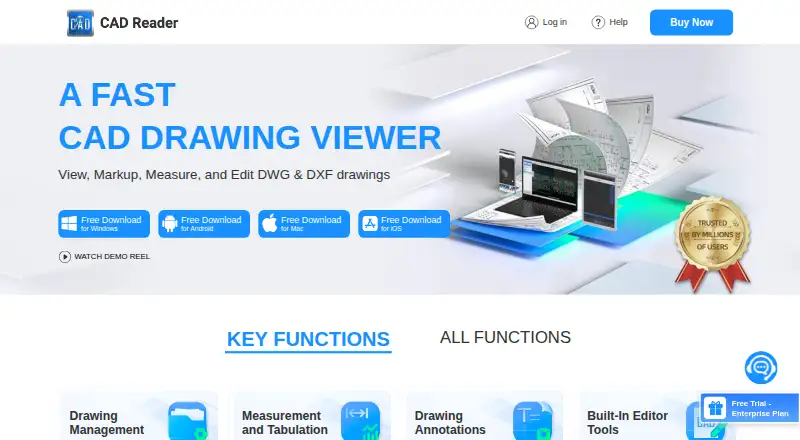
CAD Reader is a CAD drawing viewer and editor for DWG and DXF files, with tools to inspect, annotate, measure, and modify drawings. It is available on Android, iOS, macOS, and Windows. Users can compare two drawings to highlight differences, measure lengths, areas, arc lengths, perpendicular distances, and angles, and extract drawing text and tables. Extracted tables, search results, and measurement data can be exported to Excel. File tools include PDF export, CAD version conversion, external reference management, and CRP import and export. Markup options include freeform lines, text, revision clouds, and leader lines, plus photo and audio attachments on mobile. Editing tools cover creating or recovering DWG files, editing text and layers, and modifying drawing objects. The product highlights QS/cost estimators and site inspection engineers as intended users. The Free plan is listed as free, and the download is free. Professional is offered through a Buy Now option and Enterprise through Contact Sales; those options have no listed price or billing term. Mobile devices support opening up to two drawings simultaneously.
Good
- Supports DWG and DXF drawings on four listed platforms.
- Compares two drawings to highlight differences.
- Includes a broad set of length, area, and angle measurements.
- Exports extracted tables, search results, and measurement data to Excel.
- Provides markup, editing, and file conversion tools.
Watch out
- Mobile devices support opening up to two drawings simultaneously.
- Professional and Enterprise prices and billing terms are unstated.
Who it suits
CAD Reader suits QS/cost estimators and site inspection engineers who need to review or mark up DWG and DXF drawings. It may also suit users who need drawing measurements, comparisons, or Excel exports across desktop and mobile platforms.
Verdict
Choose CAD Reader if you need DWG and DXF viewing, measurement, markup, or editing tools across its listed platforms. Its drawing comparison and Excel exports are useful for review workflows. Consider the mobile two-drawing limit and the unstated Professional and Enterprise pricing when choosing a plan.
Plans and prices
From CAD Reader's own pricing page, checked 15 Oct 2026.
| Plan | Price | What it gives you |
|---|---|---|
| Free | Free | Basic functions · Windows, Android, Mac, iOS |
| Professional (1 MONTH VIP) | $7 a month | VIP features · per month |
| iOS 1 Month VIP | $9 a month | In-app purchase |
| Professional (6-MONTH VIP) | $40 a month | VIP features · every 6 months |
| Professional (1 YEAR VIP) | $45 a year | VIP features · per year |
| iOS 1 Year VIP | $50 a year | In-app purchase |
| Professional | Priced on request | Buy Now option; price and billing term not stated on the opened page |
| Enterprise | Priced on request | Team account management · Premium support |
The facts
Each one read from CAD Reader's own pages, with the date it was checked.
What it does
- Annotations
- Annotation tools include text, freeform lines, clouds, leaders, shapes, categories and revision markups.checked 15 Oct 2026
- API and SDK
- The vendor pages reviewed describe downloadable applications and user help but do not describe a public API, SDK or developer platform.checked 15 Oct 2026
- CAD editing
- Editor tools include creating and recovering DWG files, layer operations, copy, move, rotate, mirror, scale, break, explode, delete and text editing.checked 15 Oct 2026
- Data extraction
- It extracts drawing text and tables, and offers Excel export for extracted tables and search results.checked 30 Sep 2026
- Documentation depth
- Documentation consists of a general Q&A page plus a community tutorial and troubleshooting library.checked 15 Oct 2026
- Drawing comparison
- The comparison tool highlights differences between two drawings.checked 15 Oct 2026
- Drawing splitting
- A one-click drawing-splitting export is intended to handle oversized drawings.checked 15 Oct 2026
- Editing
- The listed editor tools include creating and recovering DWG files, editing text and layers, and modifying drawing objects.checked 30 Sep 2026
- External references
- External reference management automatically loads reference files and binds them to one CAD file.checked 15 Oct 2026
- File handling
- The page lists PDF export, CAD file version conversion, external reference management, and CRP import and export.checked 30 Sep 2026
- Integrations
- The pages identify Excel export for measurement data, extracted tables, and search results; no other named integrations are stated.checked 30 Sep 2026
- Intended users
- The product page highlights QS/cost estimators and site inspection engineers as intended users.checked 30 Sep 2026
- Licence
- The product is presented as proprietary software under Beijing Honghu Yuntu Technology Co., Ltd. copyright notices; no open-source licence is stated.checked 15 Oct 2026
- Limit: coordinate labeling
- A Google Play reviewer reported X and Y coordinates displayed with swapped labels; the developer said the issue was fixed in November 2025.checked 15 Oct 2026
- Limit: missing formats and tools
- G2 reviewers report that fewer file formats are supported and ask for more tools or more free features; one reviewer cannot view Revit models.checked 15 Oct 2026
- Limit: performance
- G2 reviewers mention slow startup, lag and occasional processing delays.checked 15 Oct 2026
- Markup
- Markup tools include freeform lines, text, revision clouds, leader lines, and mobile photo and audio attachments.checked 30 Sep 2026
- Measurement
- Measurement tools include length and area, arc length, perpendicular distance, continuous measurement, and radius, circular, and angle measurements.checked 30 Sep 2026
- Measurement tabulation
- Measured lengths and areas can be categorized, tabulated and exported to Excel.checked 15 Oct 2026
The company
- Company
- The user agreement identifies Beijing Honghu Yuntu Technology Co., Ltd. as the service provider and gives its address as No. 23 Zhongguancun Software Park, Haidian District, Beijing, China.checked 30 Sep 2026
- Company legal name
- The app stores and vendor copyright identify Beijing Honghu Yuntu Technology Co., Ltd. as the developer or owner.checked 15 Oct 2026
- Company profile
- LinkedIn describes FastCADReader as privately held in construction, headquartered in Beijing, with 51–200 employees.checked 15 Oct 2026
- Company relationship
- LinkedIn says CAD Reader and PlanForm were developed by Honghu Yuntu (Hong Kong) Technology Co., Limited.checked 15 Oct 2026
Where it runs
- Limit: iOS usability
- Apple reviewers report difficulty importing files, unclear instructions, white-screen experiences and at least one DWG that would not open.checked 15 Oct 2026
The full review of CAD Reader
Overview
CAD Reader is a DWG and DXF viewer that also covers measurement, annotation, drawing comparison, data extraction, and editing. It is best suited to quantity surveyors, cost estimators, and site inspection engineers who need to review plans and carry field observations on Android, iOS, macOS, or Windows. The bottom line is a broad CAD review toolkit in one application, though mobile work is constrained to two simultaneously open drawings and the higher tiers require a pricing conversation.
Its scope makes it more than a read-only viewer. Users can inspect quantities, mark revisions, compare drawing versions, pull tables into Excel, and make changes to drawing content. That combination is useful when review and takeoff work are part of the same workflow; it is less compelling if you only need occasional browser-based viewing.
Browse our CAD Viewer Software directory for more options.
Key features
Measurement and comparison
CAD Reader measures length and area, arc length, perpendicular distance, and continuous runs, with separate radius, circular, and angle tools. That range suits estimating and inspection tasks where a single linear tool is not enough. Drawing comparison highlights differences between two drawings, making revision review more direct than checking sheets manually. On mobile, however, the simultaneous-opening limit is two drawings, so larger comparison sets require a more staged process.
Markup and editing
Freeform lines, text, revision clouds, and leader lines provide practical ways to flag work and communicate changes. Mobile users can attach photos and audio, which is particularly relevant to site inspections where a visual or spoken observation belongs with the plan. Editing goes beyond annotation: the listed tools can create and recover DWG files, edit text and layers, and modify drawing objects. Choose it when the same users need to correct or adapt drawings; choose a simpler viewer when editing is outside your remit.
Extraction and file handling
The software extracts drawing text and tables, and exports extracted tables, search results, and measurement data to Excel. This is a meaningful advantage for cost and quantity workflows because information can move into spreadsheet-based estimating or reporting. PDF export, CAD version conversion, external-reference management, and CRP import and export extend its usefulness across mixed-file projects.
Support and service considerations
Support options include an interactive Q&A forum, email and WhatsApp support, and one-on-one personal-support tiers. The privacy policy is intended to comply with GDPR principles for European customers. The user agreement does not guarantee security, uninterrupted or timely service, or error-free operation, so organizations with strict availability or assurance requirements should review that risk before standardizing on the service.
Pricing
CAD Reader uses a freemium model with a free trial.
| Plan | Price | Best fit |
|---|---|---|
| Free | free | Individuals who want a free download and can work within the free offering |
| Professional | Custom pricing | Practitioners needing the paid feature set and support options |
| Enterprise | Custom pricing | Organizations evaluating deployment and sales-led arrangements |
The comparison page presents Free, Professional, and Enterprise tiers, but the individual feature allocation for each tier is not given. Professional has a Buy Now route without a published price or billing term, while Enterprise uses Contact Sales. That makes the free plan the only clearly priced entry point and leaves budgeting for paid adoption dependent on a quote. Confirm included features, seats, quotas, renewal terms, and support level before purchasing.
Platforms
CAD Reader runs on Android, iOS, macOS, and Windows. The cross-platform coverage supports teams that move between desktop drafting or review and mobile inspection. Mobile photo and audio attachments add field context, while the two-drawing simultaneous-opening cap can limit side-by-side review of more extensive revision packages.
Who it's for
Quantity surveyors and cost estimators get measurement tools plus Excel export for turning drawing information into working data. Site inspection engineers benefit from markup, revision clouds, leader lines, and mobile photo or audio attachments. Design and coordination teams can use comparison, layer and text editing, DWG recovery, and file conversion when drawings need active review rather than simple display.
It is a weaker fit for someone who only opens an occasional file, wants a browser-only tool, or needs a clearly published Professional or Enterprise price before evaluating procurement.
Pros and cons
Pros
- Broad DWG and DXF workflow: viewing, measurement, markup, comparison, extraction, conversion, and editing are covered in one product.
- Useful measurement depth: arc, perpendicular, continuous, radius, circular, and angle measurements go beyond basic length and area checks.
- Spreadsheet handoff: Excel export for measurements, tables, and search results supports estimating and reporting.
- Field-oriented markup: mobile photo and audio attachments connect observations to drawings.
- Free entry point: the Free plan costs nothing and a trial is offered.
Cons
- Mobile comparison limit: only two drawings can be opened simultaneously on mobile devices.
- Paid-plan budget uncertainty: Professional and Enterprise use custom pricing with no published billing term.
- Feature allocation is unclear: the tier comparison does not identify which individual capabilities belong to each plan.
- Service assurances are limited: the agreement disclaims guarantees for security, continuity, timeliness, and error-free operation.
Alternatives
Pick ShareCAD when browser opening without an account and support across web and Linux matter more than CAD Reader's editing and field tools; its free viewer shows a file-size limit of up to 50 MB, with a $49 per plan Standard tier.
ODA File Converter is the better choice when free CAD-file conversion is the priority and you do not need CAD Reader's review, markup, or measurement workflow.
Choose eDrawings Viewer for a free viewer on Android, iOS, macOS, and Windows; advanced collaboration requires eDrawings Professional and mobile pricing varies by region.
Autodesk Viewer fits free web or macOS/Windows viewing when an Autodesk Account is acceptable and uploaded designs expiring after 30 days is workable.
Consider CAD Pockets for Android, iOS, or web access with fundamental CAD features, third-party cloud storage, and 100MB of cloud space.
3D-Tool is a Windows-focused alternative for opening DDD, STL, and 3MF files; its free viewer cannot export CAD files.
CAD Viewer is a free browser CAD option for viewing, review, and editing through an open-source toolkit.
CADViewer suits teams seeking server or self-hosted deployment and a 10-day full-server trial, rather than a straightforward free desktop/mobile reader.
Verdict
Choose CAD Reader if your work combines DWG/DXF inspection with detailed measurement, markup, comparison, Excel extraction, and occasional editing across desktop and mobile. Its strongest case is a survey or inspection workflow that needs both plan intelligence and field evidence. Look elsewhere if you need many drawings open on mobile, a browser-first viewer, or transparent paid-plan pricing before committing.
Getting started
- Visit https://dwg.fastcadreader.com/.
- Choose the free download or review the Professional and Enterprise options.
- Install CAD Reader on Android, iOS, macOS, or Windows.
- Open a DWG or DXF drawing to view, measure, mark up, or edit it.
Limits worth knowing
The Free plan is listed as free, but the feature comparison does not specify which individual features belong to each tier. On mobile, up to two drawings can be open simultaneously.
Questions
Is CAD Reader free?
A Free plan is listed as free, and the download is free. A free trial is also listed.
Which platforms does CAD Reader support?
The listed platforms are Android, iOS, macOS, and Windows.
Can CAD Reader work with DWG and DXF files?
Yes. DWG and DXF support are listed.
What plans are available?
The listed plans are Free, Professional, and Enterprise. Professional has a Buy Now option, while Enterprise has a Contact Sales option.
What integrations are named?
Excel export is listed for measurement data, extracted tables, and search results; no other named integrations are stated in the facts.