CAD Pockets
CAD Pockets is a mobile CAD product for viewing and working with .dwg drawings, with Android and iOS apps and a web version.
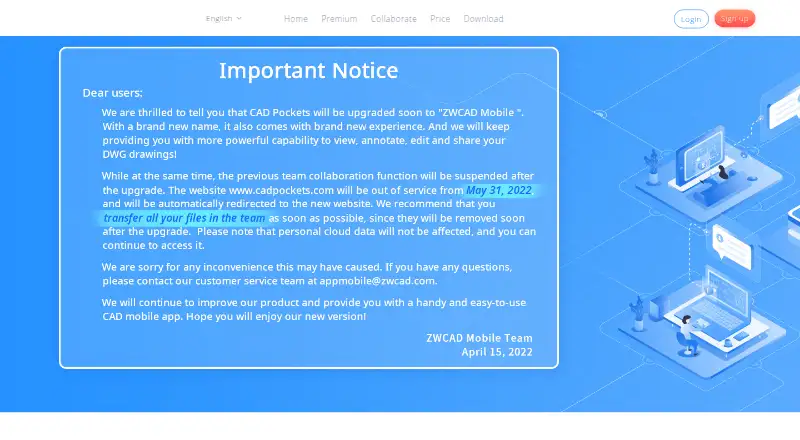
What CAD Pockets is
CAD Pockets is a mobile CAD product for viewing and working with .dwg drawings, with Android and iOS apps and a web version. It can open DWG, DWF, DXF and PDF files on a smart device, with 2D and 3D wireframe views as well as 3D solid mode. Drawing tools include lines, polylines, circles, rectangles, arcs, text and blocks; editing tools include copy, move, rotate and mirror. Review features include dimensions, measurements, revision clouds, free sketching and text annotations. The product connects to 12 popular online cloud storage services. Its Collaboration edition adds drawing discussions, task assignment, grouped member management and drawing history. Creating and editing DWG files are app-only; the web version supports collaboration features such as annotations and communication. The free plan includes fundamental CAD features, third-party cloud storage and 100MB of cloud space. The download page lists version 4.6.0, updated Oct 21, 2021.
Good
- Opens DWG, DWF, DXF and PDF files.
- Offers 2D and 3D viewing modes.
- Includes measurement and annotation tools.
- Connects to 12 online cloud storage services.
- Free plan includes 100MB of cloud space.
Watch out
- Creating and editing DWG files are app-only.
- Free plan provides 100MB of cloud space.
- Free plan support is through a QQ Group.
- Listed version 4.6.0 was updated Oct 21, 2021.
Who it suits
CAD Pockets may suit people who need to view or mark up CAD drawings on a smart device, or teams that need drawing discussions and task assignment. Users who need to create or edit DWG files must use the app rather than the web version.
Verdict
CAD Pockets covers drawing viewing, markup and app-based DWG editing, with collaboration features in a separate edition. Check the web limitation and the listed version date against your needs.
Plans and prices
From CAD Pockets's own pricing page, checked 2 Oct 2026.
| Plan | Price | What it gives you |
|---|---|---|
| Free | Free | Fundamental CAD features · third-party cloud storage · 100MB cloud space · QQ Group support |
| Collaboration | Priced on request | 5/10/15... members · 1T scalable cloud space · discussions · task assigning · group member management · drawing history · customized service · 5*8h online service · VIP service channel |
| Premium | Priced on request | Fundamental and advanced CAD features · third-party cloud storage · 2GB cloud space · QQ Group support |
The facts
Each one read from CAD Pockets's own pages, with the date it was checked.
Where it runs
- App listing
- The download page lists CAD Pockets version 4.6.0 and says it was updated on Oct 21, 2021.checked 2 Oct 2026
What it does
- Cloud storage integrations
- The home page says CAD Pockets connects to 12 popular online cloud storage services, and pricing lists third-party cloud storage as a feature.checked 2 Oct 2026
- Customization
- The business page says corporate customers can add or remove functions, integrate CAD Pockets with their own company system, or have it built on a private cloud.checked 2 Oct 2026
- Editing
- Drawing tools include lines, polylines, circles, rectangles, arcs, text and blocks, while editing tools include copy, move, rotate and mirror.checked 2 Oct 2026
- File formats
- The site says the app can view DWG, DWF, DXF and PDF files on a smart device.checked 2 Oct 2026
- Purpose
- CAD Pockets is a mobile CAD product for viewing and working with .dwg drawings.checked 2 Oct 2026
- Review tools
- The product includes dimensions, measurements, revision clouds, free sketching and text annotations.checked 2 Oct 2026
- Security
- The site says it uses HTTPS encryption and states that it obeys GDPR.checked 2 Oct 2026
- Support
- The Collaboration plan lists 5*8h online service and a VIP service channel; Free and Premium list QQ Group support.checked 2 Oct 2026
- Viewing
- It supports 2D and 3D wireframe views and 3D solid mode.checked 2 Oct 2026
- Web limitation
- Creating and editing DWG files are app-only features; the web version supports collaboration features such as annotations and communication.checked 2 Oct 2026
The company
- Founded
- 1998checked 28 Sep 2026
- Headquarters
- Guangzhou, Chinachecked 28 Sep 2026
- Team collaboration
- The Collaboration edition supports drawing discussions, task assignment, grouped member management and drawing history.checked 2 Oct 2026
Money
- Trial
- The pricing page states in Chinese that each eligible team may apply for a three-month trial; a trial team defaults to 99 members.checked 2 Oct 2026
The full review of CAD Pockets
CAD Pockets is a mobile CAD app for people who need to inspect drawings and make basic changes away from a desktop. It is most compelling for phone- and tablet-based review, with team collaboration as an option for groups that need shared drawing discussions and task assignment.
Overview
Support for DWG, DWF, DXF and PDF, plus 2D and 3D viewing modes, makes CAD Pockets useful for opening a range of drawing files on a smart device. Its app combines viewing with drawing, editing and markup tools, so it can serve more than a read-only role. The important trade-off is that creating and editing DWG files are app-only; the web version supports collaboration, including annotations and communication, rather than DWG editing.
Connections to 12 popular online cloud storage services can help users work with files they already keep elsewhere. The free plan also includes 100MB of cloud space, a useful starting allowance but a constraint for anyone expecting to store a sizeable drawing library there.
Key features
Viewing and editing on a smart device
Users can inspect drawings in 2D or 3D wireframe views and in 3D solid mode. Drawing tools include lines, polylines, circles, rectangles, arcs, text and blocks; copy, move, rotate and mirror tools support changes to drawings. That is a substantive toolkit for mobile work, but the app-only editing boundary rules it out for users who need to create or modify DWG files in a browser.
Markup and review
Dimensions, measurements, revision clouds, free sketching and text annotations give reviewers ways to communicate proposed changes and clarify drawing details. These tools make the app more useful for review than a viewer that only displays files. For teams, the Collaboration edition adds drawing discussions, task assignment, grouped member management and drawing history, which provide a more structured way to coordinate review work.
Cloud, security and customization
Third-party cloud storage is included in the Free and Premium plans, while the home page describes connections to 12 popular services. The site says CAD Pockets uses HTTPS encryption and complies with GDPR. Corporate customers can add or remove functions, integrate the product with their own company system, or have it built on a private cloud. Those options may suit organizations with specific deployment or workflow needs; they are not necessary reasons for an individual user to choose the app.
Pricing
CAD Pockets uses a freemium model. The Free plan costs nothing and includes fundamental CAD features, third-party cloud storage, 100MB of cloud space and QQ Group support. It is a sensible way to get started with mobile drawing work, but the small cloud allowance is the clearest reason to consider a paid edition.
Premium has custom pricing and includes fundamental and advanced CAD features, third-party cloud storage, 2GB of cloud space and QQ Group support. It is the more relevant upgrade for an individual who wants advanced CAD features and more storage without the team-management tools of Collaboration. The 2GB allowance is an improvement over Free, though still finite.
Collaboration also has custom pricing. It supports 5, 10, 15 or more members and includes 1T of scalable cloud space, discussions, task assignment, grouped member management, drawing history, customized service, 5*8h online service and a VIP service channel. This is the plan for teams that need shared review workflows and dedicated service; it is more than an individual viewer needs.
A free trial is offered: each eligible team may apply for a three-month trial, and a trial team defaults to 99 members. The stated trial terms are team-based, so they are less directly useful to someone evaluating the product alone.
Platforms
CAD Pockets is available on Android, iOS and the web. The distinction matters: DWG creation and editing belong to the apps, while the web version supports collaboration features such as annotations and communication. Anyone choosing it for browser-based editing should look elsewhere.
The download page lists version 4.6.0, updated on Oct 21, 2021. Readers who depend on a particular release date should check whether that version meets their needs.
Who it's for
CAD Pockets is best suited to mobile users who need to open common CAD and document formats, inspect 2D or 3D drawings, mark them up and make app-based edits. Its Collaboration edition also suits teams that want discussions, task assignment and drawing history alongside shared cloud space. It is a weaker fit for users who require DWG editing in a browser or individuals who need more than the Free plan's 100MB without paying custom pricing.
Pros and cons
- Pro: It combines DWG, DWF, DXF and PDF viewing with 2D and 3D modes, giving mobile users broad drawing access.
- Pro: Drawing, editing and markup tools support more than passive viewing, including measurements and revision clouds for review.
- Pro: Collaboration adds discussions, task assignment, member management and drawing history for team-based review.
- Con: DWG creation and editing are app-only, so the web version cannot replace a browser-based CAD editor.
- Con: Free includes just 100MB of cloud space; Premium's 2GB is still limited for larger drawing collections.
- Con: Premium and Collaboration have custom pricing, making the cost of upgrading harder to compare upfront.
Alternatives
CAD Viewer Software is a useful starting point for comparing options across the category.
- CAD Reader is worth considering if you need Android, iOS, macOS and Windows coverage; it also has a free plan and free trial.
- Autodesk Viewer is the alternative to consider for a free web viewer. It requires an Autodesk Account, uploaded designs expire after 30 days by default, and anyone with a shared link can access the design.
- eDrawings Viewer suits readers looking for a free viewer across Android, iOS, macOS and Windows. Advanced collaboration requires eDrawings Professional, and mobile app pricing varies by region.
- DWG FastView may suit someone who wants a stated monthly Premium price and 5G cloud storage: its Premium plan is $3.99 a month, billed Save 45%, and includes premium annotations, dimensions and measurements and removal of mobile ads.
- 3D-Tool is a Windows-only alternative.
- DWGSee is another alternative to compare.
- Glovius is another alternative to compare.
- Autodesk DWG TrueView is a free Windows desktop option for viewing 2D and 3D DWG files and converting them for compatibility with earlier AutoCAD versions.
Verdict
Choose CAD Pockets if mobile drawing access, app-based edits and practical markup matter more than browser-based DWG editing. The Collaboration edition gives teams a clear set of review and coordination tools, while the Free plan provides a no-cost way to start with a modest cloud allowance. Look elsewhere if you need to create or edit DWG files on the web, or need clearer upgrade pricing before committing.
Alternatives to CAD Pockets
- 1
ShareCAD
Free planAndroidiOSWebLinux8.0From $49 a month - 2

CAD Reader
Free planAndroidiOSmacOSWindows7.9From $45 a year - 3
CADViewer
AndroidiOSWebAPI7.6From $2,444 a year - 4
DWG FastView
AndroidiOSWebAPI7.6From $47.99 a year - 5

DWGSee
AndroidiOSWebAPI7.6$69 one-time - 6
Glovius
AndroidiOSWebWindows7.6From $299 a year