Autodesk Viewer
Autodesk Viewer is a free browser application for uploading, viewing, and sharing design files, including 2D and 3D formats such as DWG, STEP, RVT, IGES, and…
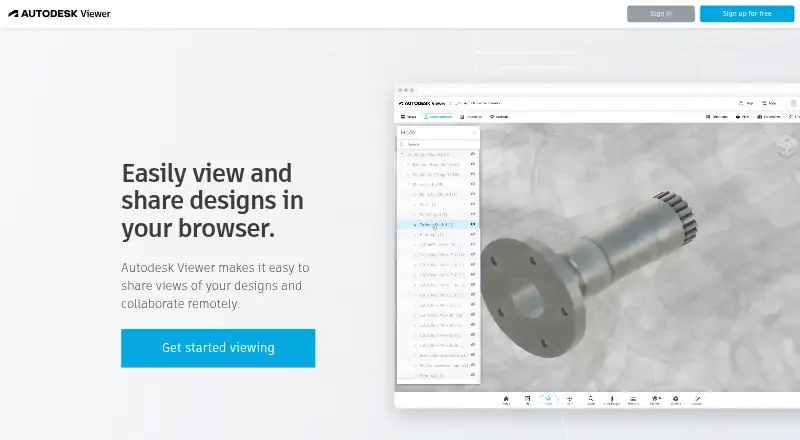
What Autodesk Viewer is
Autodesk Viewer is a free browser application for uploading, viewing, and sharing design files, including 2D and 3D formats such as DWG, STEP, RVT, IGES, and SolidWorks. Its tools let users navigate and browse models, inspect properties, measure, explode or section views, add markup, print, and capture screenshots. Design views can be shared by link, with annotations and drawing tools available for collaboration. A shared view is a converted representation, not access to the original file, so viewers cannot retrieve or edit source files through it. Saved files are not searchable, but anyone with a shareable link can access a design. Views expire after 30 days by default, and owners can extend the expiry. An Autodesk Account is required. The browser-based viewer is listed for Windows, Mac, and Chrome OS; the platform listing also names macOS and web. Autodesk says Viewer data is stored in the United States, without regional storage. RVT support covers Revit 2015 or later, while DWG object-enabler viewing is limited to AutoCAD Architecture, Plant 3D, and Civil 3D.
Good
- Free browser-based design viewing
- Supports many 2D and 3D formats
- Includes measurement, section, and markup tools
- Shareable links support annotations and drawing
Watch out
- An Autodesk Account is required
- Views expire after 30 days by default
- Anyone with a share link can access the design
- Data storage is limited to the United States
Who it suits
Autodesk Viewer suits people who need to inspect or share design views in a browser, including stakeholders who do not need access to the source files.
Verdict
Autodesk Viewer covers a broad set of viewing and markup tasks without charge. Keep in mind that shared views do not expose source files, but links are accessible to anyone who has them.
Plans and prices
From Autodesk Viewer's own pricing page, checked 19 Oct 2026.
| Plan | Price | What it gives you |
|---|---|---|
| Autodesk Viewer | Free | browser-based · Autodesk account required · 1GB maximum upload per file |
| Free | Free | Requires an Autodesk Account · Uploaded designs expire after 30 days by default · Anyone with a shared link can access the design |
The facts
Each one read from Autodesk Viewer's own pages, with the date it was checked.
What it does
- Account requirement
- Using Autodesk Viewer requires an Autodesk Account.checked 19 Oct 2026
- Automatic conversion
- Uploaded files are automatically converted into viewable representations.checked 19 Oct 2026
- Collaboration
- Users can share a design view through a link and use annotations and drawing tools for online collaboration.checked 3 Oct 2026
- Data location
- Autodesk says Autodesk Viewer data is stored in the United States and regional storage is not supported.checked 19 Oct 2026
- Developer API
- The Viewer SDK is a JavaScript library for embedding and interacting with 2D and 3D models in websites.checked 19 Oct 2026
- Documentation and support
- Autodesk provides guides, tutorials, API references, community support, Stack Overflow monitoring and optional Autodesk Developer Network support.checked 19 Oct 2026
- Encryption and compliance
- Autodesk says Viewer is based on Forge, which it describes as ISO 27001 compliant, and that uploads are encrypted.checked 19 Oct 2026
- Extensibility
- The SDK supports toolbar customization, extensions and user-written plug-ins.checked 19 Oct 2026
- File compatibility
- Autodesk lists support for more than 80 file types, including DWG, STEP, DWF, RVT and SolidWorks.checked 19 Oct 2026
- Integrations
- Autodesk presents the viewer as working with AutoCAD, Revit, Fusion 360, Inventor and other Autodesk products.checked 19 Oct 2026
- Licence
- APS APIs, SDKs, sample code and documentation are governed by Autodesk Terms of Use and Developer Terms.checked 19 Oct 2026
- Limit: editing
- G2 reviewers repeatedly say the viewer has limited or absent editing and is not a replacement for full design software.checked 19 Oct 2026
- Limit: large models
- G2 reviewers report slow loading or lag with heavy Revit and complex files.checked 19 Oct 2026
- Limit: markup and interface
- G2 reviewers ask for more markup options and a simpler interface.checked 19 Oct 2026
- Link access
- Files saved to Autodesk Viewer are not searchable, but anyone with the shareable link can access the design.checked 3 Oct 2026
- Markup
- Users can annotate designs with markup and drawing tools.checked 19 Oct 2026
- Measurement
- The viewer includes tools for measuring designs.checked 19 Oct 2026
- Model pipeline
- Developers prepare files with the Model Derivative API before loading them into the Viewer.checked 19 Oct 2026
- Notable news
- On 8 December 2025 Autodesk announced updates consolidating APS and Autodesk Developer Network terms and clarifying API commercial-use rules.checked 19 Oct 2026
Where it runs
- Browser platform
- Autodesk lists Autodesk Viewer as browser-based and available on Windows, Mac, and Chrome OS.checked 3 Oct 2026
- Browser support
- The live viewer page specifies WebGL-capable Chrome 56+, Firefox 51+ and Edge 14+ browsers.checked 19 Oct 2026
The company
- Company founded
- LinkedIn lists Autodesk’s founding year as 1982.checked 19 Oct 2026
- Company headquarters
- LinkedIn lists Autodesk headquarters in San Francisco, California.checked 19 Oct 2026
- Company size
- LinkedIn lists Autodesk as a public software company with 10,001+ employees.checked 19 Oct 2026
The full review of Autodesk Viewer
Overview
Autodesk Viewer is a browser-based service for inspecting and sharing 2D and 3D design files. It is a strong fit for teams that need to review CAD work without giving every stakeholder authoring software. Its core trade-off is clear: review tools are free, but shared views are converted representations, not a route to editable source files.
Key features
Support for DWG, DXF, STEP, RVT, IGES, SolidWorks and other formats makes Autodesk Viewer useful when project files span different design applications. RVT support covers Revit 2015 or later, while DWG object-enabler viewing is limited to AutoCAD Architecture, Plant 3D and Civil 3D. Those constraints may rule it out for projects relying on other object-enabler content or older Revit files.
Navigation, model browsing, properties, measurement, section and explode tools let reviewers examine a design beyond a static preview. Markup and drawing tools support feedback, with printing and screenshots useful for handing off review notes. That is a capable set for inspection and discussion, but it does not make the shared view a substitute for editing the design: stakeholders cannot access or modify the source through it.
Users can share views by link. Files saved to Autodesk Viewer are not searchable, but anyone with the link can access the design, so link distribution needs care. Views expire after 30 days by default, though owners can extend the expiry. An Autodesk Account is required to use the service.
Autodesk says its security practices include secure development, vulnerability assessment, risk mitigation, audits and third-party assessments. Viewer data are stored in the United States, with no regional storage option; organizations with residency requirements elsewhere should look elsewhere.
Pricing
Free — free. The plan includes Autodesk Viewer’s design viewing, measurement, markup, sharing and collaboration tools, with no free-trial deadline. It suits reviewers and project teams that need browser-based inspection without a software charge. The practical limits are the Autodesk Account requirement, 30-day default view expiry, link access for anyone who receives a shared URL, and the fact that shared views do not expose editable source files.
Platforms
Autodesk Viewer is browser-based and available on Windows, Mac and Chrome OS. The listed platforms also include macOS and Windows, so it suits desktop users who want to inspect designs in a browser rather than install a dedicated viewer.
Who it's for
Choose Autodesk Viewer for cross-format design review, measurement and feedback when stakeholders need to inspect models but not edit them. It is less suitable for teams that need recipients to work directly on source files, require regional data storage outside the United States, or depend on DWG object-enabler viewing beyond the supported AutoCAD Architecture, Plant 3D and Civil 3D types.
Pros and cons
- Pro: Broad 2D and 3D format support, including DWG, DXF, RVT, STEP, IGES and SolidWorks, helps teams review work across design applications.
- Pro: Measurement, section, explode and markup tools make the browser view useful for substantive review and feedback.
- Pro: The plan costs nothing, with no trial expiry.
- Con: Anyone with a shared link can access the design, so links should be distributed deliberately.
- Con: Views expire after 30 days by default, requiring owners to extend them when reviews need to remain available.
- Con: Shared views do not provide access to editable source files, and data storage is restricted to the United States.
Alternatives
CAD Viewer Software is a useful starting point if you want to compare options across the category. Consider ShareCAD if opening files in a browser without an account matters more than Autodesk Viewer’s requirement for an Autodesk Account; its free viewer has a 50 MB file-size limit. CAD Reader is another option to compare if you want a free download with a free trial and support across Android, iOS, macOS and Windows.
ODA File Converter may suit readers looking for a free CAD interoperability tool from a non-profit technology consortium. Choose eDrawings Viewer if you want a free viewer across desktop and mobile platforms; advanced collaboration requires eDrawings Professional, and mobile app pricing varies by region. CAD Pockets offers a free plan with fundamental CAD features, third-party cloud storage and 100MB of cloud space, making it worth considering if mobile and web access are priorities.
3D-Tool is a Windows-only alternative if your work centers on DDD, STL and 3MF files and you can accept that its free viewer cannot export CAD files. CAD Viewer is a free browser option for viewing, review and editing with an open-source toolkit. CADViewer is a paid alternative with a 10-day trial if you want to evaluate its full server offering.
Verdict
Autodesk Viewer is an easy recommendation for teams that need free, browser-based CAD inspection and markup across a broad range of formats. Its best reason to choose it is the combination of measurement and collaboration tools without a plan fee. Look elsewhere if stakeholders must edit source files, if link-based access is too open for your workflow, or if United States-only data storage does not meet your requirements.
Alternatives to Autodesk Viewer
- 1
ShareCAD
Free planAndroidiOSWebLinux8.0From $49 a month - 2

CAD Reader
Free planAndroidiOSmacOSWindows7.9From $45 a year - 3
CADViewer
AndroidiOSWebAPI7.6From $2,444 a year - 4
DWG FastView
AndroidiOSWebAPI7.6From $47.99 a year - 5

DWGSee
AndroidiOSWebAPI7.6$69 one-time - 6
Glovius
AndroidiOSWebWindows7.6From $299 a year