
BuildSchematics Converter
BuildSchematics Converter is a free web tool for converting Minecraft schematic files between supported formats.
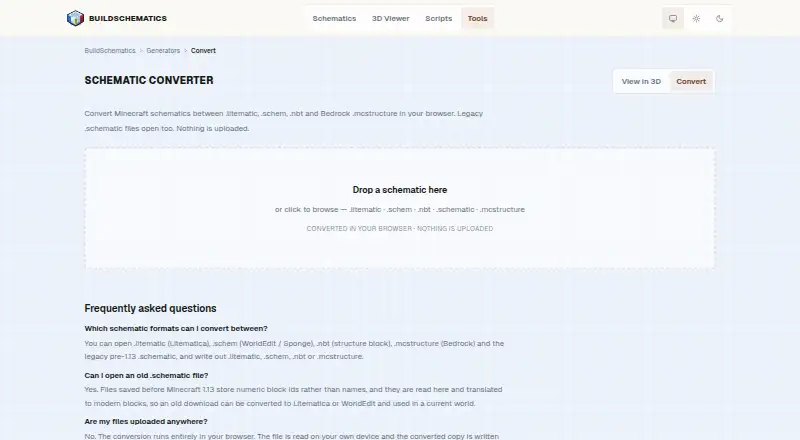
What BuildSchematics Converter is
BuildSchematics Converter is a free web tool for converting Minecraft schematic files between supported formats. It accepts .litematic, .schem, .nbt, .mcstructure, and legacy pre-1.13 .schematic files, and exports .litematic, .schem, .nbt, or .mcstructure. Older numeric block IDs are translated into modern blocks. Conversion runs in the browser, with files read from and saved to your device, and no account is needed to browse, preview, or download. A 3D preview is available, but the workflow is export-only. When converting Java builds for Bedrock, blocks and positions carry over, and stairs, logs, and slabs retain their orientation. Other rotations use defaults; container contents do not transfer, and blocks without Bedrock equivalents are omitted. The .nbt option is disabled for builds larger than 48 blocks on any axis. If Litematica or WorldEdit rejects a converted file as too new, the page advises setting the Minecraft version to the one being played.
Good
- Supports five input file formats
- Translates legacy numeric block IDs
- Conversion runs in the browser
- No account required for browsing, previewing, or downloading
- Includes a 3D preview
Watch out
- Export-only; no placement workflow
- Some Java-to-Bedrock rotations use defaults
- Container contents do not carry across
- .nbt export is disabled above 48 blocks on any axis
Who it suits
It suits Minecraft players and builders who need to convert supported schematic files in a browser. It may also help people who want to preview a build before exporting it.
Verdict
BuildSchematics Converter handles several Minecraft schematic formats without requiring an account or sending opened files off the device. Check its Java-to-Bedrock limitations and .nbt size restriction before relying on a conversion.
Plans and prices
From BuildSchematics Converter's own pricing page, checked 4 Oct 2026.
| Plan | Price | What it gives you |
|---|---|---|
| BuildSchematics Converter | Free | Browser based · no account required |
The facts
Each one read from BuildSchematics Converter's own pages, with the date it was checked.
What it does
- Advertising
- The privacy policy says most pages carry third-party ads whose scripts may set cookies and process technical request data.checked 4 Oct 2026
- Affiliation
- BuildSchematics says it is independent and is not sponsored, endorsed, or operated by Mojang Studios or Microsoft.checked 4 Oct 2026
- Audience
- BuildSchematics describes its community build library as serving survival players, builders, server owners, and people checking a build's size and block cost before downloading.checked 4 Oct 2026
- Formats accepted
- It opens .litematic, .schem, .nbt, .mcstructure, and legacy pre-1.13 .schematic files.checked 4 Oct 2026
- Formats exported
- It writes .litematic, .schem, .nbt, or .mcstructure files.checked 4 Oct 2026
- Java to Bedrock
- Blocks and positions carry over, and stairs, logs, and slabs retain orientation; other rotations default, container contents do not carry across, and blocks without Bedrock equivalents are omitted.checked 4 Oct 2026
- Legacy conversion
- Legacy numeric block IDs are read and translated to modern blocks.checked 4 Oct 2026
- Local processing
- Conversion runs entirely in the browser; files are read from and written to the user's device.checked 4 Oct 2026
- NBT size limit
- The .nbt option is disabled for builds larger than 48 blocks on any axis because vanilla structure blocks cannot load them.checked 4 Oct 2026
- No account
- The maker says browsing, previewing, and downloading require no account.checked 4 Oct 2026
- Privacy
- BuildSchematics says files opened in its browser-based viewer never leave the device, while technical request data may be processed by hosting providers and network intermediaries when pages load.checked 4 Oct 2026
- Purpose
- Converts Minecraft schematic files between supported formats in the browser.checked 4 Oct 2026
- Support
- The maker accepts bug reports, command-output issues, copyright questions, and practical feedback by email.checked 4 Oct 2026
- Version handling
- The page advises setting the Minecraft version to the version being played if Litematica or WorldEdit rejects a converted file as too new.checked 4 Oct 2026
Alternatives to BuildSchematics Converter
- 1

Bloxelizer
Free planAndroidiOSWebAPI7.9From $29.99 a year - 2
SchemConvert
Free planOpen sourceLinuxmacOSWindows7.7$4.99 one-time - 3
CurseForge
Free planWeb7.2Free plan - 4
Litematic Converter
Free planOpen sourceLinuxmacOSWindows7.1Free plan - 5

AutoBuild
Free planWebLinuxmacOSWindows6.9Free plan - 6
SchemViewer
Free planWebLinuxmacOSWindows6.6Free plan