SchemConvert
SchemConvert converts Minecraft schematic files among .nbt, .schem, .litematic and .bp formats.
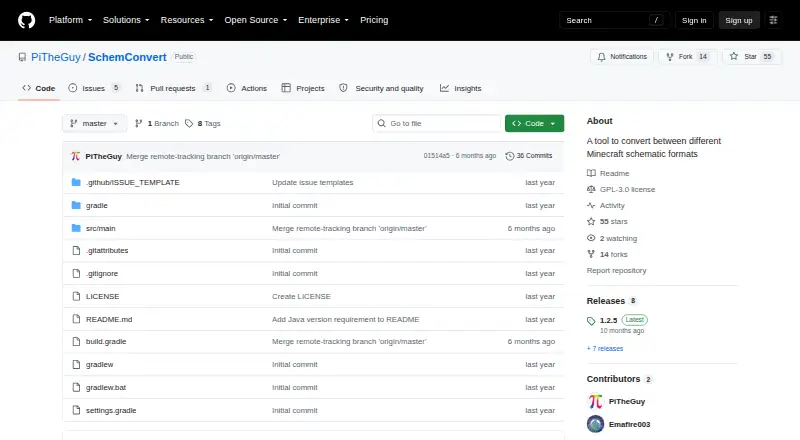
What SchemConvert is
SchemConvert converts Minecraft schematic files among .nbt, .schem, .litematic and .bp formats. The formats correspond to different tools: .nbt is used by vanilla structure blocks, .schem by community programs such as WorldEdit and MCEdit, .litematic by Litematica, and .bp by Axiom for blueprints. It can convert multiple schematic files in one batch, and its listed placement workflow is export-only. SchemConvert is a free, open-source desktop tool for Linux, macOS and Windows, published under the GPL-3.0 license. Running it requires Java 21 or later. A release note mentions command-line conversion to .litematic. The project is hosted on GitHub. GitHub reports that the repository has no published security advisories and has not set up a SECURITY.md file. Its stated scope is focused on converting and exporting files in the supported formats.
Good
- Converts four schematic formats
- Can batch-convert multiple schematics
- Free and open source under GPL-3.0
- Runs on Linux, macOS and Windows
Watch out
- Requires Java 21 or later
- Placement workflow is export-only
Who it suits
SchemConvert suits Minecraft users who need to convert schematic files between the four supported formats. It is relevant to desktop users comfortable with the Java 21-or-later requirement.
Verdict
SchemConvert is a focused option for converting supported Minecraft schematic formats, including in batches. Check the Java requirement and export-only workflow against your needs.
Plans and prices
From SchemConvert's own pricing page, checked 9 Oct 2026.
| Plan | Price | What it gives you |
|---|---|---|
| Free | Free | No pricing or usage limits stated |
| SchemConvert Litematica to WorldEdit (third-party BuiltByBit listing by Frostxrv | $4.99, paid once | unlimited servers you own · no redistribution or resale · Paper/Purpur 1.21.11+ · Java 21+ · one purchase |
The facts
Each one read from SchemConvert's own pages, with the date it was checked.
What it does
- Axiom format
- It supports .bp files used by Axiom blueprints.checked 15 Oct 2026
- Batch conversion
- A release note says the tool supports converting multiple schematics at once.checked 9 Oct 2026
- Blueprint format
- The README identifies .bp as the format used by Axiom for blueprints.checked 9 Oct 2026
- Build system
- The project uses Gradle’s Java application plugin and Shadow plugin 8.1.1 to build an all-dependencies JAR.checked 15 Oct 2026
- CLI default output
- If only a format is provided, the output file is created beside the input with the corresponding extension.checked 15 Oct 2026
- CLI input
- The command-line interface requires an input file and accepts an optional output format.checked 15 Oct 2026
- CLI output inference
- When no format is supplied, the program infers the output format from the output filename.checked 15 Oct 2026
- Command line
- A release note mentions fixing conversion to .litematic via the command line.checked 9 Oct 2026
- Dependencies
- The build declares Guava, jopt-simple 5.0.4, and Gson 2.10.1 dependencies.checked 15 Oct 2026
- GUI workflow
- The maker describes downloading a JAR, selecting input and output files, and clicking Convert.checked 15 Oct 2026
- Independent listing status
- A similarly named third-party BuiltByBit plugin listing is attributed to creator Frostxrv, reports zero purchases and one download, and is marked not yet rated.checked 15 Oct 2026
- Independent usage documentation
- PicoLimbo documents running SchemConvert with java -jar SchemConvert-1.2.5-all.jar and selecting input, output, and the .schem conversion type.checked 15 Oct 2026
- Java requirement
- The repository says Java 21 or newer is required.checked 15 Oct 2026
- License
- The repository is publicly licensed under GNU GPL version 3.0.checked 15 Oct 2026
- Limit: conversion error
- An issue reports an unexpected error when converting a .litematic file even after the user installed Java 21.checked 15 Oct 2026
- Limit: folder conversion request
- An open enhancement issue requests support for using folders as input for mass conversion.checked 15 Oct 2026
- Limit: legacy format
- An open issue says the application has no .schematic format selector; the maintainer described that format as old and low priority.checked 15 Oct 2026
- Limit: startup confusion
- A Reddit user reported that the program flashed and closed, and the maker replied that the JAR file had to be downloaded and run.checked 15 Oct 2026
- Limit: structure blocks
- The maker says .nbt files used with Create’s Schematicannon are limited to 48×48×48 blocks, although Create’s file-size limit may be reached first.checked 15 Oct 2026
- Limit: WorldEdit compatibility
- An issue reports that an .nbt-to-.schem conversion produced a file missing the Version tag required by WorldEdit 7.2.16.checked 15 Oct 2026
- Litematica format
- It supports .litematic files used by Litematica.checked 15 Oct 2026
- Litematic format
- The README identifies .litematic as the format used by Litematica.checked 9 Oct 2026
The company
- Maker
- The repository owner describes themself as someone who codes things sometimes and contributes mappings for ParchmentMC.checked 9 Oct 2026
- Maker company facts
- The maker profile provides no legal company name, headquarters, founding year, employee count, or funding information.checked 15 Oct 2026
Alternatives to SchemConvert
- 1

Bloxelizer
Free planAndroidiOSWebAPI7.9From $29.99 a year - 2
CurseForge
Free planWeb7.2Free plan - 3
Litematic Converter
Free planOpen sourceLinuxmacOSWindows7.1Free plan - 4

AutoBuild
Free planWebLinuxmacOSWindows6.9Free plan - 5
SchemViewer
Free planWebLinuxmacOSWindows6.6Free plan - 6

Shulkr
Free planWeb6.6From $4.99 a month