
Bloxelizer
Bloxelizer is a Minecraft schematic and building toolkit for browsing builds, viewing them in 3D, following build guides, and converting files.
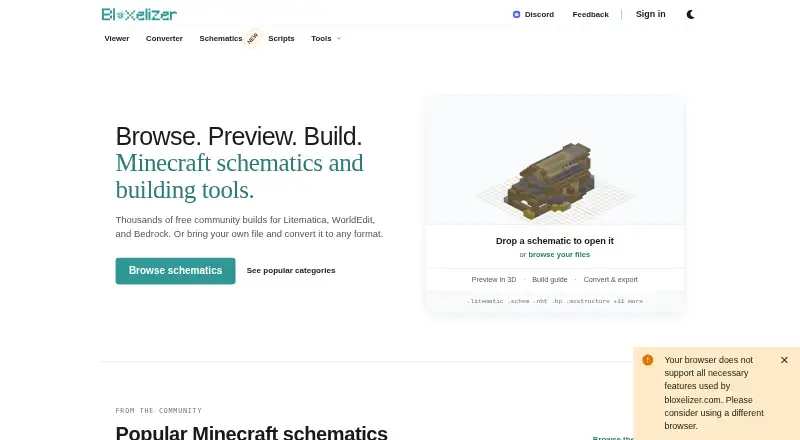
What Bloxelizer is
Bloxelizer is a Minecraft schematic and building toolkit for browsing builds, viewing them in 3D, following build guides, and converting files. Its free plan includes a voxelizer for images and 3D models, a pixelizer for pixel art and map art, and a converter. The converter handles Minecraft schematic and world formats as well as Hytale prefabs, 3D models, and images; it also supports world imports and batch processing. Conversion happens in the browser without uploading files unless you choose to save or share them. If the target Minecraft edition or version lacks a block, Bloxelizer substitutes the closest available block. The free plan needs no account. Bloxelizer says its usage measurement uses memory-only persistence and avoids cookies or local storage for analytics and advertising tracking. During the Cloud Converter and Platform API beta, submitted inputs and outputs may remain stored indefinitely.
Good
- Free plan includes voxelizer, pixelizer, and converter.
- Previews builds in 3D.
- Supports Minecraft formats, models, images, and Hytale prefabs.
- Processes conversion in the browser unless saved or shared.
- Supports batch processing and world import.
Watch out
- Unavailable blocks map to the closest available block.
- Beta cloud job files may be retained indefinitely.
- Paid subscription content may be deleted after three months.
Who it suits
It suits Minecraft builders who want to browse and preview builds, follow guides, or convert a range of schematic, world, model, and image files. The free toolkit is an option for people who want to voxelize or pixelize without creating an account.
Verdict
Bloxelizer combines build browsing and guides with file conversion and image-to-voxel or pixel-art tools. Check block substitutions and the stated retention terms before choosing cloud features or paid content storage.
Plans and prices
From Bloxelizer's own pricing page, checked 15 Oct 2026.
| Plan | Price | What it gives you |
|---|---|---|
| Free | Free | no account needed · voxelizer · pixelizer · Java/Bedrock/Hytale converter · layer guides · multi-format import/export · forever |
| Plus (monthly) | $2.50 a month | PDF/SVG/HTML build guide export · texture packs · modded blocks · private schematics · progress tracking · teams · bulk converter · no ads |
| Plus | $2.50 a month | PDF/SVG/HTML guide export · custom texture packs · modded blocks · private schematics · progress tracking · teams · bulk converter · no ads · monthly |
| API credits - 20 credits | $5, paid once | 20 credits · no expiry · no monthly minimum · one-time credit pack |
| Creator Lite | $8.33 a month | custom colors and fonts · no watermarks · schematic page · materials poster · creator dashboard · up to 40 unlisted builds · monthly |
| API credits - 50 credits | $10, paid once | 50 credits · no expiry · no monthly minimum · one-time credit pack |
| Creator | $19.99 a month | custom domains · unlimited unlisted builds · templates · team access · creator-only integrations · billed monthly |
| API credits | $20, paid once | Prepaid credits for Bloxelizer Platform API · no monthly minimum · 120 credits; $0.17 / credit; no expiry |
| API credits - 120 credits | $20, paid once | 120 credits · no expiry · no monthly minimum · one-time credit pack |
| Plus (yearly) | $29.99 a year | Everything in Free · build guide export · texture packs · modded blocks · private schematics · progress tracking · teams · bulk converter · no ads · $29.99 / yr, save 37% |
| Plus | $29.99 a year | PDF/SVG/HTML guide export · custom texture packs · modded blocks · private schematics · progress tracking · teams · bulk converter · no ads · $29.99 / yr, save 37% |
| Creator Lite | $99.99 a year | custom colors and fonts · no watermarks · schematic page · materials poster · creator dashboard · up to 40 unlisted builds · $99.99 / yr, save 24% |
The facts
Each one read from Bloxelizer's own pages, with the date it was checked.
What it does
- API availability
- The Bloxelizer Platform API and Cloud Converter are beta services paid through prepaid credits and use account API keys beginning with blxz_.checked 15 Oct 2026
- API limits
- Terms allow rate limits and per-account caps, provide no guaranteed uptime for beta features and refund server failures only after the user contacts support.checked 15 Oct 2026
- Block substitution
- When a target edition or Minecraft version lacks a block, conversion maps it to the closest available block.checked 15 Oct 2026
- Build guides
- Schematic pages provide interactive 2D and 3D layer-by-layer guides plus required-material lists.checked 15 Oct 2026
- Cloud job retention
- During the Cloud Converter and Platform API beta, submitted job inputs and generated outputs may remain stored indefinitely because no defined retention period is applied.checked 28 Sep 2026
- Cloud retention limit
- During beta, credit-paid Cloud Converter inputs and outputs have no defined retention period and may remain stored indefinitely.checked 15 Oct 2026
- Conversion limitation
- Blocks absent from the target edition or Minecraft version are mapped to the closest available block.checked 28 Sep 2026
- Developer footprint
- The public GitHub repository is a bug-report project with 4 stars, 1 fork, 1 watcher, 2 issues and one commit, rather than published application source.checked 15 Oct 2026
- Format support
- The converter supports formats including .litematic, .schem, .schematic, .nbt, .bp, and .mcstructure, and also imports worlds, Hytale prefabs, 3D models, and images.checked 28 Sep 2026
- Help and support
- The FAQ covers formats, privacy, plans and build workflows and directs users to Discord as the fastest help channel.checked 15 Oct 2026
- Independent domain facts
- ScamAdviser reports WHOIS registration on December 11, 2022, with ownership redacted through Withheld for Privacy ehf.checked 15 Oct 2026
- Integrations
- The privacy policy and terms identify Patreon, authentication, analytics, hosting, storage and support providers as connected or operational services.checked 15 Oct 2026
- Licence
- The service terms describe Bloxelizer software and branding as owned or licensed intellectual property, while a separate notice says parts of voxelization derive from Apache-2.0 Arnis code.checked 15 Oct 2026
- Limit: intermittent access
- Reddit commenters reported that the site was not working or had hiccups, with the maker suggesting another browser for a technical issue.checked 15 Oct 2026
- Limit: mobile control
- The same App Store reviewer said mobile control of Bloxelizer was somewhat difficult.checked 15 Oct 2026
- Limit: redstone accuracy
- A Reddit commenter reported that the simulator appeared to use redstone ticks instead of game ticks.checked 15 Oct 2026
- Limit: removed feature
- The maker said a previously available 2D-image-to-3D feature had been removed and replaced with an AI-based approach.checked 15 Oct 2026
- Limit: very large builds
- The maker said chunking generally keeps performance good but very large creations can hit Minecraft format limits.checked 15 Oct 2026
- Local processing
- The converter runs in the browser without uploading files unless the user chooses to save or share them.checked 28 Sep 2026
- Mobile access
- The install guide explains how to add Bloxelizer to the home screen from Safari on iOS and Chrome on Android.checked 28 Sep 2026
- Mobile installation
- Bloxelizer is offered as a progressive web app that users add from Safari on iOS or Chrome on Android.checked 15 Oct 2026
- Praise: community experimentation
- A Reddit post showed users building a redstone simulator in Bloxelizer and inviting others to test their own builds.checked 15 Oct 2026
Where it runs
- Browser processing
- The converter uses browser Web Workers and says files stay on the device unless the user chooses to save or share them.checked 15 Oct 2026
- In-browser scripts
- Bloxelizer scripts run in an isolated browser JavaScript environment and can write generated blocks into the editor.checked 15 Oct 2026
The full review of Bloxelizer
Overview
Bloxelizer combines Minecraft build browsing and planning tools with file conversion. Users can preview builds in 3D, follow build guides, and import or export a range of schematic, world, model, and image formats. Its Free plan includes the core toolkit without requiring an account.
Two creation tools broaden its scope beyond existing schematics: a voxelizer turns images and 3D models into voxel builds, while a pixelizer supports pixel art and map art. The placement workflow is export-only, so Bloxelizer prepares and presents builds rather than placing them directly into a Minecraft world.
Conversion takes place in the browser, and files are not uploaded unless users choose to save or share them. When the target Minecraft edition or version does not include a source block, the converter substitutes the closest available block, so converted builds may differ from their originals.
Key features
Build previews and guides
Three-dimensional previews help users inspect builds, while build guides provide instructions for following them. The free toolkit includes guides, and paid plans add export options for guides in PDF, SVG, or HTML formats. Paid features also include private schematics, progress tracking, texture packs, modded blocks, and team tools.
Voxelizing and pixel art
The Free plan includes a voxelizer for images and 3D models, along with a pixelizer for creating pixel art and map art. These tools give users ways to turn visual material into Minecraft-oriented work as well as browse and convert existing builds.
Import, conversion, and batch work
Bloxelizer supports Minecraft schematic and structure formats, world files, Hytale prefabs, 3D models, and common image formats. The supported list includes .litematic, .schem, .schematic, .nbt, .bp, .mcstructure, .mcstructurezip, .mcworld, Java world ZIP files, .prefab.json, .json, .glb, .gltf, .obj, .mtl, .stl, .bbmodel, .geo.json, .png, .jpg, .jpeg, and .webp. Batch conversion is available, alongside world import and format conversion.
Pricing
Bloxelizer has a free plan and paid subscriptions, as well as prepaid API credits. The listed options are:
- Free: free, billed forever. Includes the core toolkit, voxelizer, pixelizer, converter, build guides, and multi-format import and export; no account is needed.
- Plus (monthly): $2.50 a month. Adds PDF, SVG, and HTML guide export, texture packs, modded blocks, private schematics, progress tracking, teams, bulk conversion, and no ads.
- Plus (yearly): $29.99 a year. Includes the Plus features, with the plan noting a 37% saving.
- Creator Lite: $10.99 a month. Includes Plus features, custom colors and fonts, no watermarks, a schematic page, a materials poster, Creator Dashboard, and up to 40 unlisted builds.
- Creator: $19.99 a month. Includes Creator Lite features, custom domains, unlimited unlisted builds, templates, team access, and creator-only integrations as they ship.
- API credits: $20, paid once for 120 credits, listed at $0.17 / credit. Credits do not expire, and there is no monthly minimum.
Platforms
The available platform listing is web. Bloxelizer's install guide describes adding it to the home screen from Safari on iOS or Chrome on Android, providing a mobile access route through those browsers.
Who it's for
Bloxelizer suits Minecraft players who want to browse or inspect builds, follow construction guides, and convert files across supported formats. Its voxelizer and pixelizer also make it relevant to people starting from images, 3D models, or pixel art. The guide exports, private schematics, tracking, teams, creator pages, and API credits extend its usefulness to builders and creators with more involved workflows.
It is less suited to someone looking for direct in-world build placement: the listed workflow exports files rather than placing a build into a world. Users converting across editions or versions should also account for block substitutions where an exact match is unavailable.
Pros and cons
Pros
- A free core toolkit includes a voxelizer, pixelizer, converter, and build guides.
- Broad import and export support covers schematic, world, model, and image files.
- Three-dimensional previews, world import, and batch conversion are available.
- Browser-based conversion does not upload files unless users elect to save or share them.
- Paid options cover guide exports, private builds, creator tools, and API usage.
Cons
- Build placement is export-only rather than direct placement in a Minecraft world.
- Unavailable blocks are mapped to the closest available block during conversion.
- During the Cloud Converter and Platform API beta, submitted job inputs and generated outputs may be stored indefinitely because no retention period is defined.
Alternatives
For a wider view of this category, see Minecraft Schematic Tools. Other options include Litematica, Schematica, and wWaypoints. For conversion-focused alternatives, consider Litematic Converter, Craftmatic, CurseForge, MineSchematic, and Minecraft Structure Forge.
Verdict
Bloxelizer is a broad build and conversion toolkit rather than only a schematic viewer. Its free tier combines visual creation tools, guides, previews, and multi-format file handling, while paid plans add sharing, organization, and creator capabilities. The browser-based conversion model and extensive format list are useful strengths; the export-only placement workflow and possible block substitutions are important limits to weigh before choosing it.
Its privacy details deserve attention for users working with cloud features. Bloxelizer says it uses PostHog for usage measurement with memory-only persistence and does not use cookies or local storage for analytics or advertising tracking. Its policy describes reasonable administrative, technical, and organizational safeguards. Separately, content associated with paid subscription features is retained for three months after a subscription ends and may then be permanently deleted. For help, the FAQ identifies the community on Discord as the fastest route.
Getting started
- Open https://bloxelizer.com/ in a browser.
- Use the free toolkit without creating an account, or choose a paid plan for additional features.
- Import a supported schematic, world, Hytale prefab, 3D model, or image.
- Preview builds in 3D, follow a guide, or convert and export files.
- On iOS, add Bloxelizer to the home screen from Safari; on Android, use Chrome.
Limits worth knowing
The free plan includes the core toolkit, but paid features such as guide exports, private schematics, progress tracking, teams, and bulk conversion are in Plus or higher tiers. During the Cloud Converter and Platform API beta, submitted inputs and generated outputs may remain stored indefinitely; paid-feature content is retained for three months after a subscription ends.
Questions
Is Bloxelizer free?
Yes. The Free plan is free, billed forever, and includes the core toolkit without an account.
How much is Plus?
Plus costs $2.50 a month. Plus yearly costs $29.99 a year.
What platforms can I use?
Bloxelizer is available on the web. Its install guide describes adding it to the home screen from Safari on iOS or Chrome on Android.
Which formats does the converter support?
Formats include .litematic, .schem, .schematic, .nbt, .bp, .mcstructure, .mcworld, .glb, .gltf, .obj, .stl, .png, and .webp, among others.
Are files uploaded during conversion?
Conversion runs in the browser without uploading files unless you choose to save or share them.
What happens when a block is unavailable in the target version?
The converter maps blocks missing from the target edition or Minecraft version to the closest available block.
Alternatives to Bloxelizer
- 1
SchemConvert
Free planOpen sourceLinuxmacOSWindows7.7$4.99 one-time - 2
CurseForge
Free planWeb7.2Free plan - 3
Litematic Converter
Free planOpen sourceLinuxmacOSWindows7.1Free plan - 4

AutoBuild
Free planWebLinuxmacOSWindows6.9Free plan - 5
SchemViewer
Free planWebLinuxmacOSWindows6.6Free plan - 6

Shulkr
Free planWeb6.6From $4.99 a month