BEO HQ
BEO HQ turns event details into banquet event orders and related catering documents.
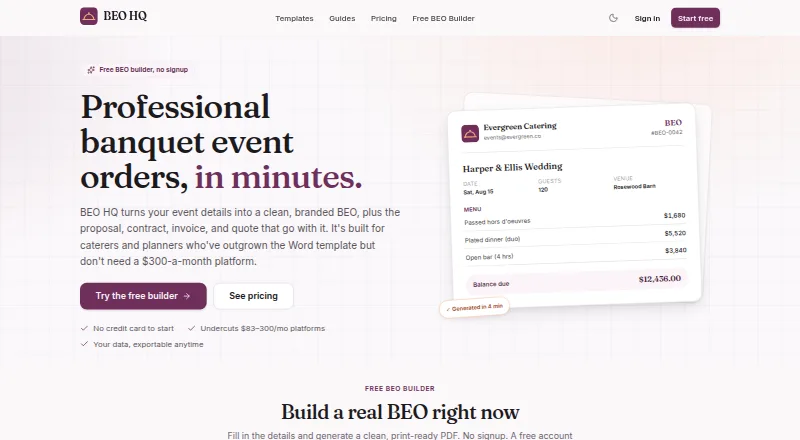
What BEO HQ is
BEO HQ turns event details into banquet event orders and related catering documents. The same event data can produce BEOs, proposals, contracts, invoices, and quotes, while the builder calculates service charges, taxes, deposits, and balances. Users can save client, venue, and menu records and make a copy of a past event. The menu library supports courses, per-person or per-item pricing, and dietary and allergen flags. Starter includes QuickBooks and CSV export. Pro adds shareable client approval links and e-signatures with an audit trail. BEO HQ says it does not process payments, leaving customers to use their own payment setup. The company describes the product as made for solo caterers and independent planners; it runs on the web. The free plan permits one BEO and one catering invoice, and PDFs have a small BEO HQ footer credit. Starter costs $19 a month and Pro costs $39 a month. The first paid subscription has a 30-day money-back guarantee, once per customer.
Good
- Creates several catering documents from shared event data.
- Calculates service charges, taxes, deposits, and balances.
- Menu library includes dietary and allergen flags.
- Starter includes QuickBooks and CSV export.
- Users can import and export documents and financials.
Watch out
- Free plan allows one BEO and one catering invoice.
- Free-plan PDFs include a BEO HQ footer credit.
- Does not process payments.
- Runs on web only.
Who it suits
BEO HQ suits solo caterers and independent planners who need to create event orders and related documents. Its reusable client, venue, and menu records may suit users who handle recurring event details.
Verdict
BEO HQ combines catering documents, event calculations, and reusable records in a web-based tool. The free plan is limited to one BEO and invoice; paid plans begin at $19 a month.
Plans and prices
From BEO HQ's own pricing page, checked 20 Oct 2026.
| Plan | Price | What it gives you |
|---|---|---|
| Free | Free | 1 banquet event order · 1 catering invoice · PDF has small BEO HQ footer credit · forever |
| Starter | $19 a month | Unlimited BEOs, invoices, proposals, contracts and quotes · kitchen sheets · packing lists · payment schedules · watermark-free PDFs · reusable clients, venues and menus · duplicate-last-event · calendar feed · QuickBooks and CSV export · monthly |
| Pro | $39 a month | Everything in Starter · e-signature with audit trail · client approval links · custom branding and logo · change-log and versioning · unlimited team members · monthly |
| Starter annual | $190 a year | Starter features · annually |
| Pro annual | $390 a year | Pro features · annually |
The facts
Each one read from BEO HQ's own pages, with the date it was checked.
What it does
- Age requirement
- The service requires users to be at least 18 years old.checked 20 Oct 2026
- Authorized persons
- The filing lists Brandon Rodrigues and Danielle Rodrigues as authorized members.checked 20 Oct 2026
- Automatic calculations
- The builder calculates service charges, taxes, deposits, balances and per-guest totals.checked 20 Oct 2026
- Branded PDFs
- The product exports print-ready BEO PDFs with three layouts, a logo and business colors.checked 20 Oct 2026
- Calculations
- The builder calculates service charges, taxes, deposits, and balances.checked 28 Sep 2026
- Calendar statuses
- A calendar shows events by date and stage from inquiry through completed, with running totals.checked 20 Oct 2026
- Data portability
- The company says users can import and export documents and financial data freely.checked 20 Oct 2026
- Documents
- The product generates BEOs, proposals, contracts, invoices, and quotes from the same event data.checked 28 Sep 2026
- Duplicate events
- A previous event can be cloned and edited for repeat formats.checked 20 Oct 2026
- E-signatures
- Pro captures typed or drawn signatures and keeps an audit trail.checked 20 Oct 2026
- Focus
- The maker positions BEO HQ for solo caterers and independent planners who need focused event documents rather than a full CRM.checked 20 Oct 2026
- Funding
- Handler Labs says it is independent and self-funded with no investors.checked 20 Oct 2026
- Integrations
- Starter lists QuickBooks and CSV export for invoices and quotes.checked 20 Oct 2026
- Integrations and exports
- Starter includes QuickBooks and CSV export.checked 28 Sep 2026
- Intended users
- BEO HQ describes itself as built for solo caterers and independent planners.checked 28 Sep 2026
- Kitchen documents
- Starter includes kitchen sheets and packing lists generated from event data.checked 20 Oct 2026
- Legal disclaimer
- BEO HQ states that it is a document-preparation tool and does not provide legal, financial or tax advice.checked 20 Oct 2026
- Legal entity
- Florida records identify the maker as HANDLER LABS LLC, a Florida limited liability company.checked 20 Oct 2026
- Limit: operational depth
- BEO HQ deliberately excludes recipe costing, staff scheduling and inventory functions found in larger catering suites.checked 20 Oct 2026
Where it runs
- Client approvals
- Pro provides shareable approval links through which clients can view, approve and sign documents.checked 20 Oct 2026
The company
- Company status
- The Florida Division of Corporations lists Handler Labs LLC as active.checked 20 Oct 2026
- Founded
- The Florida filing shows an effective date of May 25, 2026 and a filing date of May 26, 2026.checked 20 Oct 2026
- Headquarters
- The state filing lists 5510 NW 38th Terrace, Coconut Creek, Florida 33073 as the principal and mailing address.checked 20 Oct 2026
Money
- Limit: free tier
- The free plan is limited to one BEO and one catering invoice, and its PDF carries a BEO HQ footer credit.checked 20 Oct 2026
The full review of BEO HQ
Overview
BEO HQ is a web-based tool for turning event details into banquet event orders and the paperwork that goes with them. It creates BEOs, proposals, contracts, invoices, and quotes from shared event data, with calculations for service charges, taxes, deposits, and balances built into the process.
For caterers and planners who handle recurring events, saved client, venue, and menu records can reduce repeated entry, and past events can be duplicated. The menu library supports course-based organization, per-person or per-item pricing, and dietary and allergen flags.
BEO HQ does not process payments. Customers retain their own payment setup, while the software focuses on documents and event logistics. The company says users can import and export data freely and take their documents and financials with them. Its terms identify Stripe for payments and Supabase, Vercel, and Cloudflare for infrastructure. Questions can be sent to [email protected].
Key features
- Connected event documents: BEOs, proposals, contracts, invoices, and quotes draw on the same event details.
- Built-in calculations: Service charges, taxes, deposits, and balances are calculated in the builder.
- Reusable records: Save clients, venues, and menus, or duplicate an earlier event.
- Menu details: Organize by course, set per-person or per-item pricing, and record dietary and allergen flags.
- Client sign-off: Pro adds shareable approval links and e-signatures with an audit trail.
- Exports: Starter includes QuickBooks and CSV export.
Pricing
BEO HQ uses a freemium model. The Free plan costs nothing and includes one banquet event order and one catering invoice; PDFs include a small BEO HQ footer credit. A 14-day trial is available.
Starter costs $19 a month, billed monthly. It includes unlimited documents, kitchen sheets and packing lists, reusable clients, venues and menu library, and QuickBooks and CSV export. Pro costs $39 a month, billed monthly, and adds e-signature, client approval links, custom branding, and unlimited team members to everything in Starter.
The first paid subscription has a 30-day money-back guarantee, available once per customer.
Platforms
BEO HQ is available on the web.
Who it's for
BEO HQ describes itself as built for solo caterers and independent planners. Its shared event records and document generation fit businesses that need to prepare catering paperwork without separately maintaining each document. Those seeking staff scheduling or payment processing should note that neither is included.
Readers comparing tools can browse Restaurant Catering Software.
Pros and cons
- Pros: Multiple documents use the same event data; event charges and balances are calculated in the builder; reusable menu records include pricing and dietary details; users can export records and financials.
- Cons: The free plan is limited to one BEO and one catering invoice and places a footer credit on PDFs; payments are not processed in the product; e-signatures and approval links require Pro.
Alternatives
Other options to consider include Caterease, Catertoo, ChefDesk, Puree, CaterOps, CaterTrack, CaterZen, and Curate.
Verdict
BEO HQ brings event orders, proposals, contracts, invoices, and quotes together around one set of event details, with useful menu records and automatic charge calculations. Its limits are clear: the free tier is small, Pro is needed for client approvals and signatures, and payments remain outside the product. For solo caterers and independent planners focused on document preparation, the choice comes down to whether that workflow and the monthly plans fit their needs.
Alternatives to BEO HQ
- 1

Catertoo
Free planAndroidiOSWebAPI8.0From $39 a month - 2
Perfect Venue
AndroidiOSWebAPI7.8 - 3
Toast
Free planAndroidiOSWebAPI7.6From $69 a month - 4

Excellent
AndroidiOSWeb7.4From $3,600 a year - 5
CaterTrack
Free planAndroidiOSWeb7.3From ₹799 a month - 6

ChefDesk
AndroidiOSWebLinux7.3