BarcodeLabelGen
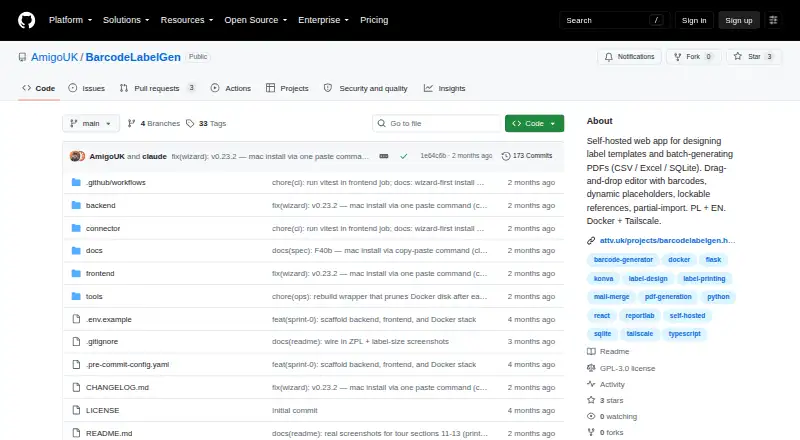
BarcodeLabelGen is a free, self-hosted web app for designing label templates and generating batches of PDFs from CSV, Excel or SQLite data.
What BarcodeLabelGen is
BarcodeLabelGen is a free, self-hosted web app for designing label templates and generating batches of PDFs from CSV, Excel or SQLite data. Its drag-and-drop editor handles text, text blocks, shapes, images, tables and barcodes, with tools for alignment, layers and object locking. Supported formats include EAN-13, EAN-14, GTIN, Code 128, GS1-128 and QR codes with checksum validation. Each batch can generate up to 1,000 labels. CSV and Excel uploads are limited to 10 MB, while SQLite uploads can be up to 50 MB; SQLite imports use read-only access and block modifying or multi-statement queries. The app imports and exports ZPL/ZPL II and exports TSPL/TSPL2 for TSC and desktop Toshiba printers. A local connector sends ZPL to compatible label printers over RAW TCP port 9100 and reports job status. Deployment uses Docker Compose, and the project recommends Tailscale Serve for production. Templates can be moved between instances as portable JSON files, while generated files are automatically deleted after 30 days. It includes administrator, editor and viewer roles.
Good
- Free software licensed under GPL-3.0.
- Generates batches of up to 1,000 labels.
- Imports CSV, Excel and SQLite data.
- Templates export as portable JSON files.
Watch out
- CSV and Excel uploads are limited to 10 MB.
- SQLite uploads are limited to 50 MB.
- Generated files are deleted after 30 days.
Who it suits
BarcodeLabelGen may suit office staff generating label batches from existing templates and template authors who need editor controls. It requires a self-hosted setup and supports CSV, Excel and SQLite data sources.
Verdict
BarcodeLabelGen offers template design and batch PDF generation for teams that can host the app themselves. Check its upload limits, printer formats and 30-day file retention against your workflow.
The facts
Each one read from BarcodeLabelGen's own pages, with the date it was checked.
What it does
- Access roles
- The app provides admin, editor, and viewer roles, with admins able to manage users and reset passwords.checked 3 Oct 2026
- Barcode formats
- Supported barcode formats include EAN-13, EAN-14, GTIN, Code 128, GS1-128, and QR codes.checked 2 Oct 2026
- Barcode types
- It supports EAN-13, EAN-14, GTIN, Code 128, GS1-128, and QR codes with checksum validation.checked 3 Oct 2026
- Batch limit
- A generation batch supports up to 1,000 labels.checked 3 Oct 2026
- Batch limits
- A batch can generate up to 1,000 labels; CSV and Excel uploads are limited to 10 MB, and SQLite uploads to 50 MB.checked 2 Oct 2026
- Data sources
- Series generation can merge template placeholders with CSV, Excel, or SQLite data.checked 3 Oct 2026
- Deployment
- The project provides Docker Compose deployment for a Linux host and recommends exposing it through Tailscale Serve.checked 3 Oct 2026
- Direct printing
- A local connector sends ZPL to compatible label printers over RAW TCP port 9100 and reports job status to the app.checked 2 Oct 2026
- Editor
- Its drag-and-drop editor supports text, images, barcodes, dynamic placeholders, alignment, and lockable objects.checked 3 Oct 2026
- Generated-file retention
- Generated files remain available for 30 days and are then deleted automatically.checked 2 Oct 2026
- Intended users
- The maker describes the app as designed for office staff generating batches from existing templates and authors who need editor control.checked 3 Oct 2026
- Language and help
- The interface supports Polish and English and includes in-app help and FAQ documentation.checked 3 Oct 2026
- License
- The repository identifies the project as GPL-3.0 licensed.checked 3 Oct 2026
- Live demo
- The maker describes a public demo with a private visitor workspace that resets after 30 minutes of inactivity.checked 3 Oct 2026
- Printer formats
- It can export ZPL/ZPL II and TSPL/TSPL2, and a local connector forwards ZPL to compatible label printers over RAW TCP 9100.checked 3 Oct 2026
- Purpose
- BarcodeLabelGen is a self-hosted web app for designing label templates and batch-generating PDFs.checked 3 Oct 2026
- Query safety
- Its SQLite import uses a read-only connection and a validator that blocks modifying or multi-statement queries.checked 3 Oct 2026
- Security
- SQLite imports use a read-only connection that accepts a single SELECT and blocks INSERT, UPDATE, DELETE, DROP, ATTACH, and PRAGMA.checked 2 Oct 2026
- Support
- The FAQ directs users to the help guide or to [email protected] for questions.checked 2 Oct 2026
- Template portability
- Templates export as self-contained .blg-template.json files that can be imported into another BarcodeLabelGen instance.checked 2 Oct 2026
- Templates
- Templates export as portable .blg-template.json files, and partial import can skip objects or override the size.checked 3 Oct 2026
Where it runs
- Connector platforms
- Prebuilt connector binaries are listed for Windows, macOS, and Linux, including Raspberry Pi variants.checked 2 Oct 2026
The full review of BarcodeLabelGen
BarcodeLabelGen is a self-hosted label-design and batch-generation app for teams working from spreadsheet or SQLite records. It is best suited to organizations that can host the service and want both reusable templates and control over who edits or uses them. Its blend of data-driven PDF output and printer connectivity is useful, though its batch and upload ceilings should shape the decision.
Overview
The workflow separates template authors from office staff who generate labels from existing designs. Administrator, editor, and viewer roles let teams distinguish management, editing, and viewing access; administrators can manage users and issue temporary password resets. The interface supports Polish and English, with in-app help and FAQ documentation.
A public demo provides a private visitor workspace that resets after 30 minutes of inactivity. The software is GPL-3.0 licensed. For a broader category comparison, see Barcode Labeling Software.
Key features
Template design and data
The drag-and-drop editor supports text, text blocks, shapes, images, tables, and barcodes, alongside alignment, layers, and object locking. That gives template authors practical layout control without requiring every batch operator to edit a design. Templates export as portable .blg-template.json files for use in another BarcodeLabelGen instance; partial import can skip objects or override the template size.
Series generation merges template placeholders with CSV, Excel, or SQLite data. A batch can contain up to 1,000 labels, with CSV and Excel uploads capped at 10 MB and SQLite uploads at 50 MB. Those limits suit routine office runs, but large datasets or higher-volume jobs may need to be split or handled elsewhere. SQLite imports use a read-only connection and accept a single SELECT, blocking modifying and multi-statement queries.
Barcodes and printing
Supported formats include EAN-13, EAN-14, GTIN, Code 128, GS1-128, and QR codes, with checksum validation. BarcodeLabelGen imports and exports ZPL/ZPL II and exports TSPL/TSPL2 for TSC and desktop Toshiba printers. A local connector can send ZPL to compatible label printers over RAW TCP port 9100 and report job status to the app. Prebuilt connector binaries cover Windows, macOS, and Linux, including Raspberry Pi variants; this makes direct printing possible, but requires a compatible printer and a locally running connector.
Hosting and retention
Deployment uses Docker Compose, and the project recommends exposing the service through Tailscale Serve for production. That approach favors teams able to manage their own hosting rather than readers seeking a turnkey cloud service. Generated files remain available for 30 days before automatic deletion, so teams needing longer access should plan to save outputs elsewhere.
Pricing
BarcodeLabelGen is free, with a free plan. Its GPL-3.0 license and self-hosted deployment make it a fit for teams willing to run and maintain the service; there is no paid tier described. The practical trade-offs are operational rather than tier-based: users must host it themselves, and batches, uploads, and generated-file retention have defined limits.
Platforms
The app is available as a web service for self-hosting on Linux, macOS, or Windows. The separate local printing connector has prebuilt binaries for Windows, macOS, and Linux, including Raspberry Pi variants.
Who it's for
BarcodeLabelGen is a strong fit for office teams that repeatedly produce labels from existing templates and for authors who need control over template editing. It is less suitable for users who want a hosted service without deployment responsibilities, need batches above 1,000 labels, or routinely import files larger than the upload caps.
Pros and cons
- Pros: CSV, Excel, and SQLite series generation turns existing records into repeatable label batches.
- Pros: Portable templates, role-based access, and partial import support shared design workflows without giving every operator editing responsibility.
- Pros: ZPL connectivity and TSPL export address both direct printing and printer-oriented file workflows.
- Cons: Self-hosting with Docker Compose adds deployment and maintenance work that a hosted option avoids.
- Cons: The 1,000-label batch ceiling and upload caps may constrain larger jobs.
- Cons: Automatic deletion after 30 days means generated files are not a long-term archive.
Alternatives
Choose PrintSpirit if a free cloud-based designer with cloud storage and sharing better suits a small-scale workflow. ZebraDesigner has a free Essentials edition for basic barcode label and tag design and printing with supported Zebra Link-OS printers. ZPLab is another free, self-hosted option for Linux, macOS, web, and Windows. LabelForge is free and open source under the MIT License, for users who prefer its desktop platforms. EASYLABEL offers a free Start plan with any Tharo printer, while its Silver plan costs $245, paid once for all available printers and Windows drivers with basic editing. Cloudlabel may suit teams seeking a paid hosted option: its STARTER plan costs €50 a month and includes three users, three labels, one print path, one printer model, file upload for data import, and unlimited print jobs. Brother P-touch Editor is a free choice for Windows users with select Brother P-touch and QL models. DYMO Connect is another free option.
Verdict
BarcodeLabelGen is worth choosing for teams that can self-host and want reusable, data-driven label templates with printer-oriented output. Its strongest case is the combination of batch generation, access roles, and direct ZPL printing; look elsewhere if you need a hosted workflow, larger batch capacity, or longer generated-file retention.
Alternatives to BarcodeLabelGen
- 1
PrintSpirit
Free planAndroidWebAPILinux8.2From $10 a month - 2
ZebraDesigner
Free planAndroidiOSWebWindows8.2$345 one-time - 3
Cloudlabels
Free planiOSWebAPI7.7From $19.90 a month - 4
Cloudlabel
Free planWebAPImacOSWindows7.6From €50 a month - 5
Brother P-touch Editor
Free planAndroidiOSAPImacOS7.4Free plan - 6
MarkMagic
WebAPILinuxmacOS7.4From $2,585 a year