
ZPLab
ZPLab is a free, open-source visual label designer and ZPL editor for ZPL-compatible printers.
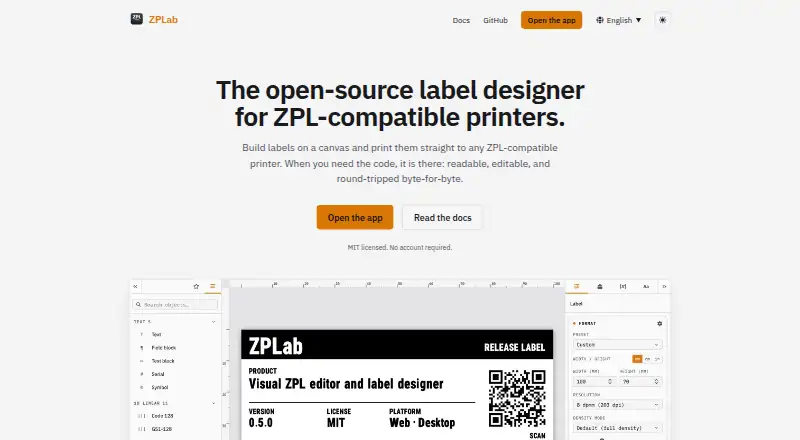
What ZPLab is
ZPLab is a free, open-source visual label designer and ZPL editor for ZPL-compatible printers. Arrange text, barcodes, shapes and images on a canvas, with generated ZPL updating as you work. Imported commands, whitespace and comments that are left untouched can be preserved byte-for-byte when exporting. The designer supports 28 barcode symbologies, and batch labels can use CSV columns as variables; desktop editions also support Excel worksheets and read-only SQLite, PostgreSQL and MySQL databases. Preview options include Labelary and, on desktop, connected printer firmware. Printing methods vary by platform and include network printing, Zebra Browser Print, the desktop spooler and USB. Desktop includes a local MCP server that can let an AI assistant read, build and validate labels or send a draft to the app. The browser and desktop interfaces offer 32 languages. ZPLab requires no account and is MIT licensed. Its self-hosted web build serves static files, with previews and printing running in the browser; server-side features are planned but unscheduled. The README says browser support models 125 of 225 ZPL II commands, with desktop covering two more through a connected printer.
Good
- Canvas edits update generated ZPL in real time.
- Preserves untouched imported ZPL content byte-for-byte.
- Supports 28 barcode symbologies.
- Batch labels can use CSV and desktop data sources.
- No account is required; MIT licensed.
Watch out
- Self-hosted web build serves static files only.
- Server-side self-hosting features have no scheduled release.
- Browser models 125 of 225 ZPL II commands.
Who it suits
It suits people designing and printing labels on ZPL-compatible printers, including those without ZPL knowledge. Desktop users can also connect supported data sources and use the local MCP server.
Verdict
ZPLab brings visual label layout and direct ZPL editing together, with batch data and several printing routes. Check its platform-specific limits if you plan to self-host or depend on broader ZPL command coverage.
The facts
Each one read from ZPLab's own pages, with the date it was checked.
What it does
- AI integration
- The desktop app includes a local MCP server that lets an AI assistant read, build, and validate labels and send a draft to the running app.checked 3 Oct 2026
- AI support
- The desktop app includes an MCP server that lets a local AI assistant read and edit the open label.checked 2 Oct 2026
- Barcodes
- ZPLab supports 28 barcode symbologies, including linear, 2D, postal, and GS1 variants.checked 3 Oct 2026
- Batch printing
- Users can map CSV columns to label variables and print one label per row; the desktop app also supports Excel worksheets and SQLite, PostgreSQL, or MySQL databases.checked 3 Oct 2026
- Data storage
- The web app stores labels in the browser; desktop API keys and database passwords are kept in the operating system keychain.checked 2 Oct 2026
- Integrations
- Previews can use Labelary, and printing can use network IP, Zebra Browser Print, the desktop print spooler, or USB, depending on platform.checked 2 Oct 2026
- Intended users
- The product is for designing and printing labels on ZPL-compatible printers, and its getting-started guide says it can be used without ZPL knowledge.checked 2 Oct 2026
- Languages
- The interface is available in 32 languages in the browser and desktop app.checked 3 Oct 2026
- License and access
- The maker says ZPLab is MIT licensed and requires no account.checked 3 Oct 2026
- Preview
- Label previews can be rendered through Labelary or, on desktop, by the connected printer’s firmware.checked 3 Oct 2026
- Printing methods
- The app can send labels over a network, through Zebra Browser Print in the browser, or through the system spooler or USB on desktop.checked 3 Oct 2026
- Privacy
- The repository README says the app sends no data to the developer.checked 3 Oct 2026
- Purpose
- ZPLab is an open-source visual label designer and ZPL editor for ZPL-compatible printers, available in a browser or as a desktop app.checked 3 Oct 2026
- Self-hosting limit
- The self-hosted web build serves static files, while printing and previews run in the browser; server-side features are described as planned but unscheduled.checked 2 Oct 2026
- Self-hosting limits
- The self-hosted container serves static files only; printing and previews run in the browser, and server-side features are planned but unscheduled.checked 3 Oct 2026
- Support
- The maker invites bug reports, questions, and pull requests through GitHub.checked 3 Oct 2026
- Visual design
- Users can place text, barcodes, shapes, and images on a canvas while ZPL updates in real time and remains editable.checked 3 Oct 2026
- ZPL coverage
- The repository README says 125 of 225 ZPL II commands are modeled in the browser, with desktop covering two more through a connected printer.checked 3 Oct 2026
- ZPL import
- Importing existing ZPL preserves untouched commands, whitespace, and comments byte-for-byte; editing regenerates only affected content in supported cases.checked 3 Oct 2026
Where it runs
- Platform downloads
- The site lists desktop downloads for Windows, macOS, and Linux, plus a self-hosted web build.checked 2 Oct 2026
- Platforms
- The maker offers downloads for Windows, macOS, Linux, and web self-hosting.checked 3 Oct 2026
Alternatives to ZPLab
- 1
PrintSpirit
Free planAndroidWebAPILinux8.2From $10 a month - 2

BarTender
AndroidiOSWebAPI7.2From $199 a year - 3

EASYLABEL
Free planWebWindows7.0$245 one-time - 4
TechnoRiverStudio
Free planWindows6.8$99 one-time - 5
Zint Barcode Generator
Free planAPILinuxmacOSSelf-hosted6.7Free plan - 6

Labeljoy
Windows6.4From $14.90 a month