Cloudlabel
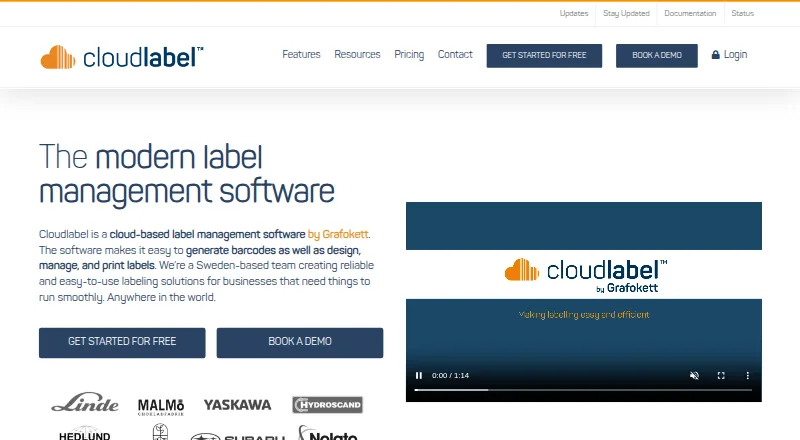
Cloudlabel is cloud-based software for creating, managing, and printing labels, as well as generating barcodes.
What Cloudlabel is
Cloudlabel is cloud-based software for creating, managing, and printing labels, as well as generating barcodes. Designs and associated data are stored centrally, so users can access and print them from different locations. The product lists native support for more than 3,000 printer models and can work with other printers through local drivers. Users can monitor print-order status in real time and connect ERP systems that produce outgoing data, including TXT or CSV files. A REST API for print jobs, articles, orders, printers, and groups is included with Standard and Business, and available as an add-on for Starter. Label versioning, approval flows, and checkout locks are among its quality-assurance tools; these are an add-on for Standard and included with Business. The free plan is limited to one user, one label, one print path, PDF-only output, and 100 print jobs per month. Paid plans listed include STARTER at €50 a month and STANDARD at €150 a month. Cloudlabel works on Mac and PC and is hosted in Microsoft Azure.
Good
- Central cloud access to label designs and data.
- Native support for more than 3,000 printer models.
- Real-time print-order status monitoring.
- ERP data imports and REST API options.
- Approval and versioning tools are available.
Watch out
- Free plan is limited to 100 print jobs per month.
- Free plan supports PDF printing only.
- REST API is an add-on for Starter.
Who it suits
The free plan may suit someone with very limited label-printing needs. Cloudlabel describes Starter for small businesses, Standard for SMBs, and Business for larger businesses.
Verdict
Cloudlabel combines centralized label design, printing, data connections, and print monitoring. Check the free plan's print and output limits, or compare paid tiers for broader requirements.
Plans and prices
From Cloudlabel's own pricing page, checked 15 Oct 2026.
| Plan | Price | What it gives you |
|---|---|---|
| FREE | Free | 1 user · 1 label · 1 print path · PDF-only printing · data-import upload file · 100 print jobs/month · € 0 month |
| STARTER | €50 a month | 3 users · 3 labels · 1 print path · 1 printer model · data-import upload plus integration add-on · unlimited print jobs · € 50 month |
| STANDARD | €150 a month | 6 users · 6 labels · 2 print paths · 3 printer models · data-import upload plus 1 integration client · unlimited print jobs · quality assurance add-on · € 150 month |
| BUSINESS | Priced on request | unlimited users · unlimited print jobs · quality assurance included · other limits listed as contact us · € -Contact us |
The facts
Each one read from Cloudlabel's own pages, with the date it was checked.
What it does
- Agent connectivity
- The documentation says the Agent supports proxy environments and USB-connected printers on Windows and Mac.checked 15 Oct 2026
- Agent file drops
- The Agent watches configured folders, processes structured flat files and creates print jobs from their contents.checked 15 Oct 2026
- Agent purpose
- Cloudlabel Agent connects the cloud service to printers on a local network and can supervise printer status and print jobs.checked 15 Oct 2026
- API
- The feature comparison lists a REST API for print jobs, articles, orders, printers, and groups, included in Standard and Business and available as an add-on for Starter.checked 28 Sep 2026
- API webhooks
- Grafokett's API article describes POST-based print-job creation and webhook feedback when an order is complete.checked 15 Oct 2026
- Azure hosting
- The product states that it is hosted in Microsoft Azure for high security and reliability.checked 15 Oct 2026
- Centralized access
- Label designs and data are stored centrally in the cloud for access and printing from anywhere.checked 28 Sep 2026
- Cloud storage
- Label designs and data are stored centrally in the cloud for access and printing from different locations.checked 15 Oct 2026
- Data automation
- ERP and other business-system data can flow into and out of Cloudlabel.checked 15 Oct 2026
- Documentation depth
- The public documentation page provides Windows and Mac Agent descriptions and download links, both showing version 1.10.3.checked 15 Oct 2026
- ERP integration
- Cloudlabel says it can integrate with ERP systems that can generate outgoing data, including through flat files such as TXT or CSV.checked 28 Sep 2026
- ERP integrations
- Cloudlabel says it can integrate with ERP systems that produce outgoing data, including Pyramid Business Studio, Visma Business and Microsoft Dynamics through flat files.checked 15 Oct 2026
- Intended users
- The pricing page describes Starter for small businesses, Standard for SMBs, and Business for larger businesses.checked 28 Sep 2026
- Label upload
- Users can import labels, control which fields are editable, lock or unlock fields, and create product articles.checked 15 Oct 2026
- Limit: paid-term entitlements
- The feature table says onboarding is included only with subscriptions longer than six months and label-designer software only with subscriptions longer than twelve months.checked 15 Oct 2026
- Limit: starter tier
- Starter limits the account to three included users, three labels, one print path and one printer model; integration is an add-on.checked 15 Oct 2026
The company
- Company identity
- LinkedIn describes Cloudlabel as a technology and internet company with 2–10 employees and a 2024 founding date.checked 15 Oct 2026
- Headquarters
- Ängelholm, Swedenchecked 28 Sep 2026
- Maker funding
- Prospeo reports that Grafokett has no recorded external funding.checked 15 Oct 2026
- Maker headquarters
- Prospeo lists Grafokett headquarters at Gasverksgatan 21, Ängelholm, Sweden.checked 15 Oct 2026
- Maker legal name
- Prospeo identifies Grafokett as a Swedish high-tech product-marking company founded in 1991.checked 15 Oct 2026
- Maker size
- Prospeo places Grafokett in the 1–10 employee range.checked 15 Oct 2026
Money
- Free plan limit
- The Free plan includes one user, one label, one print path, PDF-only printing, and 100 print jobs per month.checked 28 Sep 2026
- Limit: free tier
- The Free plan allows one user, one label, one print path, PDF-only output and 100 print jobs per month.checked 15 Oct 2026
The full review of Cloudlabel
Cloudlabel is cloud software for designing and printing labels and generating barcodes. It is best suited to businesses that need shared label workflows, printer monitoring, and links to operational data. Its centralized tools are compelling for team use, but the free plan is too restricted for ongoing production.
Overview
Cloudlabel keeps label designs and data in the cloud, allowing teams to access and print from different locations. Real-time print-order status gives users visibility into jobs, while support for more than 3,000 printer models and local drivers for others can accommodate varied printer fleets. Paid plans still cap included printer models, so organizations with many models should compare those limits with their needs.
Variable data, batch printing, and data import support repeatable workflows. ERP connections can use outgoing data, including TXT or CSV files, which is useful for businesses whose systems can produce those formats. The service is hosted in Microsoft Azure; its privacy policy says personal data is not transferred outside the European Economic Area and describes technical and organizational safeguards.
Key features
Shared printing and data workflows
Central storage makes label designs and data available across locations, a meaningful advantage over workflows tied to a single computer. Batch printing and variable data suit recurring jobs, and live order status helps teams follow print progress. Cloudlabel Agent downloads are available for Windows and Mac, while the product says it works on Mac and PC.
Integrations and quality controls
The REST API covers print jobs, articles, orders, printers, and groups. It is included with Standard and Business, but is an add-on for Starter, so the lowest paid tier may cost more for teams that need programmatic access. Quality assurance tools include versioning, approval flows, and checkout locks; they are an add-on for Standard and included with Business. Those controls matter for teams that need review steps before labels reach production.
Product experts can help tailor a solution and guide customers through getting started, which may help businesses configuring a connected workflow.
Pricing
The free plan includes one user, one label, one print path, file upload for data import, PDF-only printing, and 100 print jobs per month. It is a narrow way to try the workflow, not a practical option for regular production: the single label and monthly job cap arrive alongside the PDF restriction.
Starter costs €50 a month and includes three users, three labels, one print path, one printer model, file upload, and unlimited print jobs. Integration is an add-on. This is the entry paid tier for small businesses with modest label needs, but the single printer model and limited paths may constrain more varied operations.
Standard costs €150 a month and includes six users, six labels, two print paths, three printer models, file upload, one integration client, and unlimited print jobs. Quality assurance is an add-on. It is a better fit for SMBs that need more room for users, workflows, and printer models, though review controls and any additional integrations raise the cost.
Business has custom pricing, unlimited users and print jobs, and quality assurance included; contact Cloudlabel for other limits. Larger businesses needing broad access or built-in review controls should consider it, while those with simpler requirements may find its custom scope unnecessary.
Platforms
Cloudlabel is cloud-deployed and supports web, API, macOS, and Windows. The Windows and Mac Agent downloads give desktop users a route to connect to the service.
Who it's for
Cloudlabel is a strong fit for small businesses through larger organizations that need shared label design, data-driven printing, and visibility into print jobs. Its value rises when teams use ERP-generated data, multiple locations, or formal label review. Solo users or occasional label makers may find the free plan's one-label, one-user, PDF-only limits too restrictive, while businesses seeking a simple standalone barcode tool may not need its broader workflow.
Pros and cons
- Pros: Centralized designs and data support access across locations, rather than tying work to one computer.
- Pros: Support for more than 3,000 printer models plus local drivers can accommodate varied equipment.
- Pros: API access, ERP data workflows, and optional or included quality controls support connected, reviewed processes as plans scale.
- Cons: The free plan allows only one user and label, PDF output, and 100 monthly jobs, limiting production use.
- Cons: Starter's single printer model and add-on integrations can make it less suitable for teams with varied equipment or connected systems.
- Cons: Standard's quality assurance is an extra cost, while Business pricing and several of its limits require direct discussion.
Alternatives
Barcode Labeling Software is a useful category starting point for comparing options.
- PrintSpirit is worth considering for small-scale cloud design and batch printing, with a free edition that includes cloud storage and sharing.
- ZebraDesigner is a more focused choice for basic barcode label and tag design when using supported Zebra Link-OS printers.
- Brother P-touch Editor suits users seeking free Windows label software for select Brother P-touch and QL models.
- EASYLABEL may suit Tharo printer owners who want a free starting tier or Windows software with basic editing for a one-time fee.
- OnBarcode Barcode Generator is another option to compare.
- Zint Barcode Generator is a free, open-source barcode generation project for users who need barcode generation rather than Cloudlabel's broader label workflow.
- Cloudlabels offers a free plan with monthly label and item limits, making it another option to compare for a smaller workflow.
- LabelForge is free and open source under the MIT License, for users who prefer that model.
Verdict
Choose Cloudlabel if your business needs centrally managed labels, connected data, broad printer support, and monitoring in one cloud workflow. Its clearest advantage is bringing those team processes together, with stronger API and quality controls as plans expand. Look elsewhere if you need unrestricted free production or a lightweight, device-specific label utility: the free tier's caps are severe, and paid plans add cost as integration and review requirements grow.
Getting started
- Open the Cloudlabel website.
- Choose the Free, Starter, Standard, or Business plan.
- Install Cloudlabel Agent on Windows or Mac when local computer access is needed.
- Connect a supported printer or use a local driver for another printer.
- Import data through file upload or connect an ERP system that supplies outgoing data.
- Design labels, generate barcodes, and send print jobs.
Limits worth knowing
The Free plan includes one user, one label, one print path, PDF-only printing, and 100 print jobs per month. Starter includes three users, three labels, one print path, one printer model, and unlimited print jobs; integration is an add-on.
Questions
Does Cloudlabel have a free plan?
Yes. The Free plan includes one user, one label, one print path, PDF-only printing, file upload for data import, and 100 print jobs per month.
Which platforms does Cloudlabel support?
Cloudlabel is available through its web service and supports API, macOS, and Windows. Cloudlabel Agent downloads are offered for Windows and Mac.
Does Cloudlabel provide an API?
Yes. Its REST API covers print jobs, articles, orders, printers, and groups. It is included in Standard and Business and available as a Starter add-on.
Can Cloudlabel connect to ERP systems?
Yes. It can integrate with ERP systems that generate outgoing data, including TXT or CSV flat files.
Which quality-assurance tools are available?
Label versioning, approval flows, checkout locks, and related review tools are available as a Standard add-on and included with Business.
Alternatives to Cloudlabel
- 1
PrintSpirit
Free planAndroidWebAPILinux8.2From $10 a month - 2
ZebraDesigner
Free planAndroidiOSWebWindows8.2$345 one-time - 3
Cloudlabels
Free planiOSWebAPI7.7From $19.90 a month - 4
Brother P-touch Editor
Free planAndroidiOSAPImacOS7.4Free plan - 5
MarkMagic
WebAPILinuxmacOS7.4From $2,585 a year - 6
Avidemux
Free planOpen sourceWebLinuxmacOSWindows7.3Free plan