Backend.AI
Backend.AI is an AI infrastructure platform for building, training, and serving models, as well as running parallel computing jobs.
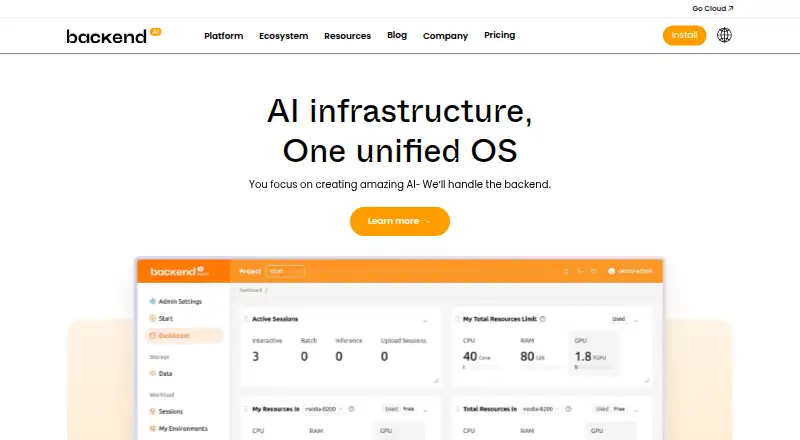
What Backend.AI is
Backend.AI is an AI infrastructure platform for building, training, and serving models, as well as running parallel computing jobs. Its container-level GPU virtualization allows multiple users to share a physical GPU through fractional allocation. The Sokovan scheduler supports multi-node, multi-tenant workloads and policy-based resource management, while the hardware abstraction layer supports more than 12 accelerator types. Backend.AI can run on-premises, in public cloud environments, or in a hybrid setup; its site says installation, model deployment, and updates can operate without internet access in air-gapped networks. The browser-based WebUI provides GPU cluster management, resource monitoring, session management, and policy-based allocation. Listed cloud environments include AWS, GCP, Azure, and OCI, and named storage integrations include VAST, WEKA, Pure Storage, and IBM Storage Scale. The free open-source plan is for home users installing on their own hardware. Try-out access is a limited-time cloud service trial, while enterprise plans require a quote. Production guidance says compute nodes should be network-isolated with restricted inbound access.
Good
- Shares physical GPUs through fractional allocation
- Supports more than 12 accelerator types
- Offers on-premises, cloud, and hybrid deployment
- WebUI includes monitoring and session management
- Free open-source plan for home hardware
Watch out
- Enterprise plan pricing requires a quote
- Free open-source plan is for home users
- Production guidance calls for isolated compute nodes
Who it suits
Backend.AI suits teams or institutions running GPU workloads, from single-GPU home use to larger clusters. It also fits organizations seeking on-premises, cloud, hybrid, or air-gapped deployment options.
Verdict
Backend.AI combines GPU sharing, workload scheduling, and deployment flexibility for AI and parallel computing. Consider the intended environment and the network-isolation guidance when assessing a production setup.
Plans and prices
From Backend.AI's own pricing page, checked 30 Sep 2026.
| Plan | Price | What it gives you |
|---|---|---|
| Open-source | Free | For home users · install and use on your own hardware |
| Try-out | Free | Small cloud service trial · available for a limited time · Request trial |
| Enterprise (cloud) | Priced on request | Lablup cloud resources · user and group management · resource allocation · Request a quote |
| Enterprise (on-premises) | Priced on request | Enterprise-specific features · GPU allocation across multiple organizations and users · Request a quote |
The facts
Each one read from Backend.AI's own pages, with the date it was checked.
What it does
- Accelerators
- The platform says its hardware abstraction layer supports more than 12 accelerator types, including NVIDIA, AMD, Intel, Rebellions, and FuriosaAI products.checked 30 Sep 2026
- Cloud providers
- The site lists AWS, GCP, Azure, and OCI as public cloud environments for GPU instances.checked 30 Sep 2026
- Deployment
- Backend.AI can be deployed on-premises, in public cloud environments, or in a hybrid setup.checked 30 Sep 2026
- GPU sharing
- Its container-level GPU virtualization lets multiple users share a physical GPU through fractional GPU allocation.checked 30 Sep 2026
- Installation
- The installation page offers operating-system and architecture selectors for downloading installation files.checked 30 Sep 2026
- Intended users
- Lablup describes its audience as ranging from small teams with a single GPU to institutions running clusters of thousands.checked 30 Sep 2026
- Orchestration
- The Sokovan scheduler supports multi-node, multi-tenant workloads and policy-based resource management.checked 30 Sep 2026
- Purpose
- Backend.AI is an AI infrastructure platform for building, training, and serving models and running parallel computing jobs.checked 30 Sep 2026
- Security architecture
- Backend.AI's documentation says compute nodes should be network-isolated with restricted inbound access in production deployments.checked 30 Sep 2026
- Storage integrations
- Named storage backends include VAST, WEKA, Pure Storage, and IBM Storage Scale, with NVIDIA GPUDirect Storage support.checked 30 Sep 2026
- Support
- Lablup invites organizations to contact its team for help planning AI clusters and scaling production workloads.checked 30 Sep 2026
- Web interface
- Backend.AI WebUI provides browser-based GPU cluster management, resource monitoring, session management, and policy-based allocation.checked 30 Sep 2026
Where it runs
- Air-gapped use
- The site says installation, model deployment, and updates can operate without internet connectivity in air-gapped networks.checked 30 Sep 2026
The company
- Founded
- 2015checked 23 Sep 2026
- Headquarters
- Seoul, South Koreachecked 23 Sep 2026
The full review of Backend.AI
Backend.AI is an infrastructure platform for building, training, and serving AI models, as well as running parallel-computing jobs. It is best suited to teams and institutions that need to share accelerators and schedule workloads across users or clusters. Its strongest case is flexible GPU management; its production network-isolation requirements make it a poor fit for anyone seeking a low-maintenance app.
Overview
Container-level GPU virtualization lets multiple users receive fractional allocations from one physical GPU. That can make shared hardware more useful than dedicating a whole accelerator to each user, particularly when workloads compete for capacity. Quota controls and utilization metrics give administrators tools to manage and monitor allocation, though this remains infrastructure to operate rather than a simple end-user utility.
Sokovan supports multi-node, multi-tenant workloads and policy-based resource management. That capability is most valuable where teams need to coordinate jobs and access across a cluster; a single-user setup may not need this level of orchestration. Production deployments should isolate compute nodes from the network and restrict inbound access, an important operational requirement for organizations planning rollout.
Key features
- Accelerator sharing: Fractional GPU allocation can let several users share physical hardware, while support for more than 12 accelerator types—including NVIDIA, AMD, Intel, Rebellions, and FuriosaAI products—offers flexibility across hardware environments.
- Scheduling and management: Sokovan handles multi-node and multi-tenant workloads. The browser-based WebUI provides cluster management, resource monitoring, session management, and policy-based allocation, giving administrators a central interface for these tasks.
- Storage integrations: Named backends include VAST, WEKA, Pure Storage, and IBM Storage Scale, alongside NVIDIA GPUDirect Storage support. This is useful for organizations using those storage systems alongside GPU workloads.
- Deployment options: Organizations can deploy on-premises, in public cloud environments, or in a hybrid setup. Backend.AI supports GPU instances on AWS, GCP, Azure, and OCI, and its air-gapped operation supports installation, model deployment, and updates without internet connectivity.
- Installation and support: Installation downloads offer operating-system and architecture selectors. Lablup also invites organizations to discuss AI cluster planning and scaling production workloads with its team.
Pricing
Backend.AI uses a freemium model, with two free entry points and quote-based enterprise options. The free plans suit different needs, but neither is a substitute for the organization-focused allocation and management offerings.
- Open-source — free: Install and use it on your own hardware. This is the clearest fit for home users who can provide and manage their own system.
- Try-out — free: A small cloud service trial, available for a limited time and obtained by requesting a trial. Its temporary access makes it useful for an initial evaluation, not an ongoing cloud setup.
- Enterprise (on-premises) — custom pricing: Request a quote for enterprise-specific features, including GPU allocation across multiple organizations and users. This is aimed at institutions sharing on-premises resources at organizational scale.
- Enterprise (cloud) — custom pricing: Request a quote for Lablup cloud resources, user and group management, and resource allocation. It fits organizations seeking those managed cloud resources rather than installing solely on their own hardware.
Platforms
Backend.AI supports API, Linux, self-hosted, and web use. Kubernetes support, cloud GPU support, hybrid deployment, and both workload-scheduling modes suit infrastructure teams working across environments; browser access also gives administrators a WebUI for cluster and session management.
Who it's for
Backend.AI is a strong candidate for AI teams, research groups, and institutions that need to allocate shared accelerators, schedule parallel jobs, or manage multi-tenant clusters. Its intended scale ranges from a small team with one GPU to institutions running clusters of thousands. The self-hosted free plan lowers the entry barrier for home users, but production operators should be prepared to isolate compute nodes and manage inbound access. Users seeking a lightweight app for an individual device should look elsewhere.
Pros and cons
- Pro: Fractional GPU allocation can let multiple users share a physical accelerator instead of reserving one GPU per person.
- Pro: Multi-node, multi-tenant scheduling and policy controls address cluster resource management, not just individual job execution.
- Pro: On-premises, cloud, hybrid, and air-gapped deployment options cover a broad range of operating environments.
- Con: Production guidance requires network-isolated compute nodes with restricted inbound access, adding deployment and security work.
- Con: Enterprise allocation features and Lablup cloud resources require a quote, so their cost cannot be assessed from a fixed plan price.
- Con: The free cloud trial is limited in duration, while the continuing free plan requires users to install and operate their own hardware.
Alternatives
For a broader comparison, see the GPU Cluster Management Software list.
- dstack is a free alternative with a self-hosted open-source orchestration plan; choose it if that stack suits your setup, or consider its GPU marketplace for pay-as-you-go GPU usage.
- GPUStack offers a free, open-source GPU cluster manager, a direct option for readers seeking cluster management without Backend.AI's quote-based enterprise plans.
- NVIDIA Mission Control is a paid, enterprise-oriented alternative requiring a license entitlement for access to its artifacts; choose it if that licensing and sales route fits your organization.
- HAMi is free, open-source GPU virtualization middleware for AI workloads on Kubernetes; choose it if that narrower Kubernetes-focused role matches your needs.
- NVIDIA Run:ai is a paid alternative for Linux and web.
- Kueue is a free, open-source Kubernetes project; consider it if you want that project rather than a broader infrastructure platform.
- SkyPilot has an open-source version linked by its site; consider it if you are looking for that open-source option.
- HTCondor is a free alternative available across API, Linux, macOS, self-hosted, web, and Windows.
Verdict
Choose Backend.AI if your team needs fractional GPU sharing, policy-based scheduling, and deployment flexibility across a cluster or multiple environments. The self-hosted free plan is a practical starting point for users with their own hardware, while enterprise allocation and cloud resources are quote-based. Look elsewhere if you need a low-maintenance individual app, or if production network-isolation work and custom-priced plans do not suit your organization.
Getting started
- Open the Backend.AI website
- Choose the Open-source plan for installation on your own hardware or request a Try-out
- Use the installation page's operating-system and architecture selectors to download files
- Deploy on premises, in a listed public cloud, or in a hybrid setup
- Configure GPU resources and manage sessions through the WebUI
Limits worth knowing
The Open-source plan is free for home users but requires installation and use on their own hardware. The Try-out plan is a free cloud trial available for a limited time; enterprise plans have no listed price and require a quote.
Questions
What does Backend.AI do?
It provides infrastructure for building, training, and serving models and for running parallel computing jobs.
Is there a free plan?
Yes. Open-source costs nothing for home users on their own hardware. A Try-out plan also costs nothing and is a limited-time small cloud service trial.
Which deployment models are supported?
Backend.AI supports on-premises, public cloud, and hybrid deployment, including air-gapped operation according to its site.
Which cloud providers are listed?
The listed public cloud environments are AWS, GCP, Azure, and OCI.
Does it support Kubernetes and quotas?
Yes. Kubernetes support and quota controls are listed, along with GPU utilization metrics.
What are the enterprise plans?
Enterprise (on-premises) and Enterprise (cloud) plans require a quote. They cover organization and user GPU allocation or Lablup cloud resources with user, group, and resource management.