
Archivision AI
Archivision AI creates photorealistic architectural renders from sketches, blueprints, floor plans, and other design images.
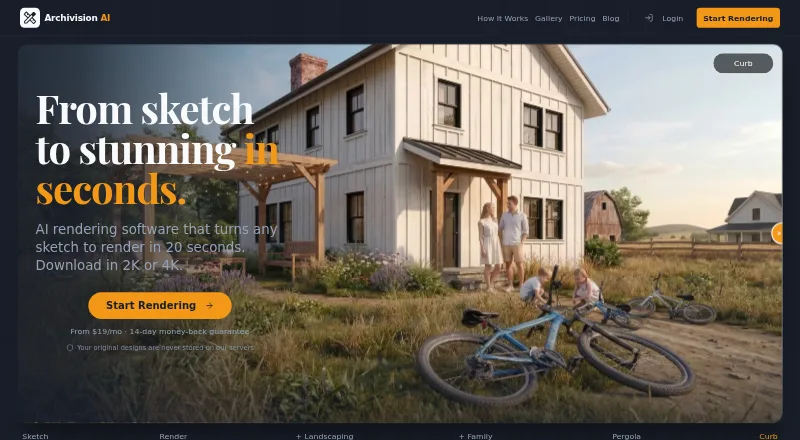
What Archivision AI is
Archivision AI creates photorealistic architectural renders from sketches, blueprints, floor plans, and other design images. It is available through the web and an API, and the maker positions it for architects exploring concepts and aligning with clients. The site says an average render takes about 20 seconds and offers 24 architectural styles, with access depending on plan. Region editing regenerates a selected area of an image, while Perspective Generation creates additional interior Room View perspectives from an existing render. SketchUp workflows use exported PNG or JPG views, screenshots, or PDF plan and elevation exports; no SketchUp plugin or extension is required. Exports reach 4K, with 2K downloads on Starter and 4K on Pro. Each render, refinement, region edit, or added perspective uses one credit. Credits reset monthly without rollover. Original designs are stated not to be stored on Archivision's servers.
Good
- Accepts sketches, plans, and design images
- Average render takes about 20 seconds
- Region editing can regenerate selected areas
- Exports available up to 4K
- API access on Studio
Watch out
- No free trial
- Monthly credits do not roll over
- Generated backgrounds can contain incoherent details
Who it suits
Archivision AI suits architects who need quick concept renders from sketches, plans, or exported design views. It also fits users wanting editable regions, extra interior perspectives, and API access.
Verdict
Archivision AI focuses on architectural visualization from common design inputs without requiring a SketchUp extension. Its credit system, plan-based style access, and acknowledged background-detail issues are important considerations.
Plans and prices
From Archivision AI's own pricing page, checked 28 Sep 2026.
| Plan | Price | What it gives you |
|---|---|---|
| Starter | $19 a month | 80 credits · 10 projects · 8 styles · 2K downloads · $19 a month |
| Pro | $39 a month | 200 credits · 25 projects · all 24 styles · Make It Real hyperrealism · 4K downloads · $39 a month |
| Studio | $79 a month | 500 credits · 60 projects · priority rendering · API access · $79 a month |
The facts
Each one read from Archivision AI's own pages, with the date it was checked.
What it does
- Additional perspectives
- Perspective Generation creates additional interior Room View perspectives from an existing render.checked 28 Sep 2026
- Architectural styles
- The product offers 24 architectural styles, with plan access varying by tier.checked 28 Sep 2026
- Credit limits
- Credits reset each month and do not roll over, and the maker says users are notified as they approach their limit.checked 28 Sep 2026
- Credit usage
- One credit covers a generation step such as a render, refinement, region edit, or additional perspective; a typical project uses six to eight credits.checked 28 Sep 2026
- Design privacy
- The site states that users' original designs are never stored on Archivision's servers.checked 28 Sep 2026
- Image editing
- Region editing lets users select an area of a returned image and regenerate that region.checked 28 Sep 2026
- Inputs and uploads
- For SketchUp workflows, users upload an exported view or screenshot as PNG or JPG; a PDF export of a plan or elevation also works.checked 28 Sep 2026
- Intended users
- The maker describes Archivision as built for architects and positions it for concept exploration and client alignment.checked 28 Sep 2026
- Known fidelity limitation
- The maker acknowledges that generated renders can contain incoherent background details and says region editing can correct an affected area.checked 28 Sep 2026
- Money-back guarantee
- Every plan comes with a 14-day money-back guarantee; the maker says it is not a free trial.checked 28 Sep 2026
- Output resolution
- The site lists exports up to 4K, with 2K downloads on Starter and 4K downloads on Pro.checked 28 Sep 2026
- Purpose
- Archivision AI creates photorealistic architectural renders from sketches, blueprints, floor plans, and other design images.checked 28 Sep 2026
- Render speed
- The site says the average render takes about 20 seconds.checked 28 Sep 2026
- SketchUp workflow
- Archivision works from exported images and requires no SketchUp plugin or extension.checked 28 Sep 2026
- Support
- The site lists support contact at [email protected].checked 28 Sep 2026
Alternatives to Archivision AI
- 1

Fashion Diffusion
AndroidiOSWebAPI7.7From $119.99 a year - 2

Vizcom
Free planWebmacOSWindows7.7From $49 a month - 3
Neolocus AI
Free planAndroidWeb7.5From $39 a month - 4
Gendo
Free planWeb7.4From £79 a month - 5

Raspberry AI Prints & Patterns
Free planWebAPI7.4From $49 a month - 6
FLORA Fashion Studio
Free planWebAPI7.3From $18 a month