
Animdock
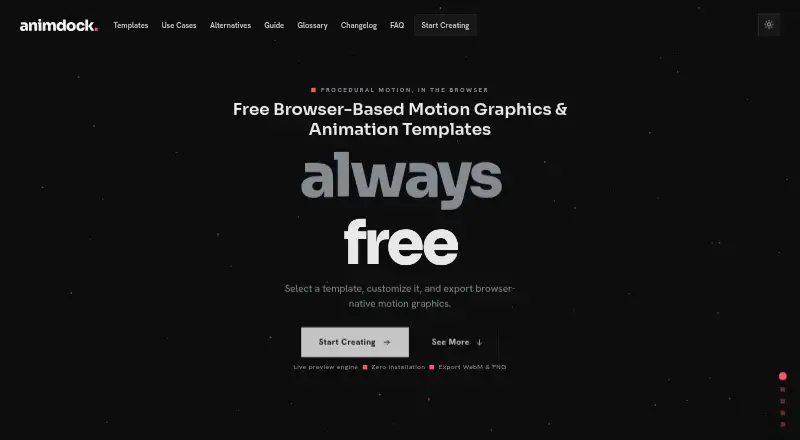
Animdock is a free browser-based editor for making procedural motion graphics and animations from templates.
What Animdock is
Animdock is a free browser-based editor for making procedural motion graphics and animations from templates. Users choose a template, adjust its parameters, preview it live, and export a WebM video or PNG still image. Its catalog includes particle effects, kinetic typography, animated backgrounds, ASCII and starfield animation, orbit effects, and logo animation. Templates use the HTML Canvas API, and rendering takes place locally in the browser. No account is required for the core experience, and login is optional; the editor can also work locally and offline without login. The Free plan costs nothing, has no subscription fees or registration requirement, and includes WebM and PNG exports. Generated graphics may be used in personal projects and commercial client work, with no plugin required. Animdock describes its intended users as motion design professionals, YouTubers, social media creators, and designers seeking quick motion assets. It runs in a web browser, but mobile is not yet supported and computer use is recommended. Google sign-in collects an email address and basic profile information for authentication and service functions. The privacy policy says Animdock does not sell, rent, or share personal data with third parties for marketing purposes.
Good
- Core experience requires no account.
- Rendering happens locally in the browser.
- Exports WebM video and PNG images.
- Commercial client work is permitted.
- Editor can work offline without login.
Watch out
- Mobile is not yet supported.
- Google sign-in collects email and profile information.
- The listed integration is Google Auth for sign-in.
Who it suits
Animdock may suit motion design professionals, YouTubers, social media creators, and designers who want template-based motion assets. It is intended for computer use rather than mobile devices.
Verdict
Animdock offers template-based motion graphics with local browser rendering and two export formats. Its lack of mobile support makes it a computer-focused option.
Plans and prices
From Animdock's own pricing page, checked 7 Oct 2026.
| Plan | Price | What it gives you |
|---|---|---|
| Free | Free | No subscription fees · no registration required · WebM and PNG exports |
The facts
Each one read from Animdock's own pages, with the date it was checked.
What it does
- Accounts
- No account is required for the core experience, and login is optional.checked 7 Oct 2026
- Audience
- Animdock describes its intended users as motion design professionals, YouTubers, social media creators, and designers seeking quick motion assets.checked 7 Oct 2026
- Commercial use
- The FAQ says generated motion graphics may be used in personal projects and commercial client work.checked 7 Oct 2026
- Data deletion
- Users can request account and associated data deletion by contacting Animdock or use the platform's clear data options.checked 7 Oct 2026
- Data handling
- The privacy policy says Animdock does not sell, rent, or share personal data with third parties for marketing purposes.checked 7 Oct 2026
- Exports
- The FAQ lists WebM video and PNG still image export formats.checked 7 Oct 2026
- Integrations
- Google Auth is listed for sign-in; the maker page does not state other integrations.checked 7 Oct 2026
- Local use
- The about page says the editor can work locally and offline without login.checked 7 Oct 2026
- Privacy
- The privacy policy says Google sign-in collects an email address and basic profile information for authentication and service functions.checked 7 Oct 2026
- Purpose
- Animdock provides browser based procedural motion graphics and animation templates.checked 7 Oct 2026
- Rendering
- Templates run using the HTML Canvas API, with rendering performed locally in the browser.checked 7 Oct 2026
- Support
- The about page lists [email protected] as the current contact address.checked 7 Oct 2026
- Templates
- The template catalog includes procedural effects and text animations such as particle effects, kinetic typography, and animated backgrounds.checked 7 Oct 2026
- Workflow
- Users select a template, adjust its parameters, preview it live, and export the result.checked 7 Oct 2026
Where it runs
- Device support
- The editor notice says mobile is not yet supported and recommends using a computer.checked 7 Oct 2026
The full review of Animdock
Animdock is a browser editor for creating motion graphics from procedural templates. It is best suited to designers, video creators, and clients who need adaptable effects quickly rather than a full production environment. The no-cost, no-registration workflow is its strongest advantage, while computer-only use narrows its audience.
Overview
Animdock centers the process on selecting a template, changing its parameters, previewing the result live, and exporting the finished asset. That focused sequence reduces the work involved in producing a repeatable visual treatment, making it a sensible choice for social posts, video inserts, channel graphics, and client deliverables. It is less compelling for users seeking a broad animation system with a stated integration ecosystem.
Rendering uses the HTML Canvas API locally in the browser. The editor can therefore work offline without a login, and the core experience does not require an account. Local rendering also keeps the workflow tied to the browser and the available templates rather than to a cloud project system.
Key features
The catalog includes particle effects, kinetic typography, animated backgrounds, ASCII animation, starfield animation, orbit animation, and logo animation. This selection covers both atmospheric backgrounds and text-led treatments, giving creators several starting points for quick motion assets. Parameter controls and live preview are useful when adapting a template, but the template-led design is not a substitute for a general-purpose animation workflow.
Exports are WebM video and PNG still images. WebM handles animated output, while PNG provides a static frame for designs that need an image rather than motion. The FAQ permits generated graphics in personal projects and commercial client work, so freelancers and client-facing creators can use the results commercially without moving to a paid tier. No plugin is required.
Login is optional. Google sign-in collects an email address and basic profile information for authentication and service functions. Animdock says it does not sell, rent, or share personal data with third parties for marketing. Account holders can request deletion by contacting the service or use its clear-data options. Support is provided through [email protected].
Pricing
The sole plan is Free at free. It has no subscription fees, requires no registration, and includes WebM and PNG exports. There is no free trial because the product is already free, and there are no separate paid tiers or stated quotas to weigh against the free experience.
This plan fits occasional creators, freelancers, and teams that need template-based assets without recurring costs. It gives up the possibility of paid-plan features because none are offered; the practical limitations are the browser workflow, the two stated export formats, and the absence of mobile support rather than a subscription cap.
Platforms
Animdock runs in a web browser and is intended for a computer. The editor notice says mobile is not yet supported, so phone and tablet users should choose another tool. Offline local operation is a useful advantage for computer users who want to work without an account or continuous service connection.
Who it's for
Motion design professionals can use it for quick procedural treatments, while YouTubers and social media creators get ready-made effects and animated text without a subscription. Designers who need a logo animation, background, or still export also benefit from the focused catalog. It is a poor fit for mobile-first workflows or anyone whose project depends on integrations beyond browser templates.
Pros and cons
Pros
- Free with no registration required: the complete stated plan costs nothing and avoids subscription commitments.
- Local and offline-capable rendering: HTML Canvas rendering lets the editor work locally without a login.
- Commercial use permitted: generated graphics can be used in client work as well as personal projects.
- Useful template range: particles, kinetic type, backgrounds, ASCII, starfield, orbit, and logo animation cover varied quick-use cases.
- Motion and still output: WebM and PNG exports support animated deliverables and static graphics.
Cons
- No mobile support: the editor is restricted to computer-based use.
- Template-centered workflow: users needing a broader animation or integration environment should look elsewhere.
- Only two stated export formats: projects requiring other delivery formats may need another tool.
Alternatives
Browse Motion Graphics Template Libraries when you want a wider category-level selection.
Choose Allavio for macOS, Windows, and web access, with free sample titles and selected templates alongside its freemium model. ProductionCrate is the better pick for extension, iOS, macOS, web, and Windows coverage or a larger library under its $49 a month PRO plan, though its free tier limits downloads to five per day.
Jitter suits web users who need defined 720p/30fps free exports or 1080p/60fps Pro output. Pick Pixel Film Studios for macOS/web assets and unlimited downloads in its paid monthly offering. MrAlexTech is a macOS/Windows alternative with a free MagicAnimate version and an optional trial. Motion Master Templates is for Final Cut Pro users seeking 114 free templates. Mixkit offers unlimited free downloads without attribution or sign-up. Choose Adobe Stock when you need a paid stock-asset catalog spanning Android, iOS, web, and API access.
Verdict
Animdock is an easy recommendation for computer-based creators who want adjustable procedural effects at no cost, with local rendering, offline operation, and commercial-use permission. Look elsewhere if you need mobile editing, additional export formats, or a larger production and integration ecosystem.
Alternatives to Animdock
- 1

ProductionCrate
Free planiOSWebExtensionmacOS8.0From $9 a month - 2
Motion Array
Free planWebExtensionmacOSWindows7.7From $10.99 a month - 3

Allavio
Free planWebmacOSWindows7.6$1.99 one-time - 4
Adobe Stock
AndroidiOSWebAPI7.4 - 5
Pixel Film Studios
Free planWebmacOS7.4Free plan - 6

Storyblocks
WebAPIExtensionmacOS7.1From $21 a month