Angular CLI
Angular CLI is a free, open-source command-line tool for building and maintaining Angular applications.
What Angular CLI is
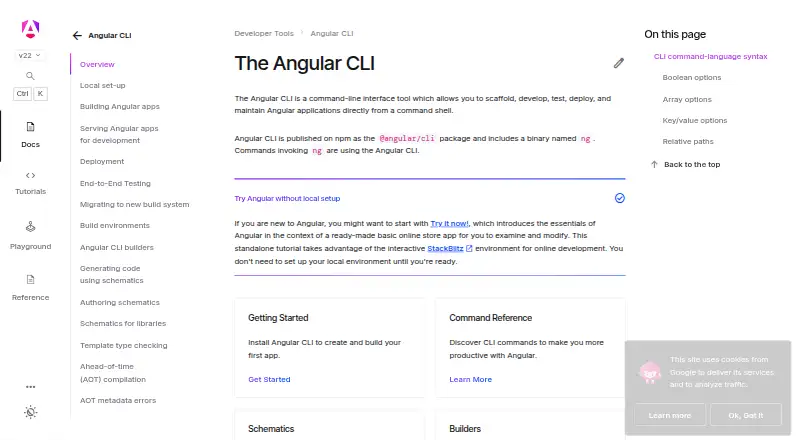
Angular CLI is a free, open-source command-line tool for building and maintaining Angular applications. Distributed on npm as @angular/cli, it provides the ng command for creating projects, developing, testing, building, and deploying them. The ng new command creates a workspace and starter application; a workspace can contain multiple applications and libraries. During development, ng serve watches files, rebuilds the app, and reloads changes. The CLI can compile, optimize, bundle, and minify projects, with documented builders using esbuild or webpack. Schematics automate generating and changing source files. The ng deploy command can run third-party builders for Firebase Hosting, Vercel, Netlify, GitHub Pages, and Amazon Cloud S3. It also supports end-to-end test builders, Tailwind CSS setup, and an MCP server with tools for code generation, workspace analysis, builds, and tests. Installation is documented for npm, pnpm, Yarn, and Bun. Local installation and use require Node.js on an active or maintenance LTS release. Angular major releases are typically supported for 24 months, including 12 months of active support and 12 months of LTS.
Good
- Creates workspaces with multiple applications and libraries.
- Development server watches files and reloads changes.
- Schematics generate and modify source files.
- Deployment builders connect to several hosting services.
- Free and open source.
Watch out
- Local use requires Node.js.
- Angular recommends an active or maintenance LTS Node.js release.
- Angular major releases typically receive 24 months of support.
Who it suits
Angular CLI suits developers creating and maintaining Angular applications who are comfortable with command-line tools and shells. Familiarity with JavaScript, HTML, and CSS is recommended; TypeScript knowledge is helpful but not required.
Verdict
Angular CLI covers project creation, development, builds, testing, and deployment from the command line. Local use requires Node.js, while Angular major releases typically receive 24 months of support.
Plans and prices
From Angular CLI's own pricing page, checked 5 Oct 2026.
| Plan | Price | What it gives you |
|---|---|---|
| Angular CLI | Free | No paid plans or usage limits stated on the opened official pages |
The facts
Each one read from Angular CLI's own pages, with the date it was checked.
What it does
- AI integrations
- The CLI includes an MCP server for AI assistants, with tools for code generation, workspace analysis, builds, and tests; its setup guide names Cursor, Antigravity, and JetBrains AI.checked 4 Oct 2026
- Builds
- The ng build command compiles TypeScript to JavaScript and can optimize, bundle, and minify output.checked 5 Oct 2026
- Build tools
- The documented build targets include builders using esbuild, webpack, and Angular Package Format tooling.checked 5 Oct 2026
- Code generation
- Schematics automate generating and modifying application source files.checked 4 Oct 2026
- Deployment integrations
- The ng deploy command runs a project deployment builder, with documented options including Firebase, Vercel, Netlify, GitHub Pages, and Amazon Cloud S3.checked 5 Oct 2026
- Development server
- The ng serve command starts a development server that rebuilds and live reloads after file changes.checked 5 Oct 2026
- Distribution
- It is published on npm as the @angular/cli package and includes the ng binary.checked 5 Oct 2026
- End-to-end testing
- The CLI supports e2e builders, with setup examples for Cypress, Nightwatch, WebdriverIO, Playwright, and Puppeteer.checked 5 Oct 2026
- Install
- Angular documents global installation using npm, pnpm, Yarn, or Bun.checked 4 Oct 2026
- Notable limit
- Angular says the CLI requires Node.js for local installation and execution; its browser tutorial offers an online introduction without local setup.checked 4 Oct 2026
- Package managers
- The CLI installation guide gives commands for npm, pnpm, yarn, and bun.checked 5 Oct 2026
- Prerequisites
- Local installation requires Node.js, and the setup guide specifies an active LTS or maintenance LTS version.checked 5 Oct 2026
- Project generation
- The ng new command creates an Angular workspace and starter application, and workspaces can contain multiple applications and libraries.checked 4 Oct 2026
- Project setup
- The ng new command creates an Angular workspace and starter application.checked 5 Oct 2026
- Purpose
- Angular CLI is a command-line tool for scaffolding, developing, testing, deploying, and maintaining Angular applications.checked 5 Oct 2026
- Requirements
- Local CLI use requires Node.js, and Angular specifies an active or maintenance LTS release for Node.js.checked 4 Oct 2026
- Security
- Angular sanitizes and escapes untrusted values inserted into the DOM through template bindings or interpolation; its security guide says it does not cover application-level authentication and authorization.checked 5 Oct 2026
- Support
- Angular's contribution guide directs general support questions to Stack Overflow and its community Discord, and says GitHub issues are for bugs and feature requests.checked 4 Oct 2026
- Support and audience
- The CLI docs recommend familiarity with JavaScript, HTML, CSS, command-line tools, and command shells; TypeScript knowledge is helpful but not required.checked 5 Oct 2026
- Tailwind integration
- The ng add tailwindcss command installs dependencies and configures Tailwind CSS in an Angular project.checked 5 Oct 2026
- Version support
- Angular major releases are typically supported for 24 months, with 12 months of active support followed by 12 months of LTS.checked 4 Oct 2026
- Vulnerability reporting
- Angular participates in Google's Open Source Software Vulnerability Reward Program and directs vulnerability reports to Google Bug Hunters.checked 5 Oct 2026
The full review of Angular CLI
Angular CLI is the command-line toolkit for building and maintaining Angular applications. It is best for developers and teams already committed to Angular who are comfortable working in a shell. Its integrated project workflow is a strong reason to choose it, though local use depends on Node.js.
Overview
The CLI brings project creation, development, builds, testing, and deployment into an Angular-focused workflow. That focus makes it a practical fit when Angular is the framework choice; it is not a general-purpose scaffold for projects built on other stacks.
Key features
Distributed on npm as @angular/cli, the tool provides the ng command and can be installed with npm, pnpm, Yarn, or Bun. ng new creates a workspace and starter application, and one workspace can contain multiple applications and libraries. That gives Angular projects a consistent home as they grow, while keeping the workflow tied to the framework.
During development, ng serve watches files, rebuilds the application, and reloads changes. The build command compiles TypeScript into JavaScript and can optimize, bundle, and minify output; documented builders use esbuild or webpack. Schematics automate generating and changing source files, and ng add tailwindcss configures Tailwind CSS in an Angular project. Together, these tools cover routine project work without requiring a separate command for each step.
Angular CLI supports end-to-end testing builders, with setup examples for Cypress, Nightwatch, WebdriverIO, Playwright, and Puppeteer. Its ng deploy command can run third-party builders for Firebase Hosting, Vercel, Netlify, GitHub Pages, and Amazon Cloud S3. These integrations broaden the workflow, although deployment runs through builders supplied by those services rather than a single built-in hosting destination.
The CLI also includes an MCP server for AI assistants, with tools for code generation, workspace analysis, builds, and tests. Its setup guide names Cursor, Antigravity, and JetBrains AI. That gives developers using those assistants a way to connect them to Angular project tasks, while the core tool remains usable as a conventional CLI.
Pricing
Angular CLI is open source and free: the Angular CLI plan costs free. There is no paid tier to unlock the documented command-line workflow, and the official pages state no usage limits. This suits individuals and teams that want Angular’s project tooling without a software subscription.
Platforms
The directory lists Linux, macOS, Windows, and self-hosted use. Local installation and execution require Node.js, specifically an active or maintenance LTS release, so users need that runtime and a command shell. Angular’s browser tutorial offers an online introduction for people who want to learn without setting up a local environment, but it is not a substitute for local CLI use.
Who it's for
Angular CLI is aimed at people building Angular applications who know JavaScript, HTML, CSS, command-line tools, and a command shell. TypeScript knowledge helps but is not required. It is a sensible default for teams standardizing Angular workspaces, especially when they want project generation, builds, testing, and deployment commands in one framework-specific toolkit. Someone seeking a scaffold for another framework should choose a tool aligned with that stack.
Pros and cons
- Pros: One CLI covers workspace creation, live development, builds, code generation, testing, and deployment integrations, reducing the need to assemble a separate tool for each routine task.
- Pros: Workspaces can hold several applications and libraries, which gives larger Angular projects room to share a common structure.
- Pros: Free and open source, with no stated usage caps or paid plan required for its described workflow.
- Cons: Local use requires Node.js at an active or maintenance LTS version, plus command-line familiarity; that adds setup for newcomers and rules out a local workflow without Node.js.
- Cons: The CLI is specifically designed for Angular, so its strengths do not carry over to unrelated frameworks.
- Cons: Deployment depends on third-party builders, and Angular recommends keeping packages current for security fixes and avoiding untrusted templates.
Alternatives
For code-generation work outside Angular’s project workflow, Code Generators is a category starting point. quicktype is a free, open-source option with a web app and CLI, while SQLDelight is a free open-source Kotlin SQL code-generation library. Fern may suit teams building API documentation sites: its free plan allows 10 team members, 1,000 pages, 250 AI credits and 2,000 page generations per month, and one site. Hygen is a free npm-distributed code generator for readers who want a separate generator rather than Angular’s integrated tooling.
Nx is another option for teams comparing project tooling; its Hobby plan is free forever and includes 50,000 credits resetting monthly, five contributors, 10 concurrent CI connections, and community support. For Spring project initialization, Spring Initializr is free and Apache 2.0 licensed. Swagger Codegen is an open-source option for generating API clients, server stubs, and documentation from OpenAPI specifications. ts-proto is a free, Apache-2.0 licensed alternative.
Verdict
Choose Angular CLI if you are building in Angular and want a free, cohesive command-line workflow from workspace creation through testing and deployment integrations. Its main advantage is how much Angular project work it brings under the ng command; look elsewhere if you need a framework-neutral generator or cannot use Node.js locally.
Getting started
- Install Node.js on an active or maintenance LTS release.
- Install @angular/cli globally using npm, pnpm, Yarn, or Bun.
- Run ng new to create a workspace and starter application.
- Use ng serve to develop with file watching and live reload.
- Use ng build to compile the project, or ng deploy with a supported third-party builder.
Questions
Does Angular CLI cost anything?
It is free and open source; the listed Angular CLI plan is free.
Which platforms does it support?
The listed platforms are Linux, macOS, self-hosted, and Windows.
Does local use require Node.js?
Yes. Local installation and execution require Node.js on an active or maintenance LTS release.
Which package managers can install it?
Angular documents global installation using npm, pnpm, Yarn, or Bun.
How long are Angular major releases typically supported?
Typically 24 months: 12 months of active support followed by 12 months of LTS.
Alternatives to Angular CLI
- 1
SQLDelight
Free planOpen sourceAndroidiOSWebAPI7.9Free plan - 2
Fern
Free planOpen sourceWebAPILinuxmacOS7.8Free plan - 3
Swagger Codegen
Free planOpen sourceWebAPILinuxmacOS7.6Free plan - 4
APIMatic
Free planWebAPIExtensionLinux7.4From $99 a month - 5
Symfony MakerBundle
Free planOpen sourceAPILinuxmacOSSelf-hosted7.4Free plan - 6

quicktype
Free planWebAPILinuxmacOS7.3From $19 a month