Ami Sampler
Ami Sampler is a free, open-source 8-bit sampler inspired by the Commodore Amiga, made for use in modern digital audio workstations.
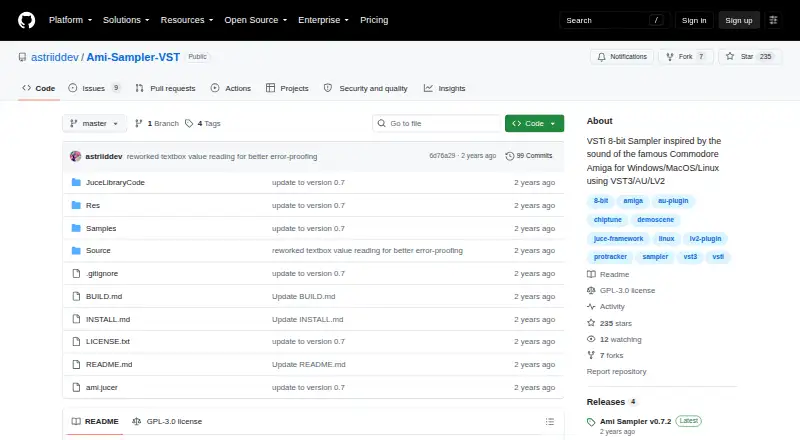
What Ami Sampler is
Ami Sampler is a free, open-source 8-bit sampler inspired by the Commodore Amiga, made for use in modern digital audio workstations. It runs as a standalone app or plugin on Windows, macOS, and Linux. Its twelve samplers each offer volume, pan, ADSR, solo and mute, plus mono or polyphonic modes up to eight voices. Sound-shaping options include sample-rate decimation, pitch glide in mono mode, two low-pass filters, vibrato, and a Paula switch that alternates note panning. The sampler loads WAV, AIF, 8SVX IFF, signed 8-bit raw PCM, mu-law BIN, and BRR files; it can save WAV, AIF, IFF, raw, and BIN. Plugin formats depend on the operating system: the installation guide lists VST3 on Windows, VST3 and AU on macOS, and VST3 and LV2 on Linux. It includes samples, including recordings made on the developer’s Amiga 500, and optional sample directories can be downloaded. The maker says sample presets and BLEP synthesis have not yet been added.
Good
- Twelve samplers have individual volume, pan, and ADSR controls.
- Supports WAV, AIF, IFF, raw, BIN, and BRR formats.
- Standalone versions are available for Windows, macOS, and Linux.
- Includes sample packs and recordings from an Amiga 500.
Watch out
- Sample presets and BLEP synthesis remain unimplemented.
- Linux plugin window scaling is disabled.
- macOS may warn that the app is unsigned.
- Ableton may show a cursor issue while the playhead moves.
Who it suits
Ami Sampler suits musicians who want an Amiga-inspired sampler in a desktop DAW or as a standalone app. Its multiple sample formats and operating-system-specific plugin options may fit users with existing sample libraries.
Verdict
Ami Sampler combines twelve channels, retro-inspired sound controls, and broad sample-format support in a free package. Check the installation guide for plugin formats on your operating system, and note the listed missing features and platform caveats.
The facts
Each one read from Ami Sampler's own pages, with the date it was checked.
What it does
- Channels
- It has twelve individual samplers, each with volume, pan, ADSR, solo/mute, and mono or polyphonic voice modes.checked 8 Oct 2026
- DAW compatibility
- The maker reports testing it in Ableton, Studio One, Tracktion Waveform, GarageBand, Ardour 8, and MusE, with format availability varying by operating system.checked 8 Oct 2026
- Downloads
- Installation instructions point to GitHub releases and list Windows, macOS, and Linux packages, including standalone applications and plugin files.checked 9 Oct 2026
- Formats and integrations
- The project describes VST3, AU, and LV2 plugin formats and reports testing with Ableton, Studio One, Tracktion Waveform, GarageBand, Ardour, and MusE.checked 9 Oct 2026
- Included samples
- The repository includes sample packs and samples recorded on the maker’s Amiga 500; additional sample directories are available for optional download.checked 9 Oct 2026
- Known bug
- The maker reports that the mouse cursor sometimes fails to change to the Amiga cursor, apparently in Ableton while the playhead is moving.checked 9 Oct 2026
- Known limitations
- The maker says sample presets and BLEP synthesis remain to be added, and notes that plugin window scaling is disabled in Linux plugins.checked 8 Oct 2026
- Known missing features
- The maker says sample presets and BLEP synthesis remain to be added.checked 9 Oct 2026
- License
- The repository identifies its license as GPL-3.0.checked 8 Oct 2026
- Master effects
- Master controls include volume, pan, two Amiga-inspired low-pass filters, and vibrato speed and depth.checked 9 Oct 2026
- MIDI and controls
- It includes a computer-key virtual MIDI keyboard mapped to ProTracker/Fasttracker notes, sample looping, MIDI channel and transposition controls, and pitch glide in mono mode.checked 9 Oct 2026
- Paula mode
- The Paula switch alternates note panning to create a wide chord effect, and is disabled in mono mode.checked 9 Oct 2026
- Purpose
- Ami Sampler is an 8-bit sampler inspired by the Commodore Amiga for use in modern digital audio workstations.checked 9 Oct 2026
- Sample formats
- It loads WAV, AIF, 8SVX IFF, 8-bit signed raw PCM, mu-law BIN, and BRR files; saving supports WAV, AIF, IFF, raw, and BIN.checked 9 Oct 2026
- Sampler channels
- It has twelve samplers, each with volume, pan, ADSR, solo/mute, and monophonic, four-voice, or eight-voice polyphonic options.checked 9 Oct 2026
- Sound controls
- It includes sample-rate decimation, pitch glide in mono mode, two selectable low-pass filters, vibrato, and a Paula switch that alternates note panning.checked 8 Oct 2026
- Support and updates
- The repository lists GitHub Issues for the project and identifies a mouse-cursor issue that can occur in Ableton while the playhead is moving.checked 8 Oct 2026
Where it runs
- macOS installation note
- The installation instructions say the macOS installer may show a warning because the program has not been signed by Apple.checked 9 Oct 2026
- macOS signing
- The installation guide says macOS may warn that the program is unsigned because the developer has not had it signed by Apple.checked 8 Oct 2026
- Platforms and formats
- The project describes Windows, macOS, and Linux support with VST3, AU, and LV2 formats; the installation guide lists VST3 on Windows, VST3 and AU on macOS, and VST3 and LV2 on Linux.checked 8 Oct 2026
- Standalone app
- The installation guide provides standalone application installation instructions for Windows, macOS, and Linux.checked 8 Oct 2026
Alternatives to Ami Sampler
- 1
Momentum
Free planWebmacOSWindows7.6From $99.95 a year - 2
Source-to-Image
Free planOpen sourceLinuxmacOSSelf-hostedWindows7.2Free plan - 3

Decent Sampler
Free planiOSLinuxmacOSWindows7.1Free plan - 4
sfizz
Free planWebAPILinuxmacOS6.9Free plan - 5
Quanta 2
iOSLinuxmacOSWindows6.6$99 one-time - 6
Vaporizer 2
Free planLinuxmacOSWindows6.5Free plan