
Akaro
Akaro is a browser-based collaboration workspace for architecture and design teams working with plans, 3D models, files, and tasks.
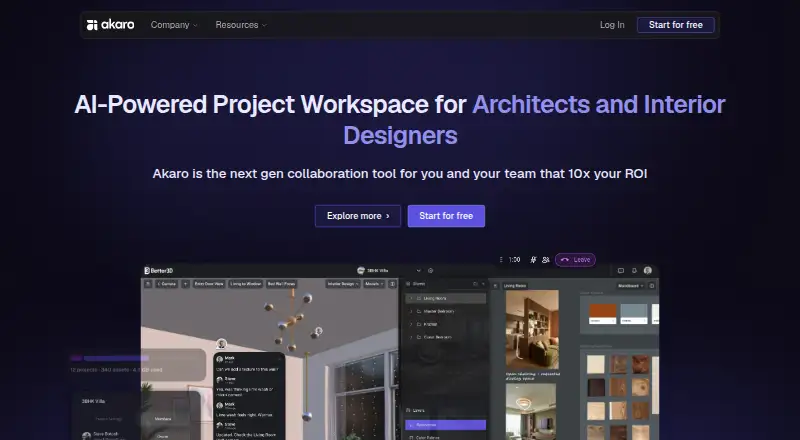
What Akaro is
Akaro is a browser-based collaboration workspace for architecture and design teams working with plans, 3D models, files, and tasks. Its Canvas, Models, Files, and Tasks modes can be arranged in single-pane or split-pane layouts. Models mode accepts GLB and GLTF files and supports orbiting, measuring, screenshots, saved camera views, and task pins on model geometry. Canvas is an infinite collaborative whiteboard and 2D CAD surface; it imports images, PDFs, and DXF/DWG files and exports PNG, PDF, or DXF. Projects combine shared canvas and 3D viewing with chat, voice calls, tasks, comments, and presence features. Phone recordings can become AI Draft tasks for team review on desktop. The phone companion provides chat, calls, recordings, and files, while models and boards remain on desktop. Permissions can be set to Edit, View, or Blocked across workspace modules. Akaro is available on the web. Its free plan covers one project, up to three users, one model up to 500 MB, and 3 GB of storage. A paid project costs ₹999.00 once, with no subscription or renewals, and includes 10 users, three models with no per-model size cap, and 25 GB of storage.
Good
- Supports GLB and GLTF model viewing and measurement.
- Canvas imports and exports several design file formats.
- Projects include chat, calls, tasks, and comments.
- Free project option includes up to three users.
- Paid project has no subscription or renewals.
Watch out
- 3D models and boards stay on desktop.
- Free project is limited to one model and 3 GB storage.
- Project chat attachments are capped at 100 MB per file.
Who it suits
Akaro suits architecture and design teams that collaborate on plans and 3D models alongside project files and tasks. Teams needing phone access should note that 3D models and boards stay on desktop.
Verdict
Akaro combines model review, 2D markup, and project collaboration in a browser workspace. The free and one-time paid project options differ in user, model, and storage limits, so teams should check those against their needs.
Plans and prices
From Akaro's own pricing page, checked 30 Sep 2026.
| Plan | Price | What it gives you |
|---|---|---|
| Free Project | Free | 1 project per organization · up to 3 users · 1 model up to 500 MB · 3 GB storage · file attachments |
| File Storage add-on | ₹25 a month | 1–100 GB · monthly |
| Paid Project | ₹999, paid once | 10 users · 3 models with no per-model size cap · 25 GB storage · model downloads · Dashboard · role-based access · voice/video/file attachments · paid once through Razorpay; no subscription or renewals |
The facts
Each one read from Akaro's own pages, with the date it was checked.
What it does
- 3D viewer
- The Models mode accepts .glb and .gltf files and supports orbiting, measuring, screenshots, saved camera views and task pins on geometry.checked 30 Sep 2026
- Access control
- Permission groups assign Edit, View or Blocked access per module across organization, project, canvas, 3D viewer, file manager and task areas.checked 30 Sep 2026
- AI drafts
- Recordings made on a phone can be turned into AI Draft tasks for the team to review on desktop.checked 30 Sep 2026
- Authentication
- Users can sign in with an Indian +91 phone number using a WhatsApp OTP or with Google.checked 30 Sep 2026
- Canvas
- The Canvas is an infinite collaborative whiteboard and 2D CAD surface that can import images, PDFs and DXF/DWG files and export PNG, PDF or DXF.checked 30 Sep 2026
- Collaboration
- Projects include shared canvas and 3D viewing, project chat, voice calls, tasks, comments and presence features.checked 30 Sep 2026
- File attachment limit
- Attachments in project chat are capped at 100 MB per file.checked 30 Sep 2026
- Google integration
- Google sign-in requests only the basic email, profile and openid scopes and does not request Gmail, Drive, Calendar or Contacts access.checked 30 Sep 2026
- Mobile access
- On phones Akaro runs at my.akaro.app as a companion with Chat, Calls, Recordings and Files, while 3D models and boards stay on desktop.checked 30 Sep 2026
- Product
- Akaro is a browser-based collaboration workspace for architecture and design teams to view 3D models, mark up plans, manage files and track tasks together in real time.checked 30 Sep 2026
- Security and compliance
- Akaro says it uses managerial, technical and operational security measures in compliance with Section 8 of India’s Digital Personal Data Protection Act 2023.checked 30 Sep 2026
- Support
- Akaro lists [email protected] for help and says support aims to respond within 24–48 business hours, Monday to Saturday, 10:00 AM–6:00 PM IST excluding public holidays.checked 30 Sep 2026
- Workspace modes
- The workspace has Canvas, Models, Files and Tasks modes, with single-pane or split-pane layouts.checked 30 Sep 2026
The company
- Headquarters
- Ahmedabad, Gujarat, Indiachecked 28 Sep 2026
Alternatives to Akaro
- 1

Dalux
Free planAndroidiOSWebAPI8.2From 49 DKK a month - 2
Nanome
Free planAndroidiOSWebAPI8.2From $4.17 a month - 3
Sketchfab
Free planAndroidiOSWebAPI8.2From $15 a month - 4
Aspose.3D Viewer
Free planAndroidiOSWebLinux7.3From $4 a month - 5
OmniView 3D
Free planAndroidiOSWeb7.3From $59 a month - 6

BIMcollab
AndroidiOSWebAPI7.2From €12.50 a month