
AirServer
AirServer turns a computer into a receiver for screen mirroring from compatible AirPlay, Google Cast, and Miracast devices.
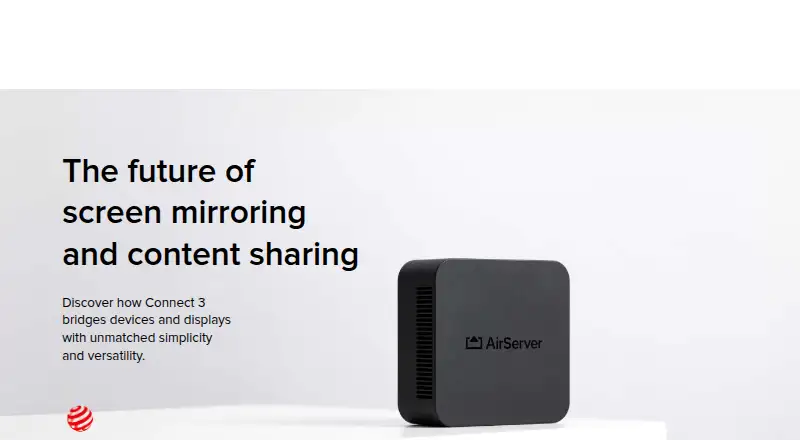
What AirServer is
AirServer turns a computer into a receiver for screen mirroring from compatible AirPlay, Google Cast, and Miracast devices. Receiver software is listed for Windows, Mac, Xbox, Surface Hub, and Embedded Linux, while the broader platform list includes Android, iOS, and Linux. AirServer Connect 3 combines AirPlay 2, Google Cast, and Miracast in one receiver. It supports up to 12 simultaneous 1080p sessions at 60 FPS, with unlimited sessions beyond that. Google Cast playback works with DRM-protected apps including Disney+, National Geographic, and Amazon Prime. Sessions remain local instead of crossing the Internet, and 802.1X protection is supported. The iOS companion app discovers receivers across subnets, while the Android app adds AirPlay mirroring. Management and reporting are free, updates need no subscription, and offline updates can use a USB drive. Plans include a $7.99 starting price, a 30-day trial, and one-time licenses, except the yearly Surface Hub option.
Good
- Supports AirPlay 2, Google Cast, and Miracast
- Up to 12 simultaneous 1080p sessions at 60 FPS
- Local sessions avoid Internet transmission
- Screen recording and mobile screen sharing
- Two-year warranty with multilingual support
Watch out
- No free plan
- Surface Hub license is billed yearly
- Enterprise licensing required for some commercial uses
- Internet access required for the trial
Who it suits
AirServer suits people and organizations needing screen sharing across AirPlay, Google Cast, and Miracast devices. Its business, educational, and enterprise licensing options support different internal and commercial uses.
Verdict
AirServer combines three major casting protocols with desktop receiving, mobile sharing, and local sessions. Buyers should match the license type to personal, internal business, educational, or broader commercial use.
Plans and prices
From AirServer's own pricing page, checked 7 Oct 2026.
| Plan | Price | What it gives you |
|---|---|---|
| 30-day trial | Free | Fully featured version · Internet access required |
| Consumer License | $19.99, paid once | For individuals for personal use |
| Business License | $39.99, paid once | For internal use only · Other commercial usage requires Enterprise Licensing |
| AirServer for Surface Hub, 1-year license | $99.99 a year | 1 license per Surface Hub · Unlimited projecting devices · 1-year license |
| Educational License | — | For students, teachers and educational institutes · Authentic educational email address required |
The facts
Each one read from AirServer's own pages, with the date it was checked.
What it does
- Connect 3 display capacity
- Connect 3 supports up to 12 simultaneous 1080p on-screen sessions at 60 FPS, with unlimited sessions beyond that.checked 7 Oct 2026
- Connect 3 protocols
- AirServer Connect 3 combines AirPlay 2, Google Cast and Miracast in one receiver.checked 7 Oct 2026
- Integrations
- Connect 3 supports Google Cast playback from DRM-protected apps including Disney+, National Geographic and Amazon Prime.checked 7 Oct 2026
- Intended users
- The Business License is for internal use, while other commercial uses such as hospitality, showrooms, broadcasting and signage require contacting AirServer about Enterprise Licensing.checked 7 Oct 2026
- License limits
- AirServer software licenses are one-time purchases with no monthly or yearly fees, except AirServer for Surface Hub, which is sold as a yearly subscription.checked 7 Oct 2026
- Management
- Connect 3 central management and reporting are free, with no additional fees or subscription models required.checked 7 Oct 2026
- Security and privacy
- Connect 3 supports 802.1X enterprise-grade protection, and its sessions remain local rather than being transmitted over the Internet.checked 7 Oct 2026
- Support and warranty
- Connect 3 has a standard two-year warranty and lists support in English, French, German, Italian and Spanish.checked 7 Oct 2026
- Updates
- Connect 3 software updates are available without a subscription fee, and offline updates can be installed using a USB flash drive.checked 7 Oct 2026
- What it does
- AirServer software turns a computer into a receiver for screen mirroring from compatible AirPlay, Google Cast and Miracast devices.checked 7 Oct 2026
The company
- Headquarters
- Reykjavík, Icelandchecked 28 Sep 2026
Where it runs
- Mobile companion apps
- AirServer Connect for iOS supports AirServer discovery across subnets, and its Android app adds AirPlay mirroring capabilities.checked 7 Oct 2026
- Receiver platforms
- AirServer lists software for Windows, Mac, Xbox, Surface Hub and Embedded Linux.checked 7 Oct 2026
Alternatives to AirServer
- 1

AirDroid Cast
Free planAndroidiOSWebLinux8.0From $1.67 a month - 2

Demodesk Scheduling
AndroidiOSWebAPI7.7 - 3

CrankWheel
Free planAndroidiOSWebAPI7.5From $29 a month - 4

Screenleap
Free planAndroidiOSWebAPI7.4From $15 a month - 5

Barco ClickShare
AndroidiOSmacOSWindows7.2$3,725 one-time - 6
Deskreen
Free planWebLinuxmacOSWindows7.1From $24.99 a year