
Adobe Fresco
Adobe Fresco is a free drawing and painting app for stylus and touch devices.
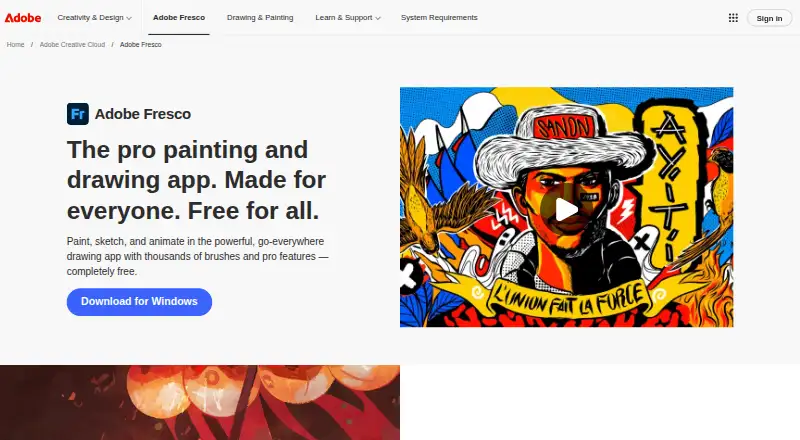
What Adobe Fresco is
Adobe Fresco is a free drawing and painting app for stylus and touch devices. It runs on iPad, iPhone, and supported Windows devices, including specified Surface ARM models. Its brush set covers pixel, vector, watercolor, and oil live brushes. Artists can create frame-by-frame animations and motion paths, while using unlimited layers. Fresco can move artwork into Photoshop and synchronize it as a Creative Cloud document. With an internet connection, work syncs automatically to Adobe Creative Cloud; offline documents remain local until reconnection. Artwork can be exported to Dropbox or other cloud storage through Publish & Export or Quick Export. The free plan includes 5 GB of cloud storage. Adobe lists a paid Fresco plus Photoshop on iPad plan with 100 GB, plus premium Adobe Fonts and more storage.
Good
- Free plan with 5 GB cloud storage
- Pixel, vector, watercolor, and oil brushes
- Frame-by-frame animation and motion paths
- Unlimited layers
- iOS and Windows support
Watch out
- No real-time collaboration
- Free storage limited to 5 GB
- Free plan has no premium Adobe Fonts
Who it suits
It suits illustrators and digital painters using stylus or touch devices. It also fits users who need animation, unlimited layers, or Photoshop and Creative Cloud workflows.
Verdict
Adobe Fresco covers drawing, painting, animation, and layered artwork in a free plan. Its strongest fit is stylus-based work across supported iOS and Windows devices, especially when Photoshop or Creative Cloud synchronization matters.
Plans and prices
From Adobe Fresco's own pricing page, checked 23 Sep 2026.
| Plan | Price | What it gives you |
|---|---|---|
| Adobe Fresco | Priced on request | Drawing and painting app · Pixel, live, and vector brushes · Animation tools · Free |
| Adobe Fresco | — | Drawing and painting app · Pixel, live, and vector brushes · Animation tools |
| Adobe Fresco Single App (Free) | Free | 5 GB cloud storage · unlimited layers |
The facts
Each one read from Adobe Fresco's own pages, with the date it was checked.
What it does
- Animation
- Fresco supports frame-by-frame animation and motion paths.checked 11 Oct 2026
- Brushes
- The app includes pixel, vector, watercolor, and oil live brushes.checked 11 Oct 2026
- Cloud sync
- Artwork syncs automatically to Adobe Creative Cloud when an internet connection is available, while offline documents are saved locally and sync when reconnected.checked 11 Oct 2026
- Compliance
- Adobe says it complies with many industry standards and regulations and undergoes independent audits.checked 11 Oct 2026
- Export
- Fresco can export artwork to Dropbox or other cloud storage through Publish & Export or Quick Export.checked 11 Oct 2026
- Illustration tools
- Yeschecked 23 Sep 2026
- Layers
- Fresco allows unlimited layers.checked 11 Oct 2026
- Premium features
- Adobe says upgrading to a paid plan provides access to premium Adobe Fonts and more file storage.checked 11 Oct 2026
- Presentation design
- Nochecked 23 Sep 2026
- Purpose
- Adobe Fresco is a drawing and painting app built for stylus and touch devices.checked 11 Oct 2026
- Real-time collaboration
- Nochecked 23 Sep 2026
- Security
- Adobe says it integrates security activities into its software development practices, processes, and tools.checked 11 Oct 2026
- Storage limit
- The free Fresco plan includes 5 GB of cloud storage; the paid Fresco plus Photoshop on iPad plan includes 100 GB.checked 11 Oct 2026
- Support
- Adobe directs Fresco users to its community forum for tips, answers, discussion, and feedback.checked 11 Oct 2026
The company
- Company
- Adobe says it was founded in 1982 by John Warnock and Charles Geschke.checked 11 Oct 2026
Where it runs
- Cross-app workflow
- Fresco artwork can be brought into Photoshop and synced as a Creative Cloud document.checked 11 Oct 2026
- Desktop app
- Yeschecked 23 Sep 2026
- Mobile app
- Yeschecked 23 Sep 2026
- Supported devices
- Adobe lists iPad, iPhone, Windows devices with Intel, Nvidia, or AMD processors, and specified Surface ARM devices as supported.checked 11 Oct 2026
Money
- Free plan
- Yeschecked 23 Sep 2026
Alternatives to Adobe Fresco
- 1
ibisPaint
Free planAndroidiOSmacOSWindows8.1From $27.99 a year - 2

Concepts
Free planAndroidiOSWindows8.0Free plan - 3

Drawpile
Free planOpen sourceAndroidiOSWebAPI7.9Free plan - 4
FireAlpaca
Free planLinuxmacOSWindows7.6$39.99 one-time - 5
Sketchbook
Free planAndroidiOSmacOSWindows7.5Free plan - 6

Clip Studio Paint
AndroidiOSWebmacOS7.4From $10.99 a year