Adblock Plus
Adblock Plus is a browser extension and mobile ad-blocking product that filters advertising, third-party tracking requests, and malicious domains.
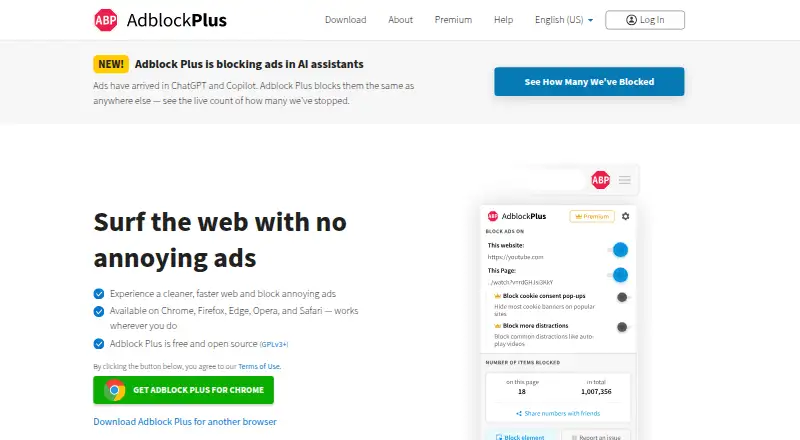
What Adblock Plus is
Adblock Plus is a browser extension and mobile ad-blocking product that filters advertising, third-party tracking requests, and malicious domains. Its filter lists include EasyList and EasyPrivacy, and users can remove the defaults, add other lists, or make their own. It blocks formats such as video ads, banners, pop-ups, and pop-unders, and can disable social buttons. Acceptable Ads are enabled by default, but users can turn them off. EasyPrivacy targets tracking domains, fingerprinting scripts, analytics requests, and data-collection domains. The desktop add-on supports Chrome, Firefox, Safari, Microsoft Edge, Opera, and Yandex Browser; mobile options include a Safari app for iOS and a product for Samsung Internet on Android. Adblock Browser is also available as a dedicated browser. The extension can access page URLs and content to block or hide ads, but does not track browsing history, record form typing, or alter submitted data. Free ad blocking is available; Premium adds blocking for cookie consent pop-ups and other distractions, at $4 a month or $40 a year.
Good
- Custom filter lists can be added or created.
- Blocks intrusive ads and third-party tracking requests.
- Available across desktop browsers and mobile products.
- Acceptable Ads can be disabled.
Watch out
- Acceptable Ads are enabled by default.
- Premium costs $4 a month or $40 a year.
- Some versions, including Safari iOS 3.x or higher, are proprietary.
Who it suits
Adblock Plus suits people who want to block ads and tracking across supported browsers and mobile products. It also fits users who want to customize filter lists or disable Acceptable Ads.
Verdict
Adblock Plus combines ad and tracking filters with options to customize lists and disable Acceptable Ads. Its free plan covers ad blocking; Premium adds controls for cookie pop-ups and other distractions.
Plans and prices
From Adblock Plus's own pricing page, checked 21 Sep 2026.
| Plan | Price | What it gives you |
|---|---|---|
| Premium | $40 a year | Blocks floating videos, site notifications, and other distractions · Blocks cookie consent pop-ups · Includes free features · billed annually |
| Adblock Plus Free | Free | free ad blocking in browsers · Acceptable Ads can be disabled |
| Adblock Plus Premium | $4 a month | block floating videos, site notifications and more · block cookie consent pop-ups · keep your ad blocker on · monthly |
| Adblock Plus Premium | $40 a year | all Free features · block floating videos, site notifications and more · block cookie consent pop-ups · keep your ad blocker on · yearly |
The facts
Each one read from Adblock Plus's own pages, with the date it was checked.
What it does
- Acceptable Ads
- Acceptable Ads are enabled by default, and users can disable the feature to browse without ads.checked 28 Sep 2026
- Ad blocking
- It blocks intrusive ads including YouTube video ads, Facebook ads, flashy banners, pop-ups, and pop-unders.checked 28 Sep 2026
- Cookie popup blocking
- Yeschecked 21 Sep 2026
- Core function
- Adblock Plus is a free browser extension that blocks advertising, third-party tracking requests, and malicious domains using regularly updated filter lists including EasyList and EasyPrivacy.checked 28 Sep 2026
- Custom filter lists
- Yeschecked 21 Sep 2026
- Element picker
- Yeschecked 21 Sep 2026
- Filter customization
- Users can remove default filter lists, add other lists, or create their own filter lists.checked 28 Sep 2026
- Financing
- Adblock Plus is free to use and always will be, while large platforms that benefit commercially from Acceptable Ads participation are charged a licensing fee.checked 28 Sep 2026
- Mobile support
- Adblock Plus provides a Safari app for iOS and an Adblock Plus product for Samsung Internet on Android, while Adblock Browser is available as a dedicated ad-blocking browser.checked 28 Sep 2026
- Open source
- The web extension is an open source project licensed under GPLv3, while some versions including Adblock Plus for Safari iOS version 3.x or higher are proprietary codebases.checked 28 Sep 2026
- Organization deployment
- Chrome and Edge deployments for businesses, schools, and organizations can use group policy, but Adblock Plus Premium is not currently supported for these deployments.checked 28 Sep 2026
- Paid from
- 40checked 21 Sep 2026
- Partner integrations
- Commercial partners can integrate ready-to-use SDKs into desktop products, Android Chromium, Android WebView, and iOS products, with dedicated technical support.checked 28 Sep 2026
- Permissions and privacy
- The extension can see page URLs and page content to block or hide ads, but it does not track browsing history, record form typing including passwords, or alter submitted data.checked 28 Sep 2026
- Premium availability
- Premium is available in the ABP iOS app and desktop extensions for Chrome, Firefox, Edge, and Opera, and one purchase works across as many supported browsers, profiles, and computers as desired.checked 28 Sep 2026
- Security certification
- eyeo states that it is ISO 27001:2022 certified.checked 28 Sep 2026
- Social buttons
- Adblock Plus can disable social media buttons so social networks cannot build profiles from the websites visited.checked 28 Sep 2026
- Tracking protection
- EasyPrivacy filter lists target third-party tracking domains, fingerprinting scripts, analytics requests, and data-collection domains.checked 28 Sep 2026
Where it runs
- Browser support
- major-browserschecked 21 Sep 2026
- Device coverage
- desktop-and-mobilechecked 21 Sep 2026
- Supported browsers
- The desktop add-on is available for Chrome, Firefox, Safari, Microsoft Edge, Opera, and Yandex Browser.checked 28 Sep 2026
Money
- Free plan
- Yeschecked 21 Sep 2026
The full review of Adblock Plus
Adblock Plus is an ad- and tracker-blocking browser extension, with related apps for mobile devices. It suits people who want free browser ad blocking and the option to tune filter lists; readers who also want cookie pop-ups and other distractions blocked need Premium.
Overview
Adblock Plus blocks intrusive ads, including video ads, banners and pop-ups, using regularly updated filter lists. It also targets third-party tracking and malicious domains. Acceptable Ads are on by default, but users can turn them off for ad-free browsing.
Filter customization is a meaningful strength: users can remove default lists, add others or create their own. The trade-off is that the extension can see page URLs and content to decide what to block or hide. It does not track browsing history, record form typing or alter submitted data.
Key features
- Ad and tracker blocking: EasyList and EasyPrivacy lists target intrusive advertising, tracking domains, fingerprinting scripts, analytics requests and data-collection domains.
- Social buttons: Users can disable social media buttons, limiting social networks’ ability to build profiles from visited websites.
- Element picker: Lets users select page elements to hide, complementing the option to manage filter lists.
- Acceptable Ads: Enabled by default, with a setting to disable the feature. This choice matters to readers who want no ads at all.
- Open source: The web extension is GPLv3-licensed, but some versions, including Safari for iOS 3.x and higher, use proprietary code. eyeo states that it is ISO 27001:2022 certified.
Pricing
The free plan costs nothing and provides browser ad blocking; Acceptable Ads can be disabled. It is the straightforward choice for readers whose priority is blocking ads without paying, but it does not include Premium’s added distraction controls.
Premium costs $4 a month, billed monthly, or $40 a year, billed annually. Both plans add blocking for cookie consent pop-ups, floating videos, site notifications and other distractions, while including the free features. The annual option is cheaper over a full year than paying monthly, but requires annual billing. One Premium purchase works across supported browsers, profiles and computers without a stated device cap.
Adblock Plus says the product is free to use; large platforms that benefit commercially from Acceptable Ads participation pay licensing fees. That financing model does not change the free plan’s stated features.
Platforms
Adblock Plus covers Android, iOS, Linux, macOS, Windows and browser extensions. Desktop add-ons are available for Chrome, Firefox, Safari, Microsoft Edge, Opera and Yandex Browser. Mobile options include a Safari app for iOS, a product for Samsung Internet on Android, and Adblock Browser, a dedicated ad-blocking browser.
Premium is available in the iOS app and desktop extensions for Chrome, Firefox, Edge and Opera. Businesses, schools and other organizations can deploy Chrome and Edge through group policy, but Premium is not supported for those deployments. Commercial partners can integrate SDKs for desktop products, Android Chromium, Android WebView and iOS products, with dedicated technical support.
Who it's for
Choose Adblock Plus if you want free browser ad blocking, control over Acceptable Ads, and the ability to tailor filter lists. Premium is a better fit if cookie pop-ups and floating videos are among the distractions you want blocked too. It is less suited to organizations seeking Premium through group-policy deployment, or readers who want every version to be open source.
Pros and cons
- Pros: The free plan includes ad blocking and lets users disable Acceptable Ads, so no subscription is needed for ad-free browsing.
- Pros: Custom lists and an element picker give users more control than a fixed set of filters.
- Pros: Premium has monthly and lower-cost annual billing, and one purchase covers supported browsers, profiles and computers.
- Cons: Acceptable Ads start enabled, so users seeking no ads must change the default.
- Cons: Premium is required for cookie pop-up and other distraction blocking.
- Cons: Safari iOS 3.x and later is proprietary, unlike the GPLv3 web extension.
Alternatives
Consider AdGuard if you want to compare a freemium option spanning the same listed desktop and mobile platforms; its personal and family annual plans cover three and nine devices, respectively. Disconnect is another freemium alternative, with a free basic extension for one browser and a Premium plan priced at $5 a month.
Ghostery may suit readers who prefer a free, open-source option with all features free and no subscription. AdLock is a freemium alternative with apps for Android, iOS, macOS and Windows, including a one-month plan at $9.95 a month.
1Blocker is worth comparing if you use its listed extension, iOS or macOS platforms and want a free trial; its monthly plan costs $2.99 a month. AdBlocker Ultimate offers a freemium option across web, desktop and mobile platforms. AdBlock is another freemium choice, with a Premium plan at $4 a month and a seven-day free trial. Blokada is an alternative spanning web, desktop and mobile platforms.
Browse more options in Ad Blocking Software and Ad blockers.
Verdict
Adblock Plus is a strong fit for readers who want free browser ad blocking with control over both Acceptable Ads and their filter lists. Premium’s added distraction blocking and cross-browser coverage make it a practical upgrade, but readers who need those features at no cost—or organizations needing Premium through group policy—should look elsewhere.
Getting started
- Visit https://adblockplus.org/.
- Choose the supported browser or mobile product for your device.
- Install the browser extension or mobile product.
- Use the free ad-blocking plan, or choose Premium at $4 a month or $40 a year.
- Adjust Acceptable Ads and filter lists to suit your preferences.
Limits worth knowing
The free plan provides ad blocking, with Acceptable Ads able to be disabled. Blocking cookie consent pop-ups, floating videos, site notifications, and other distractions is listed with Premium, priced at $4 a month or $40 a year.
Questions
Is Adblock Plus free?
Yes. Adblock Plus Free is listed as free and includes browser ad blocking.
What does Premium cost?
Premium is listed at $4 a month, billed monthly, or $40 a year, billed annually.
Which browsers does the desktop extension support?
Chrome, Firefox, Safari, Microsoft Edge, Opera, and Yandex Browser.
Can I turn off Acceptable Ads?
Yes. They are enabled by default, and users can disable them.
Is Adblock Plus open source?
The web extension is an open-source project licensed under GPLv3. Some versions, including Adblock Plus for Safari iOS version 3.x or higher, are proprietary.
Alternatives to Adblock Plus
- 1

Ghostery
Free planOpen sourceAndroidiOSExtensionLinux8.0Free plan - 2

AdLock
Free planAndroidiOSmacOSWindows7.8Free plan - 3

AdBlocker Ultimate
Free planAndroidiOSWebExtension7.7Free plan - 4

Blokada
Free planAndroidiOSWebExtension7.7From €5 a month - 5

Disconnect
Free planAndroidiOSWebAPI7.7From $50 a year - 6

1Blocker
Free planiOSExtensionmacOS7.4From $14.99 a year