A-PDF Flipbook Publisher
A-PDF Flipbook Publisher converts an uploaded PDF into an online digital flipbook that can be embedded on a website.
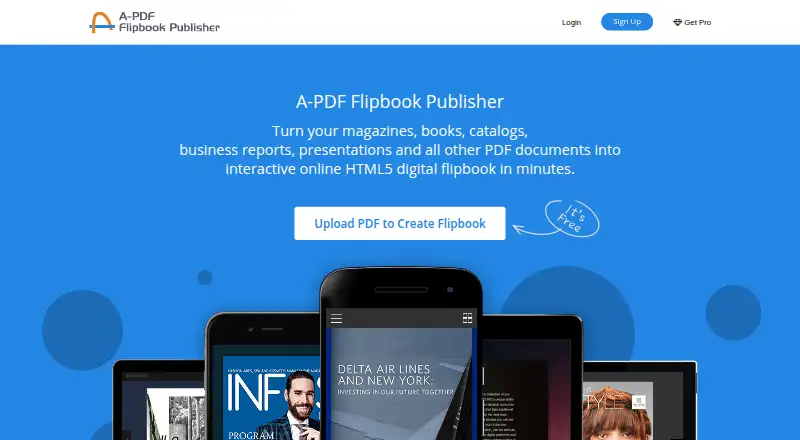
What A-PDF Flipbook Publisher is
A-PDF Flipbook Publisher converts an uploaded PDF into an online digital flipbook that can be embedded on a website. In the web workflow, users select or drag in a PDF, add publication details, convert it, and embed the result. Available details include a title, description, category, and keywords; the upload flow describes its Virality Score as a measure intended to improve searchability through Google when those details are provided. Flipbooks can be embedded as an iframe, popup window, or WordPress plugin, and shared by link, social media, or QR code. The service also offers publication statistics and the option to add a Google Analytics ID for more granular data. The free plan allows five flipbooks per day for one account, with 20G storage; it includes ads and a FlipHTML5 watermark and does not support book downloads. Paid plans include Professional at $12/month, Platinum at $25/month, and Enterprise at $83/month. The product page offers a free trial and Windows and Mac downloads. Listed platforms are web, macOS, and Windows.
Good
- Converts uploaded PDFs into online flipbooks.
- Supports several website embedding formats.
- Publications can be shared by link or QR code.
- Free plan allows five daily creations.
Watch out
- Free plan includes ads and a watermark.
- Free plan does not support book downloads.
- Free plan is limited to one account.
- Free plan limits creation to five flipbooks daily.
Who it suits
It suits people who want to turn existing PDFs into online publications and embed or share them. Its free plan may suit users who can work within the daily creation limit and accept ads and a watermark.
Verdict
A-PDF Flipbook Publisher is focused on converting PDFs into shareable, embeddable online publications. The free plan has clear limits, while the listed paid plans expand storage, daily creation allowances, or account counts.
Plans and prices
From A-PDF Flipbook Publisher's own pricing page, checked 8 Oct 2026.
| Plan | Price | What it gives you |
|---|---|---|
| Free | Free | 20G storage · 5 daily creations · 1 account · ads and FlipHTML5 watermark · no book downloads |
| Professional | $12 a month | 50G storage · unlimited daily creations · 1 account · $12/month |
| Platinum | $25 a month | Unlimited storage · unlimited daily creations · 3 accounts · $25/month |
| Enterprise | $83 a month | Unlimited storage · unlimited daily creations · 10 accounts · $83/month |
The facts
Each one read from A-PDF Flipbook Publisher's own pages, with the date it was checked.
What it does
- Analytics
- FlipHTML5 offers publication statistics and says users can add a Google Analytics ID for more granular data.checked 8 Oct 2026
- API
- FlipHTML5 advertises API access for converting PDFs to flipbooks without signing in to FlipHTML5 and directs visitors to contact the company.checked 8 Oct 2026
- Audience
- FlipHTML5 describes solutions for publishers in industries including gaming, fashion, and finance, and for content such as magazines, manuals, and annual reports.checked 8 Oct 2026
- Desktop downloads
- The product page offers download links for Windows and Mac.checked 4 Oct 2026
- Downloads
- The product page links to downloads for Windows and Mac.checked 8 Oct 2026
- Embedding
- FlipHTML5 supports embedding flipbooks on websites as an iframe, popup window, or WordPress plugin.checked 8 Oct 2026
- Hosting
- FlipHTML5 says it uses AWS, Linode, and Cloudflare for cloud services, database backup, and storage, and hosts uploaded user content with these providers.checked 8 Oct 2026
- Login options
- The sign-up flow offers registration by email and password, or signing in with Facebook or Google.checked 4 Oct 2026
- Privacy policy
- The linked FlipHTML5 privacy policy says selected Google Drive files are retrieved to generate ebooks and are not used for another purpose or shared with third parties.checked 4 Oct 2026
- Publication details
- The upload flow offers fields for title, description, category, and keywords to add information to the publication.checked 4 Oct 2026
- Purpose
- The product flow uploads a PDF, converts it into an online digital flipbook, and embeds the flipbook on a website.checked 8 Oct 2026
- Search visibility
- The upload flow describes its Virality Score as a measure intended to help publications become more searchable through Google when users add description, keywords, and category.checked 4 Oct 2026
- Security
- FlipHTML5 says it uses access controls, authentication, regular security assessments, and encryption during transmission and storage.checked 8 Oct 2026
- Sharing
- FlipHTML5 says users can share publications by link, social media, or QR code.checked 8 Oct 2026
- Support
- FlipHTML5 says its support team is committed to responding within 1 business day.checked 8 Oct 2026
- Upload options
- The online upload page supports selecting a PDF file or dragging and dropping one.checked 4 Oct 2026
- Website embedding
- The product page explicitly lists embedding the resulting flipbook on a website as the third step.checked 4 Oct 2026
- Workflow
- The described workflow is to upload a PDF, convert it into an online flipbook, then embed it on a website.checked 4 Oct 2026
Money
- Free access
- The product page says users can try A-PDF Flipbook Publisher free.checked 8 Oct 2026
- Free limits
- The FlipHTML5 free plan allows 5 flipbooks per day and 1 user, includes ads and a FlipHTML5 watermark, and does not support link detection or book downloads.checked 8 Oct 2026
The company
- Maker identification
- The product page identifies the copyright holder as A-PDF Software Co., Ltd.checked 4 Oct 2026
The full review of A-PDF Flipbook Publisher
A-PDF Flipbook Publisher converts PDFs into online flipbooks that can be placed on a website. It is a sensible fit for publishers of magazines, manuals, and reports who want a web-ready presentation without creating a reader from scratch. The free entry point is useful for occasional publishing, but branding, quota, and account restrictions make paid plans more appropriate for regular or client-facing work.
Overview
The workflow is direct: choose a PDF file or drag and drop it, add a title, description, category, and keywords, and generate the online publication. The resulting flipbook can then be embedded on a website. A-PDF Software Co., Ltd. is identified as the maker, and the product page provides Windows and Mac download links alongside the browser-based upload route.
The upload form’s Virality Score is intended to improve Google discoverability when descriptive metadata is supplied. That makes the metadata fields worth completing, although the score should be treated as a publishing aid rather than a guarantee of audience growth. Publications can also be shared by link, social media, or QR code.
Key features
Embedding and distribution
FlipHTML5, the platform supporting the online publication, provides iframe, popup-window, and WordPress-plugin embedding. Those options suit sites that need a publication inside an existing page as well as campaigns that prefer a separate popup presentation. Link, social, and QR-code sharing extend distribution beyond the host website.
Analytics and automation
Publication statistics provide a view of performance, while adding a Google Analytics ID enables more granular measurement. An advertised API can convert PDFs to flipbooks without signing in to FlipHTML5; prospective users are directed to contact the company, so it is mainly relevant to organizations planning an automated workflow.
Accounts, privacy, and hosting
Registration supports email and password or Facebook and Google sign-in. The privacy policy says selected Google Drive files are retrieved to generate ebooks and are not used for another purpose or shared with third parties. Uploaded content is hosted through AWS, Linode, and Cloudflare. Security measures cited by the platform include access controls, authentication, regular assessments, and encryption in transit and at rest. Problems are routed through an A-PDF support ticket.
Pricing
The Free plan costs nothing and includes 20G storage, five daily creations, and one account. It carries ads and a FlipHTML5 watermark, does not allow book downloads, and the broader free service also lacks link detection. This is adequate for trying the conversion process or maintaining a small, infrequent publication library, but the visible branding and five-creation ceiling are poor fits for polished commercial output.
Professional costs $12 a month, billed $12/month. It raises storage to 50G and removes the daily-creation limit while retaining one account. It is the practical step up for a solo publisher producing multiple issues or documents each month, though it does not add seats.
Platinum costs $25 a month, billed $25/month. Storage and daily creations are unlimited, and three accounts are included. This suits a small publishing team that needs shared access without enterprise-scale administration.
Enterprise costs $83 a month, billed $83/month. It combines unlimited storage and creations with 10 accounts, making it the clearest choice for departments with several contributors or client-facing publishing operations. The paid plans remove the free tier’s central capacity constraints; the listed plans do not describe additional account counts beyond their stated limits.
Platforms
A-PDF Flipbook Publisher is available on the web, Windows, and macOS. The browser workflow is the quickest route to conversion, while the Windows and Mac downloads suit users who prefer desktop software. Website embedding remains part of the publication process regardless of entry point.
Who it's for
This is best for publishers, businesses, and teams distributing magazines, manuals, annual reports, or similar PDF-led content through their own websites. Professional is a strong match for one frequent publisher; Platinum is better for a small team; Enterprise is aimed at larger groups needing up to 10 accounts. The Free plan is primarily a trial and low-volume option because ads, watermarking, no downloads, and five daily creations limit presentation and scale.
Pros and cons
Pros
- Clear PDF-to-web workflow: upload, add publication metadata, convert, and embed without a separate reader build.
- Flexible placement: iframe, popup, and WordPress options accommodate different website structures.
- Useful distribution tools: link, social, and QR-code sharing support circulation outside the host site.
- Growth path: paid tiers move from 50G storage and unlimited creations to unlimited storage with three or 10 accounts.
- Measurement and integration: statistics, Google Analytics IDs, and an API address organizations with reporting or automation needs.
Cons
- Free branding and restrictions: ads, a FlipHTML5 watermark, no book downloads, and five creations per day undermine presentation and volume.
- Limited free collaboration: the free and Professional plans provide only one account.
- Paid scaling is seat-based: teams need Platinum or Enterprise for multiple accounts, increasing the monthly commitment.
- API onboarding requires contact: automated conversion is advertised, but access is not presented as an instant self-service feature.
Alternatives
For a broader comparison, see PDF Flipbook Software.
AnyFlip is worth choosing when Android and iOS support, 100G of free storage, or 30,000 daily opens matter more than A-PDF’s plan structure.
Choose FlowPaper when self-hosting, Linux, or a 90-day free publishing period is a priority.
FlipbookPDF.net fits readers who need a 40-page free catalog limit or prefer an annual Pro subscription.
Pick Heyzine when a free allowance of five flipbooks, unlimited pages, 1GB storage, password protection, and API access better match the project.
PubHTML5 is an alternative for users seeking PDF-to-HTML5 conversion with a free five-upload-per-day allowance.
Choose Calaméo when basic statistics and a freemium publishing model are sufficient.
FlipHTML5 is the direct platform alternative for users comparing the same core free allowance, including five flipbooks per day, 20 GB storage, and one account.
Flipsnack suits users who prefer a free plan limited to five 15-page flipbooks and 100 MB PDF uploads.
Verdict
A-PDF Flipbook Publisher is a good choice for a solo publisher or small organization that wants to turn existing PDFs into embeddable, shareable web publications, with Professional offering the most practical balance for frequent one-person output. Look elsewhere if you need unbranded free publications, generous free collaboration, or a different hosting and platform mix; the free tier’s ads, watermark, download restriction, and daily cap are meaningful compromises.
Alternatives to A-PDF Flipbook Publisher
- 1
AnyFlip
Free planAndroidiOSWebmacOS8.2From $13.08 a month - 2
FlowPaper
Free planAndroidiOSWebAPI8.2From $995 a year - 3

Flipsnack
Free planAndroidiOSWebAPI8.1Free plan - 4
FlipbookPDF.net
Free planAndroidiOSWebmacOS8.0From $45.90 a year - 5
FlippingBook
AndroidiOSWebAPI7.8From $20 a month - 6

DCatalog
AndroidiOSWebAPI7.6From $299 a year