
10015.io AI Color Palette Generator
10015.io AI Color Palette Generator is a free web tool that creates customized color palettes from prompts using AI.
What 10015.io AI Color Palette Generator is
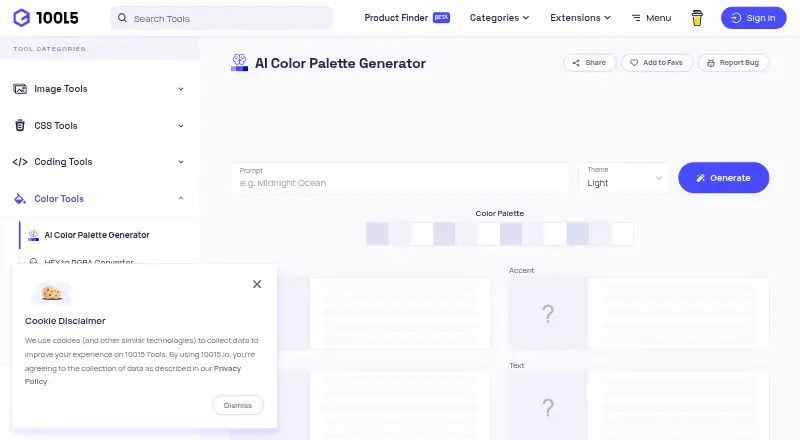
10015.io AI Color Palette Generator is a free web tool that creates customized color palettes from prompts using AI. The maker describes it as designed for designers and developers. Users can choose a light or dark theme before generating a palette. Each result includes primary, accent, background, and text colors, plus two additional shades for each of those four colors. A basic design preview shows the colors together. Palettes can be exported as CSS variables or as hexadecimal color codes in free text; the maker describes CSS variable export as a way to use palette colors in website designs. The tool does not extract colors from images. It runs on the web, and its listed plan is free. 10015.io was designed and coded by Fatih Telis, a frontend developer based in Istanbul, Turkey. The site privacy policy says it collects log data such as IP address, browser version, pages visited, and visit times. It also says the maker cannot guarantee absolute security for personal information.
Good
- Generates palettes from user prompts.
- Offers light and dark themes.
- Includes a basic design preview.
- Exports CSS variables or hexadecimal text.
- Free online tool.
Watch out
- Does not extract colors from images.
- Site collects IP address and browsing log data.
- Maker cannot guarantee absolute security.
Who it suits
This generator may suit designers and developers who want prompt-based palette ideas and exports for website designs. It is not intended for extracting colors from images.
Verdict
The tool offers prompt-based palettes with previews and two export formats at no cost. Its stated scope excludes image color extraction, and readers should note the site’s listed log-data collection and security caveat.
Plans and prices
From 10015.io AI Color Palette Generator's own pricing page, checked 7 Oct 2026.
| Plan | Price | What it gives you |
|---|---|---|
| Free online tool | Free | AI-generated color palettes · CSS variables or hexadecimal text export |
The facts
Each one read from 10015.io AI Color Palette Generator's own pages, with the date it was checked.
What it does
- Color shades
- The tool generates two additional shades for each of the four main colors.checked 7 Oct 2026
- Export formats
- Palettes can be exported as CSS variables or as hexadecimal color codes in free text.checked 7 Oct 2026
- Integrations
- The maker describes CSS variable export for incorporating palette colors into website designs.checked 7 Oct 2026
- Intended users
- The maker describes the tool as designed for designers and developers.checked 7 Oct 2026
- Palette contents
- A generated palette includes primary, accent, background, and text colors.checked 7 Oct 2026
- Preview
- Users can preview generated colors on a basic design.checked 7 Oct 2026
- Privacy data collection
- The site privacy policy says it collects log data such as IP address, browser version, pages visited, and visit times.checked 7 Oct 2026
- Purpose
- Generates customized color palettes from user prompts with AI.checked 7 Oct 2026
- Security statement
- The privacy policy says the maker strives to use commercially acceptable means to protect personal information and cannot guarantee absolute security.checked 7 Oct 2026
- Support
- The maker says users can contact it by email about issues, provide feedback, or suggest tools.checked 7 Oct 2026
- Theme options
- Users can select a light or dark theme before generating a palette.checked 7 Oct 2026
The company
- Founded
- The maker says 10015.io started operating in 2020.checked 7 Oct 2026
- Maker and location
- 10015.io was designed and coded by Fatih Telis, a frontend developer based in Istanbul, Turkey.checked 7 Oct 2026
Money
- Free access
- The maker identifies the palette generator as a free online tool.checked 7 Oct 2026
The full review of 10015.io AI Color Palette Generator
10015.io AI Color Palette Generator turns a written brief into a coordinated set of web colors. It suits designers and developers who need a quick, no-cost starting palette, especially for a website. Choose it for prompt-led exploration and simple exports; look elsewhere when your source material is an image or you need broader platform support.
Overview
The web tool generates four functional colors—primary, accent, background, and text—and adds two shades to each. You can select a light or dark theme before generation, then inspect the result in a basic design preview. This role-based structure is more practical than receiving unrelated swatches: it gives a small system to refine for interface work. The preview provides useful context for judging the colors together, but it is only a basic visual check rather than a full design-testing environment.
10015.io was designed and coded by Fatih Telis, a frontend developer based in Istanbul, Turkey. Support is handled by email for issue reports, feedback, and tool suggestions. The privacy policy says the site collects log data including IP address, browser version, pages visited, and visit times. It also says commercially acceptable protection is used while absolute security cannot be guaranteed, a consideration for organizations with strict data-handling requirements.
Key features
Prompt-led palette generation
AI generation is the central workflow. Describe a mood, brand direction, or interface idea and receive a palette arranged around common UI roles. Two extra shades for every role add room for hierarchy, states, or lighter and darker treatments without starting over. This is well suited to early concept work and quick iteration; it does not replace a designer's decisions about contrast, accessibility, or a complete visual system.
Theme choice and preview
Light and dark generation themes let you set the intended presentation before creating colors. The basic design preview then shows how the set behaves in context, which is more informative than inspecting color chips alone. Because the preview is limited to a basic design, treat it as a fast plausibility check rather than evidence that a finished product will meet every visual or accessibility requirement.
Web-ready exports
Export palettes as CSS variables for direct incorporation into website styles, or as hexadecimal color codes in free text for copying into other tools. These formats support a straightforward handoff from concept to frontend implementation. There is no image color extraction, so the generator cannot build a palette from a photograph, screenshot, or other existing artwork.
Pricing
The Free online tool plan costs free. It includes AI-generated color palettes and export as CSS variables or hexadecimal text. There is no free trial because the product is already free, and no paid tier or renewal charge is given. This is a strong fit for individual designers, developers, and small projects that need occasional prompt-based generation without an account commitment. Teams seeking paid support, administrative controls, or additional export types should not assume those are included.
Platforms
10015.io AI Color Palette Generator runs on the web. It is therefore convenient from a browser on a supported device, but there is no stated native mobile app, desktop application, extension, API, or self-hosted option.
Who it's for
Designers and developers shaping a website from a written visual direction are the clearest audience. It works particularly well when you want functional color roles, tonal variants, a quick contextual preview, and CSS variables ready for implementation at no cost. Choose another tool if your process starts with an image, requires native or offline delivery, or depends on a more extensive design-system workflow.
Pros and cons
Pros
- Structured output: Primary, accent, background, and text roles plus two shades each provide a usable mini-system.
- Useful web handoff: CSS-variable and hexadecimal-text exports reduce reformatting before development.
- Context before export: The basic design preview helps catch an obviously mismatched combination early.
- No-cost access: AI generation and both export formats are included at 0.00 USD.
Cons
- No image extraction: It cannot derive colors from photos or existing visual references.
- Basic preview only: It does not stand in for comprehensive design or accessibility evaluation.
- Web-only delivery: There is no stated app, extension, API, or self-hosted deployment.
- Privacy caveat: Site logs include IP address, browser version, visited pages, and visit times, while absolute security is not guaranteed.
Alternatives
For a broader directory of prompt-based options, browse AI Color Palette Generators.
ColorUI Prompt Palette Studio is the better pick if you need Android, iOS, an extension, API, or self-hosting, with a free plan that requires no sign-up, LLM, or API keys.
Choose Pantone Connect Palette Generator when access to more than 15,000 colors and Search, Pick, and Measure tools matters; its free Basic plan requires an account.
AIColors fits users who want unlimited palette generation on the web without an account.
Pick Chromos when project limits, palette counts, color tools, explanations, advanced reasoning, and ADA optimization are more important than a minimal generator.
Perception is an alternative for users who want AI palettes alongside color-reference pages, favorites, and bookmarks.
AI Brand Colors is another free web option for brand-color work.
Choose Color Palette Generator AI for unlimited generations, every export format, shareable links, an API, and no account requirement.
ColorBrew is a free extension and web alternative.
Verdict
10015.io AI Color Palette Generator is a sensible choice for designers and developers who want to turn a prompt into a small, web-oriented color system quickly and free. Its role-based shades, basic preview, and CSS-variable export make the path from idea to frontend clear. Look elsewhere if image-derived palettes, native or self-hosted access, extensive testing, or richer collaboration features are central to your workflow.
Alternatives to 10015.io AI Color Palette Generator
- 1

Pantone Connect Palette Generator
Free planAndroidiOSWebExtension8.0Free plan - 2

ColorUI Prompt Palette Studio
Free planOpen sourceAndroidiOSWebAPI7.7Free plan - 3
Perception
Free planWeb7.2From $14 a month - 4

Color Utility
Free planWeb6.6Free plan - 5
Chromos
Free planWeb6.4From $20 a month - 66.2From $19 a month