
ColorUI Prompt Palette Studio
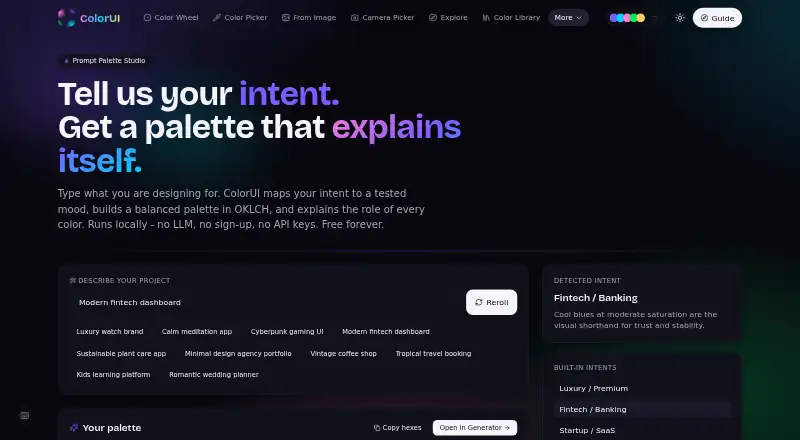
ColorUI Prompt Palette Studio turns written design requests into coordinated color palettes and explains the role of each color.
What ColorUI Prompt Palette Studio is
ColorUI Prompt Palette Studio turns written design requests into coordinated color palettes and explains the role of each color. It maps the prompt’s mood, temperature, and context to OKLCH properties, then builds palettes with primary brand tones, secondary accents, and neutral backgrounds. You can supply color names or exact hex codes, lock chosen colors, and generate matching tones around them. Palette exports include CSS custom properties, W3C design tokens, and Tailwind themes, with additional formats such as SCSS, JSON, Style Dictionary, Swift UIColor, and Android XML. Its public API requires no signup or key, supports CORS, and allows 60 requests per minute; prompts are processed without being stored or tied to personal accounts. ColorUI lists integrations for Figma, VS Code, CLI, GitHub, Raycast, and MCP, as well as Android, iOS, web, extension, API, and self-hosted availability. The toolkit also includes image color extraction, an accessibility checker, and seven harmony modes. Its free plan permits personal and commercial use without attribution.
Good
- Creates palettes from natural-language design prompts.
- Lock named colors or exact hex codes.
- Exports CSS, Tailwind, and design-token formats.
- Prompts are not stored or linked to accounts.
- Free plan allows commercial use without attribution.
Watch out
- API access is limited to 60 requests per minute.
- CLI requires Node 18 or later.
Who it suits
It suits designers and developers who want to turn a written design brief into a palette, then export colors into design or development formats. Teams needing a public API or self-hosted CLI deployment may also find its listed options relevant.
Verdict
ColorUI combines prompt-based palette creation with controls for fixed colors and a range of export formats. Its free plan, API, integrations, and self-hosted option make it suitable for different design and development workflows.
Plans and prices
From ColorUI Prompt Palette Studio's own pricing page, checked 15 Oct 2026.
| Plan | Price | What it gives you |
|---|---|---|
| Free | Free | no sign-up · no LLM · no API keys · commercial use without attribution · Free forever |
The facts
Each one read from ColorUI Prompt Palette Studio's own pages, with the date it was checked.
What it does
- Accessibility commitment
- The accessibility statement names WCAG 2.2 AA, EN 301 549, Section 508, and the European Accessibility Act as standards it follows.checked 15 Oct 2026
- AI limitation
- The maker warns that prompt generation does not itself perform precise WCAG contrast verification or color-vision-deficiency simulation.checked 15 Oct 2026
- API access
- The public API requires no API key or signup, supports CORS, and allows 60 requests per minute.checked 30 Sep 2026
- API authentication
- Normal API use requires no account or API key.checked 15 Oct 2026
- API limits
- The palette endpoint accepts prompt-based generation, harmony rules, or random mode, with random counts from 2 to 8.checked 30 Sep 2026
- Audience
- ColorUI describes itself as a toolkit for designers and developers, with more than 40 free tools and no sign-ups.checked 30 Sep 2026
- Built-in intents
- Preset intents include luxury, fintech, startup, wellness, gaming, education, nature, travel, minimal, sports, vintage, and wedding themes.checked 15 Oct 2026
- CLI
- The CLI provides palette generation, WCAG contrast checks, and color conversion through npx or global npm installation.checked 15 Oct 2026
- CLI deployment
- The CLI has zero dependencies, runs wherever Node 18+ runs, has no telemetry, and supports self-hosted deployments through COLORUI_API.checked 30 Sep 2026
- CLI requirements
- The CLI is a single approximately 9 KB JavaScript file with zero dependencies and requires Node 18 or newer.checked 15 Oct 2026
- CLI self-hosting
- CLI users can set COLORUI_API to route requests to their own deployment.checked 15 Oct 2026
- Color control
- Users can specify color names or exact hex codes and lock those colors while matching tones are generated.checked 30 Sep 2026
- Color locking
- Users can specify color names or exact hex values and have the generator preserve them while matching other tones.checked 15 Oct 2026
- Color model
- The generator maps mood, temperature, and context to OKLCH color properties.checked 30 Sep 2026
- Commercial rights
- Generated color palettes may be used in personal and commercial projects without attribution.checked 30 Sep 2026
- Commercial use
- The maker states generated palettes may be used commercially without attribution.checked 15 Oct 2026
- Exports
- Palettes can be exported as CSS custom properties, W3C design tokens, or Tailwind themes.checked 15 Oct 2026
- Figma integration
- The Figma plugin generates palettes, applies colors to selections, checks WCAG contrast, and converts color formats.checked 15 Oct 2026
- Founder
- The About page identifies Harsh Mistry as ColorUI's founder.checked 15 Oct 2026
- Independent criticism
- Gridinsoft flagged limited independent reputation data, low estimated traffic, and the site's recent registration as caution signals.checked 15 Oct 2026
- Independent domain age
- Gridinsoft reported the domain as approximately two months old at its May 26, 2026 check.checked 15 Oct 2026
- Independent hosting detail
- Gridinsoft identified Cloudflare as the hosting provider and recorded IP address 104.21.58.247.checked 15 Oct 2026
Where it runs
- Browser extension
- The browser extension supports Chromium browsers including Chrome 116+, Edge, Brave, Arc, Opera, and Vivaldi.checked 15 Oct 2026
- Browser extension status
- The maker says the Chrome Web Store submission is still under review and provides sideload instructions.checked 15 Oct 2026
The full review of ColorUI Prompt Palette Studio
ColorUI Prompt Palette Studio turns written design direction into color palettes, with controls for preserving chosen colors and exports aimed at design and development workflows. It suits people who want a no-sign-up starting point they can carry into code; its main trade-off is that prompt generation is only one part of a broader toolset, not a substitute for a full design system.
Overview
Describe a project in natural language and ColorUI generates a coordinated palette with an explanation for each color. Its OKLCH-based approach maps the prompt’s mood, temperature, and context to color properties, then groups results into primary brand tones, secondary accents, and neutral backgrounds. That gives a brief a more usable starting point than a lone suggested color.
ColorUI evaluates prompts statelessly through its backend API: prompts are not stored or tied to personal accounts. Palettes can be used in personal and commercial projects without attribution. ColorUI also presents the generator as part of a toolkit with more than 40 free tools and no sign-ups.
For a broader comparison, see our AI Color Palette Generators list.
Key features
Color names and exact hex codes can be specified and locked while the generator finds matching tones. This is useful when a project already has a brand color that must remain fixed; it also gives users more control than prompt-only generation. Seven harmony modes and a random mode broaden the ways to explore palettes.
Exports include CSS variables, Tailwind, SCSS, JSON, W3C DTCG, Style Dictionary, Swift UIColor, and Android XML. That breadth makes the results practical across web, design-token, iOS, and Android workflows. Integrations for Figma, VS Code, CLI, GitHub, Raycast, and MCP provide additional routes into existing work, though the range alone does not establish how deeply each integration is connected.
The public API needs no key or signup, supports CORS, and allows 60 requests per minute. Its palette endpoint accepts prompts, harmony rules, or random generation, with random counts from 2 to 8. That is a low-friction option for prototypes and modest integrations, but the request cap matters for higher-volume use.
The CLI has no dependencies, runs anywhere Node 18+ runs, has no telemetry, and supports self-hosted deployments through COLORUI_API. ColorUI says it uses strict CSP, HSTS preload, COOP, frame-ancestors none, SSRF guards, per-IP rate limits, and weekly CodeQL scans. Support is available by email and through a Discord community.
Pricing
Free — free, billed Free forever. There is no sign-up, no LLM, and no API key requirement; personal and commercial use is allowed without attribution. That is a strong fit for individual designers, developers, and projects that can work within the public API’s 60-requests-per-minute limit. The trade-off is that there is no paid plan described for teams needing a higher API quota or other expanded service.
Platforms
ColorUI is available on Android, iOS, web, and as an extension, API, or self-hosted option. The CLI’s Node 18+ requirement is relevant for developers deploying or using that route; self-hosting can be configured through COLORUI_API.
Who it's for
Choose ColorUI if you want to turn a written brief into a palette, preserve specific brand colors, and export directly into common design and code formats without creating an account. Its API, CLI, integrations, and self-hosted option also make it suited to developers incorporating palette generation into their workflow. It is less compelling if your priority is an established color catalogue or a product whose central offering is broader project and design management.
Pros and cons
- Pros: Prompt explanations and OKLCH-based generation make the color choices easier to interpret than a bare set of swatches.
- Pros: Locked names or hex codes help preserve existing brand colors while exploring complementary tones.
- Pros: Broad exports, a no-key public API, and self-hosted CLI support accommodate both design handoff and developer workflows.
- Pros: Stateless prompt evaluation and commercial use without attribution suit privacy-conscious and client-facing work.
- Cons: The public API’s 60 requests per minute may constrain high-volume applications.
- Cons: The free generator offers no LLM or API key; teams seeking a larger managed API allowance have no paid tier described.
Alternatives
- Pantone Connect Palette Generator is worth considering if you want access to a catalogue of more than 15,000 colors and Search, Pick, and Measure tools; its free plan requires an account.
- KColor is another free option for web and extension users.
- AIColors is a free, web-based option with unlimited palette generation and no account required.
- Chromos may suit readers who want a project-based palette workflow: its free plan allows one project and five palettes and includes color tools, explanations, advanced reasoning, and ADA optimization.
- Coolors is an alternative for web, iOS, and extension users; its Pro plan is $3 a month.
- HanoDecor Color Palette Generator is oriented toward design generation, with a Starter plan at $19 a month billed yearly ($228/year), alongside a displayed $38 price.
- Perception offers a free Lite plan with up to three AI-generated palettes at a time, plus color-reference pages, favorites, and bookmarks.
- Color Palette Generator AI is a free web and API alternative offering unlimited generations, every export format, shareable links, and no account requirement.
Verdict
ColorUI is a strong choice for designers and developers who want prompt-led palette exploration with brand-color controls, many export formats, and a genuinely low-friction API and CLI. Its combination of privacy-conscious prompt handling and commercial-use rights strengthens the case for client work. Look elsewhere if you need a higher-volume API allowance or would rather work from a large established color catalogue.
Getting started
- Open https://colorui.io/ai in a browser, or use an available Android, iOS, extension, API, or self-hosted option.
- Enter a natural-language design prompt.
- Optionally specify color names or hex codes and lock them while matching tones are generated.
- Export the palette in a supported format, such as CSS custom properties, W3C tokens, or a Tailwind theme.
- For API use, send requests without an API key or signup; observe the 60-requests-per-minute allowance.
Limits worth knowing
The free plan lists no LLM. The public API allows 60 requests per minute; its random mode accepts counts from 2 to 8.
Questions
Is ColorUI Prompt Palette Studio free?
Yes. Its Free plan is listed as free forever, with no signup, LLM, or API keys.
Can I use generated palettes commercially?
Yes. Generated palettes may be used in personal and commercial projects without attribution.
What can I export?
Exports include CSS custom properties, W3C design tokens, and Tailwind themes. Other listed formats include SCSS, JSON, Style Dictionary, Swift UIColor, and Android XML.
Does the public API require an account or API key?
No. The public API requires neither signup nor an API key, supports CORS, and allows 60 requests per minute.
What integrations does ColorUI provide?
Listed integrations include Figma, VS Code, CLI, GitHub, Raycast, and MCP.
Are prompts stored or tied to an account?
Prompts are evaluated statelessly through the backend API and are not stored or associated with personal accounts.
Alternatives to ColorUI Prompt Palette Studio
- 1

Pantone Connect Palette Generator
Free planAndroidiOSWebExtension8.0Free plan - 2
Perception
Free planWeb7.2From $14 a month - 3
Color Utility
Free planWeb6.6Free plan - 4
Chromos
Free planWeb6.4From $20 a month - 56.2From $19 a month
- 6

ColorMagic
Free planWebAPI6.1Free plan