
Zoetropic
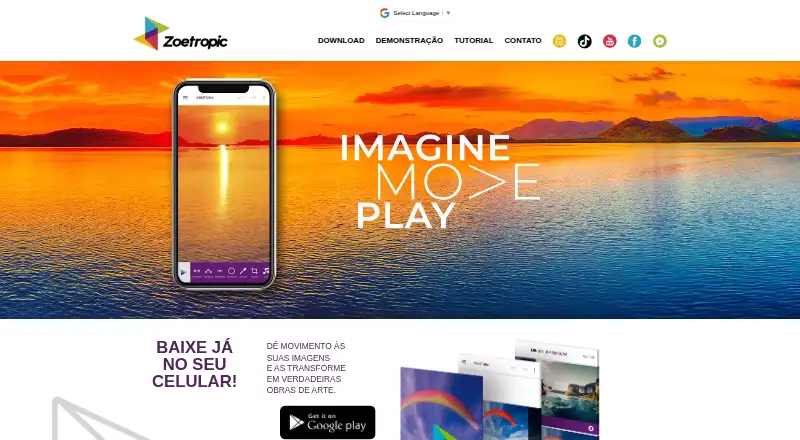
Zoetropic turns a still photo into an animation or video by letting users specify how parts of the image move.
What Zoetropic is
Zoetropic turns a still photo into an animation or video by letting users specify how parts of the image move. Its Movimento tool uses drawn arrows to set movement direction and intensity; Sequência creates several movements with standardized arrows, including flowing or curved motion. Stabilization points separate areas that move in different directions, while Máscara marks areas to keep still. The listed editing tools include 3D and camera effects, sky changes, cropping, color adjustments, text, overlays, and audio tools with an audio library. The Android listing describes creating cinemagraphs from a photo and exporting the result as video. Zoetropic is available on Android and iOS. Its free plan costs nothing and includes ads and limitations, with basic movement, sequence, stabilization, mask, audio, 3D effect, and camera effect tools. Paid plans list video without a watermark and no limits on animation speed or video repetitions. Standard is a one-time payment for lifetime removal of limitations; its price, along with Pro and Club prices, is not shown.
Good
- Available on Android and iOS.
- Arrow controls set motion direction and intensity.
- Masking can keep image regions still.
- Includes listed effects, editing tools, and audio.
- Exports video from a photo.
Watch out
- Free plan includes ads and limitations.
- Paid plans are required for video without a watermark.
- Prices for Standard, Pro, and Club are not shown.
Who it suits
Zoetropic suits people who want to animate still photos on Android or iOS, with controls for directing movement and keeping selected areas still. The free plan includes ads and limitations; paid plans list watermark-free video and removal of specified limits.
Verdict
Zoetropic provides tools for directing movement in photos, separating motion, and keeping areas still. The free plan has ads and limitations, while paid plans list watermark-free exports and removal of speed and repetition limits.
Plans and prices
From Zoetropic's own pricing page, checked 3 Oct 2026.
| Plan | Price | What it gives you |
|---|---|---|
| Free | Free | Anúncios e limitações; recursos básicos de movimento, sequência, estabilização, máscara, áudio, efeito 3D e câmera |
| Club | Priced on request | A página lista acesso a ferramentas e recursos sem limitações especificadas por plano; preço não exibido |
| Pro | Priced on request | A página lista acesso a ferramentas e recursos sem limitações especificadas por plano; preço não exibido |
| Standard | — | Remoção vitalícia das limitações · Pagamento único; limitações removidas vitaliciamente |
The facts
Each one read from Zoetropic's own pages, with the date it was checked.
Where it runs
- Android
- A página do Google Play descreve o app como uma ferramenta para criar cinemagraphs a partir de uma foto e informa que o resultado é um vídeo.checked 3 Oct 2026
- Efeitos e edição
- A tabela de planos lista efeito 3D, efeito câmera, mudança de céu, corte de imagem, alteração de cor, texto e overlays.checked 3 Oct 2026
What it does
- Áudio
- A tabela de planos lista ferramenta de áudio e biblioteca de áudios.checked 3 Oct 2026
- Desenvolvedor
- A listagem do Google Play identifica o desenvolvedor como ZOEMACH TECNOLOGIA LTDA e apresenta endereço em Aracaju, Brasil.checked 3 Oct 2026
- Estabilização
- Pontos de estabilização isolam áreas e separam movimentos em direções diferentes.checked 3 Oct 2026
- Exportação e limites
- A comparação de planos identifica vídeo sem marca d’água, sem limite de velocidade de animação e sem limite de repetições do vídeo como recursos dos planos pagos.checked 3 Oct 2026
- Função principal
- O Zoetropic dá movimento a imagens e transforma fotos em animações ou vídeos.checked 3 Oct 2026
- Máscara
- A ferramenta Máscara marca regiões da imagem que devem permanecer imóveis.checked 3 Oct 2026
- Movimento
- A ferramenta Movimento permite desenhar setas que determinam a direção e a intensidade do movimento na foto.checked 3 Oct 2026
- Segurança
- O Google Play informa que dados são criptografados em trânsito e que é possível solicitar a exclusão dos dados; também indica possível compartilhamento de identificadores do dispositivo.checked 3 Oct 2026
- Sequência
- A ferramenta Sequência cria vários movimentos com setas padronizadas e pode ser usada para fluxos como água ou movimentos curvos.checked 3 Oct 2026
- Suporte
- A listagem do Google Play informa o email de suporte [email protected].checked 3 Oct 2026
The company
- Headquarters
- Aracaju, Sergipe, Brazilchecked 28 Sep 2026
The full review of Zoetropic
Zoetropic is a mobile editor for turning still photographs into animated video. It suits creators who want to direct movement inside a single image, especially cinemagraph-style scenes, rather than build a complete video project. Its strongest case is precise motion control on a phone; its main compromise is that the free tier keeps ads and important export restrictions.
Overview
The app starts with one photo and lets you decide which parts move, in what direction, and with what intensity. Stabilization points can isolate regions or separate movements travelling in different directions, while masks mark areas that should remain completely still. This makes Zoetropic more purposeful than a one-tap animation filter, but it also demands more careful setup when a scene contains several independent motions.
Android's Google Play description positions the result as a cinemagraph made from a photo, exported as a video. The plan comparison also identifies depth animation and AI motion effects, extending the tool beyond simple directional movement. Choose it when the visual idea is motion within a still frame; look elsewhere if you need a conventional timeline editor or a desktop-first workflow.
Key features
- Movement controls: Draw arrows to set both direction and intensity. That gives you local control over a subject or background instead of animating the whole image uniformly, but achieving a convincing result depends on placing arrows carefully.
- Sequence: Standardized arrows create several movements in one image. It is particularly appropriate for repeated or curved flows such as water, where one straight directional cue would look too limited.
- Stabilization: Stabilization points isolate areas and allow separate motion directions. This is useful for layered scenes in which, for example, a foreground and background should not drift together.
- Mask: Mark regions that must stay immobile. The tool is essential for preserving faces, architecture, or other visual anchors while surrounding elements animate.
- Effects and editing: The plan table includes 3D and camera effects, sky changes, cropping, color adjustment, text, and overlays. These additions make the animation self-contained, although the defining strength remains motion design rather than broad image retouching.
- Audio: Audio tools and an audio library are included in the plan comparison, giving exported video a soundtrack option without requiring a separate editor.
- Export: Video is the stated export format. Paid access is identified as the route to video without a watermark, unrestricted animation speed, and unlimited video repetitions.
Pricing
Zoetropic uses a freemium model on Android and iOS.
| Plan | Price and terms | What it means |
|---|---|---|
| Free | free | Includes ads and limitations, with basic movement, sequence, stabilization, mask, audio, 3D, and camera effects. It is the sensible way to learn the workflow or make occasional clips, but restrictions remain part of the export process. |
| Standard | Price not listed; one-time payment | Removes limitations for life. This is the clearest fit for regular users who want a permanent upgrade rather than a recurring bill, with watermark-free video and unrestricted speed and repetitions among the paid benefits. |
| Pro | Custom pricing | Provides access to tools and features without plan-specific limits being stated. Consider it only when its broader access matches your needs and the displayed price suits your budget. |
| Club | Custom pricing | Also lists access to tools and features without limits specified by plan. It offers no clear reason to prefer it over Standard without checking the purchase screen. |
The free plan is useful for testing the animation method, while paid plans matter for polished publishing where a watermark or capped speed and repetitions would be unacceptable.
Platforms
Zoetropic has mobile apps for Android and iOS. Google Play reports encryption in transit and allows users to request data deletion; it also indicates that device identifiers may be shared. Support is provided at [email protected]. The developer is ZOEMACH TECNOLOGIA LTDA, based in Aracaju, Sergipe, Brazil.
Who it's for
Choose Zoetropic for social creators, photographers, and mobile editors who want controlled motion in a single photograph, such as flowing water, drifting skies, or a locked-off subject. It is less suitable for users seeking a full video-production suite, desktop operating-system support, or unrestricted watermark-free exports without paying.
Pros and cons
Pros
- Fine-grained direction: Arrows, stabilization points, and masks let you choreograph separate areas instead of applying one blanket animation.
- Useful free entry: Core movement tools and several effects are available at no cost, so occasional users can explore the concept before upgrading.
- Mobile focus: Android and iOS availability fits creators who make and share animated photos from a phone.
Cons
- Free-tier friction: Ads and limitations make the no-cost version less appropriate for finished client or public-facing exports.
- Paid export requirements: Watermark-free video and unrestricted speed and repetitions are reserved for paid plans.
- Plan uncertainty: Pro and Club use custom pricing and do not state plan-specific limits, making them harder to evaluate in advance.
Alternatives
Plotaverse is the better choice when you also need macOS or web access; it has Android and iOS apps, a free download, and optional in-app purchases.
Deep Nostalgia suits users looking for ready-made portrait animations across Android, iOS, and web, with several free animations and no free trial.
Dreamina is a broader AI-oriented option on mobile and web, with a free tier and a $15-per-month Basic plan that includes credits and watermark removal.
Parallax Studio is the alternative for desktop users who specifically want free, open-source software without a licence key or subscription.
Hedra is a web and API choice with credit-based monthly plans, including a $20 Basic tier and $50 Pro tier.
Motionleap offers a similar Android and iOS focus, with some free editing tools and a one-time $35.99 Unlimited access option.
Mug Life is aimed at photo effects, offering free effects with optional purchases for advanced tools.
LivePortrait is a free alternative spanning desktop systems, self-hosting, and web.
Photo Animation Software is a useful starting point when you want to compare more tools in this category.
Verdict
Zoetropic is a strong recommendation for mobile creators who want to choreograph motion inside a still image, with masks and stabilization providing meaningful control. Start with Free to learn the workflow; choose Standard when watermark-free, unrestricted exports justify a one-time purchase. Look elsewhere if you need a full timeline editor, desktop support, or clearer pricing for higher tiers.
Alternatives to Zoetropic
- 1
Dreamina
Free planAndroidiOSWebmacOS8.3From $15 a month - 2

Viggle
Free planAndroidiOSWebAPI8.2From $7.99 a month - 3

Deep Nostalgia
Free planAndroidiOSWeb7.9From $37 a year - 4

Hedra
Free planWebAPISelf-hosted7.5From $20 a month - 5
Cinemagraph Pro
iOSWebmacOS7.3From $99.99 a year - 6
Reface Unboring Animate
AndroidiOSWebmacOS7.0From $7.58 a month