Parallax Studio
Parallax Studio turns a still image into a looping 2.5D parallax animation, for artists who want motion from still artwork without a 3D pipeline.
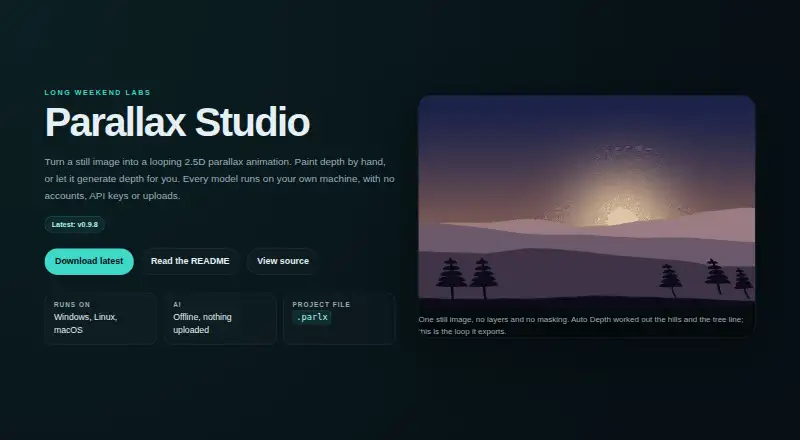
What Parallax Studio is
Parallax Studio turns a still image into a looping 2.5D parallax animation, for artists who want motion from still artwork without a 3D pipeline. Auto Depth uses Depth Anything V2 to separate a subject from its background and soften depth around hard outlines. Body Relief detects people and poses, then assigns depth across body parts for parallax movement. A depth brush provides adjustable size, hardness, strength and depth value, plus a colour-ramped overlay and undo and redo. Motion controls cover focus, path, zoom, loop type, duration and intensity, with previews at 24, 30 or 60 fps. Export animations as MP4 or GIF at a chosen resolution and frame rate; NVIDIA GPU rendering and NVENC encoding are optional. It imports PNG, JPG, JPEG and WebP, and saves .parlx JSON projects that reference image files by path. The maker says downloaded models run locally and pictures are not uploaded to a cloud service. The app is free and open source for Windows, Linux x86_64 and Apple Silicon Macs running macOS 12 or newer.
Good
- Turns still images into looping 2.5D animation
- Depth brush includes undo and redo
- Exports MP4 and GIF
- Models run locally after download, according to maker
- Free and open source
Watch out
- No mobile apps
- Face animation is not supported
- Optional 389 MB model output is not for commercial use
Who it suits
It suits artists making short loops or visual novel scenes from still art. Users who need to use output from the optional Depth Anything V2 Base model commercially should note its stated licensing limit.
Verdict
Parallax Studio combines depth tools and motion controls for animating still images without a 3D pipeline. It is free, but the optional Depth Anything V2 Base model carries a non-commercial-use restriction on its output.
Plans and prices
From Parallax Studio's own pricing page, checked 30 Sep 2026.
| Plan | Price | What it gives you |
|---|---|---|
| Free and open source | Free | No licence key · no subscription |
The facts
Each one read from Parallax Studio's own pages, with the date it was checked.
What it does
- Auto Depth
- Auto Depth uses Depth Anything V2 to separate a subject from its background and feather the depth map around hard outlines.checked 30 Sep 2026
- Body Relief
- Body Relief detects people and their poses, then creates separate depth across body parts for parallax motion.checked 30 Sep 2026
- Depth painting
- The depth brush offers adjustable size, hardness, strength and depth value, with a colour-ramped overlay and undo and redo.checked 30 Sep 2026
- Export formats
- The app exports MP4 or GIF at a chosen resolution and frame rate, with optional NVIDIA GPU rendering and NVENC encoding.checked 30 Sep 2026
- Image and project formats
- It imports PNG, JPG, JPEG and WebP, and saves projects as .parlx JSON files that reference source images by path.checked 30 Sep 2026
- Intended users
- The maker describes the product as built for artists who want motion from still art without a 3D pipeline, including visual novel scenes and short loops.checked 30 Sep 2026
- Model licensing limit
- The optional 389 MB Depth Anything V2 Base model is CC-BY-NC-4.0, and the README says not to use its output commercially.checked 30 Sep 2026
- Motion preview
- Motion controls include focus, path, zoom, loop type, duration and intensity, with preview options of 24, 30 or 60 fps.checked 30 Sep 2026
- Privacy
- The maker says models run locally after download and that pictures are not uploaded to a cloud service.checked 30 Sep 2026
- Purpose
- Parallax Studio turns a still image into a looping 2.5D parallax animation.checked 30 Sep 2026
- Support
- The maker directs users to open a GitHub issue for bugs or feature requests.checked 30 Sep 2026
- Supported systems
- Downloads are available for Windows, Linux x86_64 and Apple Silicon Macs running macOS 12 or newer.checked 30 Sep 2026
The full review of Parallax Studio
Parallax Studio is a desktop app for turning still images into looping 2.5D parallax animations. It suits artists who want to animate visual-novel scenes or short loops without building a 3D pipeline. Its depth-editing tools offer useful control at no cost, though the optional depth model’s license rules out commercial use of its output.
Overview
This is a focused tool for adding depth-driven movement to still images, not an all-purpose photo animator. It supports depth animation but not face animation, and there are no mobile apps. The ability to combine automated depth creation with pose-aware processing and manual painting gives artists several ways to shape a result rather than relying on a single automatic effect.
Projects save as .parlx JSON files that refer to source images by their file paths. Keep those images in place when moving a project; the project file does not contain the source artwork. The app imports PNG, JPG, JPEG and WebP.
Key features
Depth creation and editing
Auto Depth uses Depth Anything V2 to separate a subject from its background and soften depth-map edges around hard outlines. Body Relief detects people and their poses, then creates separate depth across body parts. These tools are relevant when an image needs more nuanced movement than a simple foreground-background split.
Motion and export
Focus, path, zoom, loop type, duration and intensity controls let users shape the motion, while previews can run at 24, 30 or 60 fps. Export to MP4 or GIF at a chosen resolution and frame rate gives the finished loop two common formats. Optional NVIDIA GPU rendering and NVENC encoding may suit users with compatible hardware, but the app does not promise those options on every system.
Privacy and model licensing
The maker says models run locally after download and pictures are not uploaded to a cloud service, which may appeal to artists who prefer to keep source images on their own device. The optional 389 MB Depth Anything V2 Base model is licensed under CC-BY-NC-4.0; its output must not be used commercially. That restriction is important for client work, monetized projects and other commercial publishing. The maker directs users to GitHub issues for bugs and feature requests.
Pricing
Parallax Studio is free and open source: the plan costs nothing, with no licence key and no subscription. There is no free trial because the app is already free. The plan is a strong fit for artists who want desktop parallax tools without a recurring fee, and there are no paid tiers or plan-based limits to weigh. The significant qualification is not price but licensing: commercial users should not use output from the optional depth model.
Platforms
Downloads are available for Windows, Linux x86_64 and Apple Silicon Macs running macOS 12 or newer. There is no mobile app, so it is not the right fit for someone who wants to animate images on an Android or iOS device.
Who it's for
Choose Parallax Studio if you make still artwork, visual-novel scenes or short loops and want to control depth and motion without a 3D pipeline. Its combination of automatic depth tools, pose-aware processing and manual brush adjustments suits artists willing to refine the image themselves. Look elsewhere if you need face animation, a mobile workflow, or commercial use of output generated with the optional Depth Anything V2 Base model.
Pros and cons
- Pros: Free and open source, with no licence key or subscription, so there is no paid plan to maintain.
- Pros: Automatic subject separation, pose-aware depth and a configurable depth brush give artists multiple ways to shape parallax.
- Pros: MP4 and GIF exports, selectable resolution and frame rate, and previews up to 60 fps support short-loop workflows.
- Pros: The maker says models run locally after download and pictures are not uploaded to a cloud service.
- Cons: Output from the optional Depth Anything V2 Base model is not for commercial use, a material constraint for paid projects.
- Cons: It does not animate faces and has no mobile apps, limiting its fit for those workflows.
- Cons: Project files reference source images by path, so moving or sharing a project requires keeping those files accessible.
Alternatives
For a broader set of options, browse Photo Animation Software. Consider these alternatives when their platforms, animation approach or pricing better match your workflow:
- Plotaverse is a freemium option for Android, iOS, macOS and web. Choose it if you need those platforms; its free download has in-app purchases, and the All-Access Monthly price is shown in the app before subscribing.
- Deep Nostalgia runs on Android, iOS and web and offers several free general animations with a free MyHeritage sign-up. It is an alternative if you want that service’s general-animation approach rather than Parallax Studio’s desktop depth-editing workflow.
- Zoetropic is a freemium Android and iOS app. Its free plan includes basic motion, sequence, stabilization, masking, audio, 3D effect and camera features, with ads and limitations; pick it if a mobile workflow and those tools matter more than desktop depth editing.
- Hedra is a freemium web and API option. Its Basic plan costs $20 a month, billed monthly, for 2,000 credits and slower generations, with commercial use; choose it if a web/API workflow and that commercial-use plan fit better.
- Motionleap is a freemium Android and iOS app with some editing tools available at no cost; additional Pro tools require an in-app purchase. Its Unlimited access plan is $35.99, paid once. It is a candidate if mobile editing is the priority.
- Mug Life offers free photo effects on Android and iOS, with advanced tools available through an optional in-app purchase. Choose it if those photo effects are a better fit than parallax animation.
- LivePortrait is a free option for Linux, macOS, Windows, web and self-hosted use. Consider it if you want an alternative across those platforms.
- PicAlive is an iOS freemium app with one free onboarding animation; free videos have usage limits, a watermark and occasional ads. It may suit an iPhone user who wants to try an animation before choosing a paid option.
Verdict
Parallax Studio is a strong choice for desktop artists who want to turn still artwork into short, controllable parallax loops without a 3D pipeline or subscription. Its combination of automatic and manual depth tools is the main reason to choose it. Look elsewhere for face animation, mobile editing, or commercial work that relies on output from its optional Depth Anything V2 Base model.
Alternatives to Parallax Studio
- 1

Dreamina
Free planAndroidiOSWebmacOS8.3From $15 a month - 2

Viggle
Free planAndroidiOSWebAPI8.2From $7.99 a month - 3

Deep Nostalgia
Free planAndroidiOSWeb7.9From $37 a year - 4

Hedra
Free planWebAPISelf-hosted7.5From $20 a month - 5
Cinemagraph Pro
iOSWebmacOS7.3From $99.99 a year - 6
Reface Unboring Animate
AndroidiOSWebmacOS7.0From $7.58 a month