YouDJ
YouDJ is DJ software aimed at making mixing accessible to beginners.
What YouDJ is
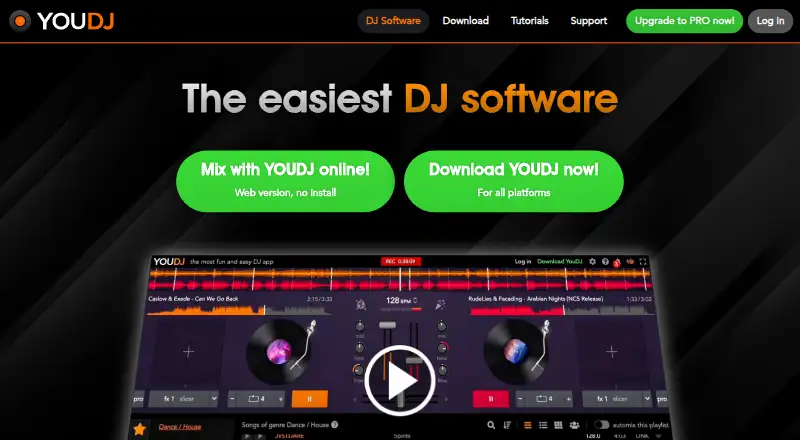
YouDJ is DJ software aimed at making mixing accessible to beginners. Its workspace combines two virtual turntables with effects, a sampler, vinyl scratching, beat synchronization, keylock, loops, hot cues, an equalizer and MIDI control. You can play demo songs or use music from YouTube, local MP3 files, Google Drive, Dropbox and iTunes. YouDJ Free is listed as free and offers DJ tools on mobile, desktop and through a Chrome extension. The software is available on Android, iOS, Linux, macOS, Windows and the web, as well as through an extension. YouDJ PRO adds recording: mixes can be saved as MP3 audio on all platforms, and as video on PC or Mac. On PC or Mac, PRO also enables live streaming to YouTube, Twitch or RTMP-compatible platforms. It supports any MIDI controller, with more than 120 controller mappings and a mapping editor, and includes eight DJ courses totaling two hours by DJ coach DJ Hapa. Public or professional use requires PRO. The homepage identifies Erik as the solo programmer and says he worked on the app for 15 years. Payments are one-time, with upgrades for life.
Good
- Two virtual turntables with a range of mixing tools.
- Music sources include YouTube, local MP3 files and cloud services.
- PRO records MP3 mixes on all platforms.
- PRO adds PC/Mac video recording and live streaming.
- PRO includes over 120 MIDI controller mappings and eight DJ courses.
Watch out
- Public or professional use requires PRO.
- PRO’s desktop-only features require PC or Mac.
Who it suits
YouDJ suits beginners looking for a DJ workspace with built-in mixing tools and several music sources. DJs who need recording, live streaming, MIDI controller support, training courses, or public and professional use should consider PRO.
Verdict
Choose YouDJ if you want beginner-oriented DJ software with two turntables, multiple music sources and free DJ tools.
Plans and prices
From YouDJ's own pricing page, checked 7 Oct 2026.
| Plan | Price | What it gives you |
|---|---|---|
| YouDJ Free | Free | Free DJ tools · mobile, desktop and Chrome extension |
| YouDJ PRO | — | PRO features · desktop-only features require PC/Mac · license for public or professional use · One-time payment; price not stated on the opened page |
The facts
Each one read from YouDJ's own pages, with the date it was checked.
What it does
- Encryption
- The privacy section says the website uses HTTPS and email-login passwords are encrypted on its servers.checked 7 Oct 2026
- MIDI support
- The PRO page says it supports any MIDI controller and includes more than 120 controller mappings and a MIDI mapping editor.checked 7 Oct 2026
- Mixing tools
- The software includes two virtual turntables, DJ effects, a sampler, vinyl scratching, beat synchronization, keylock, loops, hot cues, an equalizer and MIDI control.checked 7 Oct 2026
- Music sources
- The site says users can play demo songs and music from YouTube, local MP3 files, Google Drive, Dropbox and iTunes.checked 7 Oct 2026
- Payment processing
- Payments are processed by PayPal or Stripe, and YouDJ says it does not see customers’ credit card details.checked 7 Oct 2026
- Payment terms
- The support page says prices are one-time payments with no subscription and upgrades are for life.checked 7 Oct 2026
- Privacy
- The privacy section says unregistered users have no information recorded, while registered accounts store an email or social login ID and full name.checked 7 Oct 2026
- PRO recording
- PRO can record mixes as MP3 audio on all platforms and as video on PC/Mac.checked 7 Oct 2026
- PRO streaming
- PRO supports live streaming to YouTube, Twitch or RTMP-compatible platforms on PC/Mac.checked 7 Oct 2026
- Public use
- The site says public or professional use is allowed only with YouDJ PRO.checked 7 Oct 2026
- Purpose
- YouDJ describes itself as DJ software designed to make DJing easy for beginners.checked 7 Oct 2026
- Refunds
- Refund requests are reviewed by the maker and can take up to one week; the stated policy requires documentation of the problem.checked 7 Oct 2026
- Support
- Support is provided through a contact form, and the maker says replies can take a few days.checked 7 Oct 2026
- Tutorials
- PRO includes eight DJ courses totaling two hours, made by professional DJ coach DJ Hapa.checked 7 Oct 2026
The company
- Maker
- The homepage identifies Erik as YouDJ’s solo programmer and says he worked on the app for 15 years.checked 7 Oct 2026
The full review of YouDJ
YouDJ is beginner-oriented DJ software built around a two-turntable setup and a broad set of mixing tools. It suits newcomers who want to learn with music from several sources; its free plan is a practical place to start, but public or professional use requires PRO.
Overview
YouDJ combines familiar DJ controls with a choice of music sources, making it a welcoming option for learning the basics and trying different approaches to a mix. The range is useful for casual sessions, though the two-deck focus and beginner orientation may not suit users looking for a more specialized DJ workflow.
A key distinction is how the software may be used: YouDJ permits public or professional use only with PRO. That makes the free version better suited to private practice, while performers need to consider the paid license even if they do not need PRO’s other features.
Key features
Mixing tools and music sources
Two virtual turntables provide the core workflow, supported by effects, vinyl scratching, beat synchronization, keylock, loops, hot cues and an equalizer. A sampler and MIDI control widen the scope for experimentation. Together, these tools give beginners several ways to learn transitions and shape a mix without making YouDJ a general-purpose music production environment.
Users can play demo songs and music from YouTube, local MP3 files, Google Drive, Dropbox and iTunes. That variety makes it easier to explore the software with different sources, though it does not change the basic two-turntable design.
PRO capabilities
PRO can record mixes as MP3 audio on all platforms, and as video on PC and Mac. On those computers it also enables live streaming to YouTube, Twitch or RTMP-compatible platforms. These features make PRO more relevant to people sharing or broadcasting sets than to someone simply learning at home.
PRO supports any MIDI controller, with more than 120 controller mappings and a MIDI mapping editor. It also includes eight DJ courses, totaling two hours, from professional DJ coach DJ Hapa. The courses and mappings add useful guidance and hardware flexibility, but the computer-only limits on PRO’s streaming and video recording matter to anyone choosing a device for those tasks.
Pricing
YouDJ uses a freemium model. YouDJ Free costs nothing and includes free DJ tools across mobile, desktop and the Chrome extension. It is the natural choice for private practice and exploration, but it does not grant the public or professional-use license reserved for PRO.
YouDJ PRO has custom pricing, billed as a one-time payment. It includes PRO features and a license for public or professional use; some desktop-only features require PC or Mac. Payments are processed through PayPal or Stripe, and the maker says it does not see customers’ card details.
Refund requests are reviewed by the maker, require documentation of the problem and can take up to one week to process. Support is available through a contact form, with replies potentially taking a few days.
Platforms
YouDJ is available on Android, iOS, Linux, macOS, the web, Windows and as an extension. The broad reach suits users who want to explore the same category of software on different kinds of devices, but PRO’s live-streaming and video-recording features are limited to PC and Mac.
Who it's for
YouDJ is a good fit for beginners who want a guided-feeling starting toolkit, several music sources and room to experiment with a controller. It also suits private users who want to learn before paying. Performers should budget for PRO, and people who need computer-only streaming or video recording should make sure they can use a PC or Mac.
Pros and cons
- Pros: A free plan includes DJ tools across mobile, desktop and Chrome extension, giving newcomers multiple ways to start.
- Pros: Two turntables, effects, scratching, sync, loops, hot cues, sampler, equalizer and MIDI control provide a varied learning toolkit.
- Pros: PRO’s one-time payment and lifetime upgrades avoid a subscription commitment.
- Cons: Public or professional use requires PRO, even for users who only need the free mixing tools.
- Cons: PRO has custom pricing, so buyers cannot compare its cost from the stated plan terms.
- Cons: PRO live streaming and video recording require PC or Mac, limiting those functions on other supported platforms.
Alternatives
For a comparison of more options, browse the DJ Software category.
VirtualDJ is worth considering if its free nonprofessional-use tier or $4 per month HOME plan for entry-level controllers better fits your needs. ClubDJ Pro is another freemium option, with a free Online Mixer that does not include video mixing or MIDI support. djay offers a free download with core mixing features and an optional PRO subscription for advanced features. rekordbox may fit users who want its free tier’s basic music management and DJ features, including 1,000 cloud tracks under the stated registration or hardware-unlock conditions and one synced device. Cross DJ has a free app with optional premium features. Mixxx is a free alternative with a full version and no official paid or pro edition. DJUCED is an alternative for Hercules controller users, with its free Standard plan including four decks and MIDI control. edjing Mix is a mobile alternative for Android and iOS with a free tier that includes two decks, a crossfader, three-band EQ, Sync and automatic BPM detection.
Verdict
Choose YouDJ if you want beginner-oriented DJ software with several music sources and a generous set of tools to learn two-deck mixing. The free plan makes private practice accessible, while PRO’s one-time-payment terms and professional-use license serve users ready to share or perform. Look elsewhere if you need public use without an upgrade or want streaming and video recording away from PC or Mac.
Getting started
- Open https://you.dj/ or use YouDJ on a supported platform.
- Choose YouDJ Free for the free DJ tools.
- Use PRO for public or professional use and its additional features.
- For desktop-only PRO features, use a PC or Mac.
Questions
Is YouDJ free?
Yes. YouDJ Free is listed as free.
Which platforms does YouDJ support?
It is available on Android, iOS, Linux, macOS, Windows and the web, as well as through an extension.
What does PRO add?
PRO adds MP3 mix recording on all platforms, PC/Mac video recording and live streaming on PC/Mac. It also includes MIDI controller mappings and courses.
Can I use YouDJ for public or professional work?
The site says public or professional use is allowed only with YouDJ PRO.
How are payments handled?
The support page says payments are one-time and upgrades are for life. Payments are processed by PayPal or Stripe.
Alternatives to YouDJ
- 1

djay
Free planAndroidiOSmacOSWindows8.1From $49.99 a year - 2
rekordbox
Free planAndroidiOSmacOSWindows8.0From $10 a month - 3
VirtualDJ
Free planAndroidiOSAPImacOS8.0From $4 a month - 4

ClubDJ Pro
Free planiOSWebmacOSWindows7.2From $29.99 a year - 5

Cross DJ
Free planAndroidiOSmacOS7.1From $19.99 a year - 6

DJUCED
Free planmacOSWindows6.7From €5.99 a month