
Cross DJ
Cross DJ is a DJ mixing app for creating and performing mixes on Android, iOS, and macOS.
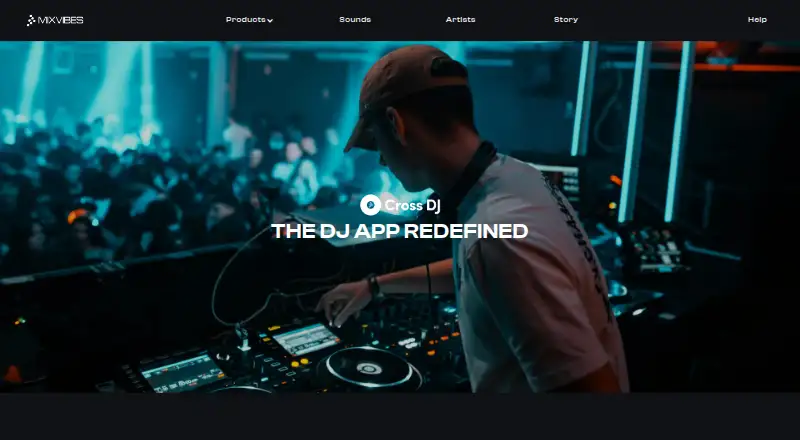
What Cross DJ is
Cross DJ is a DJ mixing app for creating and performing mixes on Android, iOS, and macOS. Its two-deck mixer includes classic DJ EQs and real-time stem separation to isolate beats and vocals. A waveform player lets users zoom and align tracks, while hot cues, adjustable loops, and a launcher with samples and one-shots provide additional mix controls. The product page lists more than 30 effects, and Automix can automate transitions. The App Store listing says users can stream tracks from Spotify, Beatport, and SoundCloud Go+, or access music through iCloud, Dropbox, and Google Drive. Cross DJ also supports cloud library sync, Ableton Link, named MIDI controllers, USB audio interfaces, and external mixers. The app is free with optional in-app purchases. Cross DJ Premium costs $19.99 a year and unlocks Pro features on iOS and Mac; Cross DJ Pro for Android is listed at $36.99, paid once. An iPhone subscription works on iPad or Mac with the same Apple ID, but subscriptions do not transfer between Apple and Android devices.
Good
- Two-deck mixer with real-time stem separation
- More than 30 listed effects
- Automix can automate transitions
- Supports Ableton Link
- Free app with optional in-app purchases
Watch out
- Subscriptions do not transfer between Apple and Android
- Premium yearly price is 19.99 USD
- Android Pro is listed at $36.99, paid once
Who it suits
Cross DJ suits people making or performing DJ mixes on Android, iOS, or macOS. Its stated music sources and hardware support may appeal to users combining streaming or cloud libraries with external equipment.
Verdict
Cross DJ offers mixing controls, effects, and Automix across mobile and Mac platforms, with a free app available. Keep in mind the platform-specific subscription limits and separate Android Pro purchase.
Plans and prices
From Cross DJ's own pricing page, checked 4 Oct 2026.
| Plan | Price | What it gives you |
|---|---|---|
| Cross DJ | Free | Free app; optional premium features · Free · in-app purchases available |
| Cross DJ Premium (Yearly) | $19.99 a year | Optional PRO subscription; unlocks Cross DJ Pro features on iOS and Mac · Yearly |
| Cross DJ Pro - Mix & Remix | $36.99, paid once | Android app; Google Play listing shows in-app purchases · Buy |
The facts
Each one read from Cross DJ's own pages, with the date it was checked.
What it does
- Ableton Link
- Cross DJ supports Ableton Link to sync performance with other apps and hardware.checked 4 Oct 2026
- Automix
- Smart transitions can automate mixes through Automix.checked 4 Oct 2026
- Effects
- The product page lists more than 30 effects.checked 4 Oct 2026
- Hardware
- The App Store listing names supported MIDI controllers and says the app supports USB audio interfaces and external mixers.checked 4 Oct 2026
- Loops and samples
- The app offers hot cues, adjustable loops, and a launcher with samples and one-shots.checked 4 Oct 2026
- Mixer and stems
- Its mixer includes classic DJ EQs and real-time stem separation to isolate beats and vocals.checked 4 Oct 2026
- Music sources
- The App Store listing says users can stream tracks from Spotify, Beatport, and SoundCloud Go+, and access music through iCloud, Dropbox, and Google Drive.checked 4 Oct 2026
- Player
- The waveform player lets users zoom and line up tracks.checked 4 Oct 2026
- Purpose
- Cross DJ is a DJ mixing app for creating and performing mixes.checked 4 Oct 2026
- Subscription portability
- A subscription bought on iPhone works on iPad or Mac with the same Apple ID, but does not transfer to Android; Android subscriptions do not transfer to Apple devices.checked 4 Oct 2026
- Support
- MIXVIBES lists [email protected] for support and points users to app store changelogs and Discord for updates on known issues and fixes.checked 4 Oct 2026
The company
- Company history
- MIXVIBES says it began in 1995, and identifies Eric Guez as its CEO at the time of its founding.checked 4 Oct 2026
- Founded
- 2012checked 28 Sep 2026
- Headquarters
- Paris, Francechecked 28 Sep 2026
Where it runs
- Platform availability
- The maker lists Cross DJ as available on iOS, macOS, and Android.checked 4 Oct 2026
The full review of Cross DJ
Cross DJ is a two-deck DJ mixing app for creating and performing sets on Android, iPhone, iPad, and Mac. It is best suited to mobile DJs and producers who want stem tools, external hardware support, and automated transitions without committing to a recurring purchase immediately. Its free starting point is useful, but the two-deck ceiling and split Apple/Android licensing make it less suitable for complex setups or people who move between ecosystems.
Overview
MIXVIBES positions Cross DJ as a practical mixing workspace rather than a full multi-deck studio. The two-deck layout covers conventional track-to-track work, and the combination of cueing, loops, effects, and stem separation gives performances more control than a basic playback app. Cloud library synchronization helps keep music organized across supported devices.
The main qualification is platform commitment. An iPhone purchase can be used on iPad and Mac with the same Apple ID, but Apple subscriptions do not carry to Android, and Android purchases do not transfer to Apple hardware. That matters for anyone maintaining both a phone and computer from different ecosystems.
Key features
Mixing and performance tools
Classic DJ EQs provide the expected way to balance frequencies, while real-time stem separation can isolate beats and vocals for more deliberate transitions or mash-up work. The waveform player zooms for closer track alignment. Hot cues and adjustable loops let you mark sections and repeat phrases, and the launcher adds samples and one-shots for live accents.
More than 30 effects give a broad palette for transitions and performance coloring. These features make Cross DJ flexible for practicing, casual sets, and semi-automated sessions, although two decks limit arrangements that depend on several simultaneous layers.
Libraries, hardware, and synchronization
Tracks can be streamed from Spotify, Beatport, and SoundCloud Go+, with additional access through iCloud, Dropbox, and Google Drive. Cloud library sync is included, which is useful when the same collection is maintained across devices. Support for USB audio interfaces, external mixers, and named MIDI controllers gives hardware-oriented DJs alternatives to touch controls. Ableton Link can synchronize Cross DJ with compatible apps and hardware, making it more viable in a broader performance rig.
Pricing
| Plan | Price | Best fit and limits |
|---|---|---|
| Cross DJ | free | Free app with optional premium features and in-app purchases. It is the sensible entry point for learning the two-deck workflow before paying. |
| Cross DJ Premium (Yearly) | $19.99 a year | Optional PRO subscription unlocking Cross DJ Pro features on iOS and Mac. It suits Apple users who want the full feature set across those devices, but the subscription does not transfer to Android. |
| Cross DJ Pro - Mix & Remix | $36.99, paid once | One-time Android purchase through the Google Play app, with in-app purchases shown by Google Play. It avoids a yearly Apple-style subscription, but the license remains separate from Apple devices. |
The free plan keeps the initial cost at zero, while the paid choices are divided by operating system rather than offering one portable entitlement. Choose the yearly plan only if your work stays within Apple hardware; choose the Android purchase if Android is your primary platform and a one-time charge is preferable.
Platforms
Cross DJ is available on Android, iOS, and macOS. Apple subscriptions work across iPhone, iPad, and Mac when the same Apple ID is used. Android and Apple purchases are separate, so cross-platform households should budget for that possibility. MIXVIBES directs support requests to [email protected] and publishes update information through app-store changelogs and Discord.
Who it's for
Cross DJ fits beginners moving beyond simple playback, mobile performers who need cues and loops, and experienced DJs seeking stem isolation, streaming-library access, or MIDI and audio-interface support in a compact setup. Automix is useful for background or lower-intervention sets. DJs who require more than two decks, or who regularly alternate between Android and Apple, should look elsewhere.
Pros and cons
Pros
- Real-time stem separation isolates beats and vocals for creative transitions.
- More than 30 effects, hot cues, loops, samples, and one-shots cover varied performance needs.
- Streaming and cloud-storage sources reduce the need to keep every track locally.
- USB audio, external mixers, MIDI controllers, and Ableton Link support hardware-based rigs.
- A free plan lets users learn the workflow before purchasing.
Cons
- Only two decks are available, limiting multi-layer and more advanced live arrangements.
- Apple and Android subscriptions do not transfer between platforms.
- The full Apple feature set requires a yearly subscription, while Android uses a separate one-time purchase.
Alternatives
YouDJ is the better choice for anyone needing the widest device coverage, including web, Windows, Linux, browser extension, Android, iOS, and Mac.
VirtualDJ suits users who want a free nonprofessional edition on desktop and mobile, with a $4-per-month HOME tier for entry-level controllers.
ClubDJ Pro is worth considering for a free online mixer or an iOS, Mac, web, and Windows workflow; its free Online Mixer omits video mixing and MIDI.
djay is an alternative freemium DJ app with free core mixing and an optional PRO subscription across Android, iOS, Mac, and Windows.
rekordbox is preferable for music management and cloud-oriented DJ work, with a free tier that allows 1,000 cloud tracks and one synced device.
Mixxx is the straightforward pick for a completely free desktop application on Linux, Mac, and Windows, with no paid or pro edition.
DJUCED is aimed at Hercules-controller users and offers a free four-deck Standard edition with MIDI, streaming, recording, Ableton Link, and Rekordbox XML import.
edjing Mix is a mobile-focused alternative for Android and iOS users seeking a free two-deck setup.
Browse more options in DJ Software.
Verdict
Choose Cross DJ if you want an approachable two-deck mixer with stem separation, effects, library connections, and hardware support, especially within one Apple ecosystem or on Android alone. Its free tier lowers the barrier to entry and Automix broadens its usefulness. Look elsewhere if you need more than two decks or a single subscription that follows you between Android and Apple devices.
Alternatives to Cross DJ
- 1

djay
Free planAndroidiOSmacOSWindows8.1From $49.99 a year - 2
rekordbox
Free planAndroidiOSmacOSWindows8.0From $10 a month - 3
VirtualDJ
Free planAndroidiOSAPImacOS8.0From $4 a month - 4

ClubDJ Pro
Free planiOSWebmacOSWindows7.2From $29.99 a year - 5
YouDJ
Free planAndroidiOSWebExtension6.8Free plan - 6

DJUCED
Free planmacOSWindows6.7From €5.99 a month