
Wox
Wox is a keyboard-first desktop launcher for opening apps, finding files, and triggering everyday actions on Linux, macOS, and Windows.
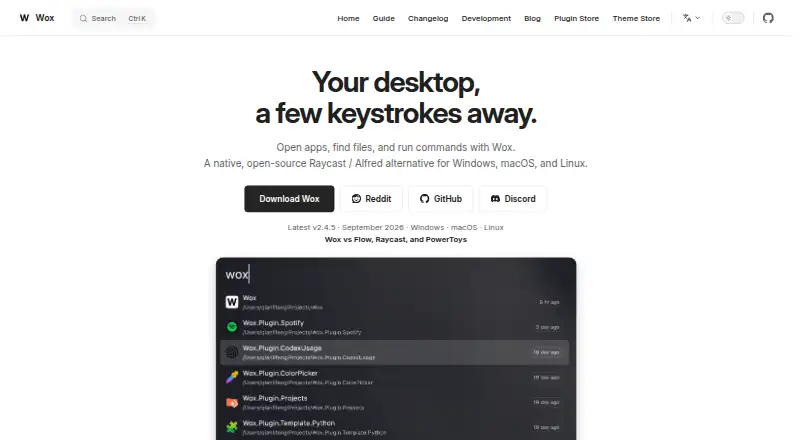
What Wox is
Wox is a keyboard-first desktop launcher for opening apps, finding files, and triggering everyday actions on Linux, macOS, and Windows. Built-in plugins cover app and file search, clipboard history, calculations, conversions, web search, notes, screenshots, timers, dictation, window layouts, and shell commands. Depending on a result, users can copy it, reveal a file, paste it, save it to Notes, or open it in another tool. Community plugins can extend Wox, with support for Node.js, Python, or scripts. It also includes AI chat and reusable AI commands, and its guide says users can configure AI providers. Released under the GPL-3.0 License, Wox is free. User data is stored under ~/.wox on macOS and Linux, or %USERPROFILE%\.wox on Windows. File Search returns paths only within configured roots that Wox can read. On Wayland, double-modifier and CapsLock-combo hotkeys require keyboard-event access through Linux evdev; CapsLock state restoration uses uinput. Feedback options include exporting diagnostics, reviewing crash reports, clearing logs, or opening a GitHub issue.
Good
- Free and released under the GPL-3.0 License.
- Runs on Linux, macOS, and Windows.
- Built-in tools include search, notes, timers, and screenshots.
- Supports community plugins and configurable AI providers.
Watch out
- File Search is limited to readable paths in configured roots.
- Some Wayland hotkeys require evdev access.
- CapsLock state restoration uses uinput.
Who it suits
Wox suits desktop users who want keyboard-driven access to applications, files, actions, and customizable workflows. Its built-in tools and community plugins offer several ways to shape that workflow.
Verdict
Wox combines a desktop launcher with built-in utilities, community plugins, and configurable AI features. Linux users relying on certain Wayland hotkeys should account for the required keyboard-event access.
The facts
Each one read from Wox's own pages, with the date it was checked.
What it does
- Actions
- Results can offer actions such as copying, revealing a file, pasting, saving to Notes, or opening an item in another tool.checked 30 Sep 2026
- AI
- Wox includes AI chat and reusable AI commands, and its guide says users can configure AI providers.checked 30 Sep 2026
- Audience
- Wox is presented as a desktop productivity launcher for people who want keyboard-driven access to apps, files, actions, and customizable workflows.checked 30 Sep 2026
- Built-in tools
- Built-in plugins include app and file search, clipboard, calculator, converter, web search, notes, screenshots, timers, dictation, window layouts, and shell commands.checked 30 Sep 2026
- Data location
- Wox stores user data under ~/.wox on macOS and Linux and %USERPROFILE%\.wox on Windows.checked 30 Sep 2026
- Extensions
- Users can install community plugins, and the project describes plugin support for Node.js, Python, or scripts.checked 30 Sep 2026
- File search limit
- File Search returns paths inside configured roots that are readable by Wox.checked 30 Sep 2026
- Integrations
- The v2.4.3 release notes list plugins for Linkding, GitHub, and Notion.checked 30 Sep 2026
- Open source
- Wox is released under the GPL-3.0 License.checked 30 Sep 2026
- Product
- Wox is a keyboard-first desktop launcher for opening apps, finding files, capturing notes, taking screenshots, running timers, searching the web, reusing clipboard history, using AI, and adding plugins.checked 30 Sep 2026
- Support
- Users can export diagnostics, review crash reports, clear logs, or open a GitHub issue through the Feedback plugin.checked 30 Sep 2026
Where it runs
- Linux hotkeys
- On Wayland, double-modifier and CapsLock-combo hotkeys require access to keyboard events through the Linux evdev interface; CapsLock state restoration uses uinput.checked 30 Sep 2026
- Platforms
- The site lists Windows, macOS, and Linux as supported platforms.checked 30 Sep 2026
Alternatives to Wox
- 1
Launchy
Free planOpen sourceAndroidAPILinuxmacOS7.7Free plan - 2
Executor
Free planOpen sourceSelf-hostedWindows7.2Free plan - 3
LaunchMenu
Free planOpen sourceAPImacOSWindows7.0Free plan - 4
Starling
Free planWebLinuxmacOSWindows6.7Free plan - 5

Dawn Launcher
Free planWindows6.5CN¥34 one-time - 6
Listary
Free planWindows6.5$19.95 one-time