WashingtonDC
washDC is an open-source SEGA Dreamcast emulator for Linux and Windows PCs with x86 processors.
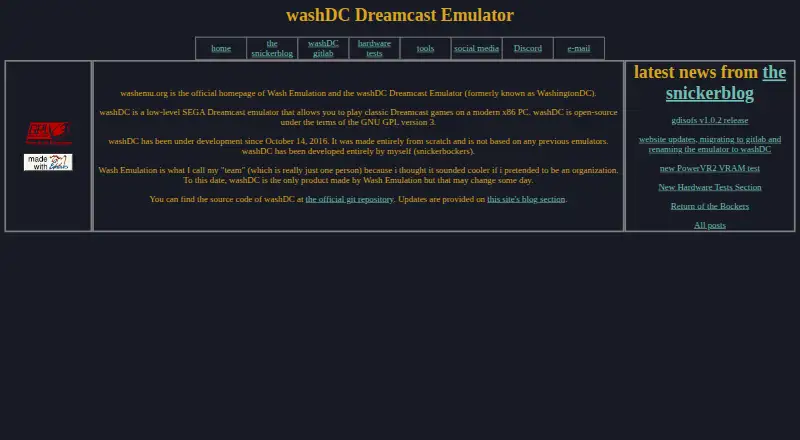
What WashingtonDC is
washDC is an open-source SEGA Dreamcast emulator for Linux and Windows PCs with x86 processors. Formerly called WashingtonDC, it was created from scratch rather than built on another emulator. The project lists GDI, CHD, CDI, ELF and raw BIN game image formats, and requires BIOS and flash images to run. Controls include keyboard input and support for up to four gamepads. Remote GDB and the WashDbg debugger are available as TCP debugging options. The emulator is licensed under GNU GPL version 3 and is free. Wash Emulation describes itself as a one-person team and washDC as its only product to date. The project also publishes homebrew programs for examining Dreamcast behavior, including a test of PowerVR2 backface culling and another that checks how SH4 writes appear across PowerVR2 memory mirrors. A separate tool, gdisofs, mounts Dreamcast game images as read-only filesystems on Linux PCs. Project updates, a Discord link and an email contact are listed on the homepage.
Good
- Open-source under GNU GPL version 3.
- Supports five listed game image formats.
- Keyboard controls and up to four gamepads.
- Remote GDB and WashDbg debugging options.
Watch out
- BIOS and flash images are mandatory.
- Supports Linux and Windows, not other listed platforms.
- Requires an x86 PC.
Who it suits
washDC may suit Linux or Windows users interested in running Dreamcast games on an x86 PC. Its debugger options and hardware-focused test programs may also interest people examining emulator behavior.
Verdict
washDC provides a free, open-source route to Dreamcast emulation on Linux and Windows. Before using it, account for its required BIOS and flash images and supported systems.
Plans and prices
From WashingtonDC's own pricing page, checked 3 Oct 2026.
| Plan | Price | What it gives you |
|---|---|---|
| washDC | Free | Open-source Dreamcast emulator · GNU GPL version 3 |
The facts
Each one read from WashingtonDC's own pages, with the date it was checked.
What it does
- Community and contact
- The homepage links to Discord and lists [email protected] as an email contact.checked 3 Oct 2026
- Contact and community
- The maker lists an email address and links to a Discord server from the official homepage.checked 3 Oct 2026
- Controllers
- The README says the emulator supports up to four gamepads and keyboard controls.checked 3 Oct 2026
- Debugging
- The README lists remote GDB and WashDbg debugger options over TCP.checked 3 Oct 2026
- Development
- The maker says development began on October 14, 2016, and the emulator was made from scratch rather than based on previous emulators.checked 3 Oct 2026
- Firmware requirement
- The README states that BIOS and flash images are mandatory to run the emulator.checked 3 Oct 2026
- Former name
- washDC was formerly known as WashingtonDC.checked 3 Oct 2026
- Game image formats
- The README lists GDI, CHD, CDI, ELF, and raw BIN as supported game image formats.checked 3 Oct 2026
- Graphics test
- The culltest hardware test validates the PowerVR2's backface culling behavior.checked 3 Oct 2026
- Hardware tests
- The maker publishes homebrew programs used to investigate Dreamcast behavior and compare it against the emulator.checked 3 Oct 2026
- License
- washDC is open-source under the GNU GPL version 3.checked 3 Oct 2026
- Open source
- washDC is open-source under the GNU GPL version 3.checked 3 Oct 2026
- Origin
- The maker says washDC was made from scratch and is not based on previous emulators.checked 3 Oct 2026
- Product
- washDC is a low-level SEGA Dreamcast emulator for playing classic Dreamcast games on a modern x86 PC.checked 3 Oct 2026
- Product scope
- The maker says washDC is the only product Wash Emulation has made to date.checked 3 Oct 2026
- Purpose
- washDC is a low-level SEGA Dreamcast emulator for playing classic Dreamcast games on a modern x86 PC.checked 3 Oct 2026
- Reverse engineering tool
- gdisofs is a FUSE module for mounting SEGA Dreamcast games as read-only filesystems.checked 3 Oct 2026
- Source code
- The maker links to the official washDC source repository on GitLab.checked 3 Oct 2026
- Supported systems
- The project README describes WashingtonDC as an emulator for Linux and Microsoft Windows.checked 3 Oct 2026
- Updates
- The maker says project updates are provided in the site's blog section.checked 3 Oct 2026
- VRAM test
- The pvr2 mem test checks whether SH4 writes to PowerVR2 memory are reflected across its mirrors.checked 3 Oct 2026
The company
- Founded
- 2016checked 28 Sep 2026
- Maker
- Wash Emulation says it is a one-person team and washDC is its only product to date.checked 3 Oct 2026
Where it runs
- Linux support
- The maker describes gdisofs, a separate tool, as a way to mount Dreamcast game images as read-only filesystems on Linux PCs.checked 3 Oct 2026
The full review of WashingtonDC
washDC is a low-level SEGA Dreamcast emulator for modern x86 computers, aimed at Linux and Windows users who want an open-source implementation they can inspect and debug. It is a particularly good fit for developers and technically minded players comfortable supplying firmware files; users seeking the broadest compatibility or a simpler setup may prefer another emulator.
Overview
Formerly called WashingtonDC, washDC has been developed from scratch since 2016 by Wash Emulation, a one-person team. The project is released under the GNU GPL version 3, with source code available through its official GitLab repository. That combination makes it suitable for readers who value code access, licensing freedom, and a project whose implementation choices can be examined rather than treated as a black box.
Its low-level focus is reflected in the maker's hardware-investigation work. Published homebrew programs compare emulator behavior with Dreamcast behavior, including PowerVR2 backface-culling checks and tests of mirrored VRAM writes. Those tools make washDC more interesting for emulator development and reverse engineering than a player-only package, although they do not establish universal game compatibility.
Key features
washDC accepts GDI, CHD, CDI, ELF, and raw BIN game images. Supporting that range reduces conversion work for a mixed library and also covers executable-style Dreamcast software, but it does not remove the need for the required BIOS and flash images. Anyone without those files cannot get to the actual emulation stage.
Keyboard controls and support for up to four gamepads cover solo play and local multiplayer. OpenGL is the listed graphics backend, which keeps the rendering requirement clear but gives users who need another backend a reason to consider alternatives.
Remote GDB and the WashDbg debugger operate over TCP. These options are meaningful for developers examining software or emulator behavior; they are unnecessary complexity for someone who only wants to launch games. The separate gdisofs FUSE tool mounts Dreamcast game images as read-only filesystems on Linux, adding a useful inspection and reverse-engineering workflow rather than another gaming mode.
Pricing
| Plan | Price | What it includes |
|---|---|---|
| washDC | free | Open-source Dreamcast emulator under GNU GPL version 3 |
There is no paid tier, subscription, seat limit, or trial decision to weigh. The free plan suits anyone who can meet the firmware and system requirements, while its practical cost is the time and technical work involved in obtaining BIOS and flash images and configuring a low-level emulator.
Platforms
washDC supports Linux and Microsoft Windows on x86 PCs. Linux users also get the gdisofs mounting tool; Windows remains a supported platform according to the maker. OpenGL is the documented graphics backend, and controller support extends to four gamepads alongside keyboard input.
Who it's for
Choose washDC if you want a GPL-licensed Dreamcast emulator with source access, several image formats, debugger connectivity, or tools for studying hardware behavior. It is also a sensible free option for Linux and Windows owners who already have the mandatory firmware files. Look elsewhere if you need a different graphics API, a broader platform range, or a player-first setup with fewer prerequisites.
Pros and cons
- Pros: free and GPLv3-licensed, with source available for inspection and modification.
- Pros: five documented image formats reduce format-specific barriers for existing libraries.
- Pros: four-gamepad support, keyboard controls, remote GDB, and WashDbg cover both local play and development work.
- Pros: hardware-comparison homebrew tests give low-level investigation a concrete toolset.
- Cons: BIOS and flash images are mandatory, making setup dependent on firmware preparation.
- Cons: Linux and Windows are the supported systems, and OpenGL is the listed graphics backend.
- Cons: its low-level, developer-oriented emphasis may be excessive for readers seeking the simplest way to play.
Alternatives
For a wider emulator shortlist, see Dreamcast Emulators. MAME is the better choice when Android or macOS support matters, though ROMs and copyrighted software are generally not included. Choose nullDC 2.0.0 if you want Linux, macOS, web, and Windows coverage with downloadable build artifacts.
Flycast suits users wanting a free, ad-free option across Android, Linux, macOS, and Windows, provided they supply their own game files. The other Flycast listing is worth considering for Dreamcast, Naomi, Naomi 2, and Atomiswave emulation. The Flycast listing is another free, open-source alternative on Android, Linux, macOS, and Windows.
Deecy is a free Linux and Windows alternative from developer Sen. Redream is the option to consider if you prefer a freemium model with a one-time Premium payment listed at $6, paid once and high-definition rendering. Nitrocast is a free Linux alternative.
Verdict
washDC is a strong choice for technically confident Linux and Windows users who value GPL source access, varied image-format support, and debugging or hardware-analysis tools. Its main reason to choose it is that unusually transparent, low-level development focus at no monetary cost. Its main reason to look elsewhere is the mandatory BIOS and flash setup combined with limited platform and graphics-backend coverage.
Alternatives to WashingtonDC
- 1
Flycast
Free planOpen sourceAndroidLinuxmacOSSelf-hosted7.6Free plan - 2
Flycast
Free planOpen sourceAndroidLinuxmacOSSelf-hosted7.5Free plan - 3
MAME
Free planAndroidLinuxmacOSWindows7.1Free plan - 4
nullDC 2.0.0
Free planWebLinuxmacOSWindows6.9Free plan - 5

Redream
AndroidLinuxmacOSWindows6.2$6 one-time - 6
Flycast
AndroidLinuxmacOSWindows6.1