nullDC 2.0.0
nullDC 2.0.0 is a Sega Dreamcast emulator with browser access and downloadable builds for Windows, macOS, and Linux.
What nullDC 2.0.0 is
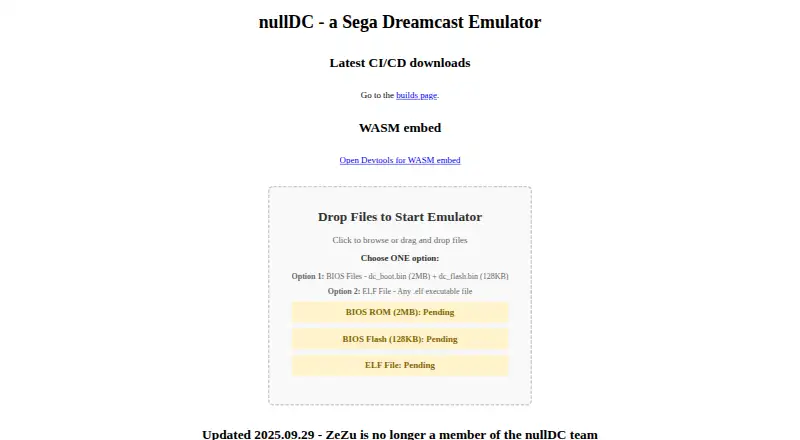
nullDC 2.0.0 is a Sega Dreamcast emulator with browser access and downloadable builds for Windows, macOS, and Linux. The browser page provides a WASM embed where users can drop files to start the emulator. Startup can use the Dreamcast BIOS files dc_boot.bin (2MB) and dc_flash.bin (128KB), or an .elf executable. The project describes accuracy as an aim. The builds page lists v2.0.0-pre-388-g95a924b as its most recent build, dated 2025-11-10 08:17:38 UTC. Windows and macOS artifacts cover aarch64 and x86_64; Linux artifacts cover aarch64, riscv64gc, and x86_64. nullDC is open source under the MIT license and available free; that license provides the software without warranty. The home page retains historical beta releases and a stereoscopy build, while the beta 1 netplay server is compatible only with beta 1. For assistance, the project points users to the nullDC forum at ngemu.com.
Good
- Browser embed can start from dropped files.
- Windows, macOS, and Linux builds are listed.
- Open source under the MIT license.
- Linux builds include a riscv64gc target.
Watch out
- BIOS files or an .elf executable are needed to start.
- Historical beta 1 netplay works only with beta 1.
- The MIT license provides the software without warranty.
Who it suits
nullDC suits Dreamcast users who want a browser-based option or downloadable builds for Linux, macOS, or Windows. Users starting it need either the listed BIOS files or an .elf executable.
Verdict
nullDC offers browser access alongside builds for three desktop operating systems, with several architecture targets listed. Check the startup-file requirement and the beta 1-only netplay limit before choosing it.
Plans and prices
From nullDC 2.0.0's own pricing page, checked 5 Oct 2026.
| Plan | Price | What it gives you |
|---|---|---|
| nullDC 2.0.0-pre | Free | No price listed; downloadable build artifacts |
The facts
Each one read from nullDC 2.0.0's own pages, with the date it was checked.
What it does
- Accuracy aim
- The project description characterizes the emulator as aiming to be accurate.checked 5 Oct 2026
- Build date
- The listed build date is 2025-11-10 08:17:38 UTC.checked 5 Oct 2026
- Build version
- The builds page lists the most recent version as v2.0.0-pre-388-g95a924b.checked 5 Oct 2026
- Downloads
- Download artifacts are listed for Apple Darwin, Windows MSVC, and Linux GNU targets, including aarch64 and x86_64 builds.checked 5 Oct 2026
- ELF input
- The site also accepts any .elf executable file as an alternative to BIOS files.checked 5 Oct 2026
- Historical release
- The home page lists nullDC beta 1.6 as released 7/11/2007.checked 5 Oct 2026
- Historical releases
- The home page lists historical beta releases from 2007 and a stereoscopy build from 2008.checked 4 Oct 2026
- Historical stereoscopy build
- The home page lists a drkpvr stereoscopy build released 10/1/2008 and says it may also fix some glitches.checked 5 Oct 2026
- Latest build
- The builds page lists v2.0.0-pre-388-g95a924b as its most recent build.checked 4 Oct 2026
- License
- The project's GitHub page shows an MIT license for the software.checked 5 Oct 2026
- Netplay limit
- The historical beta 1 netplay server is listed as compatible only with beta 1.checked 4 Oct 2026
- Purpose
- nullDC is described as a Sega Dreamcast emulator.checked 5 Oct 2026
- Support
- The home page directs users to the nullDC forum at ngemu.com for help.checked 5 Oct 2026
- Warranty
- The MIT license text states that the software is provided as is without warranty.checked 5 Oct 2026
Where it runs
- BIOS input
- The site says to provide dc_boot.bin (2MB) and dc_flash.bin (128KB) to use BIOS files.checked 5 Oct 2026
- Browser use
- The official site provides a WASM embed and lets users drop files to start the emulator.checked 5 Oct 2026
- Linux builds
- Download artifacts are listed for aarch64, riscv64gc, and x86_64 Linux GNU targets.checked 4 Oct 2026
- Linux target
- The builds page also lists a riscv64gc-unknown-linux-gnu artifact.checked 5 Oct 2026
- macOS builds
- Download artifacts are listed for aarch64 and x86_64 Apple Darwin targets.checked 4 Oct 2026
- Windows builds
- Download artifacts are listed for aarch64 and x86_64 Windows MSVC targets.checked 4 Oct 2026
The company
- Team update
- The home page states that ZeZu was no longer a member of the nullDC team as of 2025-09-29.checked 4 Oct 2026
The full review of nullDC 2.0.0
nullDC 2.0.0 is a Sega Dreamcast emulator with a browser-based option and downloadable desktop builds. It is best for users who can provide the files needed to start an emulator and want a free, open-source choice. Its range of launch options is useful, but it is not a ready-to-play route without a BIOS or ELF executable.
Overview
nullDC combines a browser WASM embed with builds for Windows, macOS, and Linux. The project describes its aim as accurate emulation, which may appeal to users who prioritize fidelity. That aim is not a substitute for a turnkey setup: starting the emulator requires a Dreamcast BIOS pair or an ELF executable.
Key features
In the browser, users can drop files into the WASM embed. One startup path requires dc_boot.bin (2MB) and dc_flash.bin (128KB); the other accepts any .elf executable. The two options give users flexibility over what to launch, but people without those files will need to prepare them before using nullDC.
The most recent build is v2.0.0-pre-388-g95a924b, dated 2025-11-10. Treat it as a pre-release rather than the same thing as the historical beta releases, which include beta versions from 2007 and a stereoscopy build from 2008. The beta 1 netplay server works only with beta 1, so it is not a general netplay option for the current build.
nullDC is open source under the MIT license. The license provides the software as is, without warranty. For help, the project points users to the nullDC forum at ngemu.com.
Pricing
nullDC is free, with no trial required. The nullDC 2.0.0-pre plan costs free and includes downloadable build artifacts. There is no paid tier to compare; the main trade-off is the setup requirement for a BIOS pair or ELF file.
Platforms
The browser option serves users who want to launch through a WASM embed. Downloadable builds target Windows MSVC and Apple Darwin for aarch64 and x86_64, and Linux GNU for aarch64, riscv64gc, and x86_64. That selection covers several desktop architectures, though it does not include Android builds.
Who it's for
nullDC is a sensible fit for Dreamcast users who want a free, MIT-licensed emulator and value a browser option alongside desktop builds. It is a weaker fit for people who want a straightforward launch without supplying a BIOS or executable, or who need the historical beta 1 netplay server to work with a current version.
Pros and cons
- Pros: Browser access and desktop builds give users a choice of where to run the emulator.
- Pros: The MIT license and free price make it an option without a software purchase.
- Pros: Builds span multiple architectures, including Linux riscv64gc.
- Cons: Startup requires the BIOS files or an ELF executable, adding a preparation step.
- Cons: The netplay server is restricted to beta 1, limiting its relevance to users of the current pre-release.
- Cons: The software is provided without warranty.
Alternatives
For a broader comparison, browse Dreamcast Emulators.
Choose MAME if Android support matters more than nullDC's browser option; it is also free and runs on Linux, macOS, and Windows. Flycast is another free Android, Linux, macOS, and Windows option, with no ads; its game files must be owned by the user. The separate Flycast listing highlights Dreamcast, Naomi, Naomi 2, and Atomiswave emulation, which may suit users seeking those systems. WashingtonDC is a free, open-source option for Linux and Windows. Flycast is a free open-source alternative for Android, Linux, macOS, and Windows. Deecy is a free Linux and Windows alternative. Redream offers a free plan across Android, Linux, macOS, and Windows, with a one-time Premium payment of $6, paid once. Nitrocast is a free Linux alternative.
Verdict
Choose nullDC if you want a free, open-source Dreamcast emulator with browser access and builds spanning desktop operating systems and architectures. Its main strength is that range of options; its main drawback is the need to provide a BIOS pair or ELF executable before it can start. If that setup requirement or the beta 1-only netplay limit is a deal-breaker, compare other Dreamcast emulators.
Getting started
- Visit https://nulldc.emudev.org/.
- For browser use, open the WASM embed and drop files to start.
- Provide dc_boot.bin and dc_flash.bin, or use an .elf executable file.
- For desktop use, select a listed build artifact for your platform.
- For help, visit the nullDC forum at ngemu.com.
Limits worth knowing
The BIOS startup option requires dc_boot.bin (2MB) and dc_flash.bin (128KB). The historical beta 1 netplay server is compatible only with beta 1.
Questions
Does nullDC cost anything?
The listed nullDC 2.0.0-pre plan is free, and the software is open source under the MIT license.
Which platforms are supported?
The supported platforms are web, Windows, macOS, and Linux.
What files are needed to start it?
One option uses dc_boot.bin (2MB) and dc_flash.bin (128KB); the other uses any .elf executable file.
Where can I get help?
The project home page directs users to the nullDC forum at ngemu.com.
What is the most recent listed build?
The builds page lists v2.0.0-pre-388-g95a924b, dated 2025-11-10 08:17:38 UTC.
What license does it use?
The project's GitHub page shows an MIT license. The license text states the software is provided without warranty.
Alternatives to nullDC 2.0.0
- 1
Flycast
Free planOpen sourceAndroidLinuxmacOSSelf-hosted7.6Free plan - 2
Flycast
Free planOpen sourceAndroidLinuxmacOSSelf-hosted7.5Free plan - 3
MAME
Free planAndroidLinuxmacOSWindows7.1Free plan - 4
WashingtonDC
Free planLinuxWindows6.4Free plan - 5

Redream
AndroidLinuxmacOSWindows6.2$6 one-time - 6
Flycast
AndroidLinuxmacOSWindows6.1