w3D
w3D is an iOS app for creating and presenting 3D clothing mockups.
What w3D is
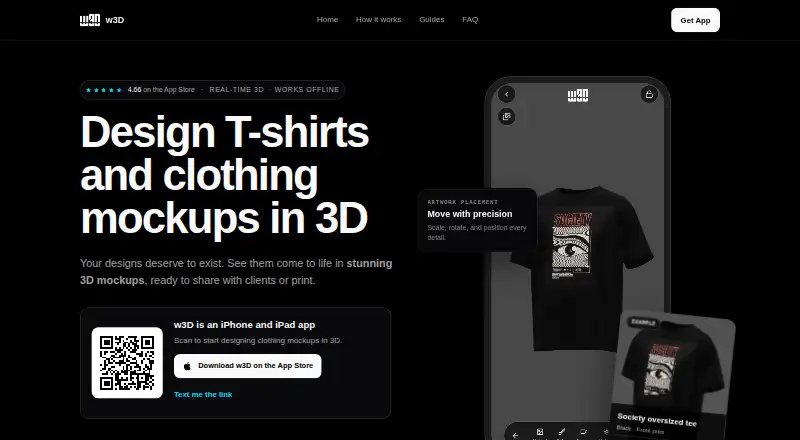
w3D is an iOS app for creating and presenting 3D clothing mockups. Its catalog includes T-shirts, hoodies, caps, pants, polo shirts, and other garment models. Users can add artwork and move, scale, or rotate it on a garment, then adjust garment color, camera, lighting, and background. The site shows PNG, MP4, and GLB export options and depicts Blender, Unity, Godot, and Unreal Engine alongside its export workflow. The app works fully offline, and its privacy policy says designs and mockups are stored locally rather than uploaded to w3D servers. Anonymous usage analytics may be collected, and third-party analytics or crash-reporting services may be used. The App Store listing requires iOS 15.0 or later and lists iPhone compatibility. w3D is a visual design and presentation tool, not a print-ready export option; users are advised to confirm production requirements with their manufacturer. Download is free with in-app purchases. Premium prices are $7.99 a month, $79.99 a year, and $99.99, paid once for each of two lifetime options.
Good
- Works fully offline.
- Stores designs and mockups locally.
- Offers PNG, MP4, and GLB export options.
- Includes a catalog of clothing models.
Watch out
- Requires iOS 15.0 or later.
- Does not offer print-ready export.
- Anonymous analytics may be collected.
- Premium access has paid options.
Who it suits
w3D suits T-shirt designers, clothing brands, and mockup creators who want to arrange artwork on 3D garments. It is for visual presentation rather than print-ready production output.
Verdict
w3D provides tools for composing and presenting clothing mockups, including offline use and local storage. For production requirements, users should confirm details with their manufacturer.
Plans and prices
From w3D's own pricing page, checked 4 Oct 2026.
| Plan | Price | What it gives you |
|---|---|---|
| Free | Free | Free download; in-app purchases available |
| w3D Pro - Monthly Premium Access | $7.99 a month | Premium access |
| w3D Pro - Yearly Premium Access | $79.99 a year | Premium access |
| w3D Pro - Lifetime Access | $99.99, paid once | Lifetime access |
| w3D Pro - Lifetime Premium | $99.99, paid once | Lifetime premium access |
The facts
Each one read from w3D's own pages, with the date it was checked.
What it does
- Analytics
- The privacy policy says anonymous usage analytics may be collected and third-party analytics or crash-reporting services may be used.checked 4 Oct 2026
- Artwork editing
- Users can upload artwork and move, scale, and rotate it on a garment.checked 4 Oct 2026
- Export formats
- The site shows PNG, MP4, and GLB export options.checked 4 Oct 2026
- Garment catalog
- The mobile catalog includes T-shirts, hoodies, caps, pants, polo shirts, and other clothing models.checked 4 Oct 2026
- Intended users
- The site describes the product for T-shirt designers, clothing brands, and mockup creators.checked 4 Oct 2026
- Offline use
- The App Store description says the app works fully offline.checked 4 Oct 2026
- Privacy
- The privacy policy says designs and mockups are stored locally and are not uploaded to w3D servers.checked 4 Oct 2026
- Production limit
- The site describes w3D as a visual design and presentation tool and says users should confirm production requirements with their manufacturer.checked 4 Oct 2026
- Purpose
- w3D is a mobile app for designing and presenting 3D clothing mockups.checked 4 Oct 2026
- Scene controls
- Users can adjust garment color, camera, lighting, and background.checked 4 Oct 2026
- Support
- The site provides a support link and says contact details submitted to support are used to respond to the request.checked 4 Oct 2026
- Workflow compatibility
- The site depicts Blender, Unity, Godot, and Unreal Engine alongside its export workflow.checked 4 Oct 2026
Where it runs
- Supported device requirement
- The App Store listing says the app requires iOS 15.0 or later and lists iPhone compatibility.checked 4 Oct 2026
The full review of w3D
w3D is an iOS app for arranging artwork on 3D clothing mockups and shaping how those garments are presented. It is best for designers and apparel brands developing visual concepts on a phone. Its offline workflow is appealing, but anyone preparing files for manufacturing should choose a production-focused tool.
Overview
w3D brings garment models and scene controls into a mobile design workflow. Users can place uploaded artwork on apparel, then adjust its position and scale and refine the garment’s color, camera, lighting, and background. That makes the app more useful for presenting a concept than for completing a production workflow.
The app works fully offline, and designs and mockups are stored locally rather than uploaded to w3D servers. Anonymous usage analytics may still be collected, and third-party analytics or crash-reporting services may be used. Contact details submitted to support are used to respond to the request.
Key features
Garment mockups and scene controls
The catalog includes T-shirts, hoodies, caps, pants, polo shirts, and other clothing models. Artwork can be moved, scaled, and rotated on a garment, while scene controls let users change garment color, camera, lighting, and background. Together, those tools suit mockup creators who need to show how an idea could look on apparel; they do not turn the app into a print-preparation system.
Export and workflow
The site shows PNG, MP4, and GLB export options and depicts Blender, Unity, Godot, and Unreal Engine alongside its export workflow. That makes w3D relevant to visual presentations and workflows involving those tools. It does not offer print-ready export, and users should confirm production requirements with their manufacturer.
Offline use and privacy
Offline operation is useful for working without a connection, while local storage keeps designs and mockups off w3D servers. The tradeoff is that analytics may still be collected through anonymous usage data and third-party analytics or crash-reporting services.
Pricing
The free plan costs nothing and is a free download, with in-app purchases available. It is the sensible starting point for trying the mobile mockup workflow, but the free-plan description does not define particular feature caps.
w3D Pro - Monthly Premium Access costs $7.99 a month and suits users who want premium access without committing to a year. w3D Pro - Yearly Premium Access costs $79.99 a year, a better fit for regular users willing to pay annually. Both are described as premium access; specific quotas, seat limits, and renewal terms are not given.
w3D Pro - Lifetime Premium and w3D Pro - Lifetime Access each cost $99.99, paid once. Either is aimed at someone who expects to keep using premium access rather than paying monthly or yearly; the plan descriptions do not distinguish their included access. The paid plans do not change the app’s stated production limitation: print-ready export is not offered.
Platforms
w3D is an iOS mobile app requiring iOS 15.0 or later, with iPhone compatibility listed. Its phone-first format suits users who want to compose mockups on a mobile device, but it is not presented as a desktop or web app.
Who it's for
w3D fits T-shirt designers, clothing brands, and mockup creators who need a mobile way to place artwork on varied apparel and control the presentation scene. Offline use and local storage are practical advantages for that visual work. It is a poor fit for anyone whose central requirement is print-ready output or production files.
Pros and cons
- Pro: A catalog spanning T-shirts, hoodies, caps, pants, polo shirts, and other clothing gives mockup creators several garment types to present.
- Pro: Artwork placement and camera, lighting, background, and color controls allow more than a flat image preview.
- Pro: Offline use and local design storage support disconnected work without uploading designs to w3D servers.
- Con: Print-ready export is not available, so production requirements must be handled and confirmed with the manufacturer.
- Con: Analytics and third-party crash-reporting services may be used, despite local storage of designs and mockups.
- Con: It is limited to iOS, with iPhone compatibility and an iOS 15.0-or-later requirement.
Alternatives
Browse T-Shirt Design Software for a broader category view. Choose Kittl instead if a web-based design tool and its free plan of five projects and 100 one-time AI tokens better match the task. MockupFit is a stronger fit for web or API workflows that need unlimited garment designs, live previews, mockup downloads, or Printful export on its free plan.
Pick Screenhance Apparel Mockup Generator when an extension or web tool with a free allowance of three monthly exports, 1x resolution, and five-minute screen recordings suits the job. ClozDesign is a web alternative for users comfortable with three total free projects and 20 MB image storage, with exports requiring Pro. YupTees may suit someone seeking a web-based option that is free and requires no signup.
Printonator is another free web-based T-shirt designer, with JPG and PNG uploads capped at 10 MB. Choose YouWear.ai if a web design studio with five free credits per new account, where one credit covers one generation or edit, is a better match; physical products cost extra. inkXE is a paid alternative with a one-time Essential plan priced at $2,999, paid once.
Verdict
Choose w3D if you want to compose and present apparel mockups on an iPhone, especially when offline access and local design storage matter. Its garment and scene controls serve visual concept work well. Look elsewhere if print-ready output is central: w3D is for presentation, not production.
Alternatives to w3D
- 1

Kittl
Free planWeb7.3Free plan - 2
inkXE
AndroidiOSWebAPI7.2$2,999 one-time - 3

FastEditor
AndroidiOSWebAPI6.9From €95 a month - 4
Screenhance Apparel Mockup Generator
Free planWebExtension6.9From $12 a month - 5
ClozDesign
Free planWeb6.6From $9.90 a month - 6
MockupFit
Free planWebAPI6.6From $29 a month