VB-CABLE
VB-CABLE is a virtual audio device that routes sound from its CABLE input to its CABLE output, allowing a player application to connect to a recorder applica…
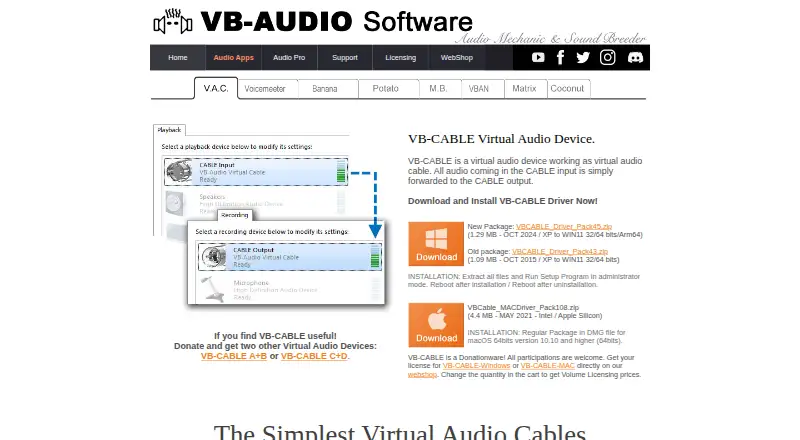
What VB-CABLE is
VB-CABLE is a virtual audio device that routes sound from its CABLE input to its CABLE output, allowing a player application to connect to a recorder application. VB-Audio says it can work without configuration and supports Windows audio applications using MME, KS, DX, WaveRT, or WASAPI interfaces. The manual lists input at 16 or 24 bits, 44.1–192 kHz, and one to eight channels, with automatic output conversion when needed. Drivers are listed for Windows XP SP2 through Windows 11, including Windows 10/11 Arm64, and for macOS 10.10 or later on Intel and Apple Silicon. Separate A+B and C+D packages are offered to connect more applications. VB-Audio describes the software as donationware: the download is free and users choose whether and how much to pay. The listed Windows and Mac licenses are each $5, paid once for professional or server use, with licensing by user or PC and volume discounts. Windows installation requires extracting the ZIP, running setup as administrator, and restarting the computer. Older Windows XP through Windows 7 versions are limited to eight channels.
Good
- Connects player and recorder applications.
- Can be used without configuration.
- Automatically converts output format when needed.
- Drivers cover Windows and macOS.
- Free download with optional payment.
Watch out
- Windows installation requires administrator setup and restart.
- Older Windows versions are limited to eight channels.
- Professional or server licenses cost $5, paid once.
Who it suits
VB-CABLE suits people who need to route audio between a player and recorder application on Windows or macOS. Its extra cable packages and professional or server licenses may suit users connecting more applications or licensing for those uses.
Verdict
VB-CABLE provides a direct audio route between applications, with a free download and separately listed professional or server licenses. Check the channel limit for older Windows versions and the installation steps before choosing it.
Plans and prices
From VB-CABLE's own pricing page, checked 9 Oct 2026.
| Plan | Price | What it gives you |
|---|---|---|
| Free download | Free | Download and test; donationware; user chooses whether and how much to pay |
| VB-CABLE for Windows | $5, paid once | Windows XP–11 (32/64-bit); professional or server use licenses by user or PC; volume discounts |
| VB-CABLE MAC | $5, paid once | macOS 10.10+; Intel and Apple Silicon; professional or server use licenses by user or PC; volume discounts |
The facts
Each one read from VB-CABLE's own pages, with the date it was checked.
What it does
- Additional cables
- VB-Audio offers separate A+B and C+D cable packages for Windows and macOS to connect more applications.checked 9 Oct 2026
- Audio formats
- The manual says audio input can use 16- or 24-bit formats, 44.1–192 kHz, and 1–8 channels, with output format conversion performed automatically when needed.checked 9 Oct 2026
- Installation
- Windows installation requires extracting the ZIP, running setup as administrator, and restarting the computer after installation.checked 9 Oct 2026
- Intended users
- The maker presents VB-CABLE as a simple way to connect two applications, such as a player and a recorder, and offers professional or server licenses by user or PC.checked 9 Oct 2026
- Licensing model
- VB-Audio describes VB-CABLE as donationware with free access and a pay-what-you-want license price; it also offers volume licensing for professional use.checked 9 Oct 2026
- Notable limit
- The manual says Windows XP through Windows 7 versions are limited to eight channels, while Windows 10/11 supports up to 16 channels on listed interfaces.checked 9 Oct 2026
- Privacy
- VB-Audio's privacy policy says personal data is not transmitted outside the European Union and describes technical and organisational measures to secure processed personal data.checked 9 Oct 2026
- Purpose
- VB-CABLE is a virtual audio device that forwards audio from its CABLE input to its CABLE output to connect a player application to a recorder application.checked 9 Oct 2026
- Setup
- The maker says VB-CABLE can be used without configuration and supports Windows audio applications using MME, KS, DX, WaveRT, or WASAPI interfaces.checked 9 Oct 2026
- Support
- For technical problems VB-Audio directs users to its support resources, forum, or Discord, and asks them to include a screenshot and concise problem description.checked 9 Oct 2026
The company
- Founded
- 1999checked 28 Sep 2026
- Headquarters
- Sigoules, Francechecked 28 Sep 2026
Where it runs
- Mac support
- The maker lists a macOS driver for macOS 10.10 and later, supporting Intel and Apple Silicon.checked 9 Oct 2026
- Windows support
- The manual says the driver supports Windows XP SP2 through Windows 11, 32- or 64-bit, and Windows 10/11 Arm64.checked 9 Oct 2026
Alternatives to VB-CABLE
- 1

Krisp AI Meeting Assistant
AndroidiOSExtensionmacOS7.8From $8 a month - 2

RØDE UNIFY
Free planmacOSWindows7.4From $45.31 a year - 3
DTS Sound Unbound
Free planWindows7.1$19.99 one-time - 4
FxSound
Free planOpen sourceWindows7.1Free plan - 5
MicMixer
Free planOpen sourceWindows7.0Free plan - 6

Patchd
Free planWindows6.5From $39.99 a year